
Wstęp
This manual provides instructions for the safe and effective use of your MAXIMUM Waterproof Inspection Camera Scope. This device is designed for visual inspection of hard-to-reach areas in various applications, including automotive, plumbing, and construction. Please read this manual thoroughly before operating the device and retain it for future reference.
Informacje dotyczące bezpieczeństwa
- Nie należy podejmować prób demontażu ani modyfikacji urządzenia. Nieautoryzowane modyfikacje mogą spowodować porażenie prądem, pożar lub uszkodzenie produktu.
- Upewnij się, że baterie są włożone z zachowaniem prawidłowej polaryzacji. Wyjmij baterie, jeśli urządzenie nie będzie używane przez dłuższy czas.
- The camera head is waterproof, but the main unit (LCD monitor) is not. Avoid exposing the main unit to water or excessive moisture.
- Trzymaj urządzenie z dala od silnych pól magnetycznych, które mogą zakłócać jego działanie.
- Nie należy używać urządzenia w otoczeniu, w którym występują gazy łatwopalne lub wybuchowe.
- Clean the camera lens and screen with a soft, dry cloth. Avoid abrasive cleaners.
- This device is not intended for medical use or personal inspection.
Zawartość opakowania
Sprawdź, czy w przesyłce znajdują się wszystkie wymienione poniżej elementy:
- MAXIMUM Inspection Camera Unit with 2.7" LCD Monitor
- 9 mm Waterproof Camera Head with 3.3' (1.1 m) Flexible Cable
- Akcesoria do lusterek
- Akcesorium haczykowe
- Akcesoria magnetyczne
- Wytrzymała walizka do przechowywania
- 4 baterie AA

Cechy produktu
- Wszechstronne zastosowanie: Ideal for automotive, plumbing, construction, and other hard-to-reach inspection areas.
- Wodoodporna głowica kamery: Features a 9 mm diameter waterproof camera head on a 3.3' (1.1 m) flexible cable for navigating tight spaces.
- Integrated LCD Monitor: Images are transmitted directly onto a clear 2.7" (6.85 cm) color LCD monitor.
- Regulowana jasność: Offers 4x brightness with 5 adjustable settings for optimal visibility in dark environments.
- Zoom cyfrowy: Includes a 2x digital zoom function to magnify details.
- Obrót obrazu: Allows for image rotation on the screen for correct orientation.
- Wskaźnik stanu baterii: Provides a visual indication of remaining battery life.
- Autoekspozycja: Automatically adjusts exposure for clear image capture.

Organizować coś
1. Instalacja baterii
- Znajdź komorę baterii z tyłu jednostki głównej.
- Otwórz pokrywę komory baterii.
- Włóż cztery (4) baterie AA, zwracając uwagę na prawidłową biegunowość (+/-), zgodnie ze wskazaniami wewnątrz komory.
- Dokładnie zamknij pokrywę komory baterii.
2. Mocowanie akcesoriów
The mirror, hook, and magnet accessories can be attached to the camera head for specialized tasks:
- Select the desired accessory (mirror, hook, or magnet).
- Carefully slide the accessory onto the tip of the camera head until it is securely in place.
- Ensure the accessory does not obstruct the camera lens or LED lights.
Instrukcja obsługi
1. Włączanie/wyłączanie zasilania
- To power on the device, press and hold the power button (usually marked with a power symbol) until the LCD screen illuminates.
- Aby wyłączyć urządzenie, naciśnij i przytrzymaj przycisk zasilania, aż ekran się wyłączy.
2. Camera Head Placement
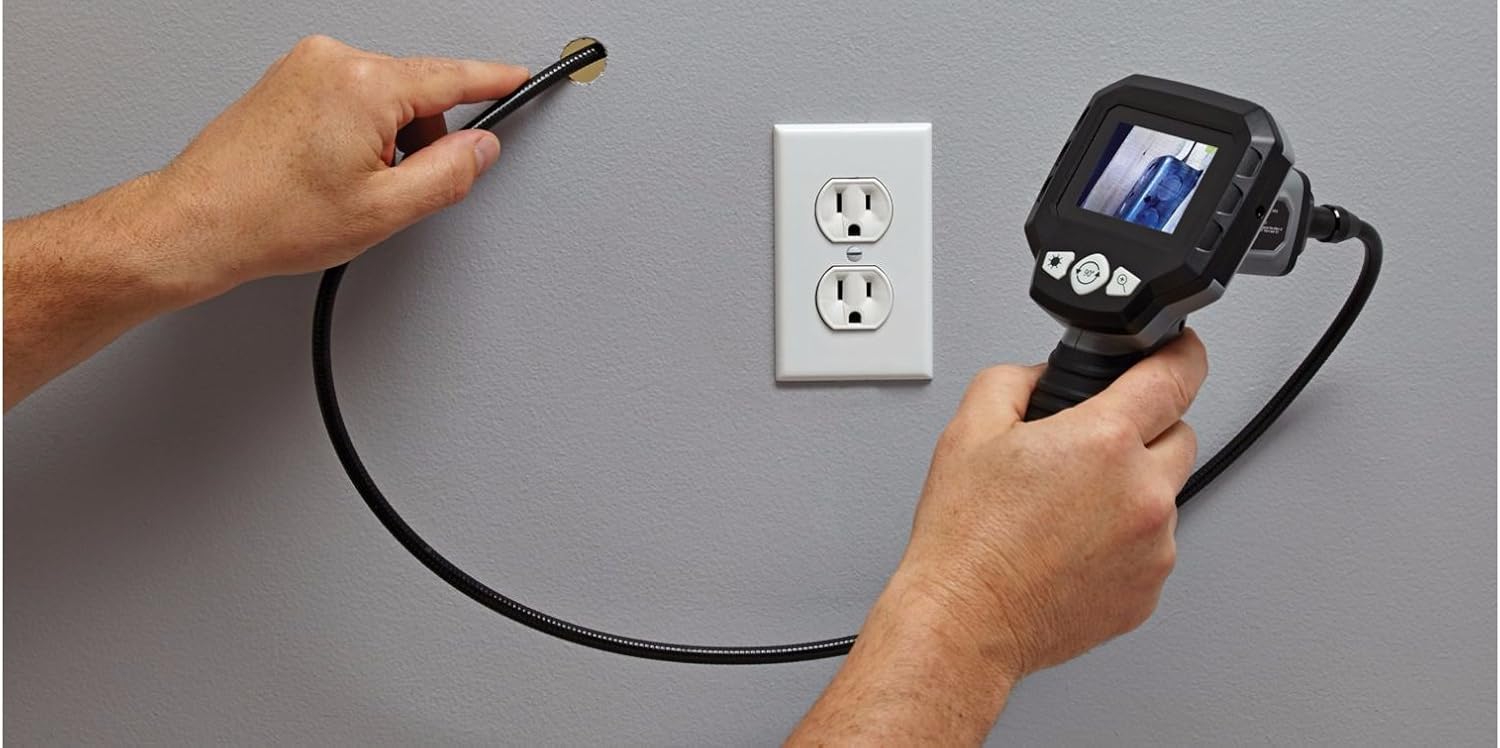
Carefully guide the flexible cable and camera head into the area you wish to inspect. The flexible cable allows for navigation around obstacles.


3. Regulacja jasności
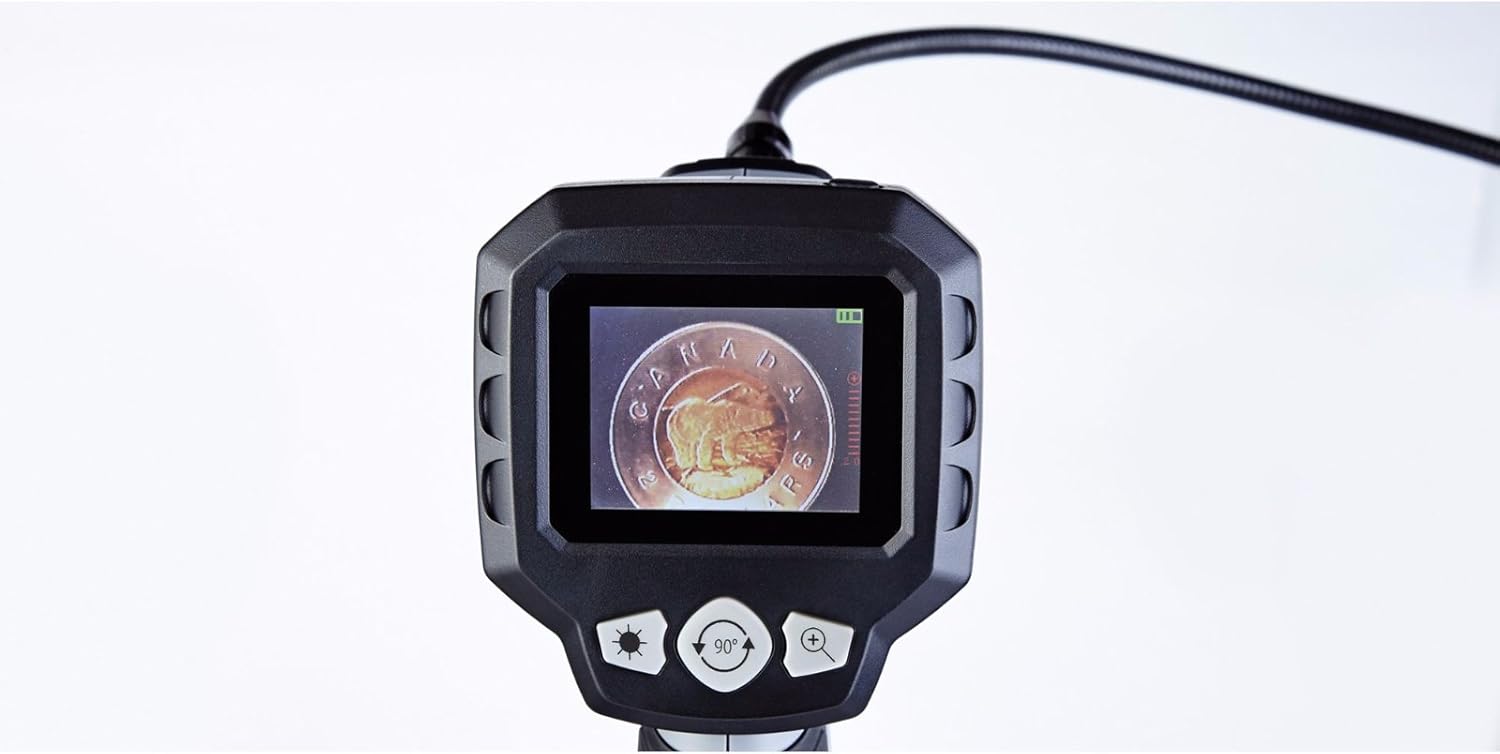
The camera head features built-in LED lights. Use the brightness control buttons (often marked with a sun icon or '+' / '-' symbols) on the main unit to cycle through the 5 brightness settings. Adjust as needed for optimal vieww różnych warunkach oświetleniowych.
4. Zoom cyfrowy
To magnify the image, press the digital zoom button (often marked with a magnifying glass icon or '+'). The device supports up to 2x digital zoom. Press the button repeatedly to cycle through zoom levels or to return to the original view.
5. Obrót obrazu
If the image on the screen appears upside down or sideways, use the image rotation button (often marked with a circular arrow icon) to adjust the orientation. Press the button to rotate the image in 90-degree increments until the desired view został osiągnięty.
6. Wskaźnik stanu baterii
The LCD screen displays a battery icon, indicating the current battery charge level. Recharge or replace batteries when the indicator shows low power to ensure uninterrupted operation.
Konserwacja
- Czyszczenie: Wipe the main unit and flexible cable with a soft, dry cloth. For the camera lens, use a lens cleaning cloth. Do not use harsh chemicals or abrasive materials.
- Składowanie: Store the device and its accessories in the provided heavy-duty case in a cool, dry place, away from direct sunlight and extreme temperatures.
- Pielęgnacja baterii: Aby zapobiec wyciekowi elektrolitu i uszkodzeniom, wyjmij baterie, jeśli urządzenie nie będzie używane przez dłuższy czas.
Rozwiązywanie problemów
| Problem | Możliwa przyczyna | Rozwiązanie |
|---|---|---|
| Urządzenie nie włącza się. | Baterie są rozładowane lub nieprawidłowo włożone. | Wymień baterie na nowe baterie AA, zwracając uwagę na prawidłową biegunowość. |
| Brak obrazu na ekranie. | Cable not fully connected; camera lens obstructed. | Ensure the flexible cable is securely connected to the main unit. Check and clean the camera lens. |
| Obraz jest zbyt ciemny lub zbyt jasny. | Brightness settings are incorrect for the environment. | Adjust the LED brightness using the dedicated buttons on the main unit. |
| Obraz jest rozmazany. | Camera lens is dirty; object is too close or too far. | Clean the camera lens. Adjust the distance between the camera head and the object for optimal focus. |
| Screen is blue or frozen. | System error; low battery. | Power off the device, remove and reinsert batteries, then power on again. Replace batteries if low. |
Specyfikacje
- Numer modelu: 057-458-0
- Rozmiar ekranu: 2.7 cala (6.85 cm) kolorowy wyświetlacz LCD
- Średnica głowicy kamery: 9 mm
- Flexible Cable Length: 3.3 stóp (1.1 metrów)
- Wodoodporność: Waterproof camera head
- Zoom cyfrowy: 2x
- Ustawienia jasności: 5 poziomy
- Źródło zasilania: 4 baterie AA (w zestawie)
- Rozdzielczość przechwytywania wideo: 1080p (for compatible recording, if applicable)
- File Format: MP4, JPEG (for compatible recording, if applicable)
- Interfejs sprzętowy: HDMI (for compatible output, if applicable)
- Producent: Maksymalny
- ASIN: B01N2M40UB
- GTIN/UPC: 648824745488
- Wymiary przesyłki: 31.2 x 25 x 12.2 cm; waga 1.68 kg
Gwarancja i wsparcie
This MAXIMUM product is covered by a manufacturer's warranty. For specific warranty terms, duration, and to obtain support or service, please refer to the documentation included with your purchase or contact the manufacturer directly. Keep your proof of purchase for warranty claims.