
KEITHLEY 2303-PJ
Keithley 2303-PJ Power Supply Instruction Manual
Model: 2303-PJ
1. Koniec produktuview
The Keithley 2303-PJ is a specialized power supply designed for testing portable, battery-operated devices. It offers advanced capabilities to simulate a battery's performance across a wide range of conditions, including output resistance and voltage response. This instrument is crucial for accurately testing device charge control circuitry and overall battery simulation.
Główne cechy obejmują:
- Ultra-fast response to transient load currents
- Variable output resistance
- 100nA DC current sensitivity
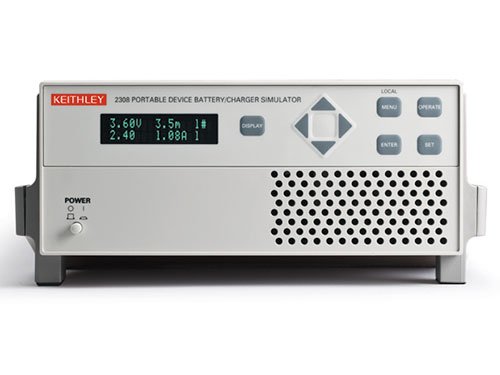
Figure 1: Front panel of the Keithley 2303-PJ Power Supply. The display shows voltage and current readings (e.g., 3.60V, 1.08A). Controls include a navigation pad, 'DISPLAY', 'MENU', 'OPERATE', 'ENTER', 'SET' buttons, and a 'POWER' button with indicator lights.
2. Konfiguracja
- Rozpakowanie i kontrola: Carefully remove the instrument from its packaging. Inspect for any signs of damage during transit. Report any damage to the shipping carrier and Keithley immediately.
- Podłączenie zasilania: Connect the supplied AC power cord to the instrument's rear panel power inlet and then to a grounded AC power outlet. Ensure the power source matches the instrument's voltagi wymagania.
- Pierwsze włączenie: Naciśnij MOC button located on the front panel. The display should illuminate, indicating the unit is operational.
- Connecting to Device Under Test (DUT): Use appropriate test leads to connect the output terminals of the 2303-PJ to the device you intend to test. Observe correct polarity.
- Wentylacja: Ensure adequate ventilation around the instrument. Do not block the ventilation grilles on the sides or rear of the unit.
3. Instrukcja obsługi
3.1 Elementy sterujące na panelu przednim
- Wyświetlacz: Pokazuje objętość wyjściowątage, current, and other operational parameters.
- Przyciski nawigacyjne (w górę, w dół, w lewo, w prawo): Used to navigate through menus and adjust parameter values.
- Przycisk ENTER: Confirms selections or entered values.
- Przycisk SET: Wchodzi w tryb ustawiania parametrów.
- Przycisk MENU: Dostęp do menu głównego umożliwiającego konfigurację i ustawienia zaawansowane.
- OPERATE Button: Włącza lub wyłącza wyjście.
- Przycisk WYŚWIETL: Cycles through different display modes or views.
3.2 Podstawowa obsługa
- Ustawienie objętościtage i prąd:
- Naciśnij USTAWIĆ przycisk.
- Use the navigation buttons to select the voltage or current parameter you wish to adjust.
- Use the navigation buttons (typically Up/Down) to change the value.
- Naciskać WCHODZIĆ aby potwierdzić ustawienie.
- Włączanie wyjścia:
- Once parameters are set, press the DZIAŁAĆ button to enable the power output. The output indicator should illuminate.
- To disable the output, press DZIAŁAĆ Ponownie.
- Odczyty monitorujące:
The display continuously shows the actual output voltage and current. Use the WYŚWIETLACZ button to cycle through different measurement views jeśli dostępne.
4. Konserwacja
- Czyszczenie: Keep the instrument clean by wiping the exterior with a soft, damp cloth. Do not use abrasive cleaners or solvents. Ensure the unit is powered off and disconnected from the AC supply before cleaning.
- Wentylacja: Periodically check that the ventilation grilles are free from dust and debris to ensure proper airflow and prevent overheating.
- Składowanie: When not in use for extended periods, store the instrument in a clean, dry environment within its specified operating temperature and humidity ranges.
- Kalibrowanie: For optimal performance and accuracy, periodic calibration by qualified personnel is recommended. Refer to the Keithley service manual or contact Keithley support for calibration procedures and intervals.
5. Rozwiązywanie Problemów
| Problem | Możliwa przyczyna | Rozwiązanie |
|---|---|---|
| Urządzenie nie włącza się. | No AC power; faulty power cord; internal fuse blown. | Check AC power connection and outlet. Try a different power cord. If fuse is suspected, contact qualified service personnel. |
| Brak objętości wyjściowejtage/prąd. | Output disabled; incorrect settings; overload protection active; faulty connections. | Naciskać DZIAŁAĆ to enable output. Verify voltage/current settings. Check for short circuits or overloads on the DUT. Ensure test leads are securely connected. |
| Niestabilne lub niedokładne odczyty. | Poor connections; external interference; instrument needs calibration. | Check all connections for looseness or corrosion. Ensure the instrument is away from strong electromagnetic fields. Consider professional calibration. |
| Przegrzanie. | Blocked ventilation; excessive ambient temperature; continuous operation at maximum load. | Ensure ventilation grilles are clear. Operate in a cooler environment. Reduce load or allow for cool-down periods. |
For issues not listed here or if troubleshooting steps do not resolve the problem, please contact Keithley technical support.
6. Specyfikacje
| Parametr | Wartość |
|---|---|
| Producent | Keithley |
| Numer części | 2303-PJ |
| Numer modelu przedmiotu | 2303-PJ |
| Waga przedmiotu | 5.44 kilogramów |
| Wymiary opakowania | Wymiary 48.26 x 33.02 x 22.86 cm |
| Ilość w opakowaniu przedmiotu | 1 |
| Czy potrzebne są baterie? | NIE |
| Data pierwszej dostępności | 4 listopada 2016 r. |
7. Gwarancja i wsparcie
Warranty information for the Keithley 2303-PJ Power Supply is typically provided with the product at the time of purchase or can be found on the official Keithley webStrona. Zachowaj dowód zakupu na wypadek roszczeń gwarancyjnych.
For technical support, service, or calibration inquiries, please contact Keithley customer service directly. Refer to the contact information provided in your product documentation or on the official Keithley webStrona (www.tek.com/keithley).
Ask a question about this manual
Ask about setup, troubleshooting, compatibility, parts, safety, or missing instructions. Manuals+ will review the question and use this page’s manual context to help answer it.