
Produkt ponadview
The 8Bitdo Ultimate Wired Controller is officially licensed by Xbox, offering a modern design and robust features for an enhanced gaming experience. It is compatible with Xbox Series X, Xbox Series S, Xbox One, and Windows 10 & 11.
Główne cechy obejmują:
- Officially Licensed by Xbox. Compatible with Xbox Series X, Xbox Series S, Xbox One & Windows 10 and above.
- Ultimate Software wirelessly with iOS and Android & wired on Xbox and PC.
- Niestandardowy Profile switch button, 3 profiles, switch on the fly.
- Customize button mapping, adjust stick & trigger sensitivity, vibration control and more.
- Two extra Pro-level Back Buttons and 3.5mm Audio Jack to directly connect your headphones.
- Perfect classic d-pad, trigger vibration, enhanced grip & a 3 meter cable.

Rycina 1: Przód view of the 8Bitdo Ultimate Wired Controller in Black.
Organizować coś
The 8Bitdo Ultimate Wired Controller is designed for plug-and-play functionality. Simply connect the controller to your compatible device using the integrated USB cable.
Connecting to Xbox Console:
- Ensure your Xbox Series X|S or Xbox One console is powered on.
- Plug the USB-A end of the controller's cable into an available USB port on your Xbox console.
- The controller will automatically connect and the Xbox button on the controller will illuminate.
Łączenie z komputerem z systemem Windows:
- Ensure your Windows 10 or Windows 11 PC is powered on.
- Plug the USB-A end of the controller's cable into an available USB port on your PC.
- The PC should automatically detect and install the necessary drivers. The Xbox button on the controller will illuminate once connected.

Figure 2: The 8Bitdo Ultimate Wired Controller connected to a laptop for PC gaming.
Operacyjny
Podstawowe sterowanie:
- Gałki analogowe: Służy do sterowania ruchem i kamerą.
- Pad kierunkowy: Do wprowadzania danych kierunkowych, często używany w grach retro lub w nawigacji po menu.
- Przyciski A/B/X/Y: Standardowe przyciski akcji.
- LT/RT (Wyzwalacze): Analog triggers with vibration motors for immersive feedback.
- LB/RB (przyciski na ramionach): Digital shoulder buttons.
- Przycisk Xbox: Powers on the controller, accesses the Xbox Guide.
- View Button (Two squares icon): Umożliwia dostęp do menu gry i funkcji systemowych.
- Menu Button (Three lines icon): Accesses game options or system menus.
- Share Button (Arrow pointing up): Robi zrzuty ekranu i klipy wideo.
Pro-level Back Buttons:
The controller features two extra programmable back buttons (P1 and P2) located on the underside. These can be mapped to any other button for quick access during gameplay.
Zawodowiecfile Przełączanie:
The controller has a dedicated Custom Profile switch button (three dots icon) to cycle through 3 customizable profiles on the fly. Each profile can store different button mappings, stick/trigger sensitivities, and vibration settings.
Sterowanie dźwiękiem:
- Gniazdo audio 3.5 mm: Connect your gaming headset directly to the controller.
- Przełącznik wyciszenia: A dedicated switch to mute your microphone.
- Regulacja głośności: Trzymaj Profile button and press UP/DOWN on the D-Pad to increase/decrease game volume. Hold the Profile button and press LEFT/RIGHT on the D-Pad to adjust game/chat balance.

Figure 3: The bottom of the controller with the 3.5mm audio jack and mute switch.
Customization (Ultimate Software)
The 8Bitdo Ultimate Software allows for extensive customization of your controller. It is available on Xbox, Windows 10 and above, Android, and iOS. While the controller is wired for gameplay, the mobile app connects wirelessly via Bluetooth for customization.
Features of Ultimate Software:
- Mapowanie przycisków: Remap any button to your preferred function.
- Stick Sensitivity: Adjust the sensitivity and dead zones of both analog sticks.
- Czułość wyzwalania: Fine-tune the sensitivity and dead zones of the LT/RT triggers.
- Kontrola wibracji: Adjust the strength of the vibration motors in different areas of the controller.
- Zawodowiecfile Kierownictwo: Create and save up to 3 custom profiles directly on the controller, allowing you to switch between them without re-configuring.
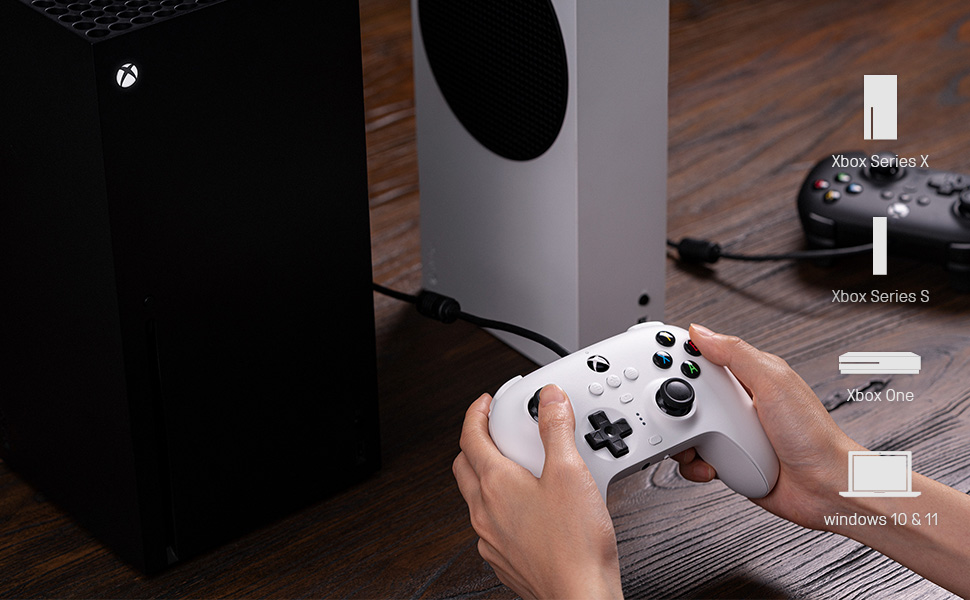
Figure 4: The 8Bitdo Ultimate Software interface for customizing button mapping.
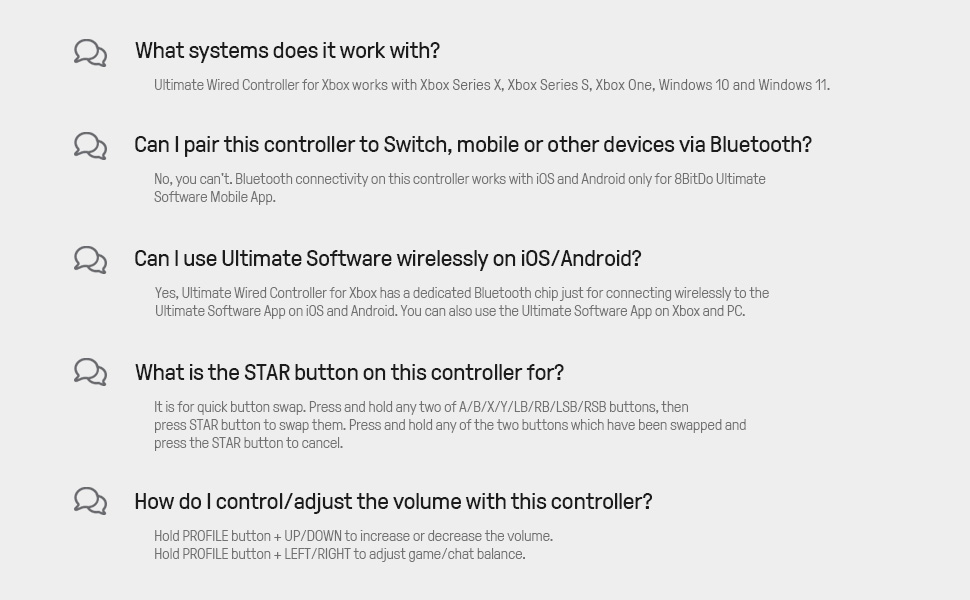
Figure 5: The 8Bitdo Ultimate Software interface for adjusting stick and trigger sensitivity.
Zgodność
The 8Bitdo Ultimate Wired Controller is designed for broad compatibility across various gaming platforms:
- Xbox Consoles: Xbox Series X, Xbox Series S, Xbox One.
- Komputer: Windows 10 and Windows 11.
- Inne platformy: The controller has also been tested to work with RetroPie on Raspberry Pi and the Mr. Project for retro gaming emulation.
Notatka: While the Ultimate Software is available on iOS and Android for customization, the controller itself does not function as a game controller on mobile phones or tablets for gameplay.

Figure 6: The 8Bitdo Ultimate Wired Controller is compatible with Xbox consoles and Windows PCs.
Konserwacja
To ensure the longevity and optimal performance of your 8Bitdo Ultimate Wired Controller, follow these maintenance guidelines:
- Czyszczenie: Regularnie przecieraj kontroler miękką, suchą ściereczką. W przypadku uporczywych zabrudzeń, delikatnie przetrzyj.amp Można użyć ściereczki, ale należy uważać, aby wilgoć nie dostała się do portów i przycisków.
- Składowanie: Store the controller in a cool, dry place away from direct sunlight and extreme temperatures. Avoid wrapping the cable tightly around the controller to prevent damage to the cable or internal connections.
- Pielęgnacja kabli: The integrated 3-meter (9.84 ft) USB cable is durable, but avoid excessive pulling, bending, or twisting, especially near the connection points.
Rozwiązywanie problemów
- Kontroler nie odpowiada:
- Sprawdź, czy kabel USB jest prawidłowo podłączony do kontrolera i konsoli/komputera.
- Spróbuj podłączyć kontroler do innego portu USB.
- Uruchom ponownie konsolę lub komputer.
- Buttons Feeling Sticky or Unresponsive:
- Clean around the buttons with a cotton swab lightly dampnasączone alkoholem izopropylowym.
- Ensure the controller's firmware is up to date using the 8Bitdo Ultimate Software.
- D-Pad Input Issues (Errant Diagonals):
- While the D-Pad is designed for precision, some retro games may interpret inputs differently. Experiment with the stick sensitivity settings in the Ultimate Software.
- Rumble Motors Noise/Weakness:
- Adjust vibration strength via the Ultimate Software. Note that some noise may be inherent to the motor design.
- Cable Length Insufficient:
- The controller comes with a 3-meter (9.84 ft) cable. If more length is needed, a USB extension cable may be required.
Specyfikacje
| Funkcja | Szczegół |
|---|---|
| Nazwa marki | 8Bitdo |
| Nazwa modelu | 6922621502227 |
| Kompatybilne urządzenia | Xbox Series X, Xbox Series S, Xbox One, Windows 10, Windows 11, PC |
| Typ kontrolera | Gamepad |
| Technologia łączności | USB (przewodowy) |
| Długość kabla | 3 metrów (9.84 stóp) |
| Dodatkowe funkcje | Two Pro-level Back Buttons, 3.5mm Audio Jack, Custom Profile Switch Button, Ultimate Software (iOS/Android/Xbox/PC) |
| Ilość przycisków | 18 |
| Waga przedmiotu | 11.7 uncji |
| Wymiary przedmiotu | 3.94 x 1.97 x 1.57 cala |
| Kolor | Czarny |
Gwarancja i wsparcie
Gwarancja: This product comes with a 1-year warranty from the manufacturer, 8Bitdo.
For further support, firmware updates, or detailed information on the Ultimate Software, please visit the official 8Bitdo webwitryny lub skontaktuj się z obsługą klienta.
Oficjalny film o produkcie
Wideo 1: Oficjalny koniecview of the 8Bitdo Ultimate Wired Controller for Xbox, showcasinjego cech i konstrukcji.