
1. Wprowadzenie
Thank you for choosing the Baseus Encok S16 Neck Hung Bluetooth Wireless In-Ear Earphone. This manual provides detailed instructions for setup, operation, and maintenance to ensure optimal performance and longevity of your device. Please read this manual thoroughly before use.
2. Zawartość opakowania
Sprawdź, czy w opakowaniu znajdują się wszystkie elementy:
- 1 x Baseus Encok S16 Wireless Earphone
- 1 x kabel ładujący
- 1 x Instrukcja obsługi
- 1 x Karta gwarancyjna

Image: Contents of the Baseus Encok S16 earphone package, showing the earphones, charging cable, user manual, and warranty card.
3. Koniec produktuview
The Baseus Encok S16 earphones feature a neck-hung design for comfortable and secure wear. Key features include:
- Mocowanie magnetyczne: Earbuds can be magnetically joined when not in use, preventing tangling and loss.
- Adjustable Coils: The earphone line length can be adjusted by sliding for a customized fit.
- High Fidelity Sound: Equipped with a dynamic speaker unit, composite diaphragm, and independent tune trope structure for clear audio.
- Wydajna moc: Utilizes a British CSR chip and 120mAh battery for low power consumption and extended battery life.
- Uniwersalna kompatybilność: Smartly matches with smartphones and tablet PCs, compatible with all Bluetooth 4.0 enabled devices.

Image: Close-up of the Baseus Encok S16 earbuds demonstrating their magnetic connection capability.
4. Konfiguracja
4.1 Ładowanie słuchawek
- Connect the provided charging cable to the charging port on the earphone's control unit.
- Podłącz drugi koniec kabla ładującego do źródła zasilania USB (np. portu USB komputera, zasilacza ściennego USB).
- Podczas ładowania kontrolka będzie świecić, a po pełnym naładowaniu zgaśnie lub zmieni kolor.
- Pełne naładowanie trwa zazwyczaj od 1.5 do 2 godzin.
4.2 parowanie Bluetooth
- Sprawdź, czy słuchawki są w pełni naładowane.
- Press and hold the Power button on the control unit until the indicator light flashes red and blue alternately, indicating pairing mode.
- Na smartfonie lub urządzeniu z włączoną funkcją Bluetooth przejdź do ustawień Bluetooth.
- Szukaj available devices and select "Baseus Encok S16" from the list.
- Once connected, the indicator light will flash blue slowly or turn solid blue.
- Jeśli zostaniesz poproszony o podanie hasła, wpisz „0000”.
5. Instrukcja obsługi
5.1 Podstawowe sterowanie
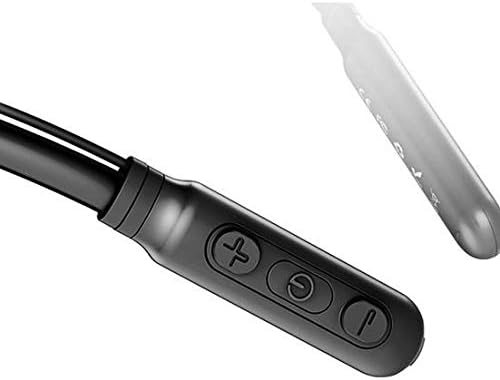
Image: Close-up of the Baseus Encok S16 earphone's inline control unit, showing the power/multi-function button, volume up, and volume down buttons.
| Przycisk | Funkcjonować |
|---|---|
| Przycisk zasilania (środek) |
|
| Zwiększanie głośności (+) |
|
| Ściszanie (-) |
|
5.2 Noszenie słuchawek
Place the neckband around your neck, ensuring the control unit is easily accessible. Insert the earbuds comfortably into your ears. Adjust the earphone line length using the sliding coils for a secure and comfortable fit.
6. Konserwacja
- Regularnie czyść słuchawki douszne i jednostkę sterującą miękką, suchą ściereczką.
- Avoid exposing the earphones to extreme temperatures, humidity, or corrosive liquids.
- Store the earphones in a cool, dry place when not in use. The magnetic earbuds can help prevent tangling during storage.
- Nie należy podejmować prób samodzielnego rozmontowywania lub naprawy słuchawek, gdyż spowoduje to utratę gwarancji.
7. Rozwiązywanie Problemów
| Problem | Rozwiązanie |
|---|---|
| Nie można włączyć | Ensure the earphones are fully charged. Press and hold the Power button for 3 seconds. |
| Nie można sparować z urządzeniem |
|
| Brak dźwięku lub niska głośność |
|
| Przerywane połączenie |
|
8. Specyfikacje
| Funkcja | Szczegół |
|---|---|
| Marka | Baza |
| Numer modelu | FWP-E-S16 |
| Technologia łączności | Bluetooth |
| Wersja Bluetooth | 4.0 (compatible with devices enabling Bluetooth 4.0) |
| Współczynnik kształtu | In Ear, Neck Hung |
| Typ sterowania | Voice Control, Touch (via buttons) |
| Pojemność baterii | 120mAh |
| Waga | 30 gram |
| Zawarte komponenty | Wireless Earphone, Charging Cable, User Manual, Warranty Card |
9. Gwarancja i wsparcie
This product comes with a Limited Warranty. Please refer to the included Warranty Card for detailed terms and conditions regarding coverage and duration.
For technical support or warranty claims, please contact your retailer or visit the official Baseus webStrona z informacjami o obsłudze klienta.
Globalny Numer Identyfikacji Handlowej (GTIN): 06953156264489