
1. Wprowadzenie
This manual provides detailed instructions for the safe and efficient operation of your VOLTCRAFT 8210 Function Generator. The 8210 is a versatile instrument combining a sweep function, function generator, pulse generator, and frequency counter into a single unit. It is designed for professional use, generating various waveforms with precision.
2. Instrukcje bezpieczeństwa
Please read these safety instructions carefully before operating the device to prevent injury and damage. Keep this manual for future reference.
- Zawsze podłączaj urządzenie do uziemionego gniazdka elektrycznego.
- Nie używaj urządzenia w mokrym lub damp warunki.
- Aby zapobiec przegrzaniu, należy zapewnić odpowiednią wentylację.
- Nie otwierać urządzenia casing; wewnątrz nie ma żadnych części, które mogłyby być naprawiane przez użytkownika. Serwis należy zlecić wykwalifikowanemu personelowi.
- Przed czyszczeniem lub przenoszeniem urządzenia należy odłączyć zasilanie.
- Unikaj stosowania objętościtages exceeding the specified maximum input ratings.
3. Koniec produktuview
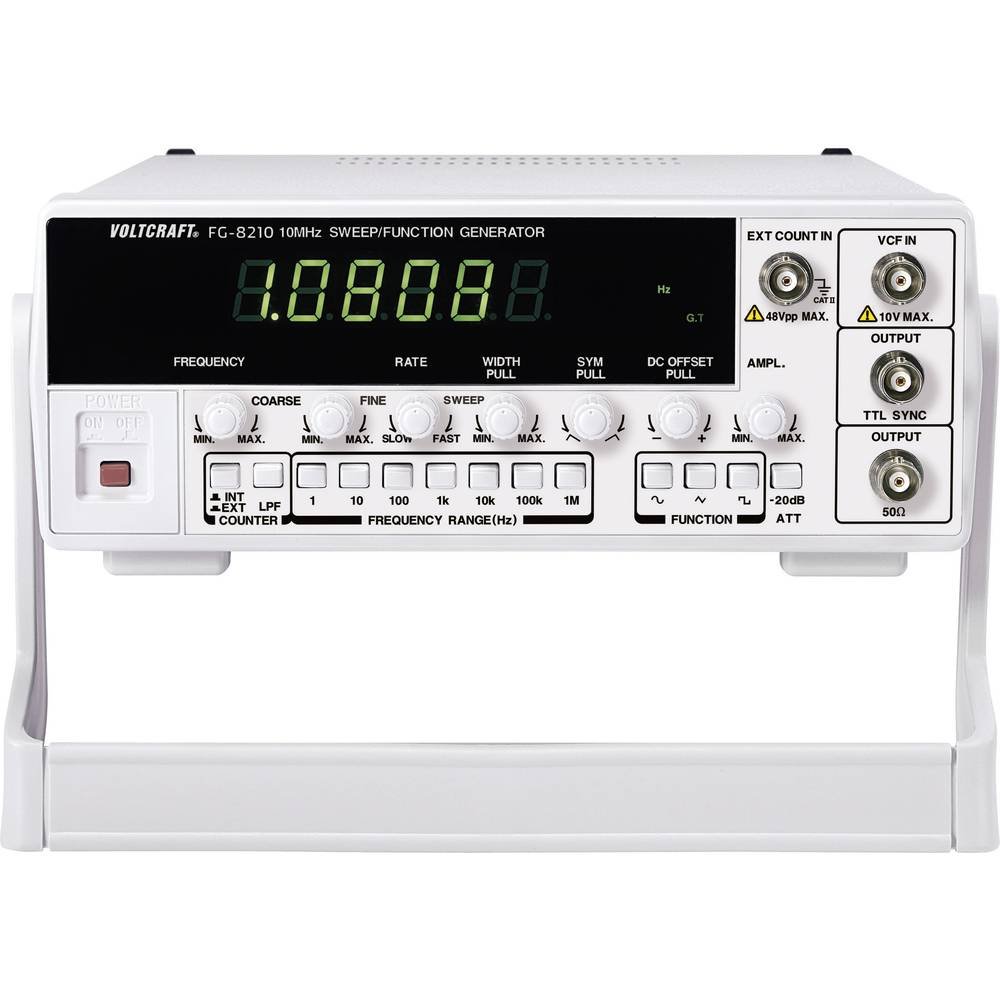
The VOLTCRAFT 8210 is a versatile 4-in-1 instrument designed for various electronic testing and development applications. It integrates the functionalities of a sweep function generator, a standard function generator, a pulse generator, and a frequency counter.
Główne cechy:
- Four-in-one functionality: Sweep function, function generator, pulse generator, and frequency counter.
- Zakres częstotliwości: Generates signals from 0.1 Hz to 10 MHz.
- Licznik częstotliwości: Measures frequencies from 2 Hz to 100 MHz.
- Generowanie przebiegów: Produces professional-grade rectangular, triangular, and sawtooth signals.
- Wyjście Ampliturgia: Maksymalny amplitude of 20 Vpp (10 Vpp into 50 ohms).
Zdjęcia produktu:


Oficjalne filmy produktowe:
W chwili obecnej nie ma możliwości osadzenia oficjalnych filmów produktu od sprzedawcy.
4. Konfiguracja
- Rozpakowywanie: Carefully remove the function generator from its packaging. Inspect the unit for any signs of damage during transit. Retain the packaging for future storage or transport.
- Umieszczenie: Place the unit on a stable, flat surface with adequate ventilation around it. Avoid placing it near heat sources or in direct sunlight.
- Podłączenie zasilania: Connect the provided power cord to the power input on the rear panel of the 8210 and then to a suitable grounded AC power outlet. Ensure the power switch is in the OFF position before connecting.
- Pierwsze włączenie: Flip the power switch to the ON position. The display should illuminate, indicating the unit is receiving power.
- Połączenia wyjściowe: Connect your test leads or cables to the appropriate output terminals (e.g., BNC connectors for main output, TTL output) on the front panel, depending on your application.
5. Instrukcja obsługi
This section details the basic operation of the VOLTCRAFT 8210 for its primary functions.
5.1. Function Generator Mode
- Wybierz formę fali: Use the dedicated buttons (e.g., Sine, Square, Triangle) on the front panel to select the desired output waveform.
- Ustaw częstotliwość: Adjust the frequency using the frequency control knob and range buttons. The display will show the current frequency.
- Regulować Ampliturgia: Użyj amplitude knob to set the desired output voltage peak-to-peak (Vpp). Monitor the output with an oscilloscope for precise adjustment.
- Przesunięcie DC: If available, use the DC offset control to add a DC bias to the output signal.
- Podłącz wyjście: Connect the main output (e.g., BNC) to your circuit or device under test.
5.2. Sweep Function Mode
The sweep function allows the output frequency to vary automatically over a specified range.
- Activate Sweep: Press the "Sweep" button to enable this mode.
- Set Start/Stop Frequencies: Use the frequency controls to define the lower and upper limits of the sweep range.
- Adjust Sweep Rate: Set the sweep duration or rate using the dedicated control.
- Wyjście monitora: Observe the sweeping signal on an oscilloscope to verify the settings.
5.3. Tryb licznika częstotliwości
The built-in frequency counter measures external signals.
- Select Counter Input: Connect the external signal to the designated frequency counter input terminal.
- Activate Counter: Press the "Counter" or "Freq. Meas." button to switch to frequency measurement mode.
- Częstotliwość odczytu: The display will show the frequency of the input signal.
6. Konserwacja
Proper maintenance ensures the longevity and accuracy of your VOLTCRAFT 8210.
- Czyszczenie: Do czyszczenia zewnętrznej części urządzenia należy używać miękkiej, suchej ściereczki. W przypadku uporczywych zabrudzeń należy użyć delikatnegoamp Można używać ściereczki z łagodnym detergentem, upewniając się, że płyn nie dostanie się do urządzenia. Nie należy używać środków czyszczących ani rozpuszczalników o działaniu ściernym.
- Składowanie: When not in use for extended periods, store the unit in a dry, dust-free environment, preferably in its original packaging.
- Kalibrowanie: Periodic calibration by qualified service personnel is recommended to maintain measurement accuracy, especially for critical applications.
7. Rozwiązywanie Problemów
If you encounter issues with your VOLTCRAFT 8210, refer to the following common problems and solutions:
| Problem | Możliwa przyczyna | Rozwiązanie |
|---|---|---|
| Brak zasilania/Wyświetlacz wyłączony | Power cord disconnected, power switch off, faulty outlet. | Check power cord connection, ensure power switch is ON, test outlet with another device. |
| Brak sygnału wyjściowego | Output cable disconnected, amplitude set to zero, incorrect function selected. | Verify output cable connection, increase amplitude, ensure correct waveform/function is selected. |
| Incorrect frequency reading (counter) | Signal too weak, incorrect input range, noisy signal. | Ensure signal amplitude is sufficient, check input range settings, use shielded cables. |
Jeśli po wypróbowaniu tych rozwiązań problem nadal występuje, skontaktuj się z obsługą klienta.
8. Specyfikacje
The following are the technical specifications for the VOLTCRAFT 8210 Function Generator:
- Producent: VOLTCRAFT
- Numer modelu: 8210
- Waga przedmiotu: 3 kilograma
- Number of items in package: 1
- Baterie w zestawie: NIE
- Wymagane baterie: NIE
- ASIN: B00EPLFP46
- First Available Date on Amazon.fr: 15 lutego 2014
- Dostępność części zamiennych: Informacje niedostępne na temat części zamiennych
9. Gwarancja i wsparcie
Information regarding specific warranty terms and conditions for the VOLTCRAFT 8210 Function Generator is not available in the provided product data. Please refer to the documentation included with your purchase or contact VOLTCRAFT customer support directly for warranty details and technical assistance.
For further support, visit the official VOLTCRAFT webna miejscu lub skontaktuj się z autoryzowanym serwisem.