
1. Wprowadzenie
Thank you for choosing the Ground Zero GZIA 4115HPX 4-Channel Car Audio Amplifier. Ten amplifier is designed to deliver high-quality audio performance for your vehicle's sound system. This manual provides essential information for the proper installation, operation, and maintenance of your amplifier. Przed przystąpieniem do instalacji lub użytkowania należy dokładnie przeczytać tę instrukcję, aby zapewnić optymalną wydajność i bezpieczeństwo.
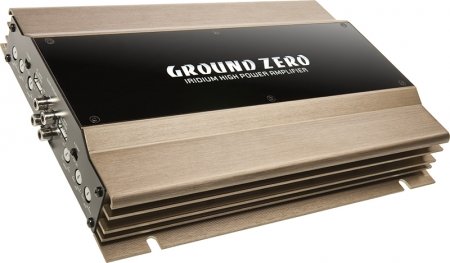
Figure 1: Ground Zero GZIA 4115HPX 4-Channel Car Audio Amplifier. This image displays the external casing amplifier, highlighting its compact design and heat sink fins.
2. Instrukcje bezpieczeństwa
Ważne informacje dotyczące bezpieczeństwa: Improper installation or use can lead to serious injury, damage to the ampuszkodzenia pojazdu.
- Przed rozpoczęciem jakichkolwiek prac elektrycznych należy zawsze odłączyć ujemny zacisk akumulatora pojazdu.
- Ensure all wiring is properly routed and secured to prevent pinching, chafing, or short circuits.
- Use appropriate gauge wiring for power, ground, and speaker connections as recommended by the manufacturer.
- Install a fuse or circuit breaker on the main power wire as close to the battery as possible.
- Unikaj montowania tzw ampPrzechowywać w miejscach narażonych na bezpośrednie działanie promieni słonecznych, nadmierne ciepło, wilgoć lub kurz.
- Nie uruchamiaj ampJeśli jest uszkodzony lub działa nieprawidłowo, skontaktuj się z lekarzem.
- Zachowaj amplifier's ventilation areas clear to prevent overheating.
3. Konfiguracja i instalacja
Prawidłowa instalacja ma kluczowe znaczenie dla wydajności i trwałości Twojego urządzenia. amplifier. Jeśli masz wątpliwości co do jakiegokolwiek etapu instalacji, skonsultuj się z profesjonalnym instalatorem car audio.
3.1 Rozpakowanie
Ostrożnie usuń amplifier from its packaging. Inspect the unit for any signs of damage that may have occurred during shipping. Retain the packaging for future transport or service needs.
3.2 Montaż
The GZIA 4115HPX amplifier is designed for surface mount installation. Choose a mounting location that is:
- Secure and stable, preventing vibration.
- Dobra wentylacja, pozwalająca na właściwe rozprowadzanie ciepła.
- Protected from moisture and direct sunlight.
- Dostępny w celu podłączenia okablowania i regulacji.
Do zamocowania użyj dołączonych śrub montażowych. amplifier to a solid surface in your vehicle. Ensure no existing wiring, fuel lines, or brake lines are damaged during drilling.
3.3 połączeń przewodów
Refer to the connection diagrams below for proper wiring. All connections should be tight and secure to prevent signal loss or electrical issues.
3.3.1 Okablowanie zasilania i uziemienia
- Moc (B+): Connect a suitable gauge power cable directly from the positive terminal of the vehicle's battery to the amplifier's B+ terminal. Install an inline fuse (not included) within 18 inches (45 cm) of the battery.
- Masa (GND): Podłącz przewód uziemiający o odpowiednim przekroju do amplifier's GND terminal to a clean, unpainted metal surface of the vehicle's chassis. Ensure a good electrical connection. The ground cable should be as short as possible.
- Zdalny (REM): Podłącz przewód zdalnego włączania do wyjścia zdalnego jednostki głównej ampzacisk REM filtra. Ten przewód włącza ampwłączanie i wyłączanie projektora za pomocą jednostki głównej.
3.3.2 Okablowanie głośników
The GZIA 4115HPX is a 4-channel amplifier. Connect your speakers to the corresponding speaker output terminals (CH1, CH2, CH3, CH4). Ensure correct polarity (+ to + and - to -) for each speaker.
- For stereo operation, connect one speaker per channel.
- For bridged operation (e.g., for a subwoofer), refer to the specific bridging instructions on the amplifier or in a detailed wiring diagram.
3.3.3 RCA Input Connections
Podłącz kable RCA do urządzenia głównego.amp wyjścia do amplifier's RCA input jacks (INPUT CH1/2, INPUT CH3/4).

Rysunek 2: Wewnętrzne view of the Ground Zero GZIA 4115HPX amplifier's circuit board. This image shows the internal components, including capacitors, resistors, and the transformer, which are responsible for audio processing and power delivery.

Rysunek 3: Szczegółowy układ wewnętrzny view of the Ground Zero GZIA 4115HPX amplifier. This image provides a closer look at the power supply section and output stage components, indicating the amplifier's robust construction.
3.4 Dostosowania początkowe
Before powering on, ensure all connections are correct and secure.
- Gain Control: Set the gain controls (LEVEL) on the amplifier to their minimum position.
- Ustawienia crossovera: Jeśli twój amplifier has built-in crossovers (HPF/LPF), set them according to your speaker type. For full-range speakers, you might use the HPF (High Pass Filter) to protect them from low frequencies. For subwoofers, use the LPF (Low Pass Filter).
4. Obsługa Ampżywsze
Po zainstalowaniu plik amplifier will turn on automatically with your head unit via the remote wire.
4.1 Setting Gain Levels
The gain control is not a volume knob; it matches the output voltage jednostki głównej do czułości wejściowej ampliyfikator.
- Turn your head unit volume to about 75-80% of its maximum.
- Powoli zwiększaj ampZwiększaj wzmocnienie lifiera, aż usłyszysz lekkie zniekształcenie, a następnie lekko je zmniejsz, aż dźwięk stanie się czysty.
- Repeat for all channels if independent gain controls are present.
4.2 Adjusting Crossovers and Bass Boost
- Filtr górnoprzepustowy (HPF): Used for full-range speakers to block low frequencies that they cannot reproduce effectively. Adjust to protect speakers and improve clarity.
- Filtr dolnoprzepustowy (LPF): Used for subwoofers to allow only low frequencies to pass through. Adjust to blend with your main speakers.
- Wzmocnienie basów: Use sparingly. Excessive bass boost can lead to distortion and potential damage to speakers or the amplifier. Adjust to enhance low-frequency response as desired, but avoid overdriving the system.
5. Konserwacja
The Ground Zero GZIA 4115HPX amplifier wymaga minimalnej konserwacji.
- Czyszczenie: Okresowo przecieraj zewnętrzną część ampPrzetrzyj filtr miękką, suchą ściereczką, aby usunąć kurz. Nie używaj silnych środków chemicznych ani ściernych środków czyszczących.
- Wentylacja: Upewnij się, że amplifier's heat sink fins and surrounding area remain free of obstructions to allow for proper airflow and cooling.
- Kontrola połączenia: Occasionally check all power, ground, remote, and speaker connections to ensure they remain tight and free of corrosion.
6. Rozwiązywanie Problemów
Jeśli masz problemy z urządzeniem amplifier, consult the following troubleshooting guide before contacting support.
| Problem | Możliwa przyczyna | Rozwiązanie |
|---|---|---|
| Amplifier does not turn on (no power indicator). |
|
|
| Brak dźwięku z głośników. |
|
|
| Zniekształcona lub słaba jakość dźwięku. |
|
|
| Amplifier overheats (protection light on). |
|
|
7. Specyfikacje
The following are the technical specifications for the Ground Zero GZIA 4115HPX 4-Channel Car Audio AmpLiyfikator:
| Funkcja | Szczegół |
|---|---|
| Numer modelu | GZIA 4115HPX |
| Liczba kanałów | 4 |
| Output Channel Quantity | 4 |
| Tomtage | 14.4 wolty |
| Cotage (maks.) | 500 watów |
| Typ montażu | Montaż powierzchniowy |
| Waga przedmiotu | 2 kg 900 gram |
| Wymiary opakowania | Wymiary 43.4 x 25 x 7.9 cm |
| ASIN | B006VTSQ8C |
8. Informacje o gwarancji
Ground Zero products are designed and manufactured to the highest quality standards. For detailed warranty terms and conditions, please refer to the warranty card included with your product or visit the official Ground Zero webZachowaj dowód zakupu na wypadek roszczeń gwarancyjnych.
9. Obsługa klienta
If you require further assistance or have questions not covered in this manual, please contact Ground Zero customer support or your authorized dealer. Contact information can typically be found on the official Ground Zero webstrona.