
Wstęp
This manual provides essential information for the safe and effective use of your Sony Cyber-shot DSC-WX50 digital camera. Please read it thoroughly before operating the camera and retain it for future reference. The DSC-WX50 is a compact digital camera featuring a 16.2 MP Exmor R CMOS sensor, 5x optical zoom, and Full HD 1080/60i video recording capabilities.
Co jest w pudełku
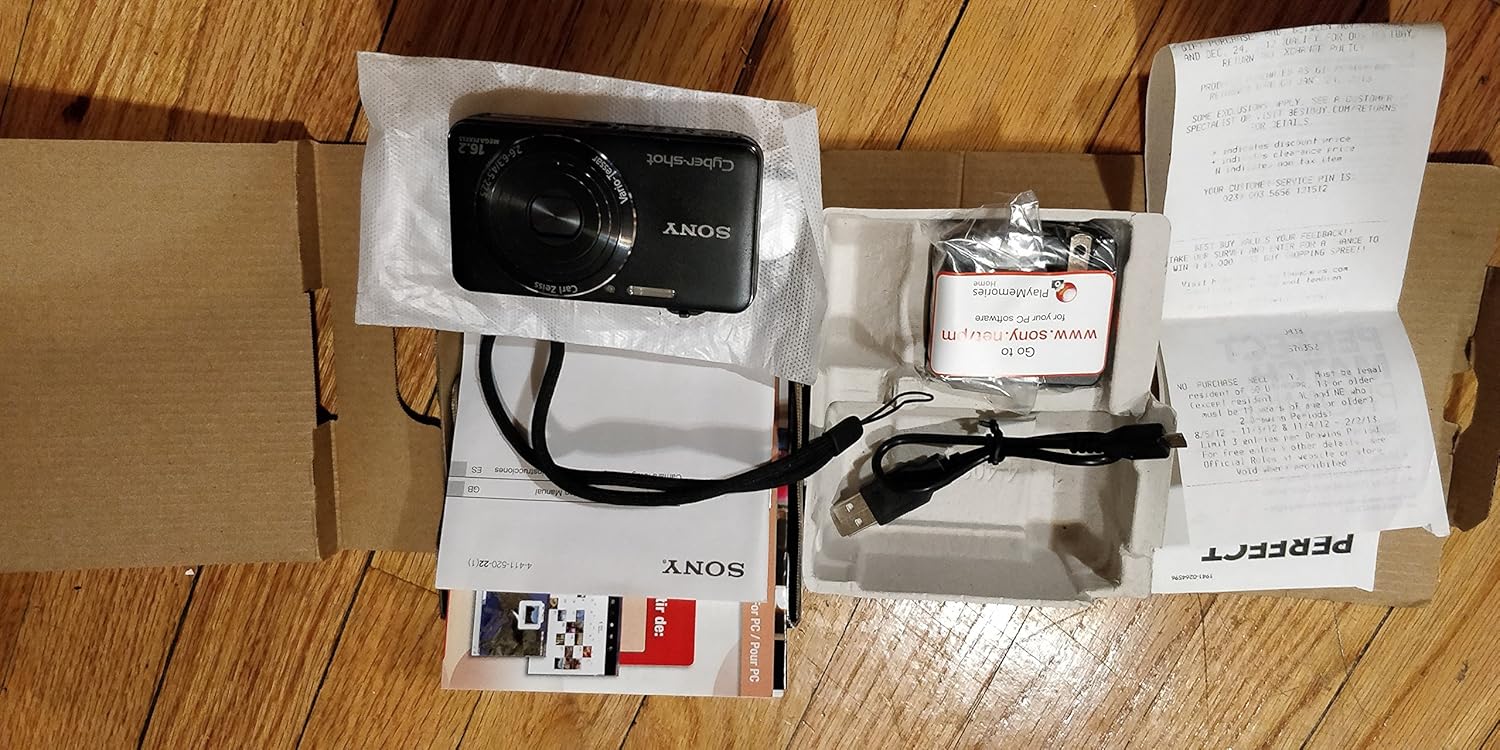
Carefully unpack your camera and ensure all items are present. The standard package contents include:
- Sony Cyber-shot DSC-WX50 Digital Camera
- Akumulator do ładowania
- Zasilacz sieciowy
- Kabel połączeniowy USB
- Pasek na nadgarstek
- Instrukcje obsługi i dokumentacja
- HDMI Cable (Built-in Media)

Image: All contents of the Sony Cyber-shot DSC-WX50 package, including the camera, cables, and documentation, laid out.

Obraz: Bliższe spojrzenie view of the included accessories, such as the charger and USB cable, within their packaging.
Organizować coś
1. Ładowanie akumulatora
Before first use, fully charge the supplied battery pack. Connect the camera to the AC adaptor using the USB cable, then plug the AC adaptor into a wall outlet. The charge lamp będzie świecić podczas ładowania i zgaśnie po jego zakończeniu.
2. Wkładanie baterii i karty pamięci
Open the battery/memory card cover on the bottom of the camera. Insert the charged battery pack firmly until it locks into place. Insert a compatible memory card (SD/SDHC/SDXC or Memory Stick Duo/Pro Duo/Pro-HG Duo) into the memory card slot until it clicks. Close the cover securely.

Obraz: Przód view of the Sony Cyber-shot DSC-WX50 camera, showing the lens and flash.
3. Ustawienia początkowe
When you turn on the camera for the first time, you will be prompted to set the date, time, and time zone. Follow the on-screen instructions to complete these settings.
Obsługa aparatu
Włączanie/wyłączanie zasilania
Naciśnij MOC Naciśnij przycisk, aby włączyć lub wyłączyć kamerę. Obiektyw wysunie się po włączeniu zasilania.
Basic Still Image Shooting (Intelligent Auto Mode)
- Włącz kamerę.
- Ustaw pokrętło trybu na Inteligentna automatyka (green camera icon).
- Frame your subject on the 2.7-inch LCD screen.
- Naciśnij przycisk migawki do połowy, aby ustawić ostrość. Wskaźnik ostrości zmieni kolor na zielony po ustawieniu ostrości.
- Aby zrobić zdjęcie, naciśnij przycisk migawki do końca.
Obraz: Tył view of the Sony Cyber-shot DSC-WX50, highlighting the 2.7-inch LCD screen and control buttons.
Funkcja Zoom
Use the zoom lever around the shutter button to adjust the focal length. The camera features 5x optical zoom and Clear Image Zoom for enhanced magnification without significant quality loss.
Video Recording (Full HD 1080/60i)
To record movies, press the dedicated FILM button. Press it again to stop recording. The camera supports Full HD 1080/60i video in AVCHD format, allowing for high-quality video capture with Optical SteadyShot Active Mode for reduced blur.
Special Shooting Modes and Features
- Tryb Superior Auto: Automatically detects 33 scenes and optimizes settings for dynamic pictures with reduced noise and improved clarity.
- Intelligent Sweep Panorama HR: Capture wide panoramic images by sweeping the camera. The camera stitches multiple frames automatically.
- 3D Still Image & 3D Sweep Panorama: Create 3D images for viewing on compatible 3D displays.
- Efekt obrazu: Apply creative filters to your photos, such as Toy Camera, Pop Color, Partial Color, and more.
- Rozmycie tła: Blurs the background to emphasize your subject, similar to DSLR effects.
- Tryb miękkiej skóry: Enhances portraits by reducing the appearance of blemishes and wrinkles.
- Face Detection & Smile Shutter: Automatically detects faces and can trigger the shutter when a smile is detected.
- Funkcja zapobiegająca mruganiu: Helps prevent photos with subjects blinking by capturing multiple shots.
- Naturalny błysk: Corrects colors for more lifelike images when using flash.
- Detekcja ruchu: Adjusts ISO and shutter speed to reduce blur in moving subjects.
- Tryb wielokątowy: Captures 15 images at different angles to create a 3D-like view on the camera's LCD when tilted.
Konserwacja
Czyszczenie aparatu
- Korpus aparatu: Przecierać miękką, suchą ściereczką. W przypadku uporczywych zabrudzeń użyć ściereczki delikatnie zwilżonej wodą.ampumyć wodą lub łagodnym detergentem, a następnie wytrzeć do sucha.
- Obiektyw: Usuń kurz za pomocą pędzelka do soczewek, a następnie delikatnie przetrzyj je ściereczką do czyszczenia soczewek. Unikaj dotykania powierzchni soczewki palcami.
- Ekran LCD: Delikatnie przetrzyj miękką, suchą ściereczką. Unikaj silnego naciskania na ekran.
Pielęgnacja baterii
Aby przedłużyć żywotność baterii, należy unikać wystawiania jej na działanie ekstremalnych temperatur. Przechowuj baterię w chłodnym, suchym miejscu, gdy nie jest używana. Jeśli aparat nie będzie używany przez dłuższy czas, wyjmij baterię.
Memory Card Care
Always format new memory cards in the camera before first use. Avoid removing the memory card while the camera is writing data (indicated by a flashing access lamp) to prevent data corruption.
Rozwiązywanie problemów
Jeśli masz problemy z aparatem, zapoznaj się z poniższymi, typowymi rozwiązaniami:
| Problem | Rozwiązanie |
|---|---|
| Kamera się nie włącza. |
|
| "Writing to Memory card was incomplete" error. |
|
| Obrazy są niewyraźne. |
|
| Lampa błyskowa się nie uruchamia. |
|
Aby uzyskać dalszą pomoc, skontaktuj się z działem obsługi klienta Sony.
Specyfikacje
| Funkcja | Szczegół |
|---|---|
| Efektywna rozdzielczość obrazu nieruchomego | 16.2 MP |
| Technologia czujnika fotograficznego | BSI CMOS |
| Zoom optyczny | 5x |
| Zoom cyfrowy | 20x |
| Rozmiar ekranu | 2.7 cali |
| Typ wyświetlacza | LCD |
| Stabilizacja obrazu | Stabilizator optyczny SteadyShot |
| Rozdzielczość wideo | Full HD 1080p (1080/60i AVCHD) |
| Utrzymany File Format | JPEG (Exif 2.3), 3D: MPF, Video: MPEG-4, AVCHD |
| Kompatybilność kart pamięci | SD/SDHC/SDXC, Memory Stick Duo/Pro Duo/Pro-HG Duo |
| Łączność | HDMI, USB |
| Minimalna ogniskowa | 25 milimetrów |
| Maksymalna ogniskowa | 125 milimetrów |
| Maksymalna apertura | f/6.3 |
| Minimalna prędkość migawki | 4 sekund |
| Maksymalna prędkość migawki | 1/1600 sekundy |
| Waga przedmiotu | 0.26 funtów |
Gwarancja i wsparcie
Aby uzyskać informacje dotyczące gwarancji i obsługi klienta, zapoznaj się z dokumentacją dołączoną do produktu lub odwiedź oficjalną stronę pomocy technicznej firmy Sony webZachowaj dowód zakupu na wypadek roszczeń gwarancyjnych.
Oficjalne wsparcie Sony: www.sony.com/electronics/support