
InFocus IN126
Instrukcja obsługi projektora DLP InFocus IN126
Model: IN126 | Brand: InFocus
1. Koniec produktuview
The InFocus IN126 is a DLP projector designed for various projection needs, offering high brightness and a clear image. This manual provides essential information for the proper setup, operation, and maintenance of your projector.
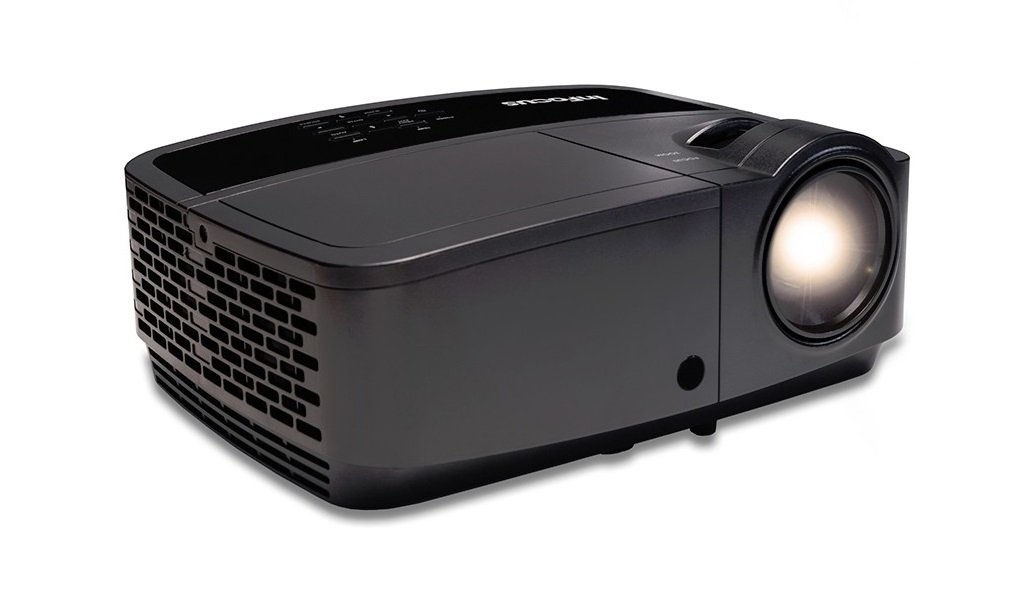
Obraz 1.1: Przód view of the InFocus IN126 DLP Projector.
Główne cechy:
- High brightness of up to 3200 lumens for clear images in various lighting conditions.
- High 3000:1 contrast ratio for sharp detail.
- Compact and portable design, weighing approximately 4.8 lbs. (2.17 kg).
- 3D-Ready capability for immersive viewdoświadczeń.
- HDMI connectivity for versatile input options.
2. Konfiguracja i instalacja
2.1 Rozpakowanie
Carefully remove the projector and all accessories from the packaging. Verify that all components are present according to the packing list.
2.2 Umiejscowienie projektora
Place the projector on a stable, flat surface or mount it securely. Ensure adequate ventilation around the projector to prevent overheating. Position the projector at an appropriate distance from the screen to achieve the desired image size.
2.3 Podłączanie urządzeń
Connect your video source (e.g., laptop, gaming console) to the projector using an HDMI cable. Ensure the cable is securely plugged into both the source device and the projector's HDMI input port.

Image 2.1: An InFocus projector set up for a business presentation, demonstrating typical usage.
2.4 Włączanie/wyłączanie
- Włączanie: Connect the power cord to the projector and a power outlet. Press the power button on the projector or remote control. The power indicator light will illuminate.
- Aby wyłączyć: Naciśnij przycisk zasilania dwa razy. Projektor przejdzie w cykl chłodzenia, a następnie całkowicie się wyłączy. Nie odłączaj projektora od zasilania podczas cyklu chłodzenia.
2.5 Regulacja obrazu
- Centrum: Obróć pierścień ostrości na obiektywie, aż obraz będzie ostry i wyraźny.
- Korekcja Keystone'a: Use the keystone adjustment feature (usually found in the projector's menu or via dedicated buttons) to correct trapezoidal image distortion if the projector is not perfectly perpendicular to the screen.
3. Obsługa projektora
3.1 Wybór źródła sygnału wejściowego
Press the 'Source' or 'Input' button on the remote control or projector control panel to cycle through available input sources (e.g., HDMI, VGA). Select the input corresponding to your connected device.
3.2 Nawigacja po menu
Use the arrow buttons on the remote or control panel to navigate the on-screen display (OSD) menu. Press 'Enter' or 'OK' to confirm selections and 'Menu' or 'Exit' to go back or close the menu.
3.3 Picture Adjustments
Within the OSD menu, you can adjust various picture settings:
- Jasność: Dostosowuje ogólną jasność lub ciemność obrazu.
- Kontrast: Steruje różnicą pomiędzy najjaśniejszymi i najciemniejszymi częściami obrazu.
- Kolor: Dostosowuje intensywność kolorów.
- Proporcje obrazu: Wybiera format wyświetlania (np. 4:3, 16:9).
3.4 Ustawienia audio
If your projector has built-in speakers or is connected to an external audio system, you can adjust the volume and other audio settings through the OSD menu.
3.5 Operacja 3D
The IN126 projector is 3D-Ready. To view 3D content, you will need compatible 3D glasses, a 3D-enabled source device, and 3D content. Refer to your 3D glasses and source device manuals for specific instructions on enabling 3D mode.
4. Konserwacja
4.1 Czyszczenie obiektywu
Do delikatnego przecierania soczewki projektora używaj miękkiej, niepozostawiającej włókien ściereczki przeznaczonej specjalnie do soczewek optycznych. Unikaj stosowania środków ściernych i nadmiernej siły, które mogą porysować soczewkę.
4.2 Cleaning the Projector Casing
Wipe the projector's exterior casing z miękkim, damp płótno. Nie używaj ostrych środków chemicznych ani rozpuszczalników.
4.3 Konserwacja filtra powietrza
Regularly check and clean the air filter to ensure proper airflow and prevent overheating. Refer to the full product manual for instructions on locating and cleaning or replacing the air filter.
4.4 Łamp Wymiana
Projektor lamp has an estimated operating life of up to 20,000 hours. When the lamp reaches the end of its life, a warning message may appear, or the image brightness may significantly decrease. Refer to the full product manual for detailed instructions on safe lamp replacement. Always use genuine InFocus replacement lamps.
5. Rozwiązywanie Problemów
W tej sekcji opisano typowe problemy, jakie mogą wystąpić podczas korzystania z projektora InFocus IN126.
5.1 Brak obrazu na ekranie
- Ensure the projector is powered on and the power indicator light is solid.
- Sprawdź, czy wszystkie połączenia kablowe (HDMI, zasilania) są stabilne.
- Sprawdź, czy w projektorze wybrano prawidłowe źródło sygnału wejściowego.
- Confirm the source device (laptop, etc.) is powered on and outputting a signal.
5.2 Image is Distorted or Blurry
- Wyreguluj pierścień ostrości na obiektywie.
- Use keystone correction to fix trapezoidal distortion.
- Ensure the projector is placed on a stable surface and is not vibrating.
- Check the resolution settings of your source device; ensure it is compatible with the projector's native resolution (1280 x 720).
5.3 Brak dźwięku
- Zwiększ głośność projektora i urządzenia źródłowego.
- Jeśli używasz zewnętrznych głośników, upewnij się, że są prawidłowo podłączone i włączone.
- Check audio settings in the projector's OSD menu.
5.4 Przegrzanie projektora
- Ensure there is sufficient space around the projector for ventilation.
- Clean the air filter to remove any dust buildup.
- Nie blokuj otworów wentylacyjnych.
6. Specyfikacje
The following table outlines the key technical specifications for the InFocus IN126 DLP Projector:
| Funkcja | Specyfikacja |
|---|---|
| Marka | W centrum uwagi |
| Nazwa modelu | IN126 DLP |
| Typ wyświetlacza | DLP |
| Rozdzielczość natywna | 1280x720 |
| Maksymalna rozdzielczość wyświetlacza | 1920x1080 |
| Jasność | 3200 lumens (ANSI) |
| Współczynnik kontrastu | 3000:1 |
| Żywotność źródła światła | 20000 godzin |
| Lamp Cotage | 230 watów |
| Technologia łączności | HDMI |
| Funkcja specjalna | 3D-Ready |
| Współczynnik kształtu | Przenośny |
| Typ montażu | Uchwyt na blat |
| Waga przedmiotu | 4.85 funtów (2.2 kg) |
| Certyfikacja testów zewnętrznych | UL, c-UL, FCC, CE |
7. Informacje o gwarancji
The InFocus IN126 DLP Projector comes with a limited manufacturer's warranty. For specific details regarding warranty coverage, duration, and terms, please refer to the warranty card included with your product or visit the official InFocus webZachowaj dowód zakupu na wypadek roszczeń gwarancyjnych.
8. Obsługa klienta
For further assistance, technical support, or to inquire about replacement parts, please visit the official InFocus support website or contact their customer service department. Contact information can typically be found on the InFocus website or in the documentation included with your projector.
Ask a question about this manual
Ask about setup, troubleshooting, compatibility, parts, safety, or missing instructions. Manuals+ will review the question and use this page’s manual context to help answer it.