
1. Wprowadzenie
Thank you for choosing the Lian Li T-LM15B-1 Top Panel. This high-quality replacement part is designed to maintain the aesthetic and functional integrity of your Lian Li PC-60F or PC-7F Midi-Tower case. Crafted from brushed aluminum, it offers a seamless replacement for damaged or worn existing panels. This manual provides essential information for proper installation and care.
2. Koniec produktuview
The Lian Li T-LM15B-1 is a genuine replacement top panel for specific Lian Li Midi-Tower PC cases. It features a sleek black brushed aluminum finish, ensuring durability and a premium look.
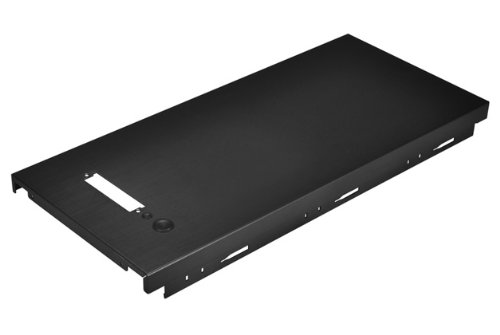
Figure 2.1: The Lian Li T-LM15B-1 top panel, showcasing its black brushed aluminum finish and cutouts for I/O ports and buttons.
Główne cechy:
- Materiał Premium: Constructed from high-quality brushed aluminum for durability and aesthetics.
- Bezpośrednia wymiana: Designed to perfectly fit Lian Li PC-60F and PC-7F Midi-Tower cases.
- Bezproblemowa integracja: Matches the original design and finish of compatible Lian Li cases.
3. Zgodność
This top panel is specifically designed for the following Lian Li Midi-Tower models:
- Lian Li PC-60F
- Lian Li PC-7F
Ważne uwagi dotyczące zgodności:
- Not compatible with PC-60FN and PC-7FN models.
- While it may fit other Lian Li Midi-Tower models, it is generally not suitable for X-series, models with front doors, or built-up designs (e.g., PC-P50, PC-B25F).
- Side Panel Mounting: Lian Li uses two different side panel mounting systems. This panel is designed for cases with narrow, protruding hooks on the upper inner sides of the side panels (typical for PC-60F/7F). Newer models (e.g., PC-60FN, PC-7FN) use wider brackets. Although the panel might physically fit, incompatibility with the side panel mounting system could hinder proper side panel attachment.
- I/O Panel Compatibility: Lian Li top panels come with different I/O panel cutouts (wide IO7 for four USB ports, narrow IO5 for two USB ports). Ensure the T-LM15B-1's I/O cutout matches your existing I/O panel. You may need to remount your I/O panel or acquire an alternative I/O panel if there is a mismatch.
4. Konfiguracja i instalacja
Installation of the Lian Li T-LM15B-1 top panel is straightforward. Please follow these steps carefully:
- Przygotowanie:
- Upewnij się, że komputer jest całkowicie wyłączony i odłączony od gniazdka ściennego.
- Place the PC case on a stable, flat surface.
- Gather any necessary tools, such as a Phillips head screwdriver, if required for your specific case model.
- Remove Existing Top Panel:
- Carefully identify the fasteners or clips holding the current top panel in place. These are typically screws on the rear or sides, or clips that can be gently disengaged.
- If your I/O panel is integrated into the top panel, carefully disconnect any cables (USB, audio, power/reset switches, LEDs) from the motherboard or power supply before fully removing the panel. Note the connection points for reassembly.
- Gently lift and remove the old top panel.
- Install New Top Panel:
- Align the Lian Li T-LM15B-1 top panel with the top frame of your PC case.
- If your I/O panel was separate, ensure it is properly seated in the new panel's cutout. If your I/O panel was part of the old panel, transfer it to the new panel and reconnect all cables to their respective headers on the motherboard. Refer to your motherboard manual for correct pin assignments if unsure.
- Carefully lower the new panel into place, ensuring all mounting points align.
- Secure the panel using the original fasteners or by engaging the clips until it is firmly seated.
- Kontrola końcowa:
- Verify that the new top panel is securely attached and does not wobble.
- Ensure all cables (if disconnected) are properly reconnected.
- Replace side panels and any other removed components.
Always handle components with care to avoid damage. If you encounter any difficulties, consult a qualified technician.
5. Konserwacja
The Lian Li T-LM15B-1 top panel requires minimal maintenance to keep its appearance. Follow these guidelines:
- Czyszczenie: Use a soft, dry, lint-free cloth to wipe down the panel regularly. For stubborn smudges, slightly dampen the cloth with water or a mild, non-abrasive cleaner suitable for aluminum surfaces. Avoid harsh chemicals or abrasive materials that could scratch the brushed finish.
- Usuwanie kurzu: Periodically use compressed air to clear any dust accumulation in the vents or around the I/O port cutouts.
- Unikaj uderzenia: Protect the panel from impacts or heavy objects that could dent or scratch the aluminum.
6. Rozwiązywanie Problemów
If you encounter issues after installing the top panel, consider the following:
- Panel Does Not Fit Securely:
- Double-check the compatibility section (Section 3) to ensure your case model is supported.
- Verify that the side panel mounting system of your case matches the panel's design (narrow hooks).
- Ensure no cables or internal components are obstructing the panel's seating.
- I/O Ports Not Functioning:
- Confirm that all I/O panel cables (USB, audio, power/reset, LEDs) are correctly and securely connected to the motherboard headers. Refer to your motherboard manual for correct pinouts.
- Check if the I/O panel itself is properly seated within the new top panel's cutout.
- Ensure the I/O panel type (IO5/IO7) is compatible with the cutout on the T-LM15B-1.
- Zarysowania lub wgniecenia:
- The panel is made of aluminum and can be scratched or dented by sharp objects or impacts. Handle with care during installation and use. Minor scratches on brushed aluminum may sometimes be reduced with specialized aluminum polishing compounds, but this is not guaranteed.
For further assistance, please contact Lian Li customer support.
7. Specyfikacje
| Funkcja | Szczegół |
|---|---|
| Numer modelu | T-LM15B-1 |
| Tworzywo | Szczotkowane aluminium |
| Kolor | Czarny |
| Zgodność | Lian Li PC-60F, PC-7F (Midi-Tower cases) |
| Wymiary opakowania | 46.5 x 21 x 3.7 cm (18.3 x 8.3 x 1.5 cala) |
| Waga | 600 gramów (1.32 funta) |
| ASIN | B003LUA7GI |
8. Gwarancja i wsparcie
Specific warranty details for the Lian Li T-LM15B-1 top panel may vary by region and retailer. Please retain your proof of purchase for any warranty claims.
For technical support, product inquiries, or warranty information, please visit the official Lian Li website or contact their customer service directly. You can often find support contact details on the Lian Li official webstrona: www.lian-li.com