
Wstęp
This manual provides essential information for the safe and efficient use of your ONKYO INTEC205 C-705FX CD Player. Please read it thoroughly before operating the unit and keep it for future reference.
The ONKYO INTEC205 C-705FX CD Player is designed for superior sound quality, incorporating advanced audio technologies. It features patented VLSC (Vector Linear Shaping Circuitry) to completely eliminate digital noise during D/A conversion, ensuring pure audio reproduction. The unit also utilizes a 192kHz/24bit Advanced Multi-bit DAC (Cirrus Logic CS4398) to faithfully convert digital signals to analog, preserving subtle musical nuances with an excellent signal-to-noise ratio. Furthermore, the "Direct Digital Pass" system uses high-purity cables for digital audio output, preventing noise interference and contributing to clear sound reproduction.
Środki ostrożności
- Nie wystawiać urządzenia na działanie deszczu i wilgoci.
- Nie otwierać casing; wszelkie prace serwisowe należy zlecać wykwalifikowanemu personelowi.
- Aby zapobiec przegrzaniu, należy zapewnić odpowiednią wentylację.
- Unikać umieszczania urządzenia w pobliżu źródeł ciepła lub w bezpośrednim świetle słonecznym.
- Używaj wyłącznie wskazanego źródła zasilania.
Zawartość opakowania
Sprawdź, czy w opakowaniu znajdują się wszystkie elementy:
- ONKYO INTEC205 C-705FX CD Player Unit
- Przewód zasilający
- Pilot zdalnego sterowania (jeśli jest dołączony)
- RCA Audio Cable (if included)
- Instrukcja obsługi (ten dokument)
Organizować coś
1. Umieszczenie
Place the CD player on a stable, level surface away from direct sunlight, heat sources, and excessive dust or vibration. Ensure adequate space around the unit for ventilation.
2. Połączenia
Podłącz odtwarzacz CD do swojego amplifier or receiver using appropriate audio cables.
- Połączenie audio analogowe: Use an RCA audio cable to connect the ANALOG OUT jacks on the CD player to the CD IN or AUX IN jacks on your amplifier. Match the red plug to the right channel (R) and the white plug to the left channel (L).
- Cyfrowe połączenie audio (opcjonalnie): For digital audio output, use either a digital coaxial cable or an optical digital cable.
- Współosiowy: Connect the DIGITAL OUT (COAXIAL) jack on the CD player to the COAXIAL DIGITAL IN jack on your ampliyfikator.
- Optyczny: Connect the DIGITAL OUT (OPTICAL) jack on the CD player to the OPTICAL DIGITAL IN jack on your ampliyfikator.
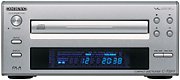 Obraz: Przód view of the ONKYO INTEC205 C-705FX CD Player, showing the disc tray, display, and control buttons. This image illustrates the general appearance of the unit.
3. Podłączenie zasilania
After all audio connections are made, plug the power cord into the AC INlet on the rear of the CD player, then plug the other end into a suitable wall outlet.
Instrukcja obsługi
1. Wkładanie płyty CD
- Naciśnij MOC przycisk, aby włączyć urządzenie.
- Naciśnij OTWÓRZ/ZAMKNIJ przycisk, aby otworzyć tacę na płytę.
- Place a CD with the label side facing up into the disc tray.
- Naciśnij OTWÓRZ/ZAMKNIJ Naciśnij przycisk ponownie, aby zamknąć tackę na płytę. Urządzenie odczyta płytę.
2. Podstawowe odtwarzanie
- ODTWÓRZ (►): Naciśnij, aby rozpocząć odtwarzanie.
- PAUZA (‖): Naciśnij, aby tymczasowo zatrzymać odtwarzanie. Naciśnij ponownie, aby wznowić.
- STOP (■): Naciśnij, aby zatrzymać odtwarzanie.
- POMIŃ (►►| / |◄◄): Press to skip to the next track or return to the beginning of the current track. Press twice to go to the previous track.
- PRZEWIJANIE DO PRZODU/ DO TYŁU: Hold down the SKIP buttons during playback to fast forward or rewind through the track.
3. Elementy sterujące na panelu przednim
The front panel includes buttons for Power, Open/Close, Play, Pause, Stop, and Skip. The display shows track number, elapsed time, and other playback information.
4. Remote Control (if applicable)
If your unit came with a remote control, refer to its specific instructions for advanced functions such as programming, repeat play, and random play.
Konserwacja
1. Czyszczenie urządzenia
Wipe the exterior of the unit with a soft, dry cloth. Do not use abrasive cleaners, waxes, or solvents as they may damage the finish. Never spray cleaning liquids directly onto the unit.
2. Postępowanie z dyskiem
- Trzymaj płyty za krawędzie, aby uniknąć pozostawienia odcisków palców na powierzchni, na której się odtwarzają.
- Keep discs clean. Wipe them with a soft, lint-free cloth from the center outwards.
- Przechowuj płyty w oryginalnych pudełkach, aby uchronić je przed kurzem i zarysowaniami.
- Do not expose discs to direct sunlight or high temperatures.
Rozwiązywanie problemów
If you experience problems with your CD player, consult the following table before seeking professional service.
| Problem | Możliwa przyczyna | Rozwiązanie |
|---|---|---|
| Brak zasilania | Przewód zasilający nie jest prawidłowo podłączony. | Sprawdź podłączenie przewodu zasilającego do urządzenia i gniazdka ściennego. |
| Brak dźwięku | Kable audio nie są prawidłowo podłączone; Amplifier input not selected. | Sprawdź połączenia kabli audio. Wybierz właściwe wejście w swoim ampliyfikator. |
| Płyta nie odtwarza się / przeskakuje | Disc is dirty or scratched; Disc inserted incorrectly; Unit needs warm-up time. | Clean the disc. Insert the disc with the label side up. Allow the unit to warm up for a few minutes before playing. |
| Disc tray opens/closes too quickly | Sensitive tray mechanism. | This can be a characteristic of the unit. Ensure the disc is placed quickly and correctly. |
| LCD display not lighting up | Internal connection issue or display malfunction. | If the unit otherwise functions, this may indicate a display panel issue. Contact customer support. |
Specyfikacje
| Funkcja | Szczegół |
|---|---|
| Marka | Onkyo |
| Numer modelu | C-705FX |
| Kolor | Srebrny |
| Waga przedmiotu | Około 2821 gramów |
| Kompatybilne urządzenia | Mówcy, Ampliofilizatory |
| Gniazdo słuchawkowe | Gniazdo 3.5 mm |
| Kluczowe technologie | VLSC (Vector Linear Shaping Circuitry), 192kHz/24bit Advanced Multi-bit DAC (Cirrus Logic CS4398), Direct Digital Pass |
| Playback Type | Tylko odtwarzanie |
Gwarancja i wsparcie
Aby uzyskać informacje o gwarancji i obsłudze klienta, zapoznaj się z oficjalną instrukcją obsługi Onkyo website or contact your local Onkyo dealer. Keep your purchase receipt as proof of purchase for warranty claims.