
Introduksjon
This manual provides detailed instructions for the assembly, operation, and maintenance of your Dystler RGB Display Cabinet Model 80001. Please read this guide thoroughly before beginning assembly or use to ensure proper function and safety. Keep this manual for future reference.
Sikkerhetsinformasjon
- Herdet glass: The cabinet features tempered glass for enhanced safety. While durable, avoid striking the glass with hard objects.
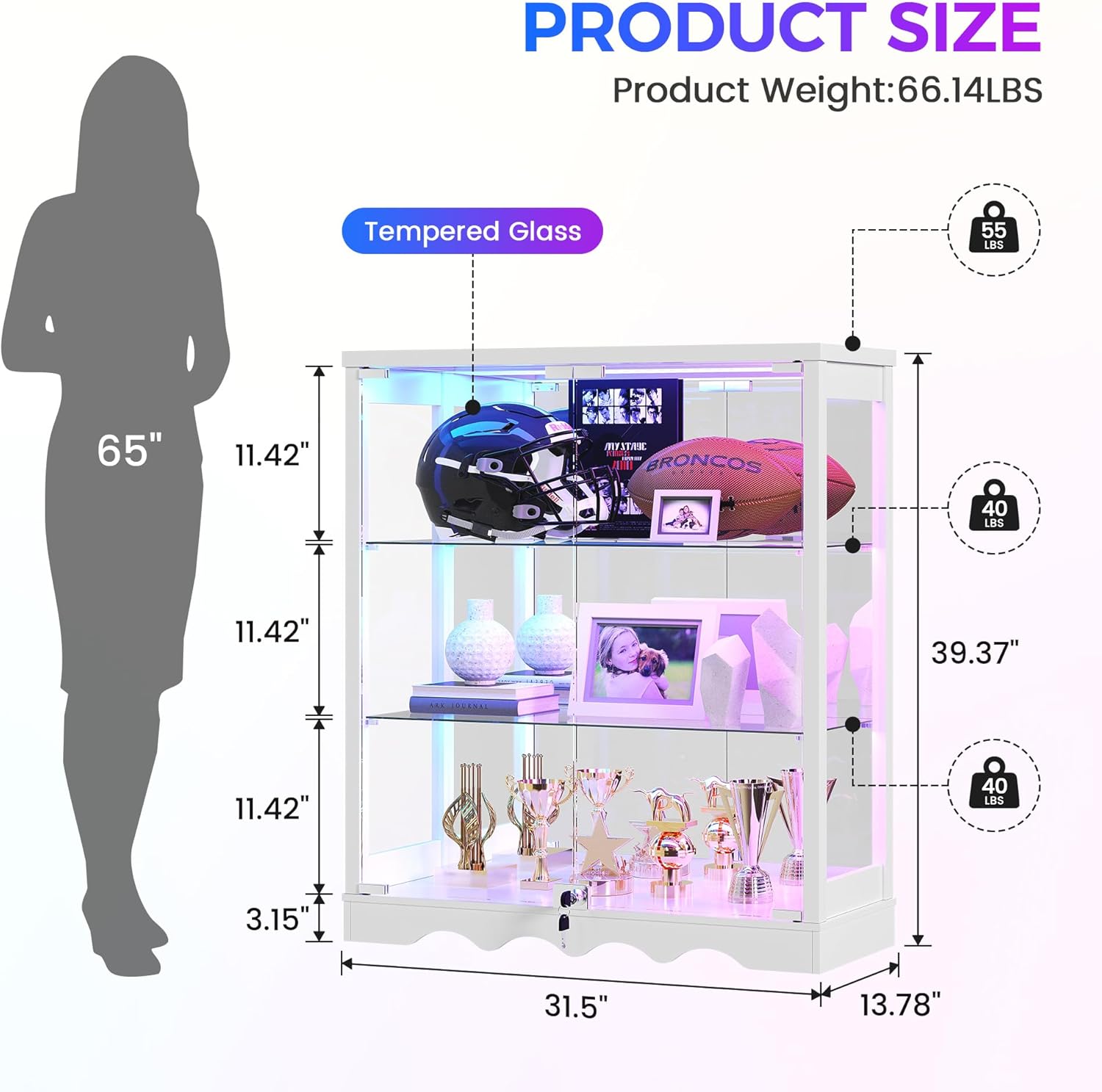
- Vekt kapasitet: Do not exceed the maximum weight capacity of 55 pounds for the entire cabinet. Distribute weight evenly across shelves.
- Tippesikring: Always install the included anti-tip device to prevent accidental tipping, especially in households with children or pets.
- Elektrisk sikkerhet: Ensure the charging station and RGB lighting are connected to a suitable power source. Do not overload the charging ports. Keep liquids away from electrical components.
- Forsamling: Assembly requires careful attention. It is recommended to have two people for assembly. Use appropriate tools as suggested in the assembly section.
- Låsemekanisme: The cabinet includes a key lock for secure storage. Keep keys in a safe place away from children.
Pakkeinnhold
Før montering, kontroller at alle komponenter er til stede og uskadet. Hvis noen deler mangler eller er skadet, vennligst kontakt kundestøtte.
- Glass Display Cabinet (main frame components)
- Tempered Glass Panels (doors, shelves)
- RGB Lighting Module with Motion Sensor
- Built-in Type-C and USB Charging Ports
- Key Lock Mechanism
- Installation Kit (screws, dowels, shelf pins, anti-tip device)
- Brukerhåndbok
Oppsett og montering
Assembly is required for this product. It is recommended to have two people for assembly. Power tools may expedite the process. Follow the steps below carefully.
Monteringsvideoguide
This video provides a step-by-step visual guide for assembling your Dystler RGB Display Cabinet. It demonstrates the process of connecting components and installing glass panels.
Generalforsamlingens trinn
- Pakk ut og identifiser delene: Lay out all components and hardware. Refer to the included parts list to ensure everything is present.
- Montering av grunnramme: Koble til bunnpanelene med den medfølgende delen. Sørg for at alle tilkoblinger er sikre.
- Fest sidepaneler: Secure the side panels to the base frame.
- Installer bakpanelet: Slide or attach the back panel into the designated grooves or positions.
- Installer topppanelet: Fest toppanelet til den monterte rammen.
- Installer glasshyller: Insert the shelf pins into the desired height positions. Carefully place the tempered glass shelves onto the pins. The cabinet offers 6 different height positions for the 2 adjustable shelves.
- Attach Glass Doors: Mount the tempered glass doors using the provided hinges. The doors feature a press-to-open design for smooth access.
- Installer lås: Secure the key lock mechanism to the bottom of the glass doors for added security.
- Installer tippesikring: Fest tippesikringen øverst på baksiden av skapet og fest den til en veggstender i henhold til instruksjonene.
- Connect RGB Lighting and Charging Station: Follow the specific instructions for connecting the RGB light module and the integrated Type-C and USB charging ports to a power source.

The fully assembled Dystler RGB Display Cabinet, ready for use.
Bruksanvisning
RGB Lighting and Motion Sensor
The Dystler RGB Display Cabinet features customizable RGB lighting with a motion sensor for convenience.
- Kontroll: The RGB lights can be controlled via a smart module or a dedicated mobile application. Refer to the specific instructions provided with the lighting kit for pairing and control.
- Color and Effects: Choose from 7 static colors and 5 dynamic lighting effects to match your ambiance.
- Bevegelsessensor: The integrated human motion sensor automatically turns on the lights when movement is detected within approximately 1 meter and turns them off after 30 seconds of no activity. The lights will resume your last selected color or effect. To disable the motion sensor, long-press the motion button on the control module for 3+ seconds.

The RGB lighting illuminates displayed items, enhancing their visual appeal.
2-i-1 ladestasjon
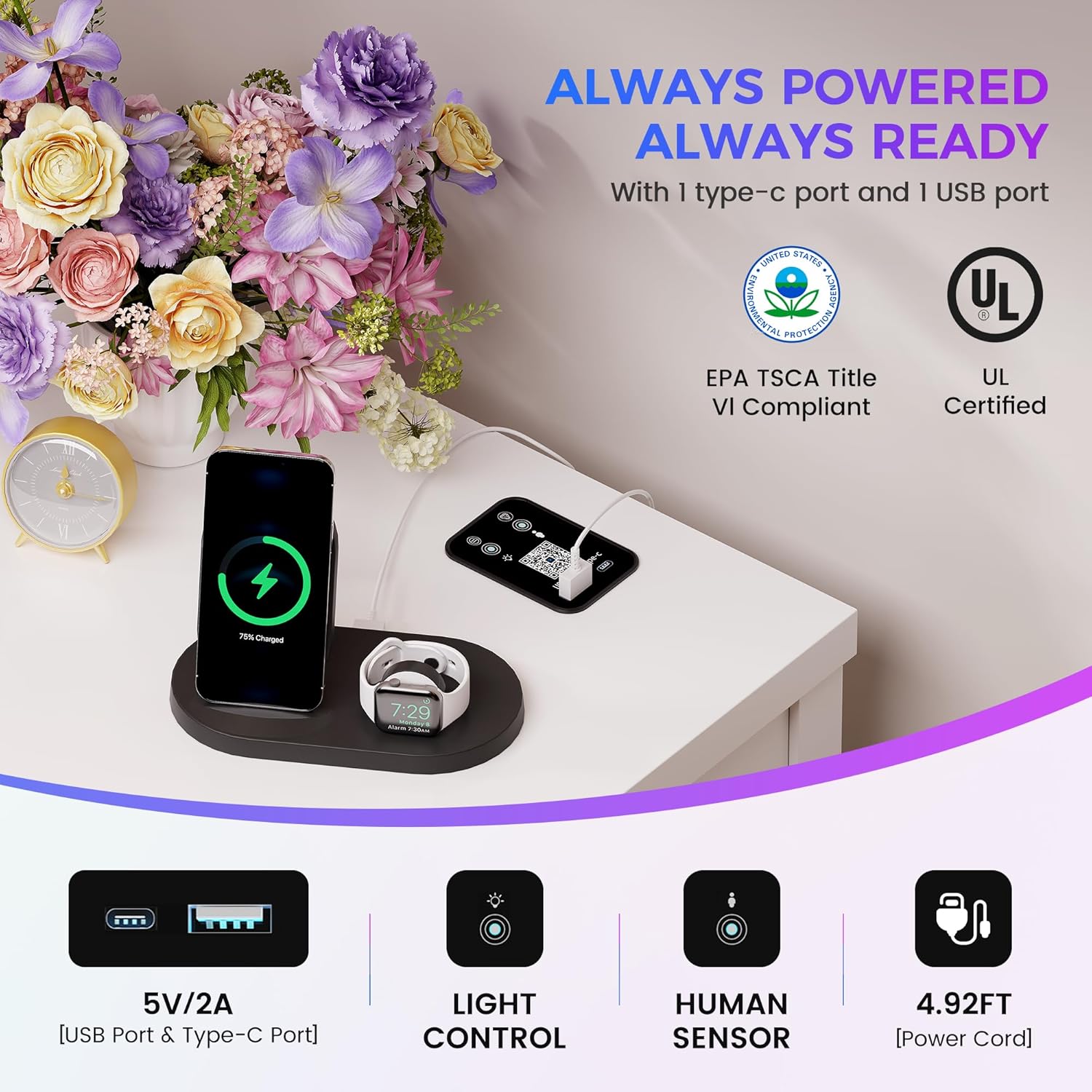
The cabinet includes a convenient charging station on the top surface.
- Porter: Utilize the built-in Type-C and USB ports to charge your electronic devices such as phones, tablets, or gaming controllers.
- Makt: Ensure the cabinet's power cable is connected to a functional wall outlet for the charging station to operate.
The integrated charging station provides convenient power for your devices.
Justerbare hyller
The cabinet features two adjustable glass shelves to accommodate items of various heights.
- Innstilling: To adjust a shelf, carefully remove the items, lift the glass shelf, remove the shelf pins from their current holes, and reinsert them into the desired new height positions. Then, gently place the glass shelf back onto the pins.
- Stillinger: There are 6 different height positions available for each adjustable shelf.

Adjustable shelves allow for flexible display arrangements.
Lockable Glass Doors
The cabinet's glass doors are equipped with a key lock for securing your valuable items.
- Operasjon: Use the provided key to lock and unlock the cabinet doors.
- Døråpning: The doors feature a handle-free, press-to-open design. Gently press the door to release the latch and open.
The key lock provides security for displayed items.
Vedlikehold
- Rengjøring av glass: Use a soft, lint-free cloth and a glass cleaner to wipe glass surfaces. Avoid abrasive cleaners that may scratch the glass.
- Rengjøringsramme: Wipe the MDF frame with a soft, damp klut. Unngå sterke kjemikalier.
- Tørke støv: Regularly dust the interior and exterior of the cabinet to maintain clarity and appearance.
- Elektriske komponenter: Ensure all electrical connections are dry and free from dust. Do not attempt to clean the charging ports or light module with liquids.
Feilsøking
- RGB Lights Not Working or Changing Randomly:
- Check all power connections to the RGB light module. Ensure the module is properly connected to the power source. If using the app, try restarting the app or reinstalling it. Consider performing a factory reset on the light module if issues persist (refer to the lighting kit's specific instructions for reset procedures).
- Ladestasjonen fungerer ikke:
- Verify that the cabinet's main power cable is securely plugged into a working wall outlet. Test the charging ports with different cables and devices to rule out cable or device issues.
- Glass Doors Not Closing/Opening Smoothly:
- Inspect hinges for any obstructions or loose screws. Ensure the cabinet is on a level surface. The press-to-open mechanism may require a firm but gentle push to engage/disengage.
- Kabinettsvingninger:
- Ensure all assembly screws are tightened. Verify the cabinet is placed on a flat, level surface. If necessary, adjust any leveling feet if present. Confirm the anti-tip device is correctly installed and secured to the wall.
Spesifikasjoner
| Trekk | Detalj |
|---|---|
| Merke | Dystler |
| Modellnummer | 80001 |
| Farge | White-new |
| Materiale | Engineered Wood, Tempered Glass |
| Produktdimensjoner (D x B x H) | 13.8" D x 31.5" B x 39.4" H |
| Varevekt | 60.6 pund |
| Maksimal vektkapasitet | 55 pund |
| Antall hyller | 3 (2 justerbare) |
| Adjustable Shelf Positions | 6 |
| Type belysning | RGB LED with Motion Sensor |
| Ladeporter | 1x Type-C, 1x USB |
| Lås type | Tastelås |
| Montering påkrevd | Ja |
| Installasjonstype | Frittstående |
Garanti og støtte
Your Dystler RGB Display Cabinet is covered by a standard return policy. For specific warranty details, please refer to your purchase documentation or contact the seller directly.
- Returnerer: Dette produktet er kvalifisert for enkel retur innen 30 dager.
- Kundestøtte: For any questions, missing parts, or technical assistance, please contact Dystler-US customer support through the platform where you purchased the product.