
Introduksjon
This manual provides essential information for setting up, operating, maintaining, and troubleshooting your HP Envy 17 Laptop. This high-performance laptop features a 17.3" FHD Touchscreen Display, Intel i7-1355U Processor, 32GB RAM, 1TB SSD, and NVIDIA GeForce RTX 3050 graphics, designed for a versatile computing experience.
Produkt overview
The HP Envy 17 is a powerful and versatile laptop designed for productivity and entertainment. Its large touchscreen display and robust internal components make it suitable for various tasks, from content creation to everyday computing.

Bilde: Foran view of the HP Envy 17 Laptop, highlighting its key features on the screen.
Oppsett
Første gangs oppstart
- Pakk ut den bærbare datamaskinen og strømadapteren.
- Koble strømadapteren til den bærbare datamaskinen og en stikkontakt.
- Åpne lokket på den bærbare datamaskinen og trykk på av/på-knappen.
- Følg instruksjonene på skjermen for å fullføre Windows 11 Home-oppsettet.
Koble til eksterne enheter
The laptop offers various ports for connecting external devices.
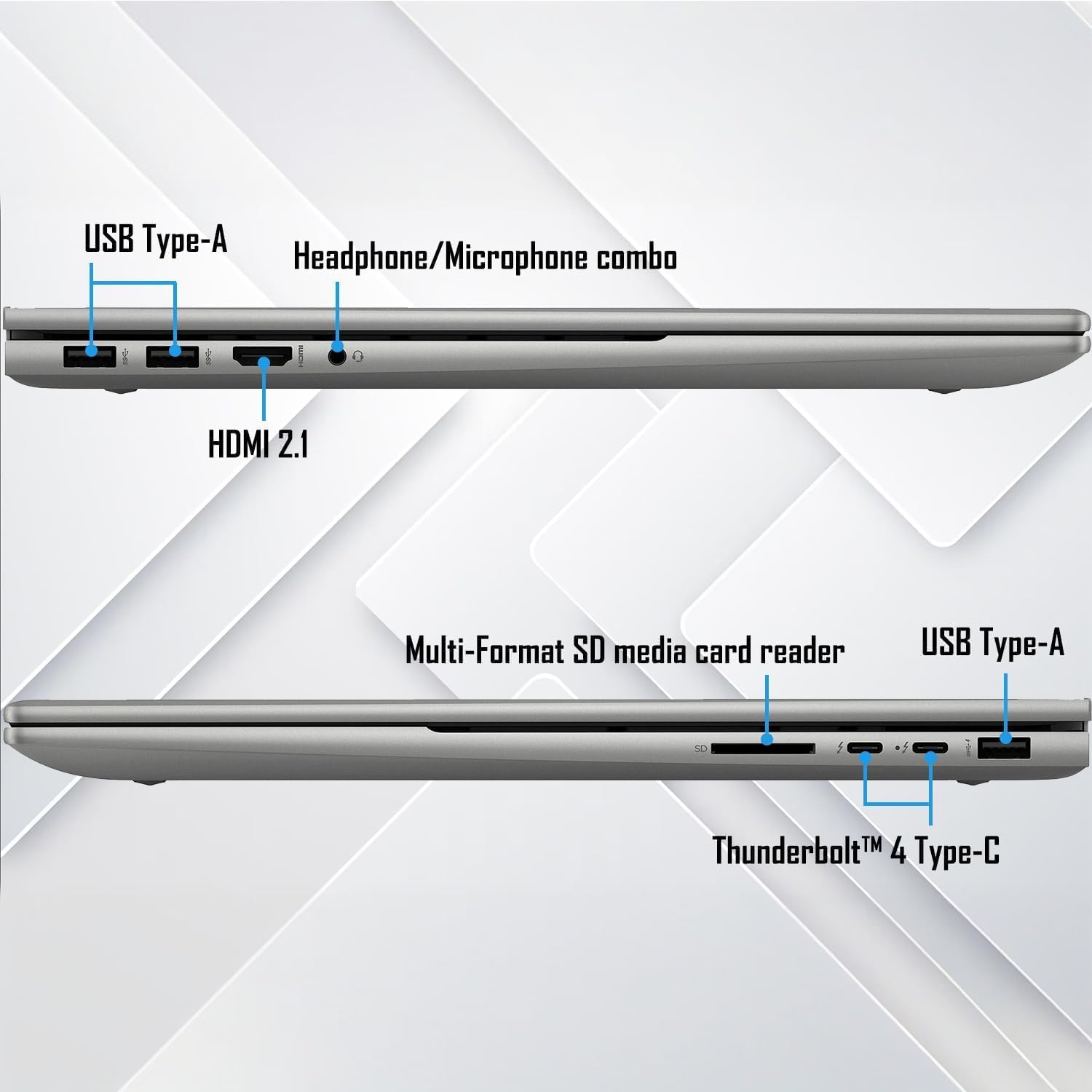
Bilde: Detaljert view of the laptop's connectivity ports on both sides.
- USB Type-A: For standard USB-enheter som mus, tastaturer og eksterne harddisker.
- Thunderbolt 4 Type-C: Supports USB Power Delivery, DisplayPort 1.4, and HP Sleep and Charge for high-speed data transfer and display output.
- HDMI2.1: Koble til eksterne skjermer eller projektorer.
- Headphone/Microphone Combination Jack: For lydinngang/-utgang.
- Multi-format SD Media Card Reader: For lesing av SD-kort.
Bruksanvisning
Berøringsskjermfunksjonalitet
The 17.3" FHD touchscreen display allows for intuitive interaction with Windows 11. Use gestures like tap, swipe, pinch-to-zoom, and scroll directly on the screen.
Tastatur og pekeplate
The full-size backlit keyboard with a numeric keypad provides a comfortable typing experience. The integrated touchpad supports multi-touch gestures for navigation.
Wi-Fi og Bluetooth-tilkobling
The laptop supports Wi-Fi 6E (2x2/160) Gig+ and Bluetooth 5.3 for high-speed wireless connections to networks and peripherals.

Image: Visual representation of the laptop's advanced Wi-Fi 6E and Thunderbolt 4 connectivity.
Lydsystem
Experience rich audio with Bang & Olufsen dual speakers. Adjust volume and sound settings through the Windows sound control panel.

Image: The laptop showcasing its Bang & Olufsen audio system with visual sound effects.
Grafikkytelse
The NVIDIA GeForce RTX 3050 with 4GB dedicated memory provides excellent graphics performance for demanding applications, gaming, and content creation.

Image: The laptop highlighting its NVIDIA GeForce RTX 3050 graphics for creative and gaming tasks.
Vedlikehold
Programvareoppdateringer
Regularly update Windows 11 and HP drivers to ensure optimal performance and security. Access Windows Update through Settings > Windows Update.
Rengjøring av den bærbare datamaskinen
- Bruk en myk, lofri klut til å rengjøre skjermen og kabinettet.
- For the screen, use a screen cleaner specifically designed for electronics.
- Unngå sterke kjemikalier eller slipende materialer.
Batteripleie
To prolong battery life, avoid extreme temperatures and frequent full discharges. It is recommended to keep the battery charge between 20% and 80% for optimal longevity.
Feilsøking
Vanlige problemer og løsninger
- Ingen strøm: Sørg for at strømadapteren er ordentlig tilkoblet og at strømuttaket fungerer. Prøv et annet uttak.
- Skjermen vises ikke: Check external display connections if applicable. Restart the laptop. If the issue persists, perform a hard reset by holding the power button for 15 seconds.
- Langsom ytelse: Close unnecessary applications, check for background processes, and ensure sufficient free storage space. Run a disk cleanup and check for malware.
- Wi-Fi-frakobling: Restart your router and the laptop. Check Wi-Fi settings and update network drivers.
Kontakter Support
If issues persist, refer to the official HP support webnettstedet (support.hp.com) or contact customer service for further assistance. Have your product serial number ready.
Spesifikasjoner
| Trekk | Detalj |
|---|---|
| Utstilling | 17.3" FHD (1920 x 1080) Touchscreen Micro-Edge IPS, 300-Nits |
| Prosessor | 13th Gen Intel Core i7-1355U (up to 5 GHz, 10-Cores, 12-Threads) |
| Grafikk | NVIDIA GeForce RTX 3050, 4GB |
| VÆR | 32GB DDR4-3200MHz |
| Lagring | 1 TB PCIe NVMe M.2 SSD-disk |
| Operativsystem | Windows 11 Home (64-bit) |
| Tastatur | Bakgrunnsbelyst tastatur i full størrelse med numerisk tastatur |
| Trådløs teknologi | Wi-Fi 6E (2x2/160) Gig+, Bluetooth 5.3 |
| Lyd | Bang & Olufsen med doble høyttalere |
| Kamera | HP True Vision 5MP IR Camera with Shutter |
| Havner | 2x Thunderbolt 4 Type-C, 1x USB Type-A (HP Sleep and Charge), 2x USB Type-A, 1x HDMI 2.1, 1x Headphone/Microphone Combo, 1x Multi-format SD Media Card Reader |
| Batteri | 4-Cell 55Wh Li-Ion Polymer |
| Vekt | 5.50 lbs |
| Dimensjoner (BxLxH) | 15.68 cm x 10.20 cm x 0.77 cm |
Merk: Spesifikasjonene kan endres uten varsel.
Garanti og støtte
For detailed warranty information and technical support, please visit the official HP support website or contact your retailer. Keep your purchase receipt and product serial number handy for faster service.