1. Inleiding
This manual provides detailed instructions for the installation, operation, and maintenance of your Denver DTB-145 DVB-T2 H.265 Set-Top Box. Please read this manual thoroughly before using the device to ensure proper functionality and to prevent damage. Keep this manual for future reference.
2. Veiligheidsinformatie
- Voeding: Use only the power adapter supplied with the device. Ensure the voltage overeenkomt met uw lokale stroomvoorziening.
- Ventilatie: Do not block any ventilation openings. Place the device on a stable, flat surface with adequate space around it for air circulation.
- Water en vocht: Stel het apparaat niet bloot aan regen, vocht of andere vloeistoffen. Plaats geen met vloeistof gevulde voorwerpen, zoals vazen, op het apparaat.
- Warmtebronnen: Houd het apparaat uit de buurt van warmtebronnen, zoals radiatoren, warmteroosters, fornuizen en andere warmteproducerende apparaten.
- Schoonmaak: Unplug the device from the power outlet before cleaning. Use a soft, dry cloth. Do not use liquid or aerosol cleaners.
- Onderhoud: Probeer dit product niet zelf te onderhouden. Laat alle onderhoudswerkzaamheden over aan gekwalificeerd onderhoudspersoneel. Bij het openen van de behuizing kunt u worden blootgesteld aan gevaarlijke stoffen.tage of andere gevaren.
- Bliksem: Koppel het apparaat los tijdens onweer of wanneer het langere tijd niet wordt gebruikt.
3. Inhoud van het pakket
Controleer of alle artikelen in het pakket aanwezig zijn:
- Denver DTB-145 DVB-T2 H.265 Set-Top Box
- Afstandsbediening
- Stroomadapter
- Gebruikershandleiding (dit document)
4. Product voorbijview
4.1 Voorpaneel

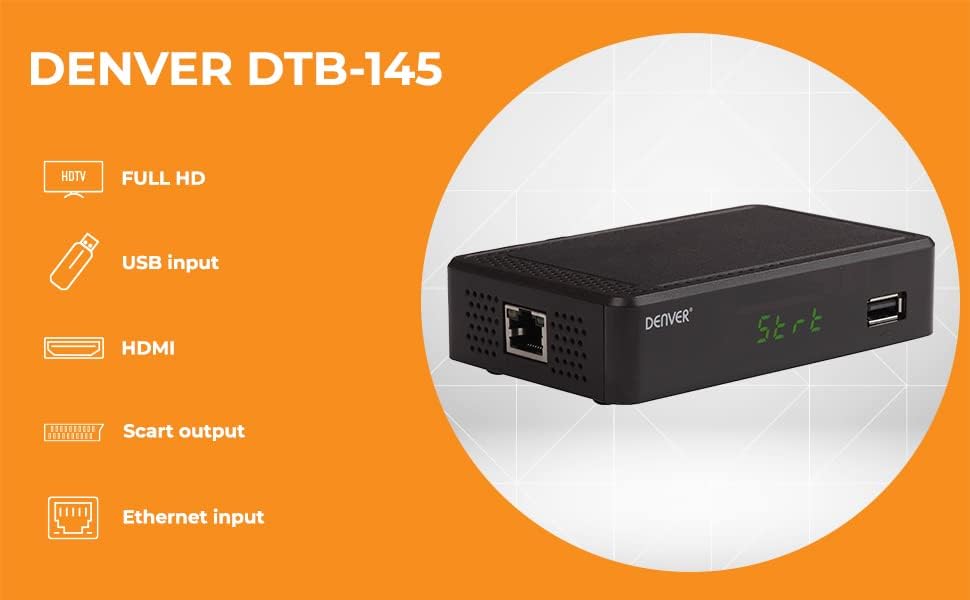
Afbeeldingbeschrijving: This image displays the front panel of the Denver DTB-145 Set-Top Box. On the left, the 'DENVER' logo is visible. In the center, a green LED display shows 'St-rt'. To the right, a USB port is present.
- Led scherm: Shows channel number, time, or operational status.
- USB-poort: Voor het aansluiten van USB-opslagapparaten voor het afspelen van media.
4.2 Achterpaneel
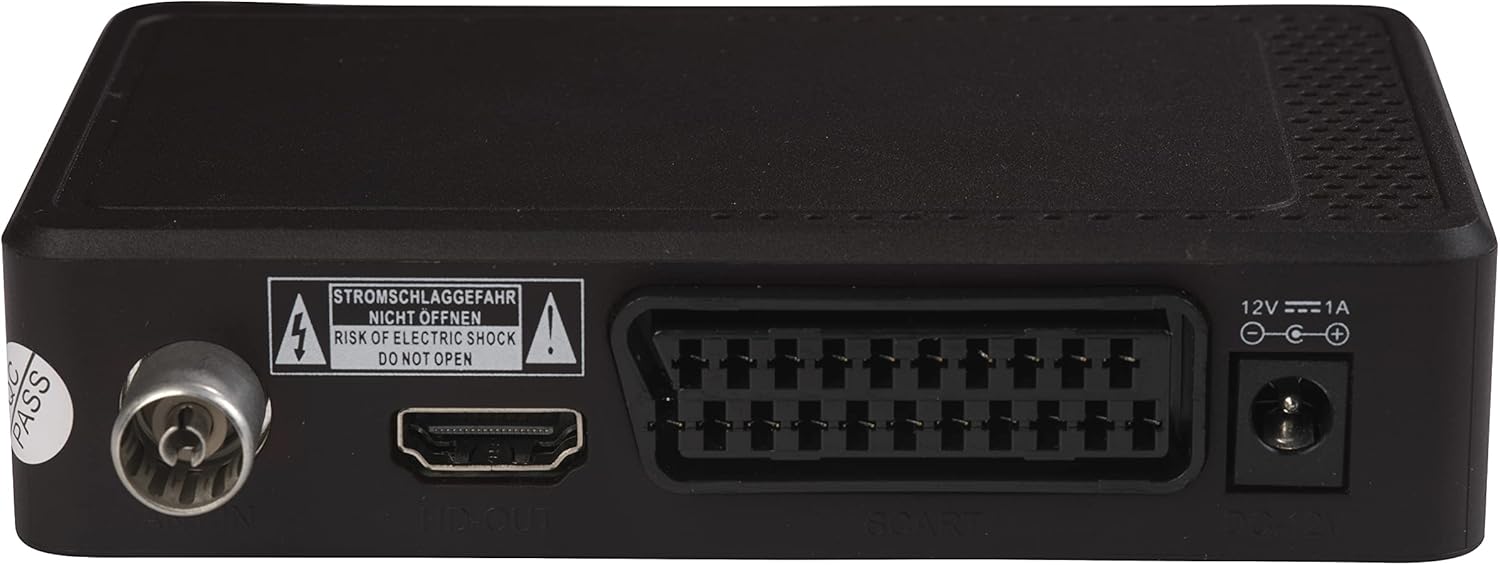
Afbeeldingbeschrijving: This image shows the rear panel of the Denver DTB-145 Set-Top Box. From left to right, the ports include: Antenna IN (RF IN), HDMI OUT, SCART, DC IN (12V), and an Ethernet port.
- RF-IN: Maakt verbinding met uw aardse antenne.
- HDMI UITGANG: Kan op uw tv worden aangesloten voor high-definition video en audio.
- SCART: Connects to older TVs for standard-definition video and audio.
- DC-ingang (12V): Wordt aangesloten op de voedingsadapter.
- Ethernet: Connects to your network for internet access (if supported by firmware for specific features).
4.3 afstandsbediening
Afbeeldingbeschrijving: This image displays the remote control for the Denver DTB-145 Set-Top Box. It features a standard layout with power, channel, volume, menu, navigation, EPG, and media control buttons.
The remote control allows you to operate all functions of the set-top box. Familiarize yourself with the button layout for easy navigation.
5. Instellen
5.1 Verbinding maken met uw televisie
- HDMI-aansluiting (aanbevolen voor HD):
- Ensure both your TV and the set-top box are powered off.
- Sluit het ene uiteinde van een HDMI-kabel (niet meegeleverd) aan op de HDMI-UITGANG port on the set-top box.
- Connect the other end of the HDMI cable to an available HDMI input on your TV. Note the HDMI input number (e.g., HDMI 1, HDMI 2).
- SCART Connection (for older TVs):
- Ensure both your TV and the set-top box are powered off.
- Connect one end of a SCART cable (not included) to the SCART port on the set-top box.
- Connect the other end of the SCART cable to the SCART input on your TV.
5.2 De antenne aansluiten
- Sluit de kabel van uw aardse antenne aan op de RF IN port on the rear panel of the set-top box.
5.3 Stroom aansluiten
- Sluit de meegeleverde stroomadapter aan op de DC-IN (12V) port on the rear panel of the set-top box.
- Plug the power adapter into a wall outlet. The set-top box should power on or enter standby mode.
5.4 First-Time Installation and Channel Scan
- Power on your TV and select the correct HDMI or SCART input source.
- Power on the set-top box using the remote control or the power button on the unit.
- The first-time installation wizard should appear. Follow the on-screen prompts to select your language, country, and initiate an automatic channel scan.
- The channel scan may take several minutes. Do not interrupt the process.
- Once the scan is complete, the set-top box will display the first available channel.
5.5 Connecting to Network (Optional)
- Connect an Ethernet cable (not included) from your router to the ETHERNET port on the rear panel of the set-top box.
- This connection may be used for potential future firmware updates or specific internet-enabled features, depending on the device's software capabilities.
6. In bedrijf
6.1 Basisfuncties
- Aan/uit: Druk op de STANDBY knop op de afstandsbediening.
- Kanaalselectie: Gebruik de CH+/CH- U kunt de knoppen gebruiken of het kanaalnummer rechtstreeks invoeren via het numerieke toetsenbord.
- Volumeregeling: Gebruik de VOL+/VOL- knoppen.
- Stom: Druk op de MUTE knop om het geluid tijdelijk te dempen.
6.2 Menunavigatie
- Druk op de MENU knop om het hoofdmenu te openen.
- Gebruik de directional arrows (▲ ▼ ◀ ►) om door de menu-opties te navigeren.
- Pers OK om een selectie te bevestigen.
- Pers EXIT Om terug te keren naar het vorige menu of het menu volledig te verlaten.
6.3 Elektronische programmagids (EPG)
- Druk op de E-PNG knop op de afstandsbediening om view the Electronic Program Guide.
- The EPG displays program schedules for current and upcoming broadcasts. Use the directional arrows to navigate through channels and programs.
6.4 Media afspelen via USB
- Plaats een USB-opslagapparaat (bijvoorbeeld een USB-stick) in de USB-poort op het voorpaneel.
- Access the media player function through the main menu or by pressing a dedicated media button (if available) on the remote.
- Blader door uw fileen selecteer de gewenste video, audio of afbeelding. file voor afspelen.
6.5 DVB Subtitles and Teletext
- If available on the broadcast, press the ONDER-T button to enable or disable DVB subtitles.
- Druk op de TTX button to access Teletext services, if provided by the broadcaster.
7. Onderhoud
7.1 Reinigen
- Always unplug the set-top box from the power outlet before cleaning.
- Gebruik een zachte, droge, pluisvrije doek om de buitenkant van het apparaat af te vegen.
- Do not use liquid cleaners, abrasive pads, or chemical sprays, as these can damage the finish or internal components.
7.2 Software-updates
Controleer regelmatig de specificaties van de fabrikant website for available software updates. Updates can improve performance, add features, or fix bugs. Follow the instructions provided with the update file voorzichtig.
8. Probleemoplossing
| Probleem | Mogelijke oorzaak | Oplossing |
|---|---|---|
| Geen beeld of geluid | Incorrect TV input selected Losse kabelverbindingen Set-top box not powered on | Select the correct HDMI/SCART input on your TV. Check all cable connections (HDMI/SCART, antenna, power). Ensure the set-top box is powered on. |
| Slechte beeldkwaliteit | Weak antenna signal Damaged antenna cable | Adjust antenna position or consider an ampgerichte antenne. Check antenna cable for damage and replace if necessary. |
| Afstandsbediening werkt niet | Lege batterijen Obstruction between remote and box Incorrect remote mode | Vervang de batterijen. Ensure a clear line of sight to the set-top box's IR receiver. Ensure the remote is in the correct mode for the set-top box. |
| Geen kanalen gevonden tijdens de scan. | Antenna not connected or faulty Zwak signaal in uw regio | Check antenna connection. Ensure antenna is suitable for DVB-T2. Try repositioning the antenna or using an outdoor antenna. |
| USB-media worden niet afgespeeld | Niet ondersteund file formaat USB-apparaat niet herkend | Refer to specifications for supported media formats. Convert files indien nodig. Ensure USB device is formatted correctly (e.g., FAT32). Try a different USB device. |
9. Specificaties
| Functie | Specificatie |
|---|---|
| Model | DTB-145 (Manufacturer Model: 110131120090) |
| Merk | Denver |
| Stemtype | DVB-T2 H.265 |
| Videocodering | H.265, MPEG-1, MPEG-2, MPEG-4 |
| Oplossing | Full HD (1920x1080) via HDMI |
| Audiocodec | Dolby Digital (Plus) |
| Audio-uitvoermodus | Surround (5.1-kanaals configuratie) |
| Connectiviteit | HDMI, SCART, USB, Ethernet |
| Speciale kenmerken | FTA (Free-to-Air) Channels, EPG, DVB Subtitles, Teletext, USB Media Playback |
| Afmetingen (L x B x H) | 12x8x3cm |
| Gewicht | 250 gram |
| Stroomverbruik | 12V, 1A (via included power adapter) |
10. Garantie en ondersteuning
This product is covered by a standard manufacturer's warranty. For specific warranty terms and conditions, please refer to the warranty card included with your product or contact your retailer. For technical support or service inquiries, please contact Denver customer service or visit their official website voor verdere assistentie.