1. Inleiding
This manual provides essential information for the safe and efficient operation of your Samsung MS19M8000AS/AA Large Capacity Countertop Microwave Oven. This appliance is designed to simplify meal preparation with its generous 1.9 cu. ft. capacity, accommodating various dish sizes. It features Sensor Cook technology for automatic cooking time adjustments and a Ceramic Enamel Interior for durability and easy cleaning. Please read this manual thoroughly before using the appliance and keep it for future reference.
2. Veiligheidsinformatie
Om het risico op brand, elektrische schokken, letsel aan personen of blootstelling aan overmatige microgolfenergie bij het gebruik van uw apparaat te beperken, dient u de volgende basisveiligheidsmaatregelen in acht te nemen:
- Lees alle instructies voordat u het apparaat gebruikt.
- Gebruik de oven niet als deze beschadigd is.
- Verwarm geen vloeistoffen of ander voedsel in afgesloten containers, aangezien deze kunnen ontploffen.
- Gebruik geen bijtende chemicaliën of dampen in dit apparaat.
- Gebruik deze oven niet voor commerciële doeleinden.
- Zorg altijd voor voldoende ventilatie rondom de magnetron.
- Houd kinderen goed in de gaten wanneer de magnetron in gebruik is.
3. Product voorbijview
The Samsung MS19M8000AS/AA microwave oven is designed for convenient and efficient cooking. Key features include:
- Grote capaciteit: 1.9 cu. ft. interior to accommodate various dish sizes.
- Sensorkoken: Automatically adjusts cooking time for optimal results.
- Keramisch geëmailleerd interieur: Durable, scratch-resistant, and easy to clean.
- Automatische ontdooiing: Vereenvoudigt het ontdooien op basis van gewicht of tijd.
- Voorinstellingen voor koken: Convenient one-touch options for common foods.
Afmetingen
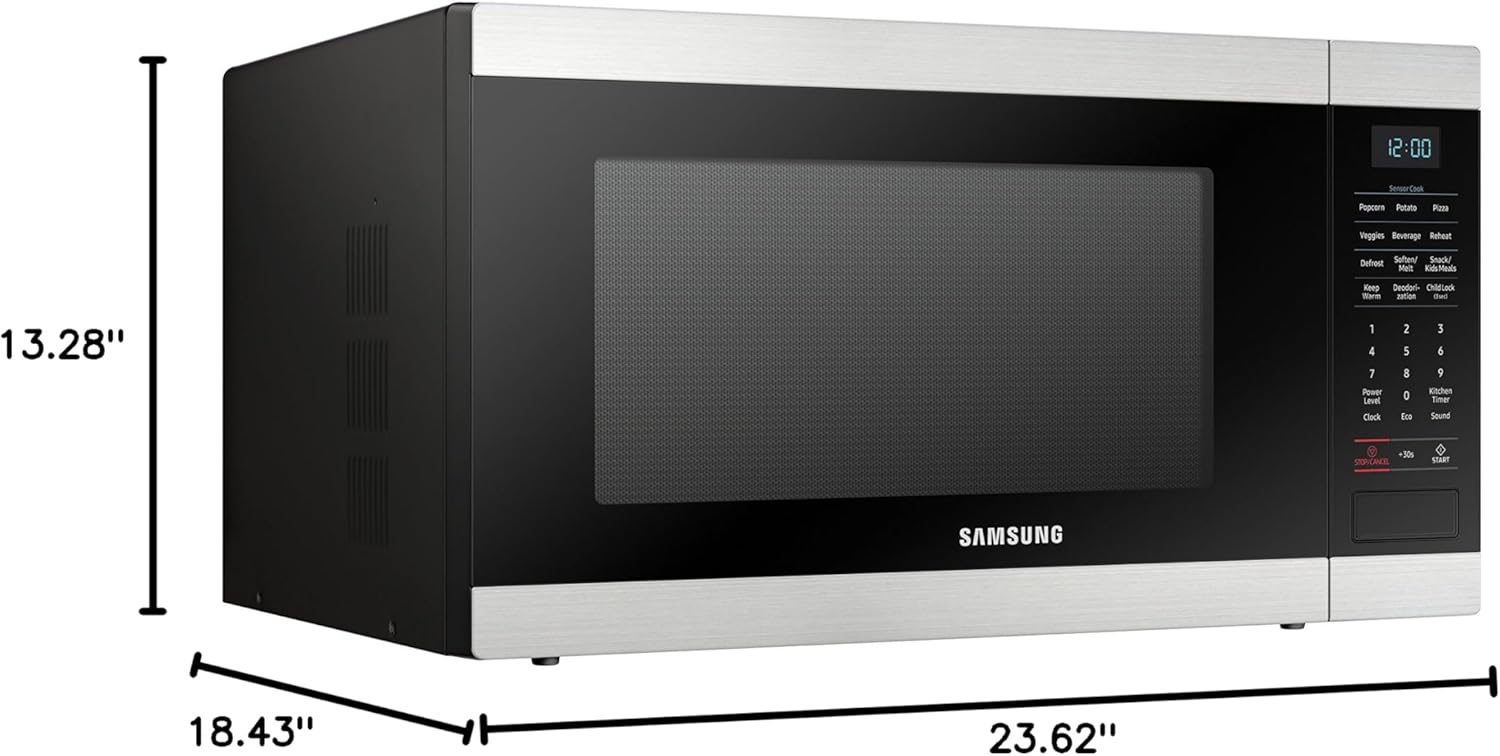
Afbeelding 1: Voorkant view of the Samsung MS19M8000AS/AA Microwave Oven with labeled dimensions (18.43"D x 23.62"W x 13.28"H).
4. Instellen
Volg deze stappen om uw magnetronoven in te stellen:
- Uitpakken: Haal de magnetron en alle verpakkingsmaterialen voorzichtig uit de doos.
- Plaatsing: Place the microwave on a flat, stable surface that is strong enough to hold the oven and the food you place in it. Ensure there is adequate space for ventilation (at least 4 inches on top, sides, and back).
- Stroomaansluiting: Plug the power cord into a grounded electrical outlet. Do not use an extension cord.
- Eerste reiniging: Veeg de binnen- en buitenkant van de oven schoon met een zachte, damp lap.
5. Gebruiksaanwijzing
Your Samsung microwave offers various cooking functions for your convenience.
Basisprincipes van de magnetronwerking
- Tijd Kok: Press the 'Cook Time' button, enter the desired cooking time using the number pad, and then press 'Start'.
- Kracht niveau: After setting the cook time, press 'Power Level' and select a power level from 1 to 10 (10 being 100% power). Press 'Start'.
- Expresskok: For quick cooking, simply press any number from 1 to 6 on the number pad for 1 to 6 minutes of cooking at 100% power.
- Voeg 30 seconden toe: Press the '+30 Sec' button to add 30 seconds of cooking time at 100% power.
Sensor koken
The Sensor Cook feature automatically detects the humidity released from food and adjusts the cooking time for optimal results. To use:
- Zet het eten in de magnetron.
- Press the 'Sensor Cook' button (e.g., 'Potato', 'Popcorn', 'Pizza').
- Druk op 'Start'. De oven bepaalt automatisch de baktijd.
Automatische ontdooiing
Use Auto Defrost to quickly and efficiently defrost various foods.
- Press the 'Auto Defrost' button.
- Select the food type (e.g., Meat, Poultry, Fish) and enter the weight using the number pad.
- Press 'Start'. The oven will calculate the defrosting time.
Kinderslot
The Child Lock feature prevents unintended operation of the microwave, enhancing safety, especially around children. To activate or deactivate:
- Activeren: Press and hold the 'Stop/Cancel' button for 3 seconds until 'LOC' appears on the display.
- Om te deactiveren: Press and hold the 'Stop/Cancel' button again for 3 seconds until 'LOC' disappears from the display.
6. Reiniging en onderhoud
Regelmatig schoonmaken en onderhouden garandeert de levensduur en optimale prestaties van uw magnetron.
- Keramisch geëmailleerd interieur: The ceramic enamel interior is designed for easy cleaning. Wipe spills immediately with a damp cloth. For stubborn stains, use a mild detergent and a soft sponge. Avoid abrasive cleaners or scouring pads.
- Buitenkant: Clean the exterior surface with a soft cloth and mild soap and water. Dry thoroughly.
- Draaitafel: The glass turntable can be removed and washed with warm soapy water or in the dishwasher.
- Deurafdichtingen: Houd de deurrubbers schoon om ervoor te zorgen dat ze goed sluiten en efficiënt werken.

Afbeelding 2: View of the easy-to-clean Ceramic Enamel Interior.
7. Probleemoplossing
Als u problemen ondervindt met uw magnetron, raadpleeg dan de volgende veelvoorkomende problemen en oplossingen:
| Probleem | Mogelijke oorzaak | Oplossing |
|---|---|---|
| Oven start niet | Deur niet goed gesloten; Netsnoer losgekoppeld; Zekering doorgebrand/stroomonderbreker uitgeschakeld | Ensure door is securely closed; Check power cord connection; Check household fuse/circuit breaker |
| Voedsel kookt niet gelijkmatig | Food not stirred/rotated; Improper power level/cook time | Stir or rotate food during cooking; Adjust power level and cook time as needed |
| Overmatig lawaai tijdens gebruik | Turntable not seated correctly; Foreign object in oven cavity | Ensure turntable is properly seated; Remove any foreign objects |
| Display toont foutcode | Interne storing | Unplug the oven for 30 seconds and plug back in. If error persists, contact service. |
8. Specificaties
| Specificatie | Waarde |
|---|---|
| Merknaam | Samsung |
| Modelinformatie | MS19M8000AS/AA |
| Artikelgewicht | 43.03 pond |
| Productafmetingen | 18.43 x 23.62 x 13.28 inch |
| Installatietype | Aanrechtblad |
| Capaciteit | 1.9 kubieke voet |
| Energieverbruik | 700 Watt |
| Deeltage | 120 Volt |
| Wattage | 950 watt |
| Materiaalsoort | Roestvrij staal |
| Binnenmateriaal type | Keramisch emaille |
| Speciale kenmerken | Defrost, Sensor Cook |
| Meegeleverde componenten | Magnetron |
9. Garantie en ondersteuning
For warranty information or technical support, please refer to the warranty card included with your product or visit the official Samsung website. You may also contact Samsung customer service for assistance.