
1. နိဒါန်း
Thank you for choosing the CinusLinus 360-12 Green Laser Level. This device is designed to provide precise and accurate leveling for a wide range of applications, from home DIY projects to professional construction sites. Featuring a 4x360° green laser, self-leveling capabilities, and a versatile tripod, this tool enhances efficiency and accuracy in your work. Please read this manual thoroughly before operation to ensure safe and correct usage.
2. ဘေးကင်းရေးအချက်အလက်
သင့်ဘေးကင်းရေးသည် အဓိကကျပါသည်။ အောက်ပါကြိုတင်ကာကွယ်မှုများကို လိုက်နာပါ။
- လေဆာရောင်ခြည် This product emits Class II laser radiation (<1mW power output). Avoid direct eye exposure to the laser beam.
- မျက်လုံးကာကွယ်ရေး Never stare directly into the laser beam. Doing so can cause permanent eye damage.
- ပတ်ဝန်းကျင်အခြေအနေများ- Avoid outdoor usage or in environments with intense natural light, as this can significantly impair laser visibility. Direct sunlight will weaken the laser energy. It is best to use the device indoors.
- ကလေးများ- စက်ပစ္စည်းကို ကလေးလက်လှမ်းမမီအောင်ထားပါ။
- ပြုပြင်ထိန်းသိမ်းမှု- လေဆာအဆင့်ကို ဖြုတ်တပ်ခြင်း သို့မဟုတ် ပြုပြင်ခြင်း မပြုလုပ်ပါနှင့်။ ပြုပြင်မှုများကို ခွင့်ပြုထားသော ဝန်ဆောင်မှုဝန်ထမ်းများသာ လုပ်ဆောင်သင့်သည်။
3. အထုပ်အကြောင်းအရာများ
ဘောက်စ်ဖွင့်သောအခါတွင် ပစ္စည်းများအားလုံး ရှိနေကြောင်း သေချာပါစေ။
- CinusLinus 360-12 Laser Level Unit
- 46.45" Aluminum Laser Level Tripod
- Rechargeable Lithium-ion Batteries (4800mAh, 2 included)
- အဝေးထိန်း
- သံလိုက်ကွင်းခတ်
- Mini Tripod Base
- USB-C Charging Cable and Adapter
- အသုံးပြုသူလက်စွဲ
4. ကုန်ပစ္စည်းကျော်view
The CinusLinus 360-12 Laser Level features a robust design with intuitive controls for ease of use. It projects four 360° green laser lines (two horizontal, two vertical) for comprehensive coverage.
အဓိက အစိတ်အပိုင်းများ-
- လေဆာထုတ်လွှတ်မှုများ- Project bright green laser lines.
- ထိန်းချုပ်ရာနေရာ: Features intelligent touch buttons for various modes and brightness adjustment.
- ဘက်ထရီအခန်း- Houses the rechargeable lithium-ion batteries.
- USB-C အားသွင်းပေါက်- အဆင်ပြေစွာ အားသွင်းနိုင်ရန်အတွက်။
- လော့ခ်/လော့ခ်ဖွင့်သည့် ခလုတ်- Engages self-leveling or manual mode.
- Mounting Thread- Standard 1/4" thread for tripod attachment.
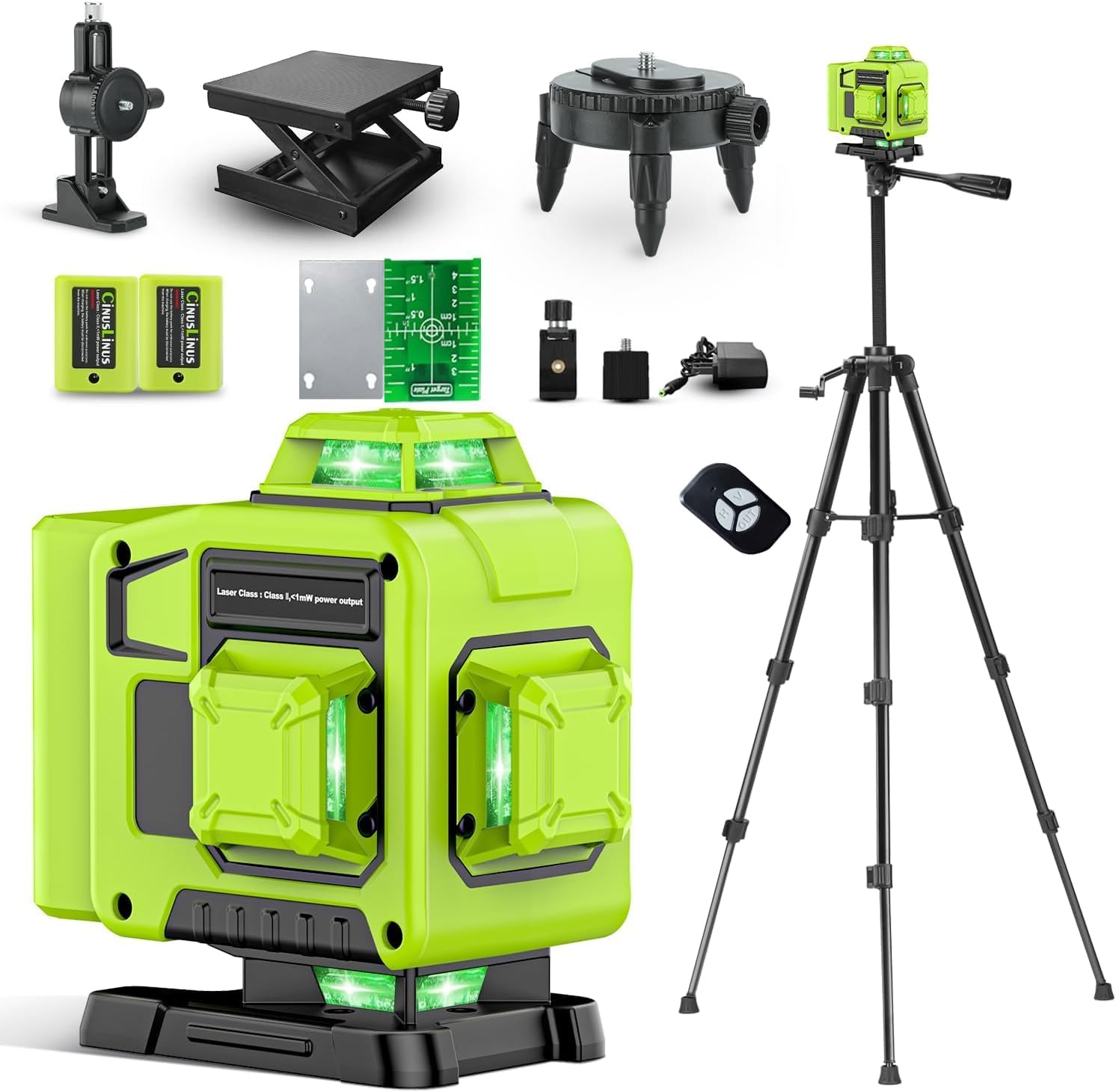
Figure 1: CinusLinus 360-12 Laser Level Unit
5. စနစ်ထည့်သွင်းပါ။
၅.၁။ ဘက်ထရီ တပ်ဆင်ခြင်းနှင့် အားသွင်းခြင်း။
- ဘက်ထရီအဖုံးကိုဖွင့်ပါ။
- Insert the two rechargeable lithium-ion batteries, ensuring correct polarity.
- ဘက်ထရီအဖုံးကို လုံလုံခြုံခြုံပိတ်ပါ။
- To charge, connect the USB-C charging cable to the device and a power source using the provided adapter. The battery indicator on the device will show charging status.
Video 1: Unboxing, Setup, and Charging the Laser Level
5.2. Attaching to Tripod or Mount
- Locate the 1/4" mounting thread at the bottom of the laser level.
- Attach the device to the included 46.45" tripod or magnetic bracket by screwing it onto the mounting thread.
- Ensure the tripod legs are fully extended and stable before securing the bracket.

Figure 2: Laser Level mounted on the included tripod.

Figure 3: Different mounting options for the laser level.
၃.၄ ။ operating mode များ
The CinusLinus 360-12 offers multiple operating modes to suit your needs:
၆.၁။ Self-Leveling မုဒ်
- Slide the Lock/Unlock switch to the 'unlock' position.
- The tool will automatically adjust to a horizontal position within a ±4° range.
- If the tilt exceeds 4°, a flashing green laser and an auditory signal will indicate that the device is out of level. Adjust the device's position until it self-levels.
6.2. Manual Mode ကိုသုံးပါ
- To engage Manual Mode, press and hold the central function button (often labeled 'OUT' or similar) for 2-3 seconds.
- In this mode, the self-leveling function is deactivated, allowing you to project laser lines at any desired angle, such as for diagonal lines on stairs.
6.3. Pulse မုဒ်
- A brief tap of the central function button activates Pulse Mode.
- This mode is intended for use with a laser receiver (not included) in diminished light scenarios or over longer distances to extend the working range.

Figure 4: Visual representation of Self-Leveling, Manual, and Pulse operating modes.
Video 2: Demonstration of Self-Leveling, Manual, and Remote Control Modes
၂
The laser level allows for brightness adjustment to optimize visibility in various indoor lighting conditions:
- Press the "H" button to increase the green laser brightness.
- Press the "V" button to decrease the green laser brightness.
- မှတ်ချက် - Brightness adjustment cannot be used simultaneously with Pulse Mode.
၅
The included remote control provides convenient operation of the laser level from a distance, allowing you to adjust settings without disturbing the device's position.
- The remote control features buttons corresponding to the laser level's functions (e.g., horizontal line, vertical line, brightness adjustment).
- Simply press the desired function button on the remote to control the laser level.

Figure 5: Remote control in use for various laser level functions.
9. အသုံးချမှုများ
The CinusLinus 360-12 Laser Level is suitable for a variety of tasks requiring precise alignment:
- ကြမ်းပြင်တပ်ဆင်ခြင်း။
- Picture hanging
- Door and window fitting
- သစ်သားလုပ်ငန်းပရောဂျက်များ
- Wallpaper installation
- ကက်ဘိနက်တပ်ဆင်ခြင်း။
- General construction and renovation projects

Figure 6: Multi-scenario use of the 4x360° laser level.
10. ပြုပြင်ထိန်းသိမ်းမှု
သင့်လျော်သော ပြုပြင်ထိန်းသိမ်းမှုသည် သင့်လေဆာအဆင့်၏ ကြာရှည်ခံမှုနှင့် တိကျမှုကို သေချာစေသည်-
- သန့်ရှင်းရေး- စက်ပစ္စည်းကို သန့်ရှင်းရန် နူးညံ့ခြောက်သွေ့သော အဝတ်ကို အသုံးပြုပါ။ အညစ်ကြေး သန့်စင်ဆေးများ သို့မဟုတ် ဖျော်ရည်များကို မသုံးပါနှင့်။
- သိုလှောင်မှု- Store the laser level in its carrying case in a dry, cool place when not in use. Remove batteries if storing for extended periods.
- ချိန်ညှိခြင်း- Regular calibration checks are recommended to ensure continued accuracy. Refer to a professional for calibration services if needed.
- ဘက်ထရီ စောင့်ရှောက်မှု- Charge batteries fully before first use and periodically during long storage to maintain battery health.
၃
ပြဿနာများ ကြုံတွေ့ရပါက အောက်ပါ ဘုံဖြေရှင်းနည်းများကို ကိုးကားပါ။
- လေဆာလိုင်းများ မမြင်ရပါ-
- Check ambient light conditions; green lasers are less visible in bright sunlight.
- ဘက်ထရီအားသွင်းထားကြောင်း သေချာပါစေ။
- Adjust brightness using the 'H' button.
- Device Beeps and Laser Flashes in Self-Leveling Mode:
- The device is tilted beyond its ±4° self-leveling range. Adjust the device's position or the tripod until it is within range.
- အဝေးထိန်းထိန်းချုပ်မှု မတုံ့ပြန်ပါ
- Ensure the remote control batteries are functional.
- Check for obstructions between the remote and the laser level.
12. သတ်မှတ်ချက်များ
| ထူးခြားချက် | အသေးစိတ် |
|---|---|
| အမှတ်တံဆိပ် | CinusLinus |
| မော်ဒယ်နံပါတ် | ၀-၉ |
| လေဆာအတန်း | အတန်းအစား II၊ <1mW |
| လေဆာအရောင် | အစိမ်းရောင် |
| လေဆာလိုင်းများ | ၃x၃၆၀° (အလျားလိုက် ၁ ခု၊ ဒေါင်လိုက် ၂ ခု) |
| ကိုယ်ပိုင် Leveling Range | ±4° |
| Indoor Visibility Range | ပေ ၅၀ အထိ |
| ပါဝါအရင်းအမြစ် | ဘက်ထရီပါဝါ |
| ဓာတ်ခဲအမျိုးအစား | Lithium Ion (2 CR5 batteries included) |
| ဘက်ထရီ စွမ်းဆောင်ရည် | 4800mAh (approx. 8-hour runtime) |
| အားသွင်းပေါက် | USB-C |
| ပစ္စည်း | အလူမီနီယံ |
| ပစ္စည်းအလေးချိန် | 2.4 ကီလိုဂရမ် |
| ပါဆယ်ထုပ်အရွယ်အစား | ၃၆ x ၁၃.၃ x ၄ စင်တီမီတာ |
| မူရင်းထုတ်လုပ်သည့်နိုင်ငံ | တရုတ် |
13. အာမခံနှင့် ပံ့ပိုးမှု
For warranty information, technical support, or service inquiries, please refer to the contact details provided with your purchase or visit the official CinusLinus website. အာမခံတောင်းဆိုမှုများအတွက် ဝယ်ယူမှုပြေစာအား ဝယ်ယူမှုအထောက်အထားအဖြစ် သိမ်းဆည်းပါ။