
1. Matulview
The Philips TAZ2200 is a versatile portable sound machine designed for enjoying various audio formats. It features a top-loading CD player, a front-loading cassette player, FM radio, Bluetooth 6.0 connectivity, USB playback, and a 3.5mm audio input. Equipped with dynamic bass boost and 6W stereo speakers, it delivers rich sound. The unit can be powered by AC mains or batteries and includes a carrying handle for portability.
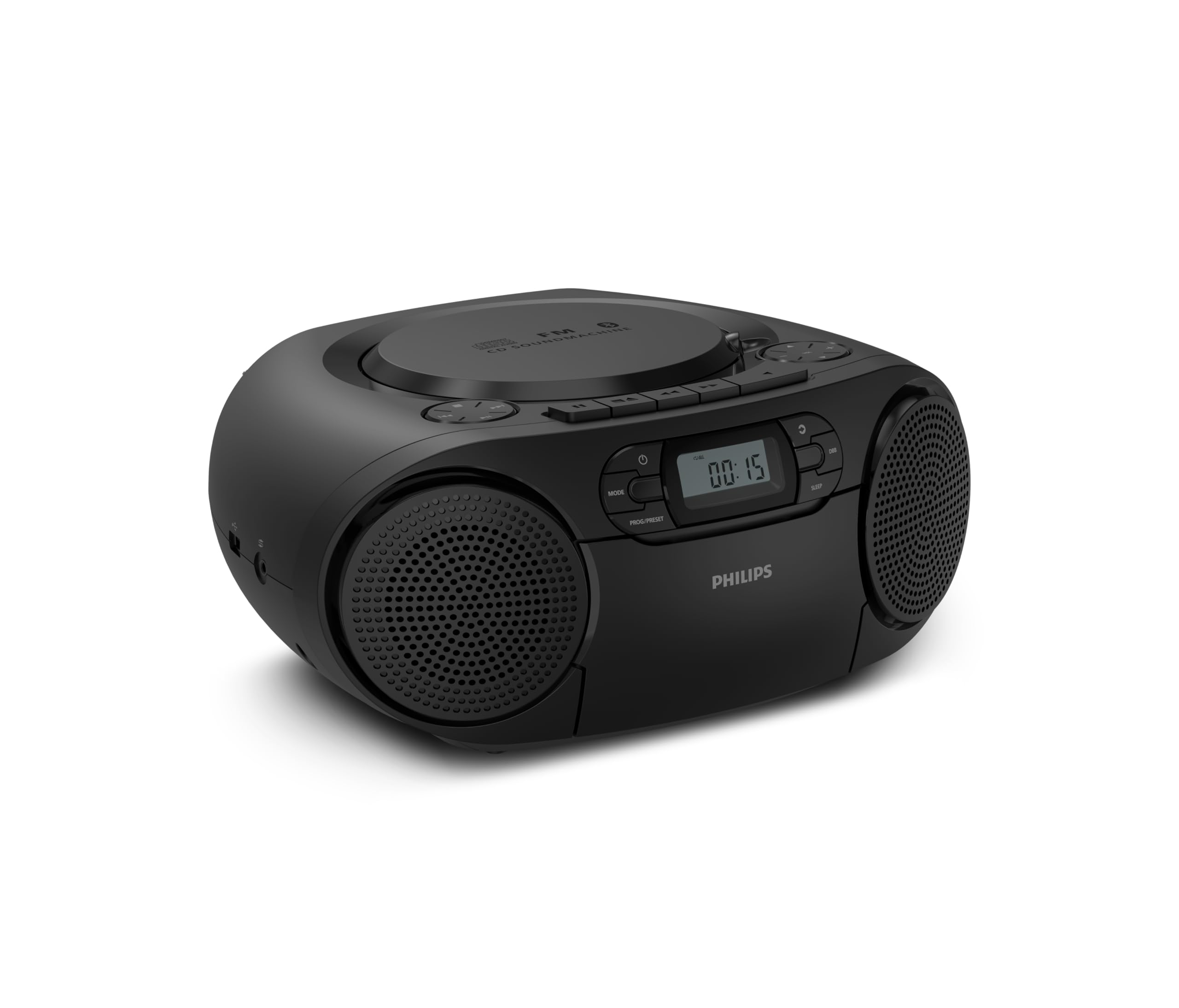
Quddiem view of the Philips TAZ2200 CD Soundmachine, showing the main display and control buttons.
2. Informazzjoni dwar is-Sigurtà
Please read these safety instructions carefully before using your device and keep them for future reference. Incorrect use may result in hazards.
- Sors tal-Enerġija: Use only the specified power adapter or batteries. Ensure the voltage jaqbel mar-rekwiżiti tal-unità.
- Ilma u Umdità: Tesponix l-unità għax-xita, umdità, taqtir, jew titjir tal-ilma. Tpoġġix oġġetti mimlija b'likwidi, bħal vażuni, fuq l-unità.
- Ventilazzjoni: Ensure adequate ventilation. Do not block any ventilation openings. Maintain a minimum distance around the unit for sufficient ventilation.
- Sħana: Tpoġġix l-unità ħdejn sorsi tas-sħana bħal radjaturi, reġistri tas-sħana, stufi, jew apparat ieħor (inkluż amplifiers) li jipproduċu sħana.
- Batteriji: Follow correct polarity when inserting batteries. Do not mix old and new batteries, or different types of batteries. Remove batteries if the unit is not used for a long period.
- Tindif: Skonnettja l-unità mill-iżbokk tal-enerġija qabel ma tnaddafha. Uża drapp artab u niexef. Tużax prodotti tat-tindif likwidi jew prodotti tat-tindif bl-ajrusol.
- Servizzi: Tippruvax isservi dan il-prodott int stess. Irreferi l-manutenzjoni kollha lil persunal tas-servizz kwalifikat.
3. X'hemm fil-Kaxxa
Meta tiftaħ il-pakkett, jekk jogħġbok kun żgur li l-oġġetti kollha elenkati hawn taħt huma preżenti:
- Philips TAZ2200 CD Soundmachine
- Kejbil tal-enerġija
- Gwida tal-bidu ta 'malajr
- Ktejjeb tal-garanzija
- Folja tas-sigurtà
4. Kontrolli u Konnessjonijiet
Kontrolli tal-Panew ta' Quddiem
The front panel features the main display, power button, mode selection, program/preset buttons, and dynamic bass boost (DBB) control. Playback controls for CD and USB are also located here.

Quddiem dettaljat view showing the display, power, mode, program/preset, and DBB buttons.
Side and Rear Connections
The side of the unit provides a USB port for digital audio playback and a 3.5mm audio input jack for connecting external devices.

Ġenb view illustrating the USB port and Audio Input jack.
The top of the unit houses the CD compartment and additional playback controls, while the rear features the AC power input and the FM antenna.

Fuq view showing the CD compartment and associated controls.

Wara view displaying the AC power input and the telescopic FM antenna.
5. Setup
5.1 Provvista tal-Enerġija
Qawwa AC
- Kun żgur li l-unità tkun mitfija.
- Connect the supplied power cable to the AC IN socket on the rear of the sound machine.
- Plug the other end of the power cable into a wall power outlet.
Qawwa tal-Batterija
For portable use, the unit can operate on 6 x C-type batteries (not included).
- Iftaħ l-għatu tal-kompartiment tal-batterija li jinsab fuq il-qiegħ ta 'l-unità.
- Insert 6 C-type batteries, ensuring correct polarity (+/-) as indicated inside the compartment.
- Agħlaq l-għatu tal-kompartiment tal-batterija sew.
5.2 Aġġustament tal-Antenna
For optimal FM radio reception, fully extend the telescopic antenna located at the rear of the unit. Adjust its position and angle to achieve the clearest signal.
6. Istruzzjonijiet Operattivi
6.1 Operazzjoni Ġenerali
- Power On/Off: Agħfas il- QAWWA buttuna biex tixgħel jew titfi l-unità.
- Kontroll tal-Volum: Uża l- VOL+ or VOLUM - buttuni biex taġġusta l-livell tal-volum.
- Dynamic Bass Boost (DBB): Agħfas il- DBB button to activate or deactivate the dynamic bass boost feature for enhanced bass sound.
- Għażla tal-Modalità: Agħfas il- MODALITÀ button repeatedly to switch between CD, Cassette, FM Radio, Bluetooth, USB, and Audio Input modes.
6.2 Daqq ta' CD
- Open the CD compartment cover on top of the unit.
- Place a CD (CD, CD-R, or CD-RW) with the label side facing up onto the spindle.
- Agħlaq il-qoxra tal-kompartiment tas-CD.
- Agħfas il- MODALITÀ buttuna biex tagħżel il-modalità tas-CD.
- Agħfas il- DĦABBA/PAWŻA buttuna biex tibda d-daqq.
- Uża l- SKIP buttuni (|< or >> |) biex taqbeż it-traċċi.
- Agħfas u żomm |< or >> | to search within a track.
- Agħfas il- STOP buttuna biex twaqqaf il-plejbek.
6.3 Daqq tal-Cassettes
- Open the cassette compartment door on the front of the unit.
- Daħħal tejp tal-cassette bit-tarf miftuħ iħares 'il fuq.
- Agħlaq il-bieba tal-kompartiment tal-cassette.
- Agħfas il- MODALITÀ buttuna biex tagħżel il-modalità Cassette.
- Agħfas il- PLAY buttuna biex tibda d-daqq.
- Uża l- RAPID QUDDIEM or REWIND buttuni biex tavvanza jew terġa' lura t-tejp malajr.
- Agħfas il- STOP buttuna biex twaqqaf il-plejbek.
6.4 Radju FM
- Agħfas il- MODALITÀ buttuna biex tagħżel il-modalità tar-Radju FM.
- Skanjar Awtomatiku: Agħfas u żomm il- PROG/PRESET button to automatically scan and store available FM stations.
- Irfinar Manwali: Agħfas il- IRTUNING buttuni (|< or >> |) to manually tune to a desired frequency.
- Iffrankar ta' presets: After tuning to a station, press PROG/PRESET once, then use |< or >> | biex tagħżel numru preset, u agħfas PROG/PRESET mill-ġdid biex tikkonferma.
- Filwaqt li jfakkru l-Presets: Fil-modalità FM, agħfas PROG/PRESET repeatedly to cycle through saved preset stations.
6.5 Daqq tal-Bluetooth
- Agħfas il- MODALITÀ button to select Bluetooth mode. The display will show 'BT' and flash, indicating it's in pairing mode.
- Fuq it-tagħmir tiegħek li jaħdem bil-Bluetooth (smartphone, tablet), attiva l-Bluetooth u fittex tagħmir disponibbli.
- Select "Philips TAZ2200" from the list of devices.
- Once paired, the unit will emit a confirmation sound, and 'BT' will stop flashing.
- Start playing audio on your connected device. The sound will be streamed to the sound machine.
6.6 Daqq tal-USB
- Insert a USB flash drive into the USB port on the side of the unit.
- Agħfas il- MODALITÀ buttuna biex tagħżel il-modalità USB.
- L-unità awtomatikament tiskopri u tibda ddoqq awdjo kompatibbli files (MP3, WAV, WMA).
- Use the playback controls (DĦABBA/PAWŻA, SKIP, STOP) as you would for CD playback.
6.7 Audio Input (AUX)
- Connect one end of a 3.5mm audio cable (not included) to the AUDIO IN jack on the side of the sound machine.
- Connect the other end of the audio cable to the headphone jack or audio output of your external device (e.g., MP3 player, turntable).
- Agħfas il- MODALITÀ button to select Audio Input mode.
- Start playing audio on your external device. The sound will be played through the sound machine.
7. Manutenzjoni
- Tindif tal-Unità: Imsaħ il-barra tal-unità b'ċarruta ratba u ħafifa.amp drapp. Tużax tindif jew solventi li joborxu.
- Kura tas-CD Player: Keep the CD compartment clean. If the lens is dirty, use a specialized CD lens cleaner. Avoid touching the lens.
- Kura tal-Cassette Player: Naddaf ir-ras tat-tejp u r-rombli tal-għafsa perjodikament b'tajjara tal-qoton ħafifa.ampened b'alkoħol isopropiliku.
- Sostituzzjoni tal-batterija: If using batteries, replace all 6 C-type batteries when the unit's performance diminishes or if the unit will not be used for an extended period.
- Ħażna: Meta ma tkunx qed tuża l-unità, aħżenha f'post nadif u niexef 'il bogħod mix-xemx diretta u minn temperaturi estremi.
8 Issolvi l-problemi
If you encounter any issues with your Philips TAZ2200, please refer to the table below for common problems and solutions.
| Problema | Kawża Possibbli | Soluzzjoni |
|---|---|---|
| Ebda qawwa | Kejbil tal-enerġija mhux imqabbad; Batteriji eżawriti jew imdaħħla ħażin. | Check AC power connection; Replace batteries or ensure correct polarity. |
| L-ebda ħoss | Volum baxx wisq; Modalità żbaljata magħżula; Headphones imqabbda. | Increase volume; Select the correct source mode (CD, FM, BT, etc.); Disconnect headphones. |
| Is-CD mhux qed idoqq | CD inserted incorrectly; CD is dirty or scratched; CD format not supported. | Insert CD with label side up; Clean or replace CD; Ensure CD is CD-R/RW compatible. |
| Il-cassette mhux qed idoqq | Cassette inserted incorrectly; Tape is damaged. | Insert cassette correctly; Try a different cassette. |
| Akkoljenza fqira tal-FM | Antenna mhux estiża jew pożizzjonata b'mod korrett; Sinjal dgħajjef. | Estendi u aġġusta kompletament l-antenna teleskopika; Ipprova ċċaqlaq l-unità għal post differenti. |
| Il-Bluetooth mhux qed jgħaqqad | Unit not in pairing mode; Bluetooth device too far; Device already paired with another unit. | Ensure unit is in Bluetooth mode and flashing; Move device closer; Disconnect from other devices. |
| Problemi ta' daqq bil-USB | Id-drajv tal-USB mhux imdaħħal sew; Inkompatibbli file ifformattja; id-drajv tal-USB korrott. | Erġa' daħħal id-drajv USB; Kun żgur files are MP3, WAV, or WMA; Try a different USB drive. |
9. Speċifikazzjonijiet
| Karatteristika | Speċifikazzjoni |
|---|---|
| Brand | PHILIPS |
| Numru tal-Mudell | TAZ2200/10 |
| Teknoloġija tal-Konnettività | Bluetooth 6.0, USB, Audio Input (3.5mm) |
| Tip ta' Kelliem | Stereo (2 speakers) |
| Qawwa tal-Ħruġ | 6 Watts (massimu) |
| Midja Appoġġjata | CD, CD-R, CD-RW, Cassette, USB (MP3, WAV, WMA) |
| Tuner tar-Radju | Digital FM with 20 presets |
| Sors tal-Enerġija | AC (wired), 6 x C-type batteries (not included) |
| Dimensjonijiet (LxWxH) | 24.5 x 28.5 x 12.5 ċm |
| Piż | 1.35 Kilogrammi |
| Kulur | Fidda |
10. Garanzija u Appoġġ
10.1 Garanzija tal-Prodott
This Philips TAZ2200 CD Soundmachine comes with a garanzija ta 'sena mid-data tax-xiri. Jekk jogħġbok żomm il-prova tax-xiri tiegħek għal talbiet taħt garanzija. Il-garanzija tkopri difetti fil-manifattura u malfunzjonamenti taħt kundizzjonijiet ta' użu normali.
10.2 Appoġġ għall-Klijent
For technical assistance, troubleshooting beyond this manual, or warranty service, please refer to the contact information provided in the warranty booklet included with your product. You can also visit the official Philips support website for your region for further assistance and FAQs.


