PowerA Advantage Wireless Controller for Nintendo Switch 2 - Mario & Yoshi
Model: NSGP0569-01V
Introduzzjoni
This manual provides comprehensive instructions for the PowerA Advantage Wireless Controller, designed for use with the Nintendo Switch family of devices. It covers setup, operation, maintenance, and troubleshooting to ensure optimal performance and longevity of your controller.
Karatteristiċi Ewlenin
Hall Effect Modules: Equipped with contact-free magnetic sensors in the thumbsticks to prevent stick drift, offering smoother control, enhanced precision, and increased longevity.
Advanced Gaming Buttons: Two mappable buttons can be programmed on the fly during gameplay without needing to access system settings.
Intuitive Motion Controls: Experience fluid and responsive motion controls for aiming, steering, flying, and other in-game actions.
Buttuna C: Provides quick access to GameChat features.
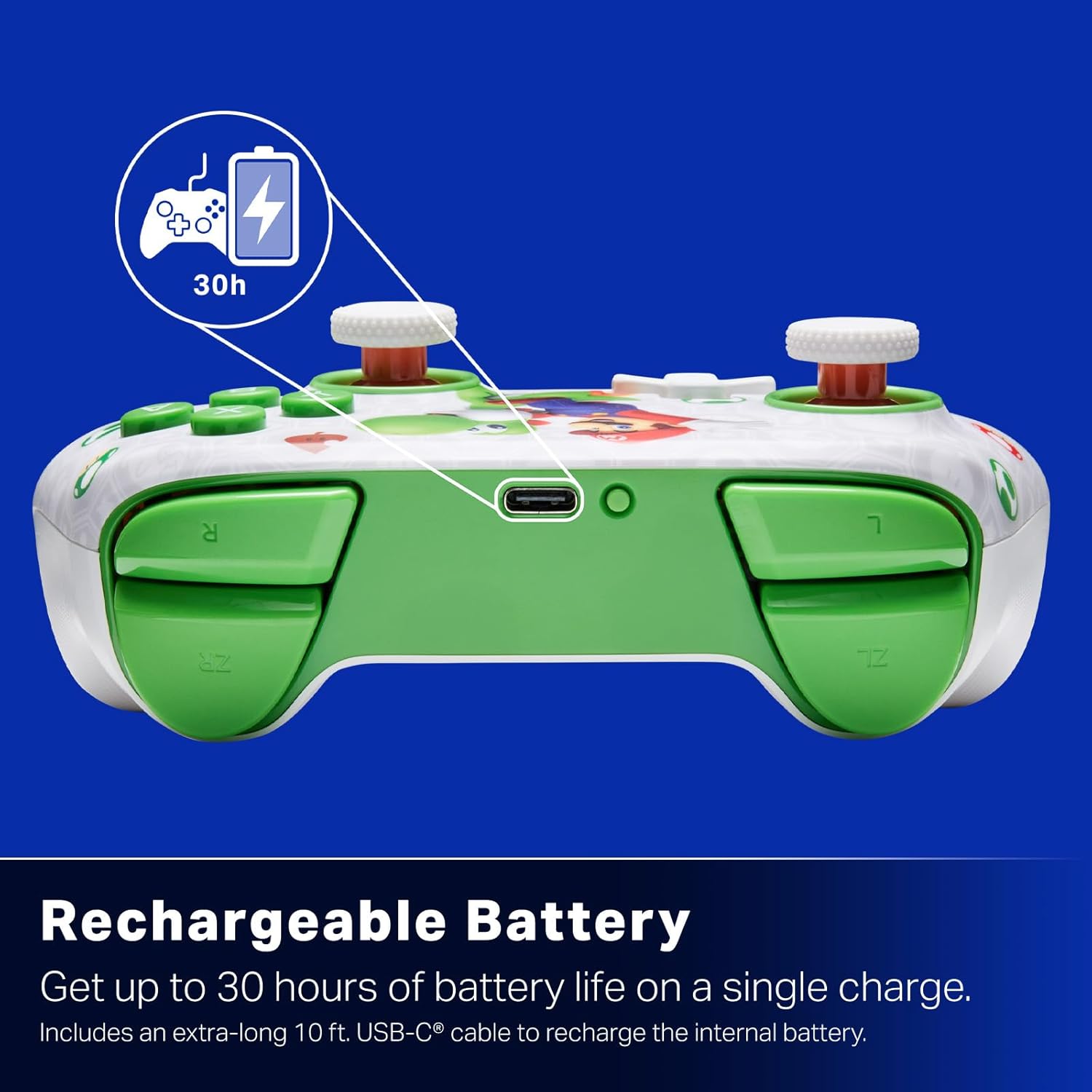
Batterija rikarikabbli: Offers up to 30 hours of gameplay on a single charge. Includes a 10 ft. (3m) USB-C cable for recharging.
Disinn Ergonomiku: Crafted for comfort during extended gaming sessions, utilizing cutting-edge ergonomics and high-quality materials.
Nintendo Family Compatibility: Compatible with Nintendo Switch 2, Nintendo Switch, Nintendo Switch – OLED Model, and Nintendo Switch Lite.
Liċenzjat uffiċjalment: PowerA products undergo rigorous testing by Nintendo to ensure compatibility and quality.
Setup Istruzzjonijiet
1. Iċċarġjar Inizjali
Before first use, fully charge your PowerA Advantage Wireless Controller. Connect the included 10 ft. (3m) USB-C cable to the controller's USB-C port and the other end to a powered USB port on your Nintendo Switch dock or a USB wall adapter.
Figure 1: Controller connected via USB-C for charging, highlighting the rechargeable battery feature.
2. Tqabbil man-Nintendo Switch
Kun żgur li l-console tan-Nintendo Switch tiegħek hija mixgħula u aġġornata bl-aħħar softwer tas-sistema.
Mill-Menu HOME, agħżel Kontrolluri, imbagħad Ibdel il-Maqbad/Ordni.
On the PowerA Advantage Wireless Controller, press and hold the Buttuna SYNC located on the top edge of the controller for at least three seconds. The player indicator LEDs on the bottom of the controller will begin to flash.
Once the controller successfully pairs, the player indicator LED(s) corresponding to the controller number will remain lit.
Agħfas il- Buttuna to confirm and exit the pairing screen.
For subsequent uses, simply press the HOME button on the controller to wake it up and automatically reconnect to your Switch console.
Istruzzjonijiet Operattivi
Kontrolli Bażiċi
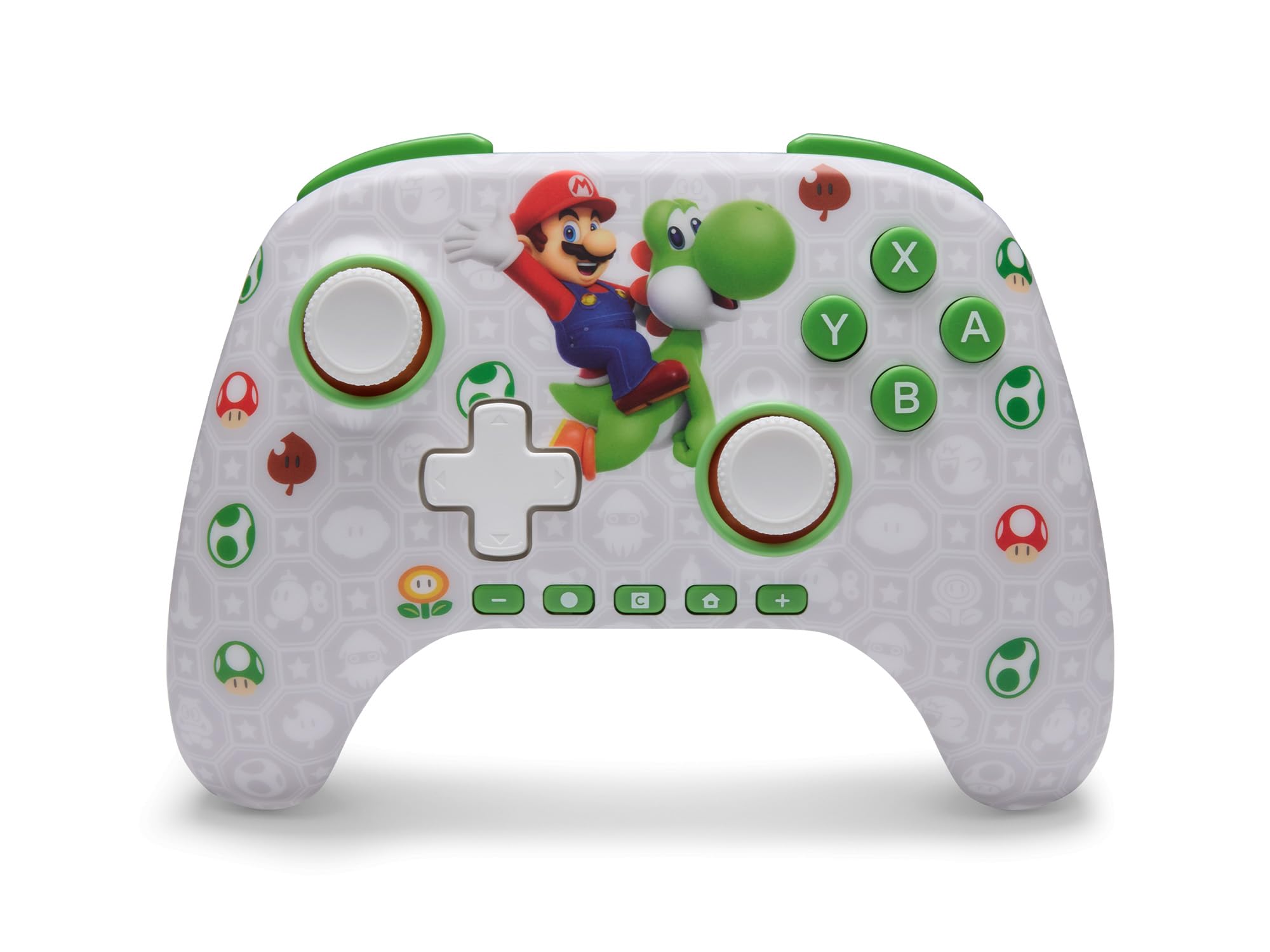
Il-PowerA Advantage Wireless Controller features standard Nintendo Switch button layouts, including A, B, X, Y buttons, L/R and ZL/ZR shoulder buttons, a D-pad, and dual analog sticks. Familiarize yourself with these controls for general gameplay.
Figura 2: Quddiem view of the PowerA Advantage Wireless Controller, highlighting the Mario and Yoshi design and button layout.
Advanced Gaming Buttons (AGB)
The controller includes two mappable Advanced Gaming Buttons (AGR and AGL) on the back. These buttons can be assigned to replicate any other button on the controller for quick access during gameplay.
Agħfas il- Program Button (PRGM) on the back of the controller. The Program LED will flash.
Agħfas il- Advanced Gaming Button (AGR or AGL) you wish to map. The Program LED will flash rapidly.
Agħfas il- buttuna you want to assign to the Advanced Gaming Button (e.g., A, B, X, Y, L, R, ZL, ZR, D-pad directions). The Program LED will stop flashing, indicating successful mapping.
To clear a mapped button, repeat steps 1-2, then press the Buttuna tal-Programm mill-ġdid.
Figure 3: Advanced Gaming Buttons (AGB) on the back of the controller, with an illustration of mappable functions.
Kontrolli tal-Moviment
The controller supports motion controls, allowing for intuitive interaction in compatible games. These controls are automatically enabled when supported by the game.
Figure 4: Controller demonstrating motion control capabilities through tilting.
C Button (GameChat)
The dedicated C Button provides quick access to GameChat features in supported titles, enhancing your multiplayer experience.
Figure 5: The 'C' button, used for GameChat features.
Manutenzjoni
Tindif: Uża drapp artab u niexef biex tnaddaf il-kontrollur. Evita li tuża kimiċi ħarxa jew materjali li joborxu.
Ħażna: Aħżen il-kontrollur f'post frisk u niexef 'il bogħod mix-xemx diretta u minn temperaturi estremi.
Kura tal-batterija: Biex ittawwal il-ħajja tal-batterija, evita li tiċċarġja l-kontrollur kompletament ta' spiss. Iċċarġjah regolarment, anke jekk ma tkunx qed tużah kontinwament.
Kura tal-Cable: Handle the USB-C charging cable with care. Avoid bending or twisting it excessively.
Issolvi l-problemi
Il-Kontrollur Mhux Qed Jikkonnettja/Jiġi Ppariġġjat
Kun żgur li l-kontrollur huwa ċċarġjat kompletament.
Iċċekkja li l-console tan-Nintendo Switch hija aġġornata għall-aħħar softwer tas-sistema.
Repeat the pairing process (see "Pairing with Nintendo Switch" in Setup Instructions).
If issues persist, try restarting both the controller and the Nintendo Switch console.
Stick Drift
Il-PowerA Advantage Controller features Hall Effect modules designed to prevent stick drift. If you experience any unintended input, ensure the controller's firmware is up to date (check PowerA's official webis-sit għal aġġornamenti).
Recalibrate the joysticks through the Nintendo Switch system settings if necessary (System Settings > Controllers and Sensors > Calibrate Control Sticks).
Ħajja Qasira tal-Batterija
Kun żgur li l-kontrollur ikun iċċarġjat kompletament qabel kull użu.
Battery life can vary based on game usage and features enabled.
Use the provided USB-C cable for optimal charging.
Speċifikazzjonijiet
Karatteristika
Dettall
Numru tal-Mudell
NSGP0569-01V
Konnettività
Wireless (Bluetooth), USB-C (for charging)
Apparati Kompatibbli
Nintendo Switch 2, Nintendo Switch, Nintendo Switch – OLED Model, Nintendo Switch Lite
Ħajja tal-batterija
Sa 30 sigħat (tvarja skont l-użu)
Tul tal-Cable
10 ft. (3m) USB-C
Dimensjonijiet
5.88 x 4.21 x 2.36 pulzieri
Piż
0.66 Liri
Karatteristiċi Speċjali
Hall Effect Thumbsticks, Mappable Advanced Gaming Buttons, Motion Controls, C Button
Garanzija u Appoġġ
Il-PowerA Advantage Wireless Controller comes with a Garanzija limitata ta 'sentejn. For detailed warranty information, product support, or to register your product, please visit the official PowerA websit fuq PowerA.com/Appoġġ.
Figure 6: Official Nintendo Licensed Product badge, ensuring quality and compatibility.
Ask a question about this manual
Ask about setup, troubleshooting, compatibility, parts, safety, or missing instructions. Manuals+ will review the question and use this page’s manual context to help answer it.