
Samsung Galaxy S26 Ultra
Samsung Galaxy S26 Ultra 5G Manwal għall-Utent
Mudell: Galaxy S26 Ultra
1. Prodott Aktarview
The Samsung Galaxy S26 Ultra 5G is a high-performance smartphone designed for advanced users, featuring a built-in privacy display, advanced AI capabilities, a 200MP camera system, and a powerful Snapdragon 8 Elite Gen 5 processor. This manual provides essential information for setting up, operating, and maintaining your device.
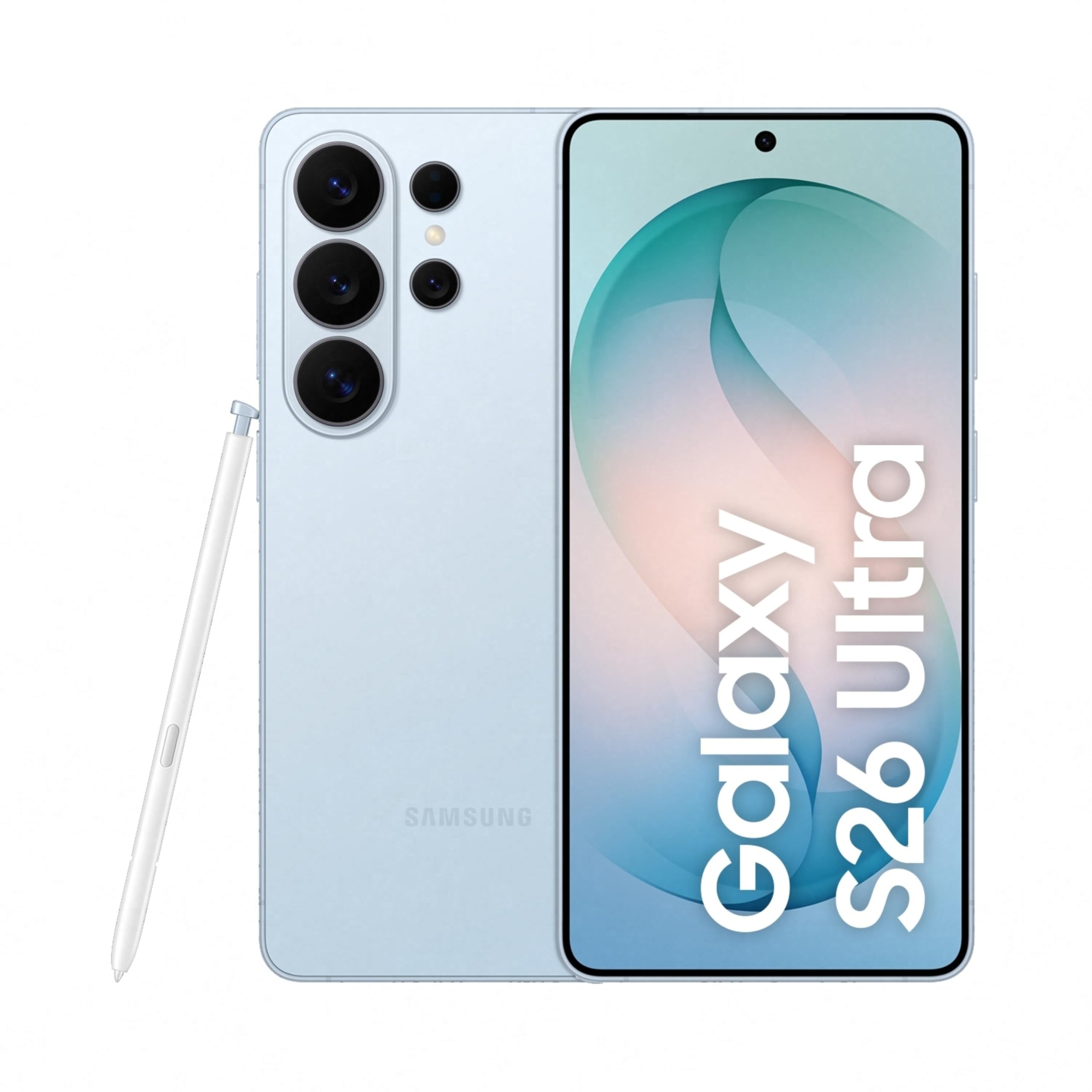
Image: Samsung Galaxy S26 Ultra 5G smartphone in Sky Blue, showcasinid-disinn eleganti u l-modulu tal-kamera tiegħu.
2. Setup Inizjali
2.1. X'hemm fil-Kaxxa
Your Samsung Galaxy S26 Ultra 5G package includes the following items:
- Smartphone (Samsung Galaxy S26 Ultra 5G)
- Data Cable (Type C to C)
- Pin tal-Ejezzjoni tas-SIM
- Gwida Quick Start
- S Pen
2.2. Daħħal is-SIM Card
- Sib it-trej tal-kard SIM fuq il-ġenb tat-tagħmir tiegħek.
- Daħħal il-pin tal-ħruġ tas-SIM fit-toqba ż-żgħira ħdejn it-trej biex tiftaħha.
- Place your Nano SIM card(s) into the tray with the gold contacts facing down. The device supports Dual SIM.
- Imbotta t-trej bil-mod lura fl-islott sakemm tikklikkja f'postu.
2.3. L-Ewwel Tixgħil u l-Konfigurazzjoni
- Agħfas u żomm il-buttuna tal-Qawwa sakemm jidher il-logo ta' Samsung.
- Segwi l-istruzzjonijiet fuq l-iskrin biex tagħżel il-lingwa tiegħek, tikkonnettja mal-Wi-Fi, u tissettja l-kont Google tiegħek.
- Configure biometric security features such as fingerprint recognition.
3. Tħaddim tat-Tagħmir Tiegħek
3.1. Navigazzjoni Bażika
The Galaxy S26 Ultra operates on Android 16 with One UI 8.5. Use the touchscreen with stylus support for navigation. Swipe gestures and on-screen buttons are standard for Android devices.

Image: Screenshot of the One UI 8.5 interface, showing various app icons and widgets.
3.2. Privacy Display
The Galaxy S26 Ultra features a built-in Privacy Display. When activated, the screen's pixels dynamically adjust to keep the display visible when viewed straight on, but appear dimmed when seen from the side. This feature helps protect your personal information in public places.
- To activate: Navigate to Settings and locate the Privacy Display options.
- Ippersonalizza viewability settings to suit your preferences.
- You can choose to hide the full screen from side view or activate it only for notifications or specific applications.

Image: A demonstration of the Privacy Display, showing how content is visible from the front but obscured from the side.
3.3. Karatteristiċi tal-Kamera
L-apparat huwa mgħammar b'sistema ta' kamera versatili:
- Kameras ta' wara: 200 MP Wide, 50 MP Ultra Wide, 50 MP Telephoto (5x Optical Zoom), 10 MP Telephoto (3x Optical Zoom).
- Kamera ta' quddiem: 12 MP.
- Modi ta' Sparar: Dual Recording, Food, Hyperlapse, Night, Panorama, Photo, Portrait, Portrait Video, Pro, Pro Video, Single Take, Slow Motion, Video.
- Lejlografija: Capture clear and detailed videos even in low-light environments.
- Horizontal Lock: Maintain a steady frame during video recording, even when moving.
- Space Zoom: Utilize 100x AI-powered Space Zoom for enhanced clarity at a distance.

Image: Diagram illustrating the camera specifications and lens capabilities of the Galaxy S26 Ultra.

Immaġni: Eżample photos demonstrating the clarity and detail captured using the Nightography feature in low-light conditions.
3.4. Karatteristiċi tal-AI
The Galaxy S26 Ultra integrates advanced AI features to enhance user experience:
- Assistenza bir-Ritratti: Edit photos using simple prompts.
- Studio Kreattiv: Generate personalized stickers from photos with ease.
- Now Nudge: Receive intelligent, real-time suggestions and reduce steps in daily tasks.
- Finder: Quickly search for information on your home screen without opening specific apps.

Image: A phone screen displaying the Photo Assist feature, showing options to edit an image of a dog.

Image: A phone screen demonstrating the sticker generation feature, creating various stickers from a single photo of a dog.
4. Prestazzjoni u Batterija
4.1. Processor and Cooling
The Galaxy S26 Ultra is powered by the Snapdragon 8 Elite Gen 5 processor, customized for Galaxy devices. It features an improved NPU, GPU, and CPU for smoother graphics and faster AI performance. A newly designed Vapor Chamber efficiently dissipates heat, ensuring sustained performance during demanding tasks like gaming.

Image: Diagram showing the NPU, GPU, and CPU components of the customized Snapdragon processor, highlighting performance improvements.
4.2. Ħajja tal-Batterija u Iċċarġjar
The device is equipped with a 5000 mAh battery, optimized for all-day use. It supports Super Fast Charging 3.0 (up to 60W) and Super Fast Wireless Charging (up to 25W). You can achieve up to 75% charge in approximately 30 minutes with Super Fast Charging 3.0.

Image: Graphic indicating that the device can charge up to 75% in approximately 30 minutes.
5. Manutenzjoni u Kura
To ensure the longevity and optimal performance of your Galaxy S26 Ultra, follow these maintenance guidelines:
- Tindif: Uża drapp artab u mingħajr suf biex tnaddaf l-iskrin u l-qafas. Evita materjali li joborxu jew kimiċi ħarxa.
- Reżistenza għall-Ilma: The device is water-resistant. However, avoid intentional submersion in water or exposure to high-pressure water jets. Dry thoroughly if it gets wet.
- Aġġornamenti tas-Software: Iċċekkja u installa regolarment aġġornamenti tas-softwer biex tibbenefika mill-aħħar karatteristiċi, irqajja tas-sigurtà, u titjib fil-prestazzjoni.
- Kura tal-batterija: Avoid extreme temperatures. For optimal battery health, try to keep the charge between 20% and 80% when possible.
- Ħażna: Neħħi perjodikament bla bżonn files u apps biex iżommu ħażna u prestazzjoni ottimali.
6. Issolvi l-problemi ta' Kwistjonijiet Komuni
Jekk tiltaqa' ma' problemi bit-tagħmir tiegħek, ipprova s-soluzzjonijiet li ġejjin:
- Apparat mhux Jirrispondi: Agħfas u żomm il-buttuna tal-Qawwa u l-buttuna tal-Volum 'l isfel simultanjament għal madwar 7-10 sekondi biex terġa' tibda l-apparat bil-forza.
- Batterija Tbattal malajr:
- Iċċekkja l-użu tal-batterija fis-Settings biex tidentifika apps li jikkunsmaw ħafna enerġija.
- Reduce screen brightness or enable power-saving mode.
- Agħlaq l-apps mhux użati li jaħdmu fl-isfond.
- Kwistjonijiet ta' Konnettività tan-Netwerk:
- Ixgħel u itfi l-Modalità Ajruplan.
- Ibda mill-ġdid it-tagħmir tiegħek.
- Check your SIM card is properly inserted.
- Irrisettja s-settings tan-netwerk fi Settings > Ġestjoni ġenerali > Irrisettja > Irrisettja s-settings tan-netwerk.
- L-App Tiġġarraf jew Tiffriża:
- Neħħi l-cache u d-dejta tal-app Settings > Apps > [Isem tal-App] > Ħażna.
- Iddiżinstalla u installa mill-ġdid l-app.
- Kun żgur li l-app hija aġġornata għall-aħħar verżjoni tagħha.
- Sensur tal-Marki tas-Swaba' Mhux Jaħdem:
- Kun żgur li subgħajk u s-sensor huma nodfa u niexfa.
- Irreġistra mill-ġdid il-marki tas-swaba' tiegħek fi Settings > Bijometrija u sigurtà > Marki tas-swaba'.
For more detailed troubleshooting or persistent issues, refer to the official Samsung support websit jew ikkuntattja lis-servizz tal-konsumatur.
7. Speċifikazzjonijiet Tekniċi
| Karatteristika | Speċifikazzjoni |
|---|---|
| Brand | Samsung |
| Mudell | Galaxy S26 Ultra |
| Sistema Operattiva | Android 16 |
| Proċessur | Snapdragon 8 Elite Gen 5 (4.74 GHz) |
| RAM | 12 GB |
| Kapaċità tal-Ħżin | 256 GB |
| Wiri | 6.9 Inches AMOLED, 3120 x 1440 Resolution, 120Hz Refresh Rate, 499 PPI |
| Riżoluzzjoni tal-Kamera ta 'wara | 200 MP, 50 MP, 50 MP, 10 MP |
| Riżoluzzjoni tal-Kamera ta 'quddiem | 12 MP |
| Kapaċità tal-batterija | 5000 Milliamp Sigħat |
| Iċċarġjar | Super Fast Charging 3.0 (up to 60W), Super Fast Wireless Charging (up to 25W) |
| Tip ta' SIM Card | Nano SIM Doppju |
| Konnettività | 5G, Bluetooth, NFC, USB Type C, Wi-Fi |
| Sigurtà Biometrika | Rikonoxximent tal-marki tas-swaba' |
| Reżistenza għall-Ilma | Reżistenti għall-Ilma |
| Dimensjonijiet | 8 x 78 x 164 Millimetru |
| Piż | 214 Gramm |
| Kontenut tal-Kaxxa | Smartphone, Data Cable (Type C to C), SIM Ejection Pin, Quick Start Guide, S Pen |
8. Garanzija u Appoġġ
8.1. Informazzjoni dwar Garanzija
Your Samsung Galaxy S26 Ultra 5G comes with a 1-year manufacturer warranty for the device and 6 months for in-box accessories from the date of purchase. Please retain your proof of purchase for warranty claims.
8.2. Appoġġ għall-Klijent
For technical assistance, service, or warranty inquiries, please contact Samsung Customer Support:
- Manifattur: Samsung India Electronics Pvt ltd
- Indirizz: 6th Floor, DLF Centre, Sansad Marg, New Delhi - 110001, India
- Email: support.india@samsung.com
- Żur l-appoġġ uffiċjali ta' Samsung websit għal FAQs u riżorsi addizzjonali.

Image: Samsung Knox Vault logo, representing the device's robust security features.
Ask a question about this manual
Ask about setup, troubleshooting, compatibility, parts, safety, or missing instructions. Manuals+ will review the question and use this page’s manual context to help answer it.