
1. Introduzzjoni
The AXIS Q6325-LE is a high-performance network camera designed for professional surveillance and monitoring applications. It features a 2 MP resolution with a light-sensitive ½-inch sensor and 31x optical zoom, ensuring clear images across various lighting conditions. Built on the ARTPEC-9 processor, this camera supports advanced analytics, including AXIS Object Analytics for detecting and classifying humans, vehicles, and vehicle types.
The device is built for outdoor use, boasting IP66, IK10, and NEMA 4x ratings for impact and weather resistance. It is also NEMA TS2 rated, allowing operation in temperatures up to 74°C. For efficient data management, Axis Zipstream technology supports AV1, H.264, and H.265 codecs, significantly reducing bandwidth and storage requirements. Enhanced security is provided by Axis Edge Vault, which protects the device and sensitive information from unauthorized access.
2. Informazzjoni dwar is-Sigurtà
- Installazzjoni professjonali: Installation should be performed by qualified personnel in accordance with all local codes and regulations.
- Sors tal-Enerġija: Use only Power over Ethernet (PoE) sources that comply with IEEE 802.3bt/Class 6 or IEEE 802.3at/Class 4 standards. Ensure the power source is stable and within the specified voltagfirxa e.
- Kundizzjonijiet Ambjentali: While the camera is designed for outdoor use and is weather-resistant, avoid exposing it to extreme conditions beyond its specified operating temperature and humidity ranges.
- Immuntar: Securely mount the camera using appropriate accessories to prevent accidental falls. Ensure the mounting surface can support the camera's weight.
- Kejbil: Protect all network cables from physical damage and environmental exposure. Use weatherproof connectors where necessary.
3. Kontenut tal-Pakkett
Verify that all components are present in the package before proceeding with installation. The standard package for the AXIS Q6325-LE typically includes:
- Kamera tan-Netwerk AXIS Q6325-LE
- Weatherproof RJ-45 network connector
- Weathershield
- Mudell tal-immuntar
- Paint paper
- Note: Mounting accessories are not always included and may need to be purchased separately.
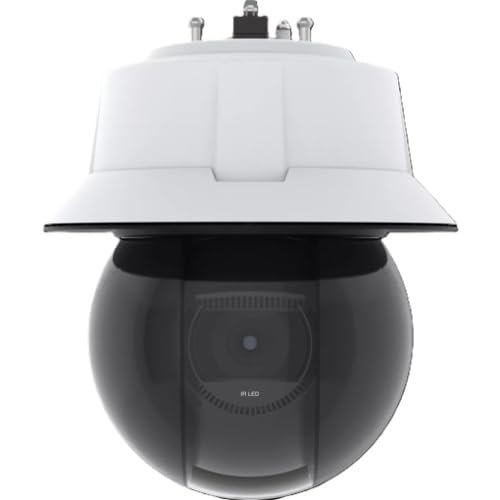
Figura 3.1: Quddiem view of the AXIS Q6325-LE network camera, showing its dome design and main lens.
4. Setup u Installazzjoni
4.1 Immuntar tal-Kamera
The AXIS Q6325-LE supports various professional mounting options, including ceiling, pole, corner, and parapet mounts. Specific mounting accessories are required for each type of installation and are typically sold separately. Refer to the mounting template for drilling holes and ensure the mounting surface is robust enough to support the camera.
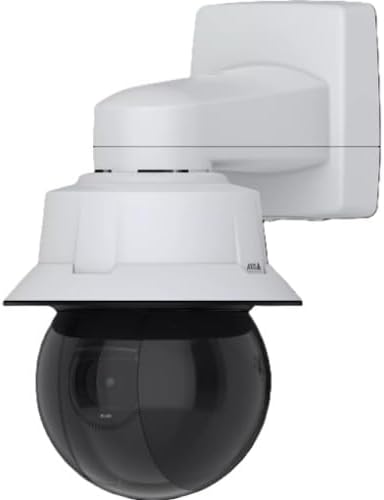
Figure 4.1: The AXIS Q6325-LE camera shown with an optional wall mounting bracket, illustrating a typical installation configuration.
4.2 Konnessjoni tan-Netwerk u tal-Enerġija
Connect the camera to your network using a standard RJ-45 Ethernet cable. The camera is powered via Power over Ethernet (PoE), compliant with IEEE 802.3bt/Class 6 or IEEE 802.3at/Class 4 standards. Ensure your network switch or PoE injector provides adequate power.
- Connect one end of the Ethernet cable to the camera's RJ-45 port.
- Connect the other end to a PoE-enabled network switch or injector.
- Ladarba tkun konnessa, il-kamera tixgħel u tipprova tikseb indirizz IP permezz tad-DHCP.
4.3 Konfigurazzjoni Inizjali
To access the camera's web interfaċċja għall-konfigurazzjoni inizjali:
- Use an AXIS IP Utility or network scanner to discover the camera's IP address on your network.
- Iftaħ a web il-browser u daħħal l-indirizz IP tal-kamera.
- Follow the on-screen prompts to set a strong password for the root user and complete the initial setup wizard.
- Configure network settings, video streams, and user access as required.
5. It-tħaddim tal-Kamera
5.1 Video Management System (VMS) Integration
The AXIS Q6325-LE is compatible with various NVRs and VMS software/applications via ONVIF and IP streaming protocols. Integrate the camera into your existing surveillance system for live viewreġistrazzjoni, u daqq.
5.2 Karatteristiċi u Funzjonalità Ewlenin
- Żum ottiku 31x: Utilize the powerful optical zoom to focus on specific areas of interest without compromising image quality.
- Advanced AI Analytics: Leverage AXIS Object Analytics to automatically detect and classify objects such as humans, vehicles, and specific vehicle types, enhancing situational awareness and reducing false alarms.
- Viżibilità Superjuri: The camera's light-sensitive sensor and advanced image processing ensure clear video in challenging lighting conditions, including low light.
- Efficient Video Compression: With support for AV1, H.264, and H.265 codecs, Axis Zipstream technology optimizes video streams to minimize bandwidth and storage consumption while maintaining video quality.
- Ċibersigurtà: Axis Edge Vault provides a secure platform for the camera, protecting its firmware and sensitive data from cyber threats.
6. Manutenzjoni
- Tindif: Periodically clean the camera's dome and housing with a soft, damp cloth to remove dust, dirt, or water spots that may affect image quality. Do not use harsh chemicals or abrasive materials.
- Aġġornamenti tal-Firmware: Regularly check the AXIS website for firmware updates. Keeping the camera's firmware up-to-date ensures optimal performance, security, and access to new features.
- Spezzjoni tal-Cable: Inspect all cables and connections for signs of wear, damage, or corrosion, especially in outdoor environments. Replace damaged cables immediately.
- Verifiki Ambjentali: Ensure that the camera's operating environment remains within specified temperature and humidity ranges. Clear any obstructions that might block the camera's view jew ventilazzjoni.
7 Issolvi l-problemi
| Problema | Kawża Possibbli | Soluzzjoni |
|---|---|---|
| Il-kamera ma tixgħelx | No PoE power; faulty Ethernet cable; PoE injector/switch issue. | Verify PoE source is active and providing power. Check cable connections. Test with a known good PoE port/injector. |
| L-ebda stream tal-vidjow | Network connectivity issue; incorrect IP address; firewall blocking; VMS configuration error. | Check network cable. Confirm camera's IP address. Ensure firewall allows traffic. Verify VMS settings for the camera. |
| Kwalità ta 'immaġni fqira | Dirty lens/dome; improper focus/zoom; low light conditions; network bandwidth issues. | Clean the camera dome. Adjust focus and zoom settings via the web interface. Ensure sufficient lighting. Check network bandwidth. |
| Ma jistax jaċċessa web interface | Incorrect IP address; network issue; browser compatibility; forgotten password. | Confirm IP address. Check network connection. Try a different browser. If password is lost, perform a factory reset (refer to manufacturer's guide for procedure). |
8. Speċifikazzjonijiet
| Brand | ASSI |
| Isem tal-Mudell | AXIS Q63 Series Q6325-LE |
| Numru tal-Mudell | 03313-001 |
| Użi Rakkomandati | Professional surveillance and monitoring applications where broad coverage, zoom, and smart analytics are important |
| Teknoloġija tal-Konnettività | Wired Ethernet (RJ-45) network connection (IP camera) |
| Karatteristika Speċjali | Clear images with ½” sensor and 31x zoom, Superior visibility in all lighting conditions, Advanced AI analytics, Reduced storage costs with AV1 codec, Built-in cybersecurity with Axis Edge Vault |
| Użu fuq ġewwa/barra | Barra |
| Apparati Kompatibbli | NVRs, VMS software/apps via ONVIF / IP streaming |
| Tip ta' Kontrollur | IP network control via VMS/apps/web interfaces (no dedicated hardware remote) |
| Tip Muntaġġ | Supports professional mounts (ceiling, pole, corner, parapet, etc.) with optional accessories |
| Protokoll tal-Konnettività | IPv4/v6, HTTP/HTTPS, RTSP/RTP/SRTP, ONVIF (S/G/M/T), FTP/SFTP, DHCPv4/v6, DNS/DDNS, SNMP, MQTT, SSH, LLDP, CDP, and more standardized network protocols |
| Sors tal-Enerġija | PoE (IEEE 802.3bt/Class 6 & IEEE 802.3at/Class 4) |
| Riżoluzzjoni tal-Qbid tal-Vidjo | 1920 × 1080 (2 MP) |
| Dimensjonijiet tal-oġġett | 11.42 x 11.02 x 13.39 pulzieri |
| Format tal-Qbid tal-Vidjo | AV1, H.264, H.265, Motion JPEG |
| Manifattur | Komunikazzjonijiet tal-Assi |
9. Garanzija u Appoġġ
For detailed warranty information, please refer to the official AXIS Communications website or the warranty card included with your product. AXIS provides comprehensive support for its products.
- Appoġġ Tekniku: Visit the AXIS Communications support portal for FAQs, troubleshooting guides, and contact information for technical assistance.
- Dokumentazzjoni: Additional documentation, including detailed installation guides and software manuals, can be found on the official AXIS websit.
- Ħanut online: For product accessories and other AXIS products, visit the AXIS Store on Amazon.