
1. Introduzzjoni
Grazzi tax-xiriasing the Sharp PS-916 Bluetooth Party Speaker System. This system includes two identical portable Bluetooth speakers designed to deliver powerful audio with versatile connectivity options. Please read this manual carefully before using the product to ensure proper operation and to maximize your listening experience.
Kontenut tal-Pakkett:
- 2 x Sharp PS-916 Party Speakers
- 1 x Cable tal-Iċċarġjar
- 1 x Kontroll mill-bogħod
- 1 x Manwal għall-Utent

Image: The Sharp PS-916 system includes two speakers for a complete stereo experience.
2. Setup
2.1 Charging the Speakers
The PS-916 speakers are equipped with rechargeable batteries, providing up to 12 hours of playback. Before initial use, fully charge both speakers.
- Connect the charging cable to the DC IN port on the rear of each speaker.
- Plug the other end of the charging cable into a suitable power adapter (not included) or USB power source.
- Id-dawl indikatur tal-iċċarġjar se jixgħel. Se jibdel il-kulur jew jintefa ladarba l-iċċarġjar ikun komplut.
2.2 Tixgħel/Jitfi
To power on or off each speaker, press and hold the ON/STAND BY INPUT buttuna li tinsab fuq il-pannell tal-kontroll.
2.3 Tqabbil Bluetooth (Speaker Uniku)
- Ensure the speaker is powered on and in Bluetooth mode. The Bluetooth indicator will flash, indicating it is ready for pairing.
- Fuq it-tagħmir mobbli tiegħek, ippermetti l-Bluetooth u fittex tagħmir disponibbli.
- Select "Sharp PS-916" from the list of devices.
- Ladarba jkun konness, l-indikatur tal-Bluetooth jieqaf iteptep u jibqa' mixgħul fiss.
Tqabbil ta' Stereo True Wireless 2.4 (TWS) (Żewġ Kelliema)
TWS allows you to connect two PS-916 speakers wirelessly for a stereo sound experience.
- Power on both PS-916 speakers.
- Ensure neither speaker is currently connected to a Bluetooth device.
- On one of the speakers (this will be the primary speaker), press the TWS button. The speaker will enter TWS pairing mode.
- The primary speaker will automatically search for the secondary speaker. Once connected, you will hear an audible confirmation, and the TWS indicator lights on both speakers will illuminate.
- Issa, qabbad l-apparat mobbli tiegħek mal-ispiker primarju permezz tal-Bluetooth kif deskritt fit-taqsima 2.3. L-awdjo se jindaqq miż-żewġ kelliema b'mod stereo.
3. Joperaw
3.1 Control Panel Overview

Image: Main control panel for the Sharp PS-916 speaker.
- ON/STAND BY INPUT: Power on/off, switch input modes (Bluetooth, USB, TF, AUX, FM).
- PLAY/PAUSE (►/∕∕): Daqq jew waqqaf id-daqq tal-awdjo.
- PREVIOUS (◀◀): Aqbeż għall-binarju preċedenti.
- NEXT (▶▶): Aqbeż għall-binarju li jmiss.
- POMPOL TAL-VOLUM: Dawwar biex taġġusta l-volum ewlieni.
- TWS: Initiate or disconnect True Wireless Stereo pairing.
- UGWALIZZATUR: Cycle through preset equalizer modes.
- BASS: Activate or deactivate bass boost.
- DAWL: Change or turn off the LED light effects.
- MIC CONTROL: Adjust microphone volume or echo (if applicable).
3.2 Portijiet tad-dħul
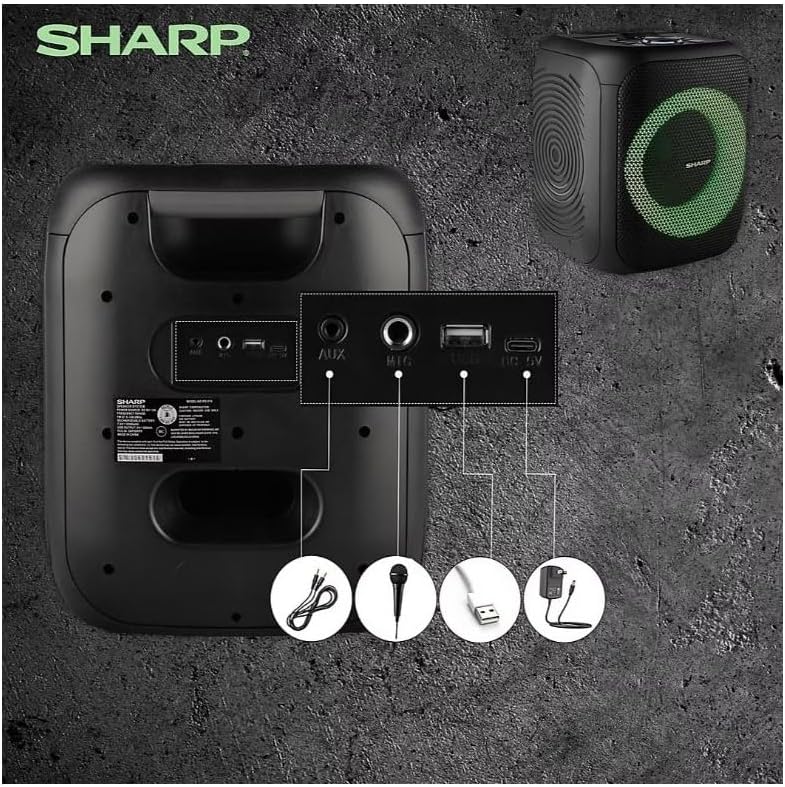
Image: Rear panel with various input and charging ports.
- AUX IN: Qabbad apparati awdjo esterni billi tuża kejbil awdjo ta' 3.5mm.
- MIC IN: Connect a microphone (sold separately) for karaoke or announcements.
- USB: Daħħal flash drive tal-USB biex iddoqq l-awdjo.
- KARTA TF: Insert a TF (microSD) card for audio playback.
- DC IN: Connect the charging cable to power and charge the speaker.
3.3 Playing Audio from USB/TF Card
- Insert a USB flash drive or TF card into the corresponding port.
- Agħfas il- ON/STAND BY INPUT button repeatedly until the display shows the USB or TF mode.
- Id-daqq jibda awtomatikament. Uża l- DĦABBA/PAWŻA, PREĊEDENTI, u LI JMISS buttuni biex jikkontrollaw daqq.
3.4 L-Użu tal-Input AUX
- Connect one end of a 3.5mm audio cable to the AUX IN port on the speaker.
- Qabbad it-tarf l-ieħor mal-jack tal-headphones jew mal-output tal-awdjo tat-tagħmir estern tiegħek.
- Agħfas il- ON/STAND BY INPUT button repeatedly until the display shows AUX mode.
- Ikkontrolla d-daqq u l-volum mit-tagħmir estern tiegħek.
3.5 Tħaddim tar-Radju FM

Image: The PS-916 features an integrated FM Tuner.
- Agħfas il- ON/STAND BY INPUT button repeatedly until the display shows FM mode.
- Agħfas u żomm il- DĦABBA/PAWŻA buttuna biex tiskennja u ssalva awtomatikament l-istazzjonijiet FM disponibbli.
- Uża l- PREĊEDENTI u LI JMISS buttuni biex tinnaviga fl-istazzjonijiet salvati.
3.6 Effetti tad-Dawl LED
Agħfas il- DAWL button to cycle through different LED light modes or to turn the lights off.
4. Manutenzjoni
4.1 Tindif
- Dejjem itfi l-ispiker u skonnettjah mis-sors tal-enerġija qabel ma tnaddfu.
- Uża drapp artab u niexef biex timsaħ l-uċuħ ta’ barra.
- Tużax prodotti tat-tindif likwidi, aerosols, jew solventi, għax dawn jistgħu jagħmlu ħsara lill-finitura jew lill-komponenti interni.
4.2 Ħażna
- Aħżen l-ispikers f'post frisk u niexef 'il bogħod mix-xemx diretta u minn temperaturi estremi.
- Jekk taħżinha għal perjodu estiż, iċċarġja l-batterija sa madwar 50% kull ftit xhur biex iżżommha f'saħħitha.
5 Issolvi l-problemi
If you encounter issues with your Sharp PS-916 speakers, please refer to the following common problems and solutions:
| Problema | Soluzzjoni Possibbli |
|---|---|
| L-ispiker ma jixgħelx. | Kun żgur li l-batterija hija ċċarġjata. Qabbad il-kejbil tal-iċċarġjar u erġa' pprova. |
| L-ebda ħoss mill-kelliem. | Iċċekkja l-livell tal-volum kemm fuq l-ispiker kif ukoll fuq l-apparat konness tiegħek. Kun żgur li l-modalità tad-dħul korretta hija magħżula. |
| L-apparat Bluetooth ma jistax jingħaqad. | Ensure the speaker is in Bluetooth pairing mode (indicator flashing). Move your device closer to the speaker. Disconnect from other Bluetooth devices. |
| It-tqabbil tat-TWS ifalli. | Ensure both speakers are powered on and not connected to any other Bluetooth devices. Try initiating TWS pairing again. |
| Ħoss distort. | Reduce the volume on both the speaker and your connected device. Ensure the audio source is not distorted. |
6. Speċifikazzjonijiet
| Karatteristika | Dettall |
|---|---|
| Brand | Sharp |
| Isem tal-Mudell | PS-916 |
| Konfigurazzjoni tal-Ispeaker | 8" Woofer, 1" Tweeter (per speaker) |
| L-ogħla qawwa tal-ħruġ | 400 Watts (għal kull kelliem) |
| Qawwa tal-Ħruġ RMS | 40 Watts (għal kull kelliem) |
| Teknoloġija tal-Konnettività | Bluetooth |
| Inputs Addizzjonali | USB, TF Card, 3.5mm AUX, Microphone Input |
| Ħajja tal-batterija | Sa 12-il Siegħa |
| Karatteristiċi Speċjali | True Wireless Stereo (TWS) Pairing, Bass Boost, LED Light Effects, FM Tuner |
| Kulur | Iswed |
| Piż tal-oġġett | 6.5 Liri (għal kull kelliem) |
| UPC | 728434122111 |
| GTIN | 728434122111 |
7. Garanzija u Appoġġ
7.1 Informazzjoni dwar Garanzija
This Sharp PS-916 product comes with a 90-day limited warranty. This warranty covers manufacturing defects under normal use. It does not cover damage caused by misuse, accidents, unauthorized modifications, or normal wear and tear.
7.2 Appoġġ għall-Klijent
For technical assistance, warranty claims, or further inquiries, please refer to the contact information provided with your purchase documentation or visit the official Sharp support websit.