Introduzzjoni
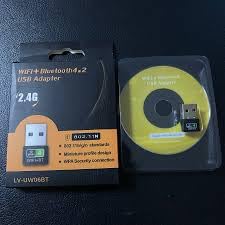
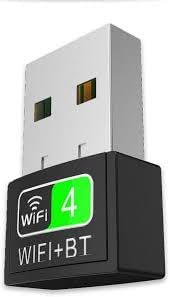
The Generic LV-UW06BT is a dual-function USB adapter designed to provide both Wi-Fi and Bluetooth connectivity to your PC, laptop, or desktop computer. This compact device supports 802.11N Wi-Fi for speeds up to 600Mbps and Bluetooth 4.2 for connecting various peripherals. It offers a convenient plug-and-play solution for Windows, macOS, and Linux operating systems, enhancing your device's wireless capabilities for streaming, gaming, browsing, and connecting audio devices or input peripherals.
Karatteristiċi ewlenin:
- Dual-function USB adapter with 802.11N WiFi and Bluetooth 4.2 support.
- High-speed Wi-Fi up to 600Mbps for gaming, streaming, and browsing.
- Bluetooth 4.2 for seamless connection of headphones, speakers, keyboards, and mice.
- Plug & Play setup for Windows, macOS, and Linux.
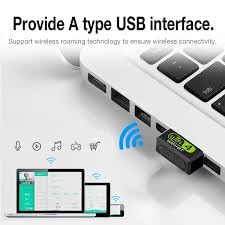
- Compact, portable design for easy integration into any USB port.
X'hemm fil-Kaxxa
Malli tiftaħ il-pakkett, għandek issib l-oġġetti li ġejjin:
- 1 x LV-UW06BT USB Dongle (WiFi + Bluetooth Adapter)
Setup
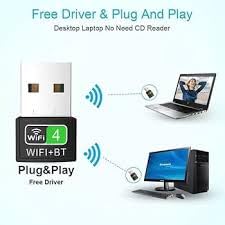
The LV-UW06BT adapter is designed for plug-and-play functionality on most modern operating systems, including Windows, macOS, and Linux. No manual driver installation is typically required.
- Daħħal l-Adapter: Locate an available USB port on your computer (desktop or laptop). Carefully insert the LV-UW06BT USB adapter into the USB port.
- Installazzjoni Awtomatika tas-Sewwieq: Your operating system should automatically detect the new hardware and install the necessary drivers. This process may take a few moments. A notification might appear indicating that the device is ready for use.
- Ivverifika l-Installazzjoni:
- Għall-Windows: Go to Device Manager. Under 'Network adapters' and 'Bluetooth', you should see entries for the newly installed Wi-Fi and Bluetooth components.
- For macOS/Linux: Check your system's network and Bluetooth settings to confirm the adapter is recognized.
If the adapter is not automatically recognized or if you experience issues, refer to the Troubleshooting section.
Istruzzjonijiet Operattivi
Once the adapter is successfully installed, you can begin using its Wi-Fi and Bluetooth functionalities.
L-użu tal-Wi-Fi:
- Aċċess għas-Settings tan-Netwerk: Click on the Wi-Fi icon in your computer's system tray (Windows) or menu bar (macOS/Linux).
- Agħżel Netwerk: Se tidher lista ta' netwerks Wi-Fi disponibbli. Agħżel in-netwerk mixtieq tiegħek.
- Daħħal il-Password: Jekk tintalab, daħħal il-password tal-Wi-Fi (ċavetta tas-sigurtà) għan-netwerk magħżul.
- Qabbad: Click 'Connect'. Your computer should now be connected to the internet via the LV-UW06BT adapter.
Bl-użu tal-Bluetooth:
- Ippermetti Bluetooth: Ensure Bluetooth is enabled on your computer. This can usually be done through your system settings or control panel.
- Apparat Par: Put your Bluetooth device (e.g., headphones, speaker, keyboard, mouse) into pairing mode. Refer to your device's manual for specific instructions.
- Żid Apparat: On your computer, go to Bluetooth settings and select 'Add a device' or 'Pair new device'.
- Agħżel u Qabbad: Your computer will scan for nearby Bluetooth devices. Select your device from the list and follow any on-screen prompts to complete the pairing process.
Manutenzjoni
To ensure the longevity and optimal performance of your LV-UW06BT USB adapter, follow these simple maintenance guidelines:
- Żomm Nadif: Imsaħ l-adapter perjodikament b'ċarruta ratba u niexfa biex tneħħi t-trab u l-fdalijiet. Evita li tuża prodotti tat-tindif likwidi.
- Ipproteġi mill-Ħsara: Evita li twaqqa' l-adapter jew li tesponih għal temperaturi estremi, umdità, jew dawl tax-xemx dirett.
- Ħażna xierqa: When not in use, store the adapter in a safe place to prevent loss or damage.
- Immaniġġja b'Kura: Always grasp the adapter by its body when inserting or removing it from a USB port, rather than pulling on the exposed USB connector.
Issolvi l-problemi
If you encounter issues with your LV-UW06BT adapter, try the following solutions:
- Adapter Mhux Rilevat:
- Ipprova daħħal l-adapter f'port USB differenti fuq il-kompjuter tiegħek.
- Ibda mill-ġdid il-kompjuter tiegħek.
- Check Device Manager (Windows) or System Information (macOS/Linux) to see if the device is listed. If there's an error, try updating or reinstalling drivers.
- Ebda Konnessjoni Wi-Fi:
- Kun żgur li r-router tal-Wi-Fi tiegħek huwa mixgħul u qed jaħdem sew.
- Verify you have selected the correct Wi-Fi network and entered the password accurately.
- Restart your computer and the Wi-Fi router.
- Iċċekkja jekk apparati oħra jistgħux jikkonnettjaw mal-istess netwerk Wi-Fi.
- Ebda Konnessjoni Bluetooth:
- Ensure Bluetooth is enabled on your computer and the device you are trying to pair.
- Make sure your Bluetooth device is in pairing mode and within range.
- Neħħi kwalunkwe tqabbil preċedenti tal-apparat mill-kompjuter tiegħek u erġa' pprova tqabbil.
- Ibda mill-ġdid il-kompjuter tiegħek.
- Veloċità baxxa tal-Wi-Fi:
- Ensure your computer is within optimal range of your Wi-Fi router.
- Imminimizza l-interferenza minn apparati elettroniċi oħra.
- Iċċekkja l-veloċità tal-fornitur tas-servizz tal-internet tiegħek.
Speċifikazzjonijiet
| Karatteristika | Dettall |
|---|---|
| Brand | Ġeneriċi |
| Mudell | LV-UW06BT |
| Interface tal-Ħardwer | Mikro USB 2.0 Tip A |
| Kulur | Iswed |
| Apparati Kompatibbli | Laptop, PC, Desktop |
| Dimensjonijiet tal-Prodott (L x W x H) | 10L x 10W x 30H Millimeters |
| Protokoll tal-Kollegament tad-Data | USB |
| Data Transfer Rate (Wi-Fi) | Up to 600Mbps (802.11N) |
| Banda ta' Frekwenza | 2.4 GHz |
| Verżjoni Bluetooth | 4.2 |
| Piż tal-oġġett | 20 Gramm |
| Manifattur | lapgear |
Informazzjoni dwar Garanzija
Dan il-prodott jiġi ma 'a Garanzija ta 'sostituzzjoni ta' 7 jum from the date of purchase. This warranty covers manufacturing defects. Please retain your proof of purchase for any warranty claims. The warranty does not cover damage caused by misuse, accidents, unauthorized modifications, or normal wear and tear.
Appoġġ
For further assistance or if you encounter issues not covered in this manual, please contact the manufacturer or your retailer. Ensure you have your product model number (LV-UW06BT) and proof of purchase ready when seeking support.
Manufacturer: lapgear