
1. Introduzzjoni
Thank you for choosing the UGREEN 11-inch Keyboard Case. This product is designed to enhance your iPad experience by providing a comfortable typing solution and versatile viewing angles, transforming your tablet into a portable workstation. This manual provides essential information for setup, operation, maintenance, and troubleshooting to ensure optimal performance.
2. Kompatibilità
Din il-kaxxa tat-tastiera hija kompatibbli mal-mudelli tal-iPad li ġejjin:
- iPad Air 11-inch (M4/M3/M2, 2026/2025/2024)
- iPad Pro 11-inch (4th/3rd/2nd/1st Gen)
- iPad Air 5th Generation (2022)
- iPad Air 4th Generation (2020)
Compatible Model Numbers: A3459, A2902, A3266, A1980, A2228, A2759, A2377, A2316, A2588.
Nota: Dan il-każ huwa le compatible with iPad Pro 11-inch (M4) 2024.

Figure 2.1: Detailed compatibility chart for UGREEN 11-inch Keyboard Case.
3. Kontenut tal-Pakkett
Jekk jogħġbok kun żgur li l-oġġetti kollha huma preżenti fil-pakkett tiegħek:
- UGREEN 11-inch Keyboard Case
- Kejbil għall-Iċċarġjar USB-C (3ft)
- Manwal għall-Utent
4. Prodott Aktarview
The UGREEN Keyboard Case features a robust design with several key functionalities:
- Precision Magnetic Back Plate: Ensures a secure and stable attachment for your iPad.
- 125° Aġġustabbli ViewIng Angolu: Allows for flexible positioning for typing, browsing, or viewing.
- Ċwievet tas-Swiċċ tal-Imqass: Provides a smooth, quiet, and consistent typing experience.
- 3-Level Adjustable Backlight: Offers illumination for comfortable use in various lighting conditions.
- Responsive Touchpad: Enables precise cursor control and supports multi-gesture navigation.
- Dual Orientation Viewing: Supports both portrait and landscape modes.
- Batterija 650mAh: Provides extended usage and standby times.

Figure 4.1: Powerful magnetic hold for stable iPad attachment.

Figure 4.2: Quick-set magnetic stand with 125° adjustable viewangolu tal-ing.

Figure 4.3: Scissor-switch keyboard design and 3-level adjustable backlighting.

Figure 4.4: Responsive touchpad with multi-gesture support.
5. Istruzzjonijiet ta' Setup
5.1 Kif Twaħħal l-iPad Tiegħek
- Align your compatible iPad with the magnetic back plate of the case.
- The iPad will securely snap into place due to the strong magnetic connection.
5.2 Powering On the Keyboard
- Locate the power switch on the right side of the keyboard.
- Slide the switch to the 'ON' position. The indicator light will briefly illuminate.
5.3 Tqabbil tal-Bluetooth
- Kun żgur li t-tastiera tkun mixgħula.
- Fuq l-iPad tiegħek, mur fuq Settings > Bluetooth.
- Ixgħel il-Bluetooth. L-iPad tiegħek se jfittex apparati fil-qrib.
- Select "UGREEN Keyboard" (or similar name) from the list of available devices.
- Segwi kwalunkwe prompts fuq l-iskrin biex tlesti l-proċess ta 'tqabbil.
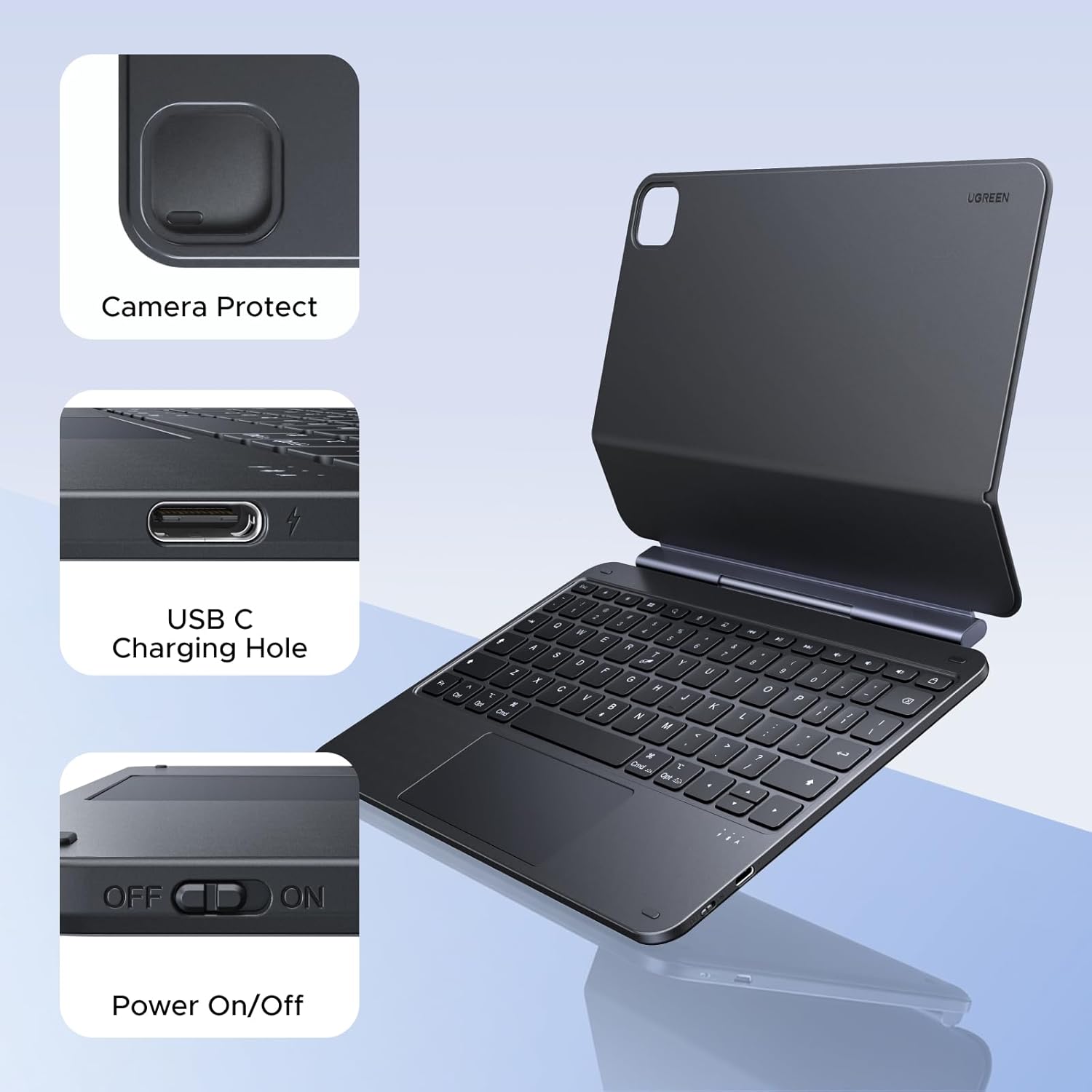
Figure 5.1: Location of the power switch and USB-C charging port.
6. Istruzzjonijiet Operattivi
6.1 Aġġustament ViewIng Angolu
The magnetic stand allows for a 125° adjustable viewing angle. Gently tilt your iPad to achieve your desired position for typing, drawing, or media consumption.
6.2 L-Użu tat-Touchpad
The integrated touchpad supports various multi-touch gestures for intuitive navigation:
- Tektek b'saba waħda: Ikklikkja/Agħżel
- Skroll b'żewġ swaba': Skrollja 'l fuq/'l isfel jew lejn ix-xellug/lemin
- Oqros biex tagħmel zoom: Zoom in/out
- Swipe 'l fuq bi tliet swaba': Iftaħ is-Swiċċ tal-App
- Three-finger swipe down: Ritorn għall-Iskrin tad-Dar
- Swew bi tliet swaba lejn ix-xellug/leminija: Aqleb bejn apps miftuħa
6.3 Aġġustament tad-Dawl ta' Wara
Agħfas il- light icon key (usually next to the function keys) to cycle through the 3 levels of backlight brightness or to turn it off.
6.4 Dual Orientation Viewing
The case supports both portrait and landscape orientations. Simply rotate your iPad while it is magnetically attached to switch modes. This allows for flexible viewing during video calls, streaming, or browsing without compromising stability.

Figure 6.1: Versatile usage modes including typing, viewing, sketching, and reading.
7. Iċċarġjar tat-Tastiera
The keyboard is equipped with a 650mAh battery for extended use.
- Ħajja tal-batterija: Up to 6 months standby time, or 5 months of regular use with the backlight off.
- Ħin tal-Iċċarġjar: Madwar sagħtejn għal ħlas sħiħ.
- Metodu tal-Iċċarġjar: Use the included USB-C cable to connect the keyboard's USB-C port to a power source.

Figura 7.1: Il-prestazzjoni tal-batterija matulview.
8. Manutenzjoni
To ensure the longevity and optimal performance of your UGREEN Keyboard Case, follow these maintenance guidelines:
- Tindif: Uża artab, damp drapp biex timsaħ il-barra tal-kaxxa. Evita kimiċi ħarxa jew materjali li joborxu. Għall-buttuni tat-tastiera, uża pinzell artab jew arja kkompressata biex tneħħi t-trab u l-fdalijiet.
- Ħażna: When not in use, store the keyboard case in a clean, dry environment away from extreme temperatures and direct sunlight.
- Immaniġġjar: Avoid dropping the case or subjecting it to strong impacts, which could damage internal components or the magnetic mechanism.
9 Issolvi l-problemi
If you encounter issues with your UGREEN Keyboard Case, refer to the following common problems and solutions:
9.1 Keyboard Not Pairing or Connecting
- Iċċekkja l-Enerġija: Ensure the keyboard's power switch is in the 'ON' position.
- Livell tal-batterija: Verify that the keyboard has sufficient battery charge. Charge it if necessary.
- Bluetooth on iPad: Confirm that Bluetooth is enabled on your iPad (Settings > Bluetooth).
- Erġa' qabbad l-Apparat: If the keyboard was previously paired, try forgetting the device on your iPad's Bluetooth settings and then re-pairing it.
- Irristartja l-Apparati: Erġa' ibda kemm l-iPad kif ukoll it-tastiera tiegħek.
9.2 Inconsistent Touchpad Response
- Naddaf it-Touchpad: Kun żgur li l-wiċċ tat-touchpad ikun nadif u ħieles mill-ħmieġ jew mill-umdità.
- Aġġornament tal-Firmware: Check the UGREEN website for any available firmware updates for the keyboard.
- Issettjar tal-iPad: Review your iPad's touchpad settings under Settings > Ġenerali > Trackpad & Mouse.
9.3 iPad Feels Top-Heavy or Unstable
- Stabbiltà tal-wiċċ: Ensure the keyboard case is placed on a flat, stable surface.
- Aġġustament tal-Angolu: Aġġusta l- viewing angle to a more balanced position. Extreme angles may reduce stability.
- Konnessjoni manjetika: Confirm the iPad is fully and securely attached to the magnetic back plate.
10. Speċifikazzjonijiet
| Karatteristika | Dettall |
|---|---|
| Brand | UGREEN |
| Numru tal-Mudell | i711 |
| Apparati Kompatibbli | Tablet (Specific iPad models listed in Compatibility section) |
| Teknoloġija tal-Konnettività | Bluetooth |
| Deskrizzjoni tat-Tastiera | Flexible, Scissor-switch |
| Layout tat-Tastiera | QWERTY |
| Materjal | Plastic, Steel (Keyboard Plate) |
| Sors tal-Enerġija | Battery Powered (650mAh Lithium Battery) |
| Karatteristiċi Speċjali | Magnetic Case, Adjustable Backlight, Touchpad |
11. Garanzija u Appoġġ
11.1 Informazzjoni dwar Garanzija
This UGREEN product is covered by a Garanzija tal-Manifattur ta' 2 Snin mid-data tax-xiri. Din il-garanzija tkopri difetti fil-materjali u l-abbilità taħt użu normali.
Il-garanzija ma tkoprix:
- Ħsara kkawżata minn inċident, abbuż, użu ħażin, għargħar, nar, terremot, jew kawżi esterni oħra.
- Damage caused by operating the product outside the permitted or intended uses described by UGREEN.
- Damage caused by service performed by anyone who is not a representative of UGREEN.
11.2 Appoġġ għall-Klijent
For technical support, warranty claims, or general inquiries, please contact UGREEN customer service through the following channels:
- Websit: Żur l-UGREEN uffiċjali websit għal riżorsi ta' appoġġ u informazzjoni ta' kuntatt.
- Email: Irreferi għall-imballaġġ tal-prodott tiegħek jew għall-UGREEN websit għall-indirizz elettroniku ta' appoġġ xieraq.
- Bejjiegħ bl-Imnut Online: If purchased from an online retailer, you may also contact their customer service for assistance.
Please have your product model number (i711) and proof of purchase ready when contacting support.