
Introduzzjoni
This manual provides detailed instructions for the Philips SPK7858 Wireless Optical Mouse. Designed for ergonomic comfort and versatile performance, this mouse features multi-connection options, adjustable DPI settings, and a rechargeable battery, making it suitable for everyday use, office tasks, and gaming. Please read this manual thoroughly to ensure proper setup and operation.
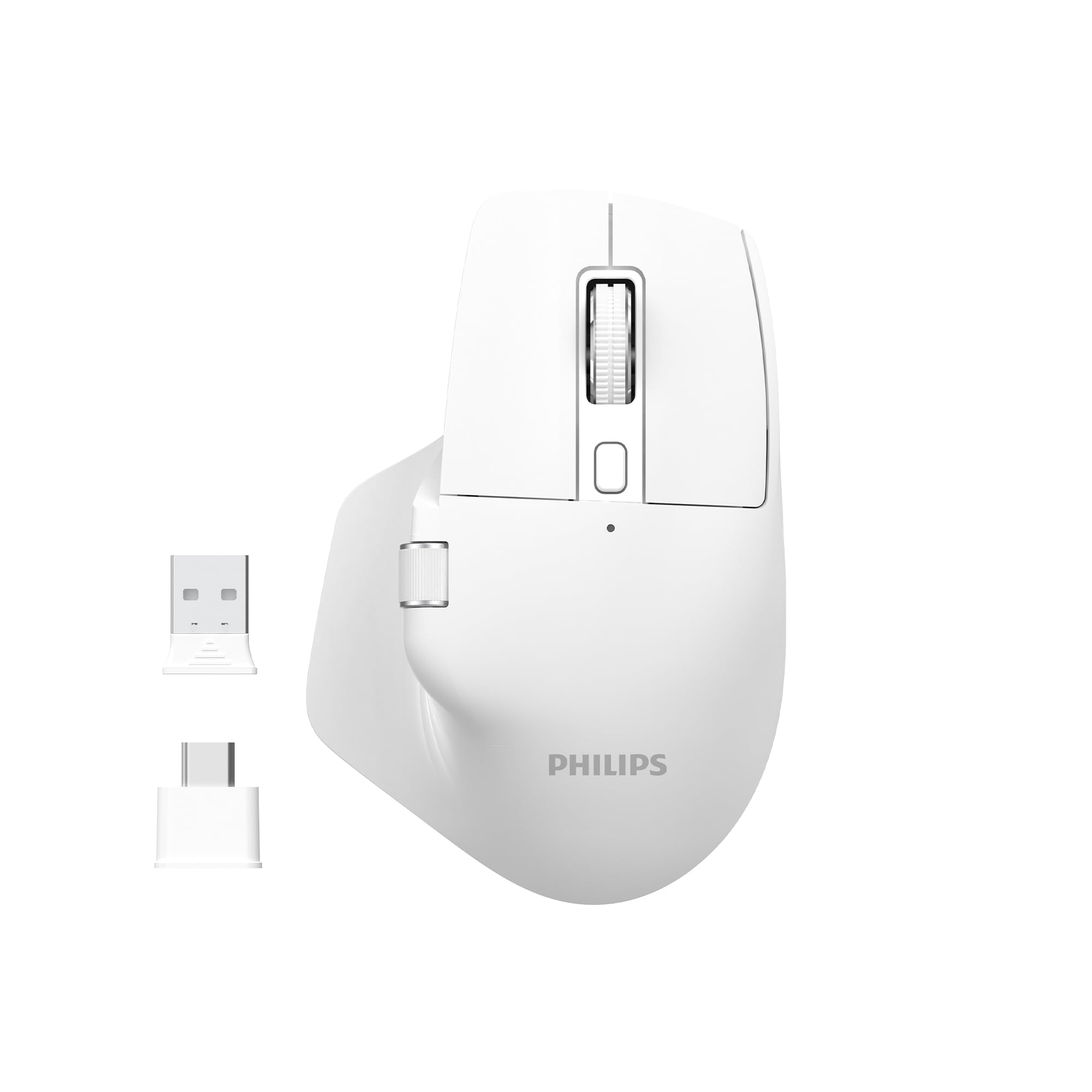
Image: The Philips SPK7858 Wireless Optical Mouse in white, shown with its USB receiver and Type-C adapter.
Setup
1. Kontenut tal-Pakkett
Qabel ma tibda, kun żgur li l-oġġetti kollha huma preżenti fil-pakkett:
- Philips SPK7858 Wireless Optical Mouse
- Riċevitur USB
- Adapter USB Type-C
- Kejbil tal-Iċċarġjar (Tip-Ċ)
- Manwal għall-Utent (dan id-dokument)
2. Iċċarġjar tal-Maws
The mouse comes with a built-in rechargeable battery. For first-time use, it is recommended to fully charge the mouse.
- Sib il-port tal-iċċarġjar tat-Tip Ċ fuq quddiem tal-maws.
- Qabbad il-kejbil tal-iċċarġjar ipprovdut mal-maws u sors ta' enerġija USB (eż., port USB tal-kompjuter, adapter tal-ħajt USB).
- Id-dawl indikatur tal-iċċarġjar jixgħel. Ladarba jkun iċċarġjat kompletament, id-dawl jista’ jibdel il-kulur jew jintefa.

Immaġni: Ġenb view of the Philips SPK7858 mouse, highlighting the Type-C charging port.
3. Konnessjoni tal-Maws
The mouse connects wirelessly via a 2.4GHz USB receiver.
- Remove the USB receiver from its storage compartment on the underside of the mouse.
- Plug the USB receiver directly into an available USB-A port on your computer. If your computer only has Type-C ports, use the provided Type-C adapter.
- Ixgħel il-maws billi tuża l-iswiċċ tal-enerġija li jinsab fuq in-naħa ta’ taħt.
- Your computer should automatically detect and install the necessary drivers. The mouse is ready for use.

Image: Underside of the Philips SPK7858 mouse, illustrating the USB dongle storage area and the optical sensor.
Tħaddim tal-Maws
Funzjonijiet tal-buttuna
The Philips SPK7858 mouse features 7 programmable buttons for enhanced control and efficiency.
- Buttuna tal-Ikklikkjar tax-Xellug: Funzjoni standard tal-ikklikkjar primarju.
- Buttuna tal-Ikklikkjar bil-Lemin: Funzjoni standard ta' klikk sekondarja.
- Scroll Wheel: Tiskrollja vertikalment. Tista' wkoll tagħfasha għall-funzjonalità tal-ikklikkja tan-nofs.
- Buttuna tal-Aġġustament tad-DPI: Iċċikla bejn is-settings tas-sensittività tad-DPI.
- Buttuna 'l quddiem: Jinnaviga 'l quddiem ġewwa web browsers jew file esploraturi.
- Buttuna b'lura: Jinnaviga lura ġewwa web browsers jew file esploraturi.
- Side Scroll Wheel: Provides horizontal scrolling functionality.

Immaġni: Quddiem view of the Philips SPK7858 mouse, detailing the main scroll wheel, DPI button, and side buttons.
Aġġustament DPI
Adjust the mouse sensitivity (DPI) to match your preference or task requirements. The SPK7858 offers 5 adjustable DPI levels.
- Press the DPI adjustment button (located behind the main scroll wheel) to cycle through the available DPI settings.
- Each press will switch to the next DPI level: 800, 1600, 2400, 3200, and 4000 DPI.
- Select the DPI setting that provides the most comfortable and precise cursor movement for your current activity.

Image: A visual representation of the five adjustable DPI levels (800, 1600, 2400, 3200, 4000) available on the Philips SPK7858 mouse.
Kompatibilità Universali
The Philips SPK7858 mouse is designed for broad compatibility across various operating systems, ensuring seamless integration with your devices.

Image: Icons representing universal compatibility with Windows, Apple (macOS), Chrome OS, Linux, and Android operating systems.
Manutenzjoni
Tindif
To maintain optimal performance and appearance, clean your mouse regularly.
- Uża drapp artab, niexef u mingħajr suf biex timsaħ il-wiċċ tal-maws.
- Għal ħmieġ iebes, neħħi ftitampLaħlaħ id-drapp bl-ilma jew b'soluzzjoni ħafifa tat-tindif. Evita kimiċi ħarxa.
- Tħallix likwidi jidħlu fil-ġisem tal-maws.
- Naddaf is-senser ottiku fuq in-naħa ta' taħt perjodikament b'tajjara tal-qoton biex tiżgura traċċar preċiż.
Kura tal-batterija
The mouse features a rechargeable battery designed for long service life.
- Iċċarġja l-maws meta l-indikatur tal-batterija juri enerġija baxxa.
- Evita li tiċċarġja l-batterija kompletament ta' spiss biex ittawwal il-ħajja tagħha.
- If storing the mouse for an extended period, charge it to about 50% before storage and recharge every few months.
Issolvi l-problemi
Il-maws ma jirrispondix
- Iċċekkja l-Enerġija: Kun żgur li l-maws huwa mixgħul u għandu biżżejjed ċarġ tal-batterija. Erġa' ċċarġjah jekk meħtieġ.
- Iċċekkja l-Konnessjoni: Verify that the USB receiver is securely plugged into a working USB port on your computer. Try a different USB port.
- Erġa 'par: Turn off the mouse, unplug the receiver, then plug the receiver back in and turn on the mouse.
- Interferenza: Move the mouse closer to the receiver or away from other wireless devices that might cause interference.
Inaccurate Tracking or Cursor Jumps
- Sensor Nadif: Naddaf is-senser ottiku fuq in-naħa ta' taħt tal-maws.
- Wiċċ: Ensure you are using the mouse on a suitable surface. Highly reflective, transparent, or uneven surfaces may affect tracking performance. A mouse pad is recommended.
- Twaqqif DPI: Aġġusta s-setting tad-DPI għal valur aktar baxx jekk il-cursor ikun sensittiv wisq.
Buttuni Mhux Jaħdmu
- Iċċekkja l-batterija: Low battery can sometimes affect button responsiveness.
- Kunflitt tas-Softwer: If using custom button assignments, check your operating system's mouse settings or any third-party software for conflicts.
Speċifikazzjonijiet
| Karatteristika | Dettall |
|---|---|
| Brand | Philips |
| Isem tal-Mudell | SPK7858 |
| Teknoloġija tal-Konnettività | Wireless (Riċevitur USB) |
| Teknoloġija ta 'Sejbien tal-Moviment | Ottiċi |
| Livelli DPI | 800, 1600, 2400, 3200, 4000 |
| Numru ta' Buttuni | 7 |
| Karatteristika Speċjali | Ergonomic Design, Rechargeable Battery |
| Kulur | Abjad |
| Piż tal-oġġett | Appross. 99g (inkluża l-batterija) |
| Batteriji | 1 Nonstandard Battery (included, rechargeable) |
| Kontenut tal-Kaxxa | Ġurdien |

Image: Diagram illustrating the dimensions of the Philips SPK7858 mouse: Height 12.3cm, Width 8.27cm, Depth 4.48cm, and approximate weight of 99g (including battery).
Informazzjoni dwar Garanzija
Philips products are manufactured to the highest standards and undergo rigorous quality checks. For detailed warranty information, including terms, conditions, and duration, please refer to the warranty card included with your product or visit the official Philips websit. Żomm l-irċevuta tax-xiri tiegħek bħala prova tax-xiri.
Appoġġ għall-Klijent
If you encounter any issues or have questions not covered in this manual, please contact Philips customer support. You can find contact details, FAQs, and additional resources on the official Philips support websit.
Appoġġ onlajn: Żur www.philips.com/support