
1. Introduzzjoni
Welcome to the user manual for your SGIN Android Tablet 10.1 Inch, Model GE8300. This manual provides essential information for setting up, operating, maintaining, and troubleshooting your new tablet. Designed with children in mind, this tablet features a durable case, parental controls, and pre-installed educational content through Kidoz software. Please read this manual thoroughly to ensure proper use and to maximize your tablet's potential.
2. Prodott Aktarview
The SGIN Android Tablet 10.1 Inch is equipped with a 10.1-inch HD IPS display, a quad-core processor, 4GB RAM, and 64GB of internal storage. It runs on Android 13 and includes a protective case with an adjustable bracket.
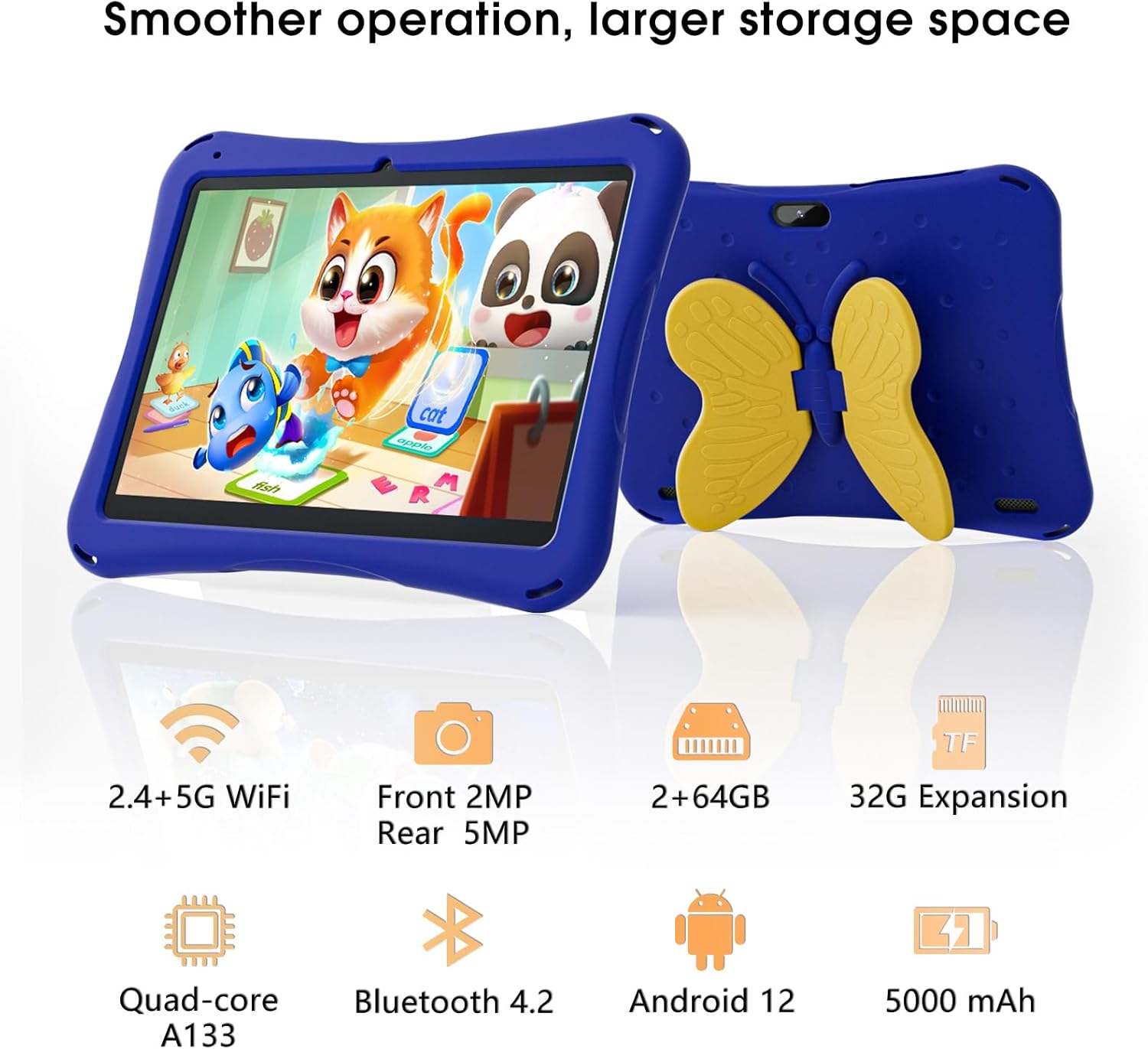
Image: SGIN Android Tablet 10.1 Inch with its protective blue case and yellow butterfly stand.
Komponenti tal-pillola

Image: Detailed diagram illustrating the various components and ports of the SGIN Android Tablet.
- Kamera ta' quddiem: Għal sejħiet bil-vidjo u selfies.
- Kamera ta' wara: Għat-teħid ta' ritratti u vidjows.
- Kelliema: Għall-output tal-awdjo.
- Port tat-Tip-C: Għall-iċċarġjar u t-trasferiment tad-dejta.
- Slott tal-Karta TF: Għal ħażna espansibbli.
- Jack tal-headphone: Għall-konnessjoni ta' headphones bil-fili.
- Żid il-Volum: Button to raise the audio level.
- Naqqas il-Volum: Button to lower the audio level.
- Parentesi: Adjustable stand integrated into the protective case.
3. Setup
3.1 Iċċarġjar tat-Tablet
Before first use, fully charge the tablet using the provided Type-C cable and power adapter. The 5000mAh battery provides approximately 6-8 hours of usage on a full charge. A charging indicator will typically appear on the screen.
3.2 Tixgħel/Jitfi
- Biex Tixgħel: Press and hold the power button (usually located on the side) until the SGIN logo appears.
- Biex Tifi: Agħfas u żomm il-buttuna tal-qawwa, imbagħad agħżel 'Itfi' mill-għażliet fuq l-iskrin.
- Biex terġa' tibda: Press and hold the power button, then select 'Restart' from the options.
3.3 Is-Setup Inizjali u l-Konnessjoni tal-Wi-Fi
Upon first power-on, follow the on-screen prompts to complete the initial Android 13 setup. This includes selecting your language, region, and connecting to a Wi-Fi network. The tablet supports both 2.4G and 5G Wi-Fi for stable internet connectivity.
- Mur fuq Settings > Netwerk u internet > Wi-Fi.
- Ixgħel il-Wi-Fi On.
- Agħżel in-netwerk mixtieq tiegħek mil-lista.
- Daħħal il-password jekk tintalab, imbagħad tektek Qabbad.
4. Istruzzjonijiet Operattivi
4.1 Navigazzjoni Bażika
The tablet uses a touch-sensitive screen for navigation. Common gestures include tapping to select, swiping to scroll, pinching to zoom, and long-pressing for additional options.
4.2 Użu tal-Kamera
The tablet features a 2MP front-facing camera and a 5MP rear camera. To use the camera:
- Iftaħ il- Kamera applikazzjoni.
- Select between front and rear cameras using the switch icon.
- Tektek il-buttuna tax-shutter biex tieħu ritratt jew tibda/twaqqaf ir-reġistrazzjoni tal-vidjow.
4.3 Ġestjoni tal-Ħażna
The tablet comes with 64GB of internal storage. If more space is needed, you can expand it by inserting a TF (microSD) card into the TF card slot. The tablet supports expansion up to 34GB.
4.4 Konnettività Bluetooth
The tablet supports Bluetooth 4.2 for connecting to wireless accessories such as headphones or speakers.
- Mur fuq Settings > Apparati konnessi > Preferenzi ta' konnessjoni > Bluetooth.
- Toggle Bluetooth On.
- Agħżel it-tagħmir tiegħek mil-lista ta' tagħmir disponibbli biex tqabbad.
5. Parental Control Features
The SGIN tablet includes a built-in parental control security system to manage your child's usage and content access.
- Issettja Passwords: Create a password to secure parental control settings.
- Limiti ta' Ħin fuq l-Iskrin: Define daily usage limits for the tablet.
- Iffiltrar tal-Kontenut: Eliminate unwanted ads and create specific media files or approved websites for your children.
- Multiple Accounts: Set up individual accounts for each child, allowing personalized settings and content access.
6. Kidoz Kids Software
The tablet comes with the Kidoz Kid's software pre-installed, offering a safe and engaging environment for children.
- Accessing Kidoz: Launch the Kidoz app from the home screen.
- Kids Store: Explore thousands of free games and educational apps available for download within the Kidoz environment.
- Kontenut Edukattiv: Kidoz provides content that supports learning in subjects like math, language, music, and painting.
7. Manutenzjoni
7.1 Tindif
Use a soft, lint-free cloth to clean the screen and the tablet's body. For stubborn smudges, slightly dampLaħlaħ id-drapp bl-ilma. Evita kimiċi ħarxa jew materjali li joborxu.
7.2 Kura tal-Batterija
To prolong battery life, avoid exposing the tablet to extreme temperatures. Charge the tablet regularly and avoid letting the battery completely drain frequently.
7.3 Aġġornamenti tas-Software
Iċċekkja perjodikament għal aġġornamenti tas-sistema biex tiżgura prestazzjoni u sigurtà ottimali. Mur fuq Settings > Sistema > Aġġornament tas-sistema.
7.4 Kawża Protettiva
The included kid-proof case is designed to protect the tablet from dust, bumps, and drops. It also features a hollow design for heat dissipation. Ensure the tablet is properly seated within the case for maximum protection.

Image: The durable anti-drop protective case with its adjustable bracket.
8 Issolvi l-problemi
If you encounter issues with your SGIN tablet, refer to the following common solutions:
- Il-Pillola Mhux Tixgħel: Kun żgur li t-tablet huwa ċċarġjat. Qabbadha mal-ċarġer u stenna ftit minuti qabel ma tipprova tixgħelha mill-ġdid.
- Skrin li ma jirrispondix: If the screen becomes unresponsive, try restarting the tablet by holding down the power button for approximately 10-15 seconds until it powers off, then power it on normally.
- Kwistjonijiet ta' Konnessjoni Wi-Fi: Check if other devices can connect to the Wi-Fi network. Restart your Wi-Fi router. On the tablet, forget the network and reconnect.
- Prestazzjoni bil-mod: Close unused applications running in the background. Clear cache data for apps. Consider performing a factory reset if performance issues persist (back up important data first).
- L-Applikazzjonijiet Jikkraxxjaw: Ensure apps are updated to their latest versions. Clear the app's cache and data via Settings > Apps > [Isem tal-App] > Ħażna u cache.
Għal kwistjonijiet li ma jiġux solvuti b'dawn il-passi, jekk jogħġbok ikkuntattja l-appoġġ għall-klijenti.
9. Speċifikazzjonijiet
Key technical specifications for the SGIN Android Tablet 10.1 Inch Model GE8300:
| Karatteristika | Speċifikazzjoni |
|---|---|
| Numru tal-Mudell | GE8300 |
| Daqs tal-Iskrin | 10.1 Pulzier |
| Riżoluzzjoni tal-Wiri | 1280 x 800 pixel (HD IPS) |
| Proċessur | 1.6 GHz Quad-core (Allwinner A133) |
| RAM | 4GB (2GB fiżiku + 2GB espansibbli) |
| Ħażna Interna | 64GB ROM |
| Ħażna espansibbli | Up to 34GB via TF Card |
| Sistema Operattiva | Android 13 |
| Kapaċità tal-batterija | 5000mAh |
| Kamera ta' Quddiem | 2MP |
| Kamera ta' wara | 5MP |
| Konnettività bla fili | 2.4G/5G WiFi, Bluetooth 4.2 |
| Kulur | Deep Blue |
| Dimensjonijiet tal-Pakketti | 32.2 x 20.4 x 4.7 ċm; 1.04 kg |
10. Garanzija u Appoġġ
10.1 Garanzija tal-Prodott
The SGIN Android Tablet 10.1 Inch Model GE8300 comes with a garanzija ta 'sena mid-data tax-xiri. Din il-garanzija tkopri difetti fil-manifattura taħt użu normali. Jekk jogħġbok żomm il-prova tax-xiri tiegħek għal talbiet ta' garanzija.
10.2 Appoġġ għall-Klijent
If you require further assistance or have questions not covered in this manual, please contact SGIN customer support. Refer to the product packaging or the official SGIN webis-sit għall-aktar informazzjoni ta' kuntatt aġġornata.