
1. Prodott Aktarview
This manual provides essential information for the SGIN 15.6 Inch Laptop Computer, Model SGIN-Y101. It covers initial setup, operation, maintenance, and troubleshooting to ensure optimal performance and longevity of your device.
Karatteristiċi ewlenin:
- Powerful Core i3 Processor: Equipped with an i3 (4-thread) CPU up to 3.9GHz for multitasking.
- Ample Storage and Speed: Features 16GB RAM and 1024GB SSD for quick application loading and smooth operation. Storage is expandable with a TF card up to 1TB.
- 15.6 Inch FHD IPS Display: Full HD 1920×1080 IPS screen with 180° viewing angles for vivid colors and sharp details.
- Tastiera backlit: White backlit keyboard for improved typing accuracy in low-light conditions. Activate with "FN" + "F5".
- All-Day Battery and Connectivity: 53.2Wh battery (7000mAh) providing up to 8 hours of battery life. Includes USB 3.0, HDMI, Micro SD slot, Kensington lock, and a headphone jack. Features WiFi 6.
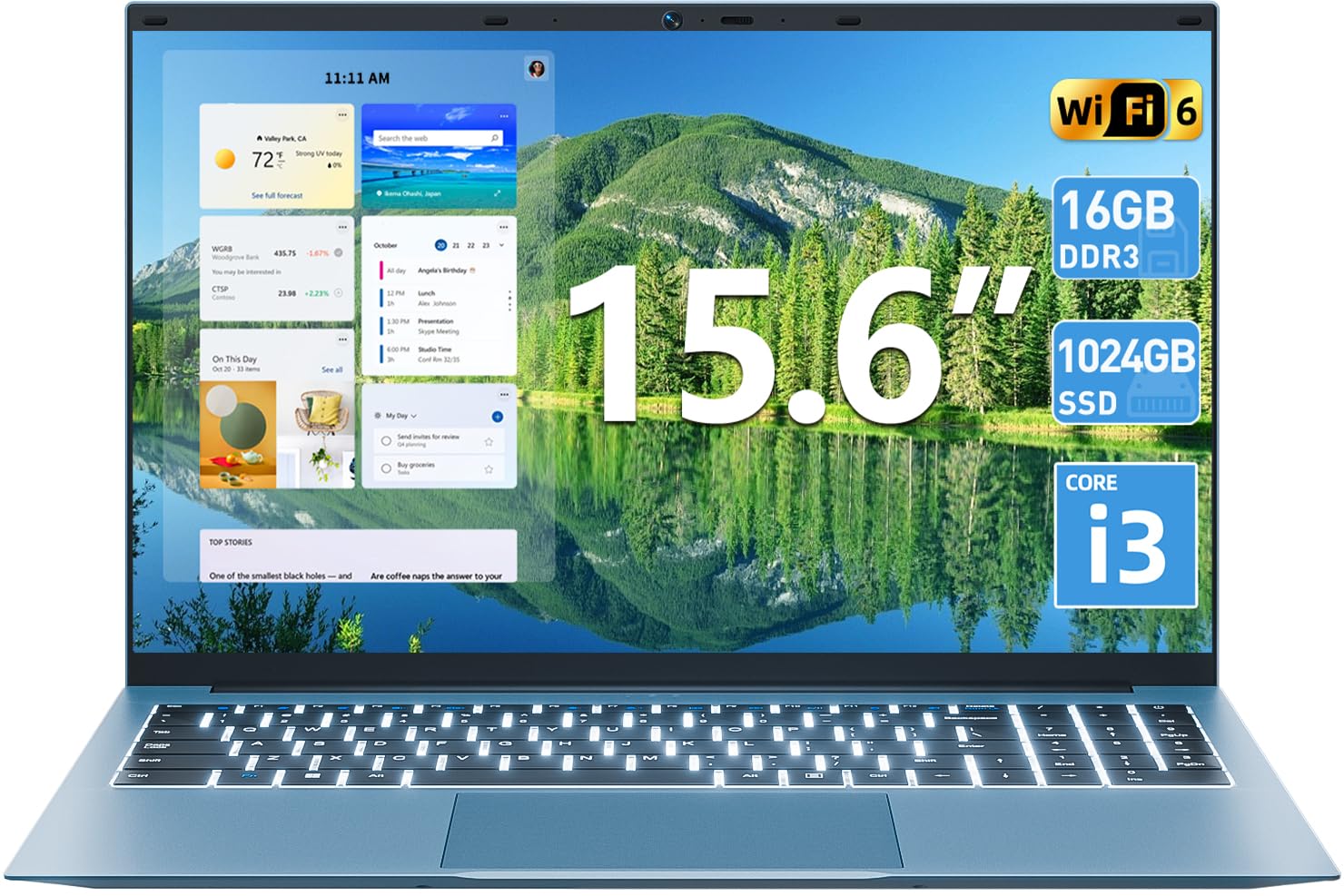
Immaġni 1.1: Fuqview of the SGIN 15.6 Inch Laptop Computer, highlighting its main features like RAM, SSD, Core i3 processor, Windows 11, battery, backlit keyboard, and WiFi 6.
2. Setup Inizjali
2.1 Kif tiftaħ il-Laptop
Neħħi l-komponenti kollha mill-imballaġġ bir-reqqa. Kun żgur li l-oġġetti li ġejjin huma preżenti:
- SGIN 15.6 Inch Laptop
- Adapter tal-Enerġija
- Manwal għall-Utent

Image 2.1: The SGIN laptop, power adapter, and user manual as typically found in the package.
2.2 Iċċarġjar tal-batterija
Before first use, fully charge the laptop battery.
- Qabbad l-adapter tal-enerġija mal-port tal-iċċarġjar fuq il-laptop.
- Ipplaggja l-adapter tal-enerġija f'iżbokk tal-ħajt.
- Allow the laptop to charge until the battery indicator shows a full charge.
Importanti: Use only the provided power adapter to avoid damage to the laptop.
2.3 Ixgħel u Setup Inizjali tal-Windows
- Iftaħ l-għatu tal-laptop.
- Agħfas il-buttuna tal-qawwa li tinsab fuq it-tastiera.
- Segwi l-istruzzjonijiet fuq l-iskrin biex tlesti s-setup inizjali tal-Windows 11, inkluż l-għażla tal-lingwa, il-konnessjoni tan-netwerk, u l-ħolqien tal-kont tal-utent.
3. It-Tħaddim tal-Laptop
3.1 Tastiera u Touchpad
The laptop features a full-size keyboard with a numeric keypad and a large touchpad for navigation.
- Tastiera backlit: To toggle the keyboard backlight, press the FN ċavetta simultanjament mal- F5 ċavetta.
- Ġesti tat-touchpad: Refer to Windows 11 settings for customizable touchpad gestures.

Image 3.1: The laptop's backlit keyboard and numeric keypad, shown illuminated for use in low-light conditions.
3.2 Konnessjoni tal-Periferali
The laptop offers various ports for connecting external devices.
- Portijiet USB: Connect USB devices such as mice, keyboards, or external storage.
- Port HDMI: Qabbad ma' monitor estern jew TV għal wiri estiż.
- Port tat-Tip-C: For data transfer and potentially charging (check specific adapter compatibility).
- Slott Mikro SD: Insert a Micro SD card for additional storage.
- Jack tal-headphone: Qabbad headphones jew kelliema esterni.
- Slot Kensington Lock: Use a compatible security cable to secure your laptop.

Image 3.2: The left side of the laptop displaying the power input, Type-C port, HDMI port, and a USB port.
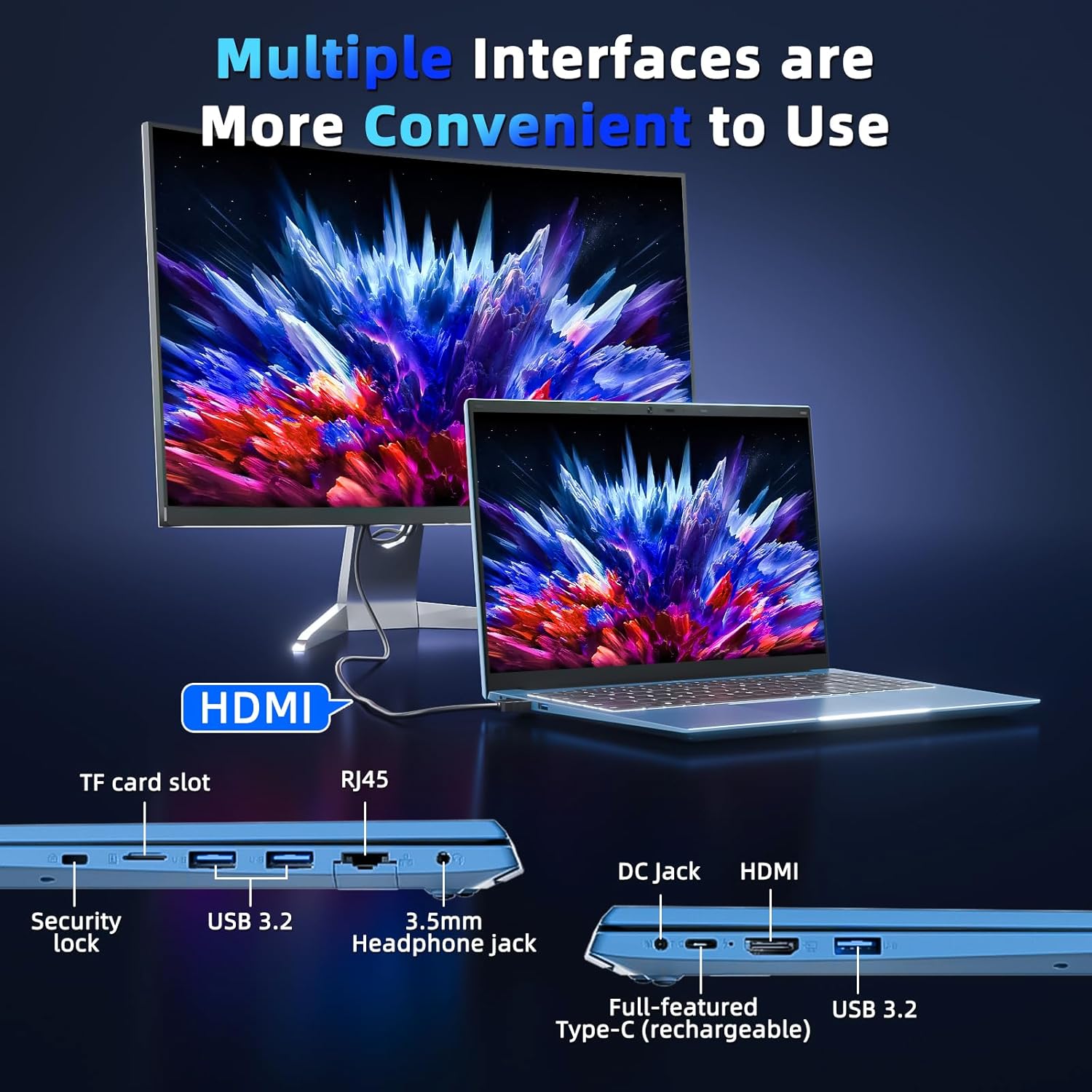
Image 3.3: The right side of the laptop displaying the Kensington lock slot, Micro SD card slot, two USB ports, and the headphone jack.
3.3 Konnettività tal-Wi-Fi
The laptop supports Wi-Fi 6 for fast wireless internet access.
- Ikklikkja l-ikona tal-Wi-Fi fit-taskbar.
- Agħżel in-netwerk mixtieq tiegħek mil-lista.
- Daħħal il-password tan-netwerk jekk tintalab u kklikkja "Qabbad".
For wired internet connection, use the Ethernet port.
4. Manutenzjoni u Kura
4.1 Tindif tal-Laptop
- Uża drapp artab u mingħajr suf biex tnaddaf l-iskrin u l-barra.
- Evita li tuża kimiċi ħarxa jew materjali li joborxu.
- Għal tbajja’ iebsa, neħħi ħafifampLaħlaħ id-drapp bl-ilma jew b'soluzzjoni għat-tindif tal-iskrin.
4.2 Kura tal-Batterija
- Evita li tiċċarġja l-batterija kompletament ta' spiss.
- Aħżen il-laptop f'post frisk u niexef meta ma jkunx qed jintuża għal perjodi twal.
- If the laptop will not be used for a long time, charge the battery to about 50-60% before storage.
4.3 WebPrivatezza tal-kamera
Il-laptop jinkludi fiżika webcam switch for privacy. Slide the switch to cover or uncover the webcam lens as needed.
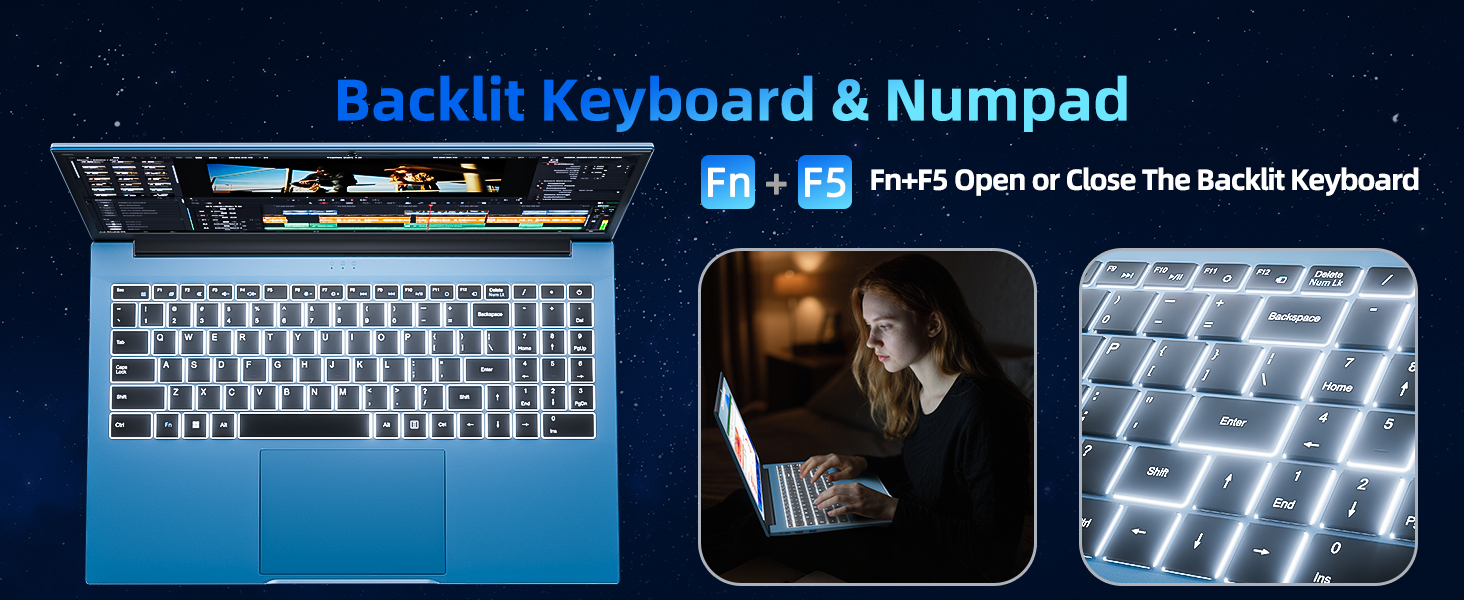
Image 4.1: Illustration of the physical webcam cover, demonstrating how to open and close it for privacy.
5 Issolvi l-problemi
5.1 Kwistjonijiet tal-Enerġija
- Il-laptop mhux qed jixgħel: Ensure the power adapter is securely connected to both the laptop and a working power outlet. Check if the battery is charged.
- Il-batterija mhix qed tiċċarġja: Verify the power adapter connection. If the issue persists, contact customer support.
5.2 Kwistjonijiet tal-Wiri
- L-iskrin huwa vojt: Ensure the laptop is powered on. Try adjusting the screen brightness using the function keys. If connected to an external monitor, disconnect it.
- Distorted image: Restart the laptop. Update display drivers if necessary.
5.3 Kwistjonijiet ta' Konnettività
- Ebda konnessjoni Wi-Fi: Check if Wi-Fi is enabled in Windows settings. Restart your router and the laptop. Ensure you are within range of a Wi-Fi network.
- Apparat Bluetooth mhux qed jikkonnettja: Ensure Bluetooth is enabled on both the laptop and the device. Make sure the device is in pairing mode.
6. Speċifikazzjonijiet
| Karatteristika | Dettall |
|---|---|
| Brand | SGIN |
| Numru tal-Mudell | SGIN-Y101 |
| Daqs tal-Iskrin | 15.6 Pulzier |
| Riżoluzzjoni tal-Wiri | 1920 x 1080 pixel (Full HD IPS) |
| Mudell tas-CPU | Core i3 (10th Gen, Intel Core i3-10100) |
| CPU Speed (Max) | 3.9 GHz |
| RAM | 16GB DDR3 SDRAM |
| Ħażna | 1024GB SSD (Expandable with TF card up to 1TB) |
| Sistema Operattiva | Windows 11 |
| Kapaċità tal-batterija | 53.2 Wh (7000mAh) |
| Konnettività bla fili | WiFi 6 (802.11ax), Bluetooth |
| Portijiet | USB 3.0, HDMI, Micro SD slot, Kensington lock, Headphone jack, Type-C |
| Tastiera | Backlit |
| Webcam | Yes (with physical privacy switch) |
| Piż | 2.52 Kilogrammi |
7. Garanzija u Appoġġ
The SGIN 15.6 Inch Laptop Computer comes with a 1-year limited protection warranty.
For technical assistance, troubleshooting, or warranty claims, please contact SGIN customer support. They offer 24/7 instant help. Refer to the contact information provided with your product packaging or visit the official SGIN websit għal dettalji ta 'appoġġ.
8. Vidjo tal-Prodott
Video 8.1: An official product video demonstrating the SGIN 15.6 Inch Laptop Computer, including its physical features and some operational aspects. This video is provided by the seller, SGIN Lap US.