
1. Introduzzjoni
Thank you for choosing the DazzlingStage 60W 9LED RGBW Stage Wall Wash Bar Light. This manual provides essential information for the safe and effective operation of your lighting fixture. Please read it thoroughly before installation and use, and retain it for future reference.
Dan stage light bar features 9 high-power RGBW LEDs, offering a wide spectrum of colors and dynamic lighting effects suitable for various events and venues.

Immaġni 1.1: Fuqview of the DazzlingStage 60W 9LED RGBW Stage Wall Wash Bar Lights in various colors.
2. Istruzzjonijiet tas-Sigurtà
- Sigurtà Elettrika: Tiżgura l-provvista tal-enerġija voltage matches the specifications of the fixture. Always disconnect power before cleaning, servicing, or moving the unit.
- Installazzjoni: Install the fixture in a well-ventilated area, away from heat sources. Ensure secure mounting to prevent accidental falls.
- Operazzjoni: Do not look directly into the light source when the fixture is operating, as it can cause eye damage. Avoid operating the unit in wet or damp kundizzjonijiet.
- Manutenzjoni: Irreferi l-manutenzjoni kollha lil persunal kwalifikat. Tippruvax issewwi l-unità int stess.
- Tfal: Żomm l-apparat fejn ma jintlaħaqx mit-tfal.
3. Kontenut tal-Pakkett
Meta tiftaħ il-pakkett, jekk jogħġbok ivverifika li l-oġġetti kollha elenkati hawn taħt huma inklużi u f'kundizzjoni tajba:
- DazzlingStage 60W 9LED RGBW Stage Wall Wash Bar Light (x1 per pack)
- Power Cord (x1 per pack)
- Remote Control (x1 per pack)
- Mounting Bracket (x1 per pack)
- Knobs (x2 per pack)
- Black Gaskets (x2 per pack)
- Instruction Manual (x1 per pack)

Immaġni 3.1: Kontenut inkluż fil-pakkett tal-prodott.
4. Komponenti tal-Prodott
Familiarize yourself with the main components of the light bar:
- Firxa ta' LED: 9 RGBW LEDs for color mixing.
- Panel tal-Kontroll: Features a 4-digit LED display and control buttons (MENU, UP, DOWN, ENTER) for mode selection and parameter adjustment.
- Portijiet tad-DMX DĦUL/ĦRUĠ: For connecting to a DMX controller or linking multiple units.
- Power IN/OUT: For power connection and daisy-chaining power to other units.
- Bracket tal-immuntar: Adjustable bracket for floor standing or truss mounting.
- Sink tas-Sħana: Integrated cooling system to maintain optimal operating temperature.

Image 4.1: Key components and dimensions of the light bar.
5. Setup u Installazzjoni
The DazzlingStage Wall Wash Bar Light offers flexible installation options:
5.1 Immuntar tal-Bracket
Attach the included mounting bracket to the light bar using the provided knobs and gaskets. Ensure the bracket is securely fastened.
5.2 Għażliet ta' Tqegħid
- Bil-wieqfa fl-art: The bracket allows the light bar to stand upright on a flat surface. Adjust the angle as needed.
- Truss Mounting: Uża cl xierqaamps (not included) to attach the bracket to a lighting truss. Ensure the truss and clamps can support the weight of the fixture.
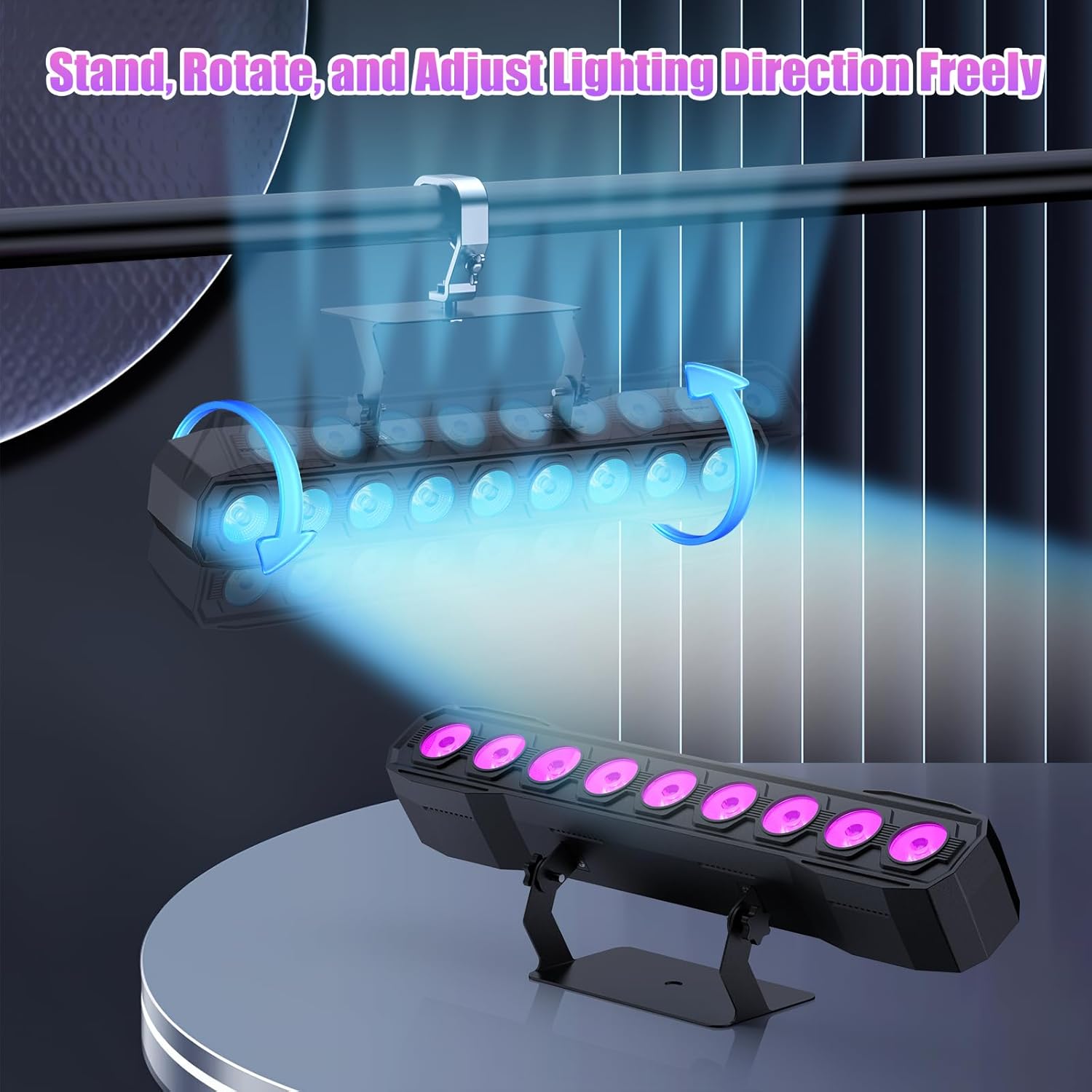
Image 5.1: Illustration of mounting and angle adjustment options.
5.3 Konnessjoni tal-Enerġija
Connect the power cord to the Power IN port on the back of the fixture and then to a suitable power outlet. Multiple units can be daisy-chained using the Power OUT port to simplify wiring for larger setups.
6. Modi Operattivi
The DazzlingStage Wall Wash Bar Light supports several control modes:
- Kontroll DMX512: For professional control via a DMX console.
- Modalità Awtomatika: Pre-programmed lighting sequences.
- Sound-Activated Control: Lights react to ambient sound.
- Kontroll mill-bogħod: Convenient wireless control using the included remote.
- Modalità Kaptan-Skjav: Link multiple units where one acts as a master and others as slaves, synchronizing effects.
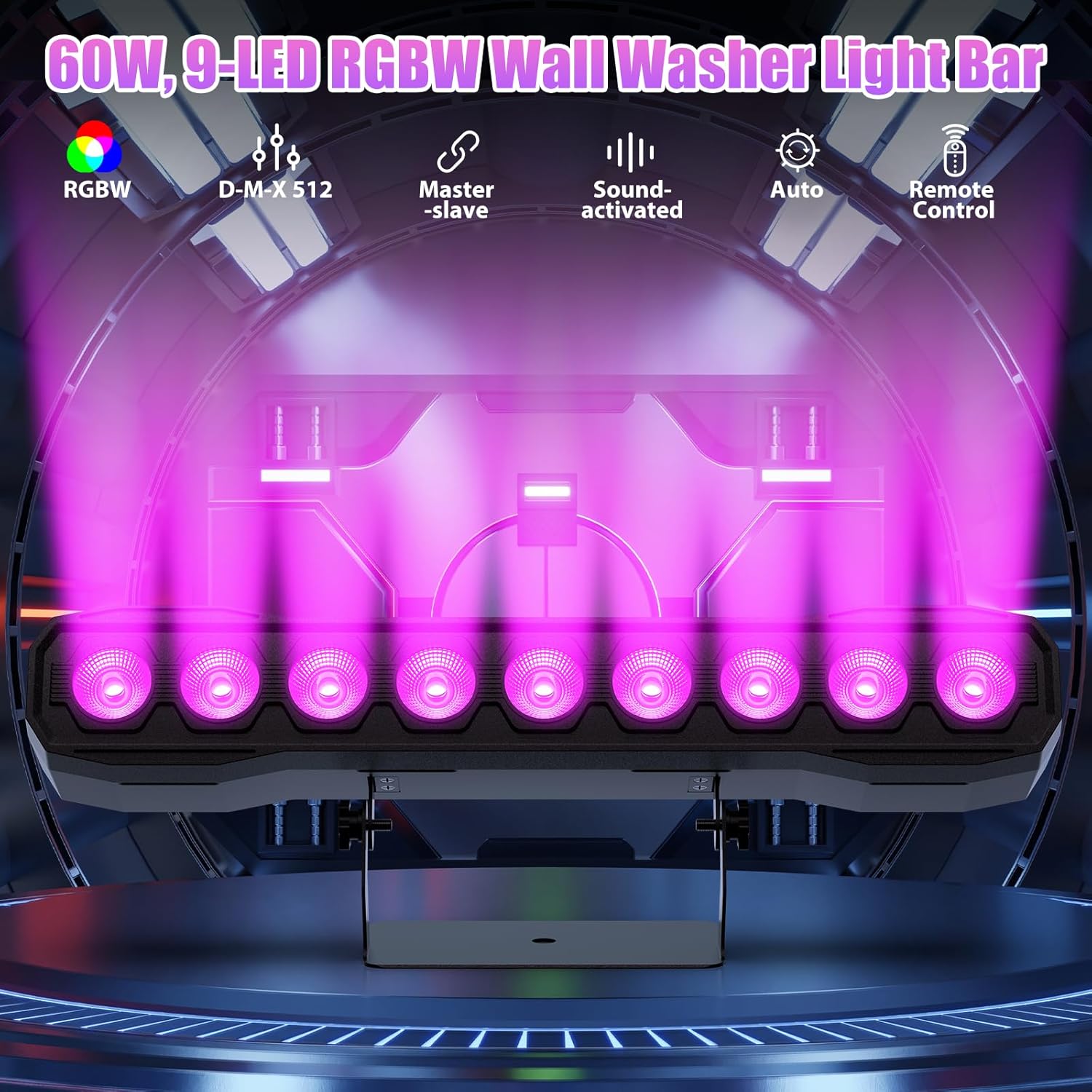
Immaġni 6.1: Fuqview of available control modes.
6.1 Display Panel Operation
Use the buttons on the back of the fixture to navigate the menu and select modes:
- MENU: Ċikli minn għażliet tal-menu prinċipali.
- FUQ ISFEL: Adjusts values or navigates sub-menus.
- Daħħal: Jikkonferma l-għażla.
6.2 Effetti tad-Dawl
The fixture supports various dynamic effects:
- Taħlit tal-Kulur: Over 16.7 million color combinations with 0-100% linear dimming.
- Strobe Effett li jteptep.
- Aqbeż: Instant color changes.
- Fade: Tranżizzjonijiet bla xkiel bejn il-kuluri.
- Polz: Gradual changing effects.
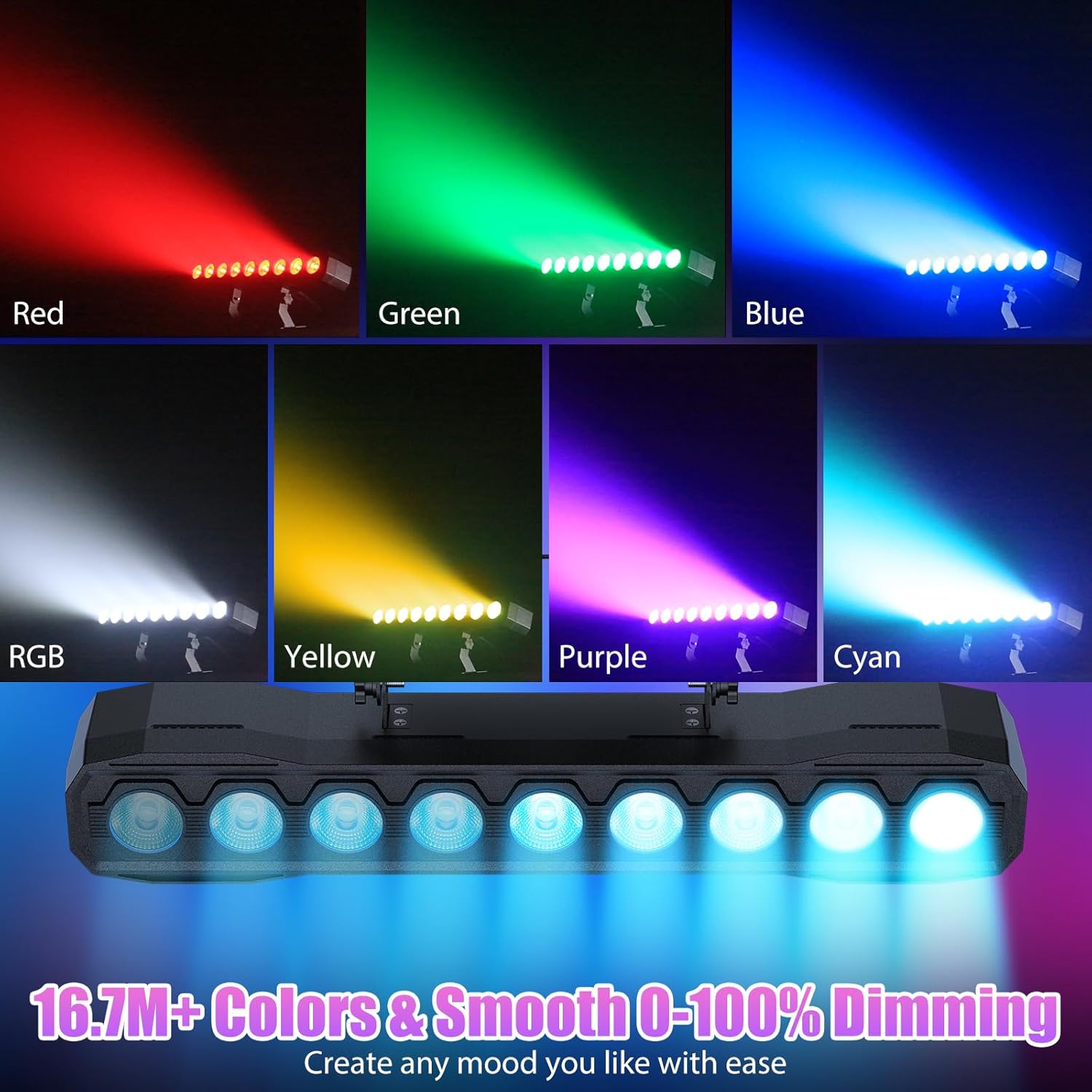
Immaġni 6.2: Eż.amples of color mixing and dimming capabilities.

Image 6.3: Visual representation of Strobe, Jump, Fade, and Pulse effects.
7. Funzjonijiet ta 'Kontroll mill-bogħod
Il-kontroll remot inkluż jipprovdi aċċess konvenjenti għal diversi funzjonijiet:
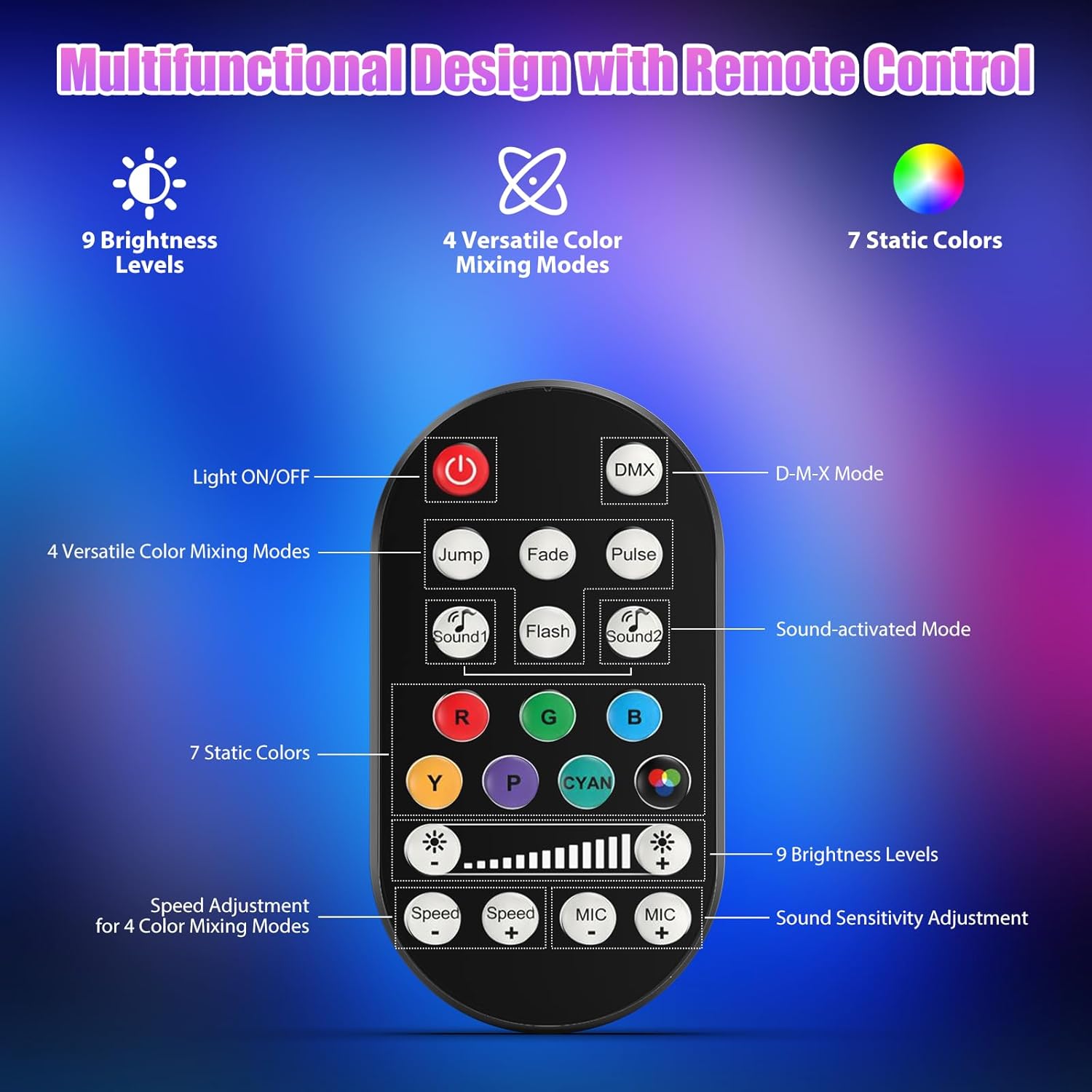
Image 7.1: Remote control layout and functions.
- Dawl mixgħul/mitfi: Jixgħel jew jitfi l-unità.
- DMX: Jattiva l-modalità ta' kontroll DMX.
- Jump, Fade, Pulse, Flash: Selects different color mixing modes.
- Sound1, Sound2: Activates sound-activated modes with different sensitivities.
- R, G, B, Y, P, Cyan, White: Jagħżel kuluri statiċi.
- Livelli ta' luminożità: Adjusts the overall intensity of the light (9 levels).
- Veloċità +/-: Adjusts the speed of dynamic effects.
- MIC +/-: Adjusts the sound sensitivity for sound-activated modes (15 levels).
8. DMX512 Control
For advanced control, connect the fixture to a DMX512 controller. The light bar typically uses 4 or 8 DMX channels. Refer to the display panel for DMX address setting and channel assignments.
8.1 Issettjar tal-Indirizz DMX
Use the MENU, UP, DOWN, and ENTER buttons on the fixture's display panel to set the DMX starting address. The display will show 'AXXX' where XXX is the address (e.g., A001).
8.2 DMX Channel Functions (Example - 8 Channel Mode)
| Kanal | Funzjoni | Firxa ta' Valur | Deskrizzjoni |
|---|---|---|---|
| CH1 | Master Dimmer | 0-255 | Luminożità ġenerali (0% sa 100%) |
| CH2 | Intensità Ħamra | 0-255 | Red LED brightness (0% to 100%) |
| CH3 | Intensità ħadra | 0-255 | Green LED brightness (0% to 100%) |
| CH4 | Intensità Blu | 0-255 | Blue LED brightness (0% to 100%) |
| CH5 | Intensità abjad | 0-255 | White LED brightness (0% to 100%) |
| CH6 | Strobe/Effect | 0-255 | 0-10: No function; 11-255: Strobe speed (slow to fast) |
| CH7 | Programm Awtomatiku | 0-255 | Selects and controls speed of built-in auto programs |
| CH8 | Ħoss Attiv | 0-255 | Activates sound mode and adjusts sensitivity |
Tabella 8.1: Eżample DMX Channel Functions (may vary slightly by firmware version).
9. Manutenzjoni
Regular maintenance ensures optimal performance and extends the lifespan of your fixture.
- Tindif: Periodically clean the lens and housing with a soft, lint-free cloth. Do not use abrasive cleaners or solvents. Ensure the fixture is powered off and cool before cleaning.
- Spezzjoni: Iċċekkja regolarment il-kejbils tal-enerġija, il-kejbils tad-DMX, u l-ħardwer tal-immuntar għal kwalunkwe sinjal ta’ xedd jew ħsara. Ibdel il-komponenti bil-ħsara immedjatament.
- Ħażna: When not in use for extended periods, store the fixture in a dry, dust-free environment.
10 Issolvi l-problemi
Jekk tiltaqa' ma' problemi, irreferi għall-problemi u s-soluzzjonijiet komuni li ġejjin:
| Problema | Kawża Possibbli | Soluzzjoni |
|---|---|---|
| Ebda qawwa | Power cable disconnected; No power from outlet; Blown fuse | Check power cable connection; Test outlet with another device; Replace fuse if necessary |
| Ebda output tad-dawl | Dimmer channel at 0%; Incorrect mode selected; DMX signal issue | Increase dimmer level; Select desired operating mode; Check DMX cable and address settings |
| Incorrect colors/effects | Incorrect DMX channel values; Remote control interference | Verify DMX channel settings; Ensure remote is pointed directly at the sensor; Check for other IR interference |
| Il-modalità attivata bil-ħoss ma taħdimx | Microphone sensitivity too low; No sound input | Increase MIC sensitivity via remote or display; Ensure sufficient sound is present near the fixture |
| Is-sħana żejda tal-apparat | Poor ventilation; Blocked heat sink | Ensure adequate airflow around the unit; Clean any dust or debris from the heat sink fins |
11. Speċifikazzjonijiet
| Karatteristika | Dettall |
|---|---|
| Brand | DazzlingStage |
| Numru tal-Mudell | ZQ06190 |
| Sors tad-Dawl | 9 x 60W RGBW LEDs |
| Taħlit tal-Kulur | RGBW 4-in-1, 16.7 million colors |
| Dimming | 0-100% dimming elettroniku lineari |
| Angolu tar-raġġ | 35° Angolu Wide |
| Modi ta' Kontroll | DMX512, Auto, Sound-Activated, Remote Control, Master-Slave |
| Kanali DMX | 4 or 8 Channels (selectable) |
| Wiri | Display LED b'4 ċifri |
| Materjal | Acrylonitrile Butadiene Styrene (ABS) |
| Dimensjonijiet tal-Prodott | 18.1 x 5.5 x 5.1 pulzieri (46 x 14 x 13 ċm) |
| Piż tal-oġġett | Appross. 1.98 lbs (0.9 kg) |
| Input tal-Enerġija | AC 100-240V, 50/60Hz |
| Manifattur | Shenzhen Zhuoqiong Technology Co., Ltd. |
12. Garanzija u Appoġġ
DazzlingStage products are designed for reliability and performance. For warranty information, please refer to the terms and conditions provided at the time of purchase or contact your retailer.
If you require technical assistance or have questions not covered in this manual, please contact DazzlingStage customer support through the retailer's platform or the official brand website. Please have your model number (ZQ06190) and purchase details ready when contacting support.