
1. Introduzzjoni
Grazzi tax-xiriasing the Z-Edge 27-inch 4K UHD IPS Monitor, Model S274K. This monitor is designed to provide a high-quality visual experience for both professional and gaming applications, featuring a 3840x2160 resolution, 120Hz refresh rate, and 1ms response time. This manual provides essential information for setting up, operating, and maintaining your monitor to ensure optimal performance and longevity.

Image: Visual comparison demonstrating the clarity of 4K UHD (3840x2160) resolution compared to QHD (2560x1440) and FHD (1920x1080) on the Z-Edge monitor.
2. Informazzjoni dwar is-Sigurtà
Jekk jogħġbok aqra l-istruzzjonijiet kollha bir-reqqa qabel ma tuża dan il-prodott. Żomm dan il-manwal għal referenza futura.
- Tesponix il-monitor għax-xita, umdità, jew temperaturi estremi.
- Aċċerta ruħek li jkun hemm ventilazzjoni xierqa madwar il-monitor. Timblokkax il-fetħiet tal-ventilazzjoni.
- Uża biss l-adapter tal-enerġija li jiġi mal-monitor.
- Evita li tpoġġi oġġetti tqal fuq il-korda tad-dawl.
- Skonnettja l-plagg tal-enerġija mis-sokit jekk il-monitor ma se jintużax għal perjodu estiż.
- Tippruvax tagħmel manutenzjoni tal-monitor int stess. Irreferi għal kull manutenzjoni f'idejn persunal kwalifikat.
3. Kontenut tal-Pakkett
Ivverifika li l-oġġetti kollha huma preżenti fil-pakkett tiegħek:
- Z-Edge 27-inch 4K UHD Monitor
- Stand tal-Monitor (Bażi u Għonq)
- Adapter tal-Enerġija
- Cable HDMI
- Manwal għall-Utent (dan id-dokument)
- Viti għall-Assemblaġġ tal-Stand
4. Monitoraġġ Fuqview
4.1 Quddiem View
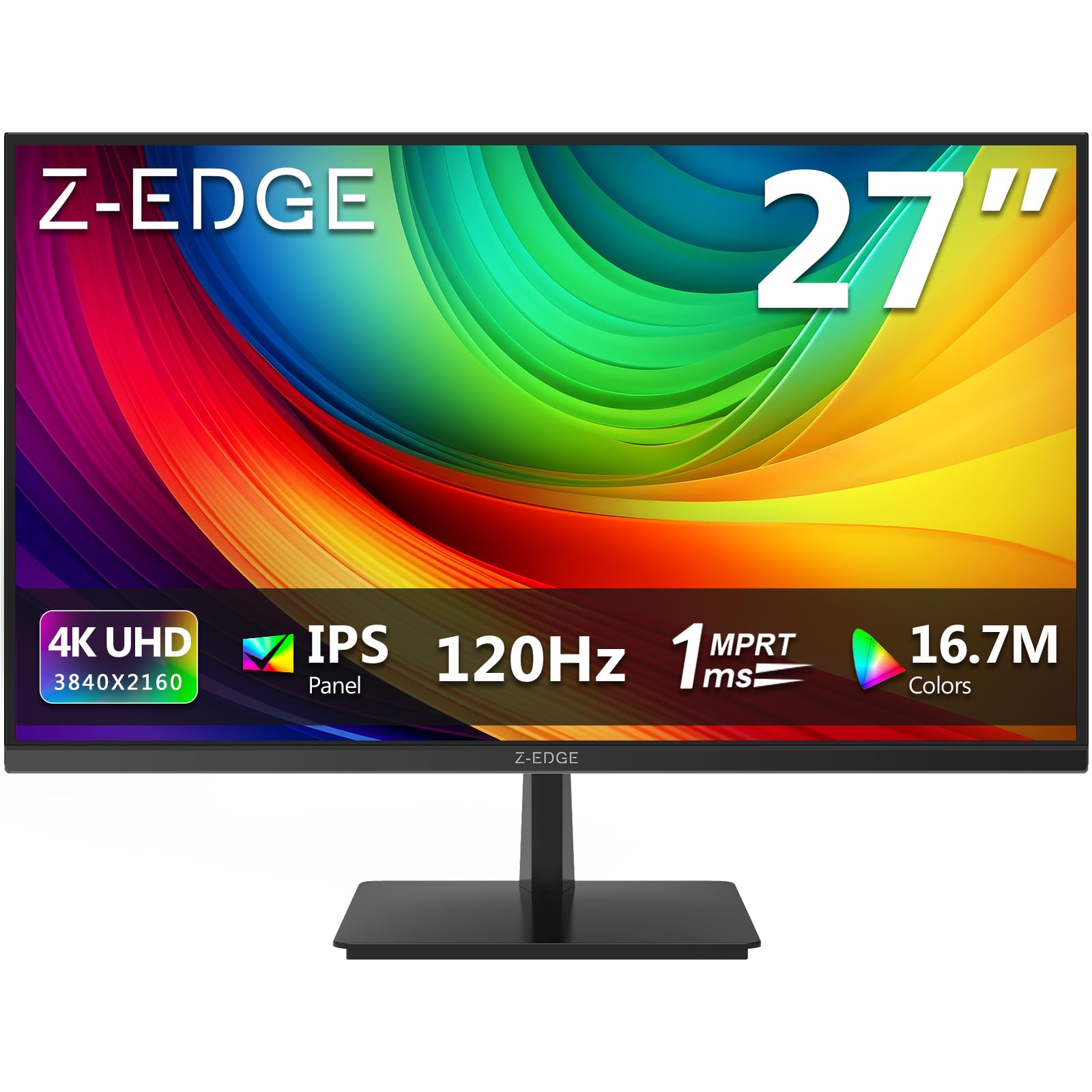
Immaġni: Quddiem view of the Z-Edge 27-inch 4K UHD monitor. This image shows the monitor displaying a vibrant scene, highlighting its slim bezels and overall design.
4.2 Wara View u l-Portijiet

Immaġni: Wara view of the Z-Edge 27-inch 4K UHD monitor. This image illustrates the monitor's connectivity options, including HDMI and DisplayPort inputs, and the VESA mounting pattern.
Portijiet Disponibbli:
- DC 12V: Port tad-dħul tal-enerġija.
- HDMI 1/2 (2.0): Two HDMI input ports for connecting various devices.
- DP 1/2 (1.4): Two DisplayPort input ports for high-resolution connections.
- Out tal-Awdjo: 3.5mm audio jack for connecting external speakers or headphones.

Immaġni: Dettaljata view of the monitor's input ports. This diagram clearly labels each port, including DC 12V power, two HDMI 2.0, two DisplayPort 1.4, and an audio output.
5. Setup
5.1 Assemblaġġ tal-Istand
- Oħroġ il-monitor mill-imballaġġ tiegħu bir-reqqa, filwaqt li żżomm l-iskrin protett.
- Waħħal l-għonq tal-istand mal-pannell tal-monitor billi tuża l-viti pprovduti.
- Connect the stand base to the stand neck, securing it with the remaining screws.
- Poġġi l-monitor immuntat fuq wiċċ stabbli u ċatt.
Alternatively, the monitor supports VESA 100x100mm mounting for wall mounts or monitor arms. Ensure the VESA mount is rated for the monitor's weight.
5.2 Konnessjoni ma' Apparat
Connect your computer, game console, or other compatible device to the monitor using either an HDMI or DisplayPort cable.
- For 4K resolution at 120Hz, use a DisplayPort 1.4 cable or an HDMI 2.0 cable.
- Insert one end of the cable into the corresponding port on your device and the other end into an available HDMI or DP port on the monitor.
5.3 Konnessjoni tal-Enerġija
- Connect the power adapter to the DC 12V port on the monitor.
- Ipplaggja l-adapter tal-enerġija fi żbokk tad-dawl.
6. Istruzzjonijiet Operattivi
6.1 Tixgħel/Jitfi
Agħfas il-buttuna tal-qawwa li tinsab fuq il-monitor biex tixgħelu jew titfih. Id-dawl indikatur tal-qawwa jixgħel meta l-monitor ikun mixgħul.
6.2 Navigazzjoni tal-Menù tal-OSD
The On-Screen Display (OSD) menu allows you to adjust various monitor settings. Use the control buttons (usually located on the back or bottom of the monitor) to navigate the menu.
- Agħfas buttuna biex tiftaħ il-menù tal-OSD.
- Use the directional buttons to move between options.
- Agħfas il-buttuna tal-għażla biex tikkonferma għażla jew tidħol f'sottomenù.
- Agħfas il-buttuna tal-ħruġ biex tagħlaq il-menù tal-OSD.
6.3 Settings tal-Istampa
Adjust display characteristics to your preference:
- Luminożità: Aġġusta l-luminanza ġenerali tal-iskrin.
- Kuntrast: Modify the difference between light and dark areas.
- Temperatura tal-Kulur: Select from preset modes (e.g., Warm, Cool, User) or adjust RGB values manually.
- Proporzjon tal-aspett: Choose between Full, 4:3, or 16:9.
6.4 Karatteristiċi tal-Logħob

Image: Visual representation of the difference between 120Hz and 60Hz refresh rates, illustrating how 120Hz provides a smoother and more fluid visual experience, especially for fast-paced content.
- FreeSync / Adaptive Sync: Enable this feature in the OSD menu and on your graphics card settings to synchronize the monitor's refresh rate with your GPU's frame rate, reducing screen tearing and stuttering.
- Ħin ta' Rispons (MPRT): Adjust for faster pixel response, beneficial for fast-paced gaming.

Image: Visual demonstration of FreeSync technology. The left side shows screen tearing and stuttering when FreeSync is off, while the right side displays smooth, fluid motion with FreeSync enabled.
6.5 Għażla tal-Input
If you have multiple devices connected, use the OSD menu or a dedicated input select button to switch between HDMI 1, HDMI 2, DP 1, and DP 2 inputs.
7. Manutenzjoni
7.1 Tindif tal-Monitor
- Dejjem aqla’ l-monitor mill-plagg tal-elettriku qabel ma tnaddaf.
- Uża drapp ratba u mingħajr ħelu ftit dampMaħsul bl-ilma jew b'tindif tal-iskrin ħafif u mhux abrażiv.
- Tisprejjax it-tindif direttament fuq l-iskrin.
- Avoid using alcohol-based cleaners, ammonia, or abrasive materials.
7.2 Kura Ġenerali
- Żomm il-monitor 'il bogħod mix-xemx diretta u minn sorsi ta' sħana.
- Tpoġġix oġġetti tqal fuq il-monitor jew il-kejbils tiegħu.
- Evita li tmiss l-iskrin b'oġġetti li jaqtgħu.
8 Issolvi l-problemi
| Problema | Kawża Possibbli | Soluzzjoni |
|---|---|---|
| L-ebda immaġni fuq l-iskrin |
|
|
| L-immaġni hija mċajpra jew distorta |
|
|
| Tiċrit jew tfixkil tal-iskrin (logħob) |
|
|
| No audio from headphones/speakers |
|
|
9. Speċifikazzjonijiet
| Karatteristika | Dettall |
|---|---|
| Brand | Z-Xfer |
| Numru tal-Mudell | S274K |
| Daqs tal-Iskrin | 27 Pulzier |
| Tip ta' Panel | IPS |
| Riżoluzzjoni | 4K UHD (3840 x 2160 Pixel) |
| Riffriskar Rata | 120 Hz |
| Ħin ta' Rispons | 1ms MPRT |
| Proporzjon ta' l-aspett | 16:9 |
| Luminożità | 250 cd/m² |
| Proporzjon ta' Kuntrast | 1000:1 |
| Appoġġ tal-Kulur | 1.07 Billion Colors (99% sRGB) |
| ViewIng Angolu | 178° (H/V) |
| Konnettività | 2x HDMI 2.0, 2x DisplayPort 1.4, Ħruġ tal-Awdjo |
| Karatteristiċi Speċjali | Adjustable Tilt (-5°~15°), FreeSync, Flicker-Free, Ultra Slim Bezel |
| Kompatibilità VESA | 100x100mm |
| Konsum tal-Enerġija | 32 Watt |
| Klassi tal-Effiċjenza tal-Enerġija | F (Link tal-EPREL) |

Image: Key display specifications including IPS Panel technology, 250 nits brightness, support for 16.7 million colors, and a 1000:1 contrast ratio.
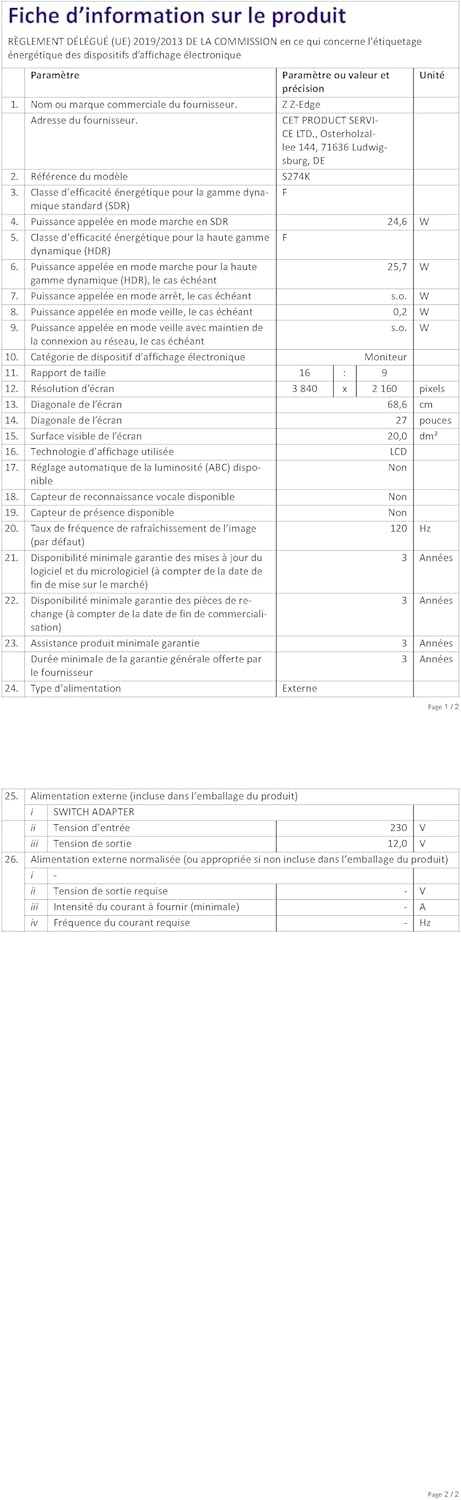
Image: EU Energy Label for the Z-Edge S274K monitor, indicating an energy efficiency class of F and energy consumption of 25 kWh per 1000 hours.
10. Garanzija u Appoġġ
10.1 Garanzija tal-Manifattur
This Z-Edge monitor comes with a Garanzija ta' 1 snin mill-manifattur from the date of purchase. This warranty covers defects in materials and workmanship under normal use. It does not cover damage caused by misuse, accidents, unauthorized modifications, or external causes.
Għal talbiet ta' garanzija, jekk jogħġbok żomm il-prova tax-xiri tiegħek.
10.2 Appoġġ għall-Klijent
If you encounter any issues not covered in the troubleshooting section or require further assistance, please contact Z-Edge customer support. Refer to the official Z-Edge webis-sit għall-aktar informazzjoni ta' kuntatt u riżorsi ta' appoġġ aġġornati.