
1. Introduzzjoni
This manual provides essential instructions for setting up, operating, maintaining, and troubleshooting your HONOR 400 5G smartphone. Please read this guide thoroughly to ensure proper use and to maximize the performance of your device.
The HONOR 400 is a powerful 5G smartphone featuring a 6.55-inch AMOLED display, a Qualcomm Snapdragon 7 Gen 3 processor, 12GB of RAM, and 512GB of internal storage. It operates on Android 15 and is equipped with a 5300mAh battery, a 200MP main camera, and dual-SIM capabilities.
2. X'hemm fil-Kaxxa
Upon unboxing your HONOR 400 smartphone, verify that all items are present:
- HONOR 400 5G Smartphone
- Cable USB
- (Other accessories such as a charger, SIM ejector tool, or protective case may vary by region and package contents.)
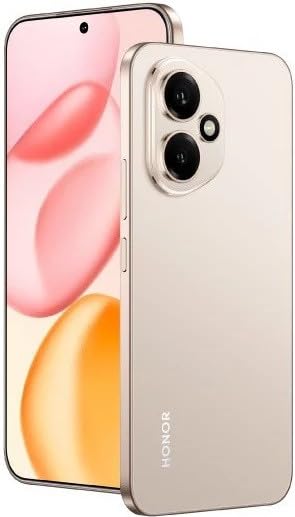
Figura 2.1: The HONOR 400 5G Smartphone. This image displays the device's sleek design and the main screen.
3. Device Overview
Iffamiljarizza ruħek mal-komponenti fiżiċi tal-ismartphone HONOR 400 tiegħek.
3.1 Quddiem View
- Wiri: 6.55-inch AMOLED screen with 1264 x 2736 pixels resolution.
- Kamera ta' quddiem: 50 MP, f/2.0 (wide) for selfies and video calls.
- Earpiece: Jinsab fit-tarf ta' fuq tad-displej.
An illustration of the front view would typically show the display, front camera, and earpiece.
3.2 Wara View
- Sistema tal-Kamera Prinċipali:
- 200 MP, f/1.9 (wide), 1/1.4", PDAF, OIS
- 12 MP, f/2.2, 112° (ultrawide), AF
- Flash: Flash LED għal fotografija f'dawl baxx.
- HONOR Logo: Identifikazzjoni tal-marka.
An illustration of the rear view would typically highlight the camera module and brand logo.
3.3 Ġenb Viewi u Portijiet
- Buttuna tal-Qawwa: Typically on the right side, used to power on/off and wake/sleep the device.
- Buttuni tal-Volum: Typically on the right side, above the power button, for adjusting volume.
- Port USB tat-Tip Ċ: Jinsab fil-qiegħ, użat għall-iċċarġjar u t-trasferiment tad-dejta.
- Trej tal-SIM Card: Location varies, typically on the side or bottom, for inserting Nano-SIM cards.
- Microphones & Speakers: Strategically placed for calls and audio output.
Illustrations of the device's sides would show the placement of buttons, ports, and the SIM tray.
4. Setup
4.1 Daħħal il-Kards tas-SIM
- Sib it-trej tal-karta SIM fuq it-tagħmir tiegħek.
- Daħħal l-għodda tal-ejecter tas-SIM (jekk provduta) fit-toqba ż-żgħira ħdejn it-trej u imbotta bil-mod sakemm it-trej joħroġ 'il barra.
- Place your Nano-SIM card(s) into the designated slots on the tray. The HONOR 400 supports Dual-SIM (Nano-SIM + ESIM OR Nano-SIM + Nano-SIM). Ensure the gold contacts face downwards.
- Erġa' daħħal it-trej fit-telefon bir-reqqa.
An image demonstrating SIM card insertion would be helpful here.
Importanti: Qabel ix-xiriasing, verify network compatibility with your service provider. This device supports GSM networks (2G, 3G, 4G LTE, and 5G SA/NSA) but does not support CDMA networks.
4.2 L-Ewwel Xgħel u l-Wizard tas-Setup
- Agħfas u żomm il-buttuna tal-Power sakemm jidher il-logo tal-HONOR.
- Follow the on-screen instructions to complete the initial setup, which includes selecting your language, connecting to Wi-Fi, setting up your Google account, and configuring security features.
5. Tħaddim tat-Tagħmir Tiegħek
5.1 Sistema Operattiva Android 15
Your HONOR 400 runs on Android 15, offering a user-friendly interface and access to a vast ecosystem of applications via the Google Play Store. Navigate using gestures or on-screen buttons, customize your home screen, and manage notifications.
5.2 Funzjonijiet Bażiċi
- Tagħmel Sejħiet: Tektek l-ikona tat-Telefon, daħħal in-numru, u tektek il-buttuna tas-sejħa.
- Tibgħat Messaġġi: Use the Messaging app to send SMS/MMS.
- Ibbrawżjar fuq l-Internet: Iftaħ a web browser (e.g., Chrome) to access the internet via Wi-Fi or mobile data.
- Ġestjoni tal-App: Download, install, and uninstall apps from the Google Play Store.
5.3 Użu tal-Kamera
The HONOR 400 features a versatile camera system:
- Kamera ta' wara: Utilize the 200 MP main sensor for high-resolution photos and the 12 MP ultrawide lens for expansive shots. Features include PDAF and Optical Image Stabilization (OIS).
- Kamera ta' quddiem: The 50 MP wide-angle front camera is ideal for selfies and video conferencing.
- Reġistrazzjoni tal-vidjo: Capture videos in up to 4K resolution at various frame rates (30, 60, 120 fps).
A diagram of the camera interface or tips for photography modes could be included here.
5.4 Konnettività
Your device supports multiple connectivity options:
- 5G/4G LTE: Konnettività tad-dejta mobbli b'veloċità għolja.
- Wi-Fi: Qabbad ma' netwerks mingħajr fili għal aċċess għall-internet.
- Bluetooth: Imqabbad ma' headphones mingħajr fili, kelliema, u apparati oħra.
- USB Tip-Ċ: Għall-iċċarġjar u l-konnessjoni ma' kompjuter għat-trasferiment tad-dejta.
6. Manutenzjoni
6.1 Kura tal-Batterija
- The HONOR 400 is equipped with a 5300mAh non-removable battery.
- Biex ittawwal il-ħajja tal-batterija, evita temperaturi estremi u ħoll il-batterija kompletament ta' spiss.
- Use the provided USB cable and a compatible charger for optimal charging.
6.2 Aġġornamenti tas-Software
Regularly check for and install software updates to ensure your device has the latest features, security patches, and performance improvements. You can usually find this option in your phone's Settings menu under "System & updates" or "About phone."
6.3 Tindif tal-Apparat Tiegħek
Uża drapp artab u mingħajr suf biex tnaddaf l-iskrin u l-qafas tat-telefon tiegħek. Evita li tuża kimiċi ħarxa jew materjali li joborxu.
7 Issolvi l-problemi
This section addresses common issues you might encounter with your HONOR 400 smartphone.
7.1 L-Apparat Mhux Qed Jixgħel
- Ensure the battery is charged. Connect the phone to a charger for at least 15 minutes before attempting to power it on again.
- Try a forced restart by holding the Power button for an extended period (e.g., 10-15 seconds).
7.2 Kwistjonijiet ta' Konnettività tan-Netwerk
- Iċċekkja jekk is-SIM card tiegħek hijiex imdaħħla sew.
- Verify that mobile data is enabled in your phone's settings.
- Ibda mill-ġdid it-tagħmir tiegħek.
- Confirm with your service provider that your plan is active and there are no network outages fl-inħawi tiegħek.
- Ensure your device is compatible with your network's frequencies (GSM only, no CDMA).
7.3 L-Applikazzjonijiet Jikkraxxjaw jew Jiffriżaw
- Agħlaq u terġa' tiftaħ l-app.
- Neħħi l-cache u d-dejta tal-app minn Settings > Apps.
- Kun żgur li l-app hija aġġornata għall-aħħar verżjoni tagħha.
- Ibda mill-ġdid it-telefon tiegħek.
7.4 Prestazzjoni bil-mod
- Agħlaq l-apps fl-isfond li mhumiex meħtieġa.
- Cache ċara u temporanja files.
- Ensure you have sufficient free storage space (512GB internal storage).
- Erġa' ibda t-tagħmir tiegħek regolarment.
8. Speċifikazzjonijiet
| Karatteristika | Dettall |
|---|---|
| Isem tal-Mudell | Unur 400 |
| Sistema Operattiva | Android 15.0 |
| Proċessur | Qualcomm SM7550-AB Snapdragon 7 Ġen 3 (4 nm), Otta-qalba (1x2.63 GHz Cortex-A715 & 3x2.4 GHz Cortex-A715 & 4x1.8 GHz Cortex-A510) |
| RAM | 12 GB |
| Ħażna Interna | 512 GB (mhux espansibbli) |
| Wiri | 6.55 Inches AMOLED, 1B colors, 1264 x 2736 pixels |
| Kamera ta' wara | 200 MP (wide, OIS) + 12 MP (ultrawide) |
| Kamera ta' Quddiem | 50 MP (wiesa') |
| Riżoluzzjoni tal-Qbid tal-Vidjo | 4K (30, 60, 120 fps) |
| Kapaċità tal-batterija | 5300 Milliamp Hours (non-removable) |
| SIM Card | Dual-SIM (Nano-SIM + ESIM OR Nano-SIM + Nano-SIM) |
| Konnettività | 5G, GSM, LTE, Wi-Fi, Bluetooth, USB Type-C |
| Dimensjonijiet | 156.5 x 74.6 x 7.3 mm (6.16 x 2.94 x 0.29 pulzieri) |
| Piż | 202 Gramma (6.49 oz) |
| Kulur | Desert Gold (as per product listing, actual color may vary by variant) |
9. Garanzija u Appoġġ
9.1 Garanzija tal-Manifattur
The HONOR 400 smartphone comes with a 1 Sena Garanzija tal-ManifatturDin il-garanzija tkopri difetti fil-materjali u fix-xogħol taħt użu normali. Jekk jogħġbok żomm il-prova tax-xiri tiegħek għal talbiet ta' garanzija.
For specific terms and conditions of the warranty, please refer to the warranty card included with your product or visit the official HONOR support websit.
9.2 Appoġġ għall-Klijent
For further assistance, technical support, or service inquiries, please contact HONOR customer support through their official webis-sit jew l-informazzjoni ta' kuntatt ipprovduta fl-imballaġġ tal-prodott tiegħek.
You can typically find support resources, FAQs, and contact details on the official HONOR websit: www.hihonor.com