
1. Introduzzjoni
This manual provides comprehensive instructions for the installation, operation, and maintenance of the EARU Electric 3-Phase Voltage and Overcurrent Protector, Model EARU-1008. This device is designed to safeguard 3-phase electrical systems by continuously monitoring voltage and current, offering protection against over-voltage, taħt il-voltage, overcurrent, and phase failure. It is suitable for industrial and commercial applications requiring reliable electrical monitoring and protection.
2. Informazzjoni dwar is-Sigurtà
TWISSIJA: Periklu ta' xokk elettriku. L-installazzjoni u l-manutenzjoni għandhom jitwettqu biss minn persunal kwalifikat.
- Dejjem skonnettja l-enerġija qabel ma tinstalla jew tagħmel manutenzjoni fuq l-apparat.
- Żgura ertjar xieraq biex tevita xokk elettriku.
- Iċċekkja li l-konnessjonijiet tal-wajers kollha huma sikuri u korretti skont id-dijagramma tal-wajers.
- Tħaddimx l-apparat jekk jidher li hu bil-ħsara.
- Aderixxi mal-kodiċijiet elettriċi lokali u nazzjonali kollha.
3. Prodott Aktarview
3.1. Karatteristiċi ewlenin
- Real-time 3-Phase Monitoring: Displays live voltage (L1, L2, L3) and current (L1, L2, L3) values.
- Protezzjoni Komprensiva: Salvagwardji kontra l-volum żejjedtage, taħt il-voltage, overcurrent, and phase failure.
- Parametri Aġġustabbli: User-configurable settings for protection thresholds and recovery delays.
- Automatic Phase Failure Reset: Detects and automatically resets after phase anomalies.
- High-Visibility LED Display: Bright red LED for clear readings in various lighting conditions.
- Immuntar fuq il-Ferrovija DIN: Easy integration into standard electrical panels.
- Clear Terminal Labeling: Simplified installation with clearly marked input and output terminals.
3.2. Komponenti u Wiri
The device features a clear LED display and intuitive control buttons for configuration. The display shows real-time voltage and current for each phase, along with indicators for protection status.
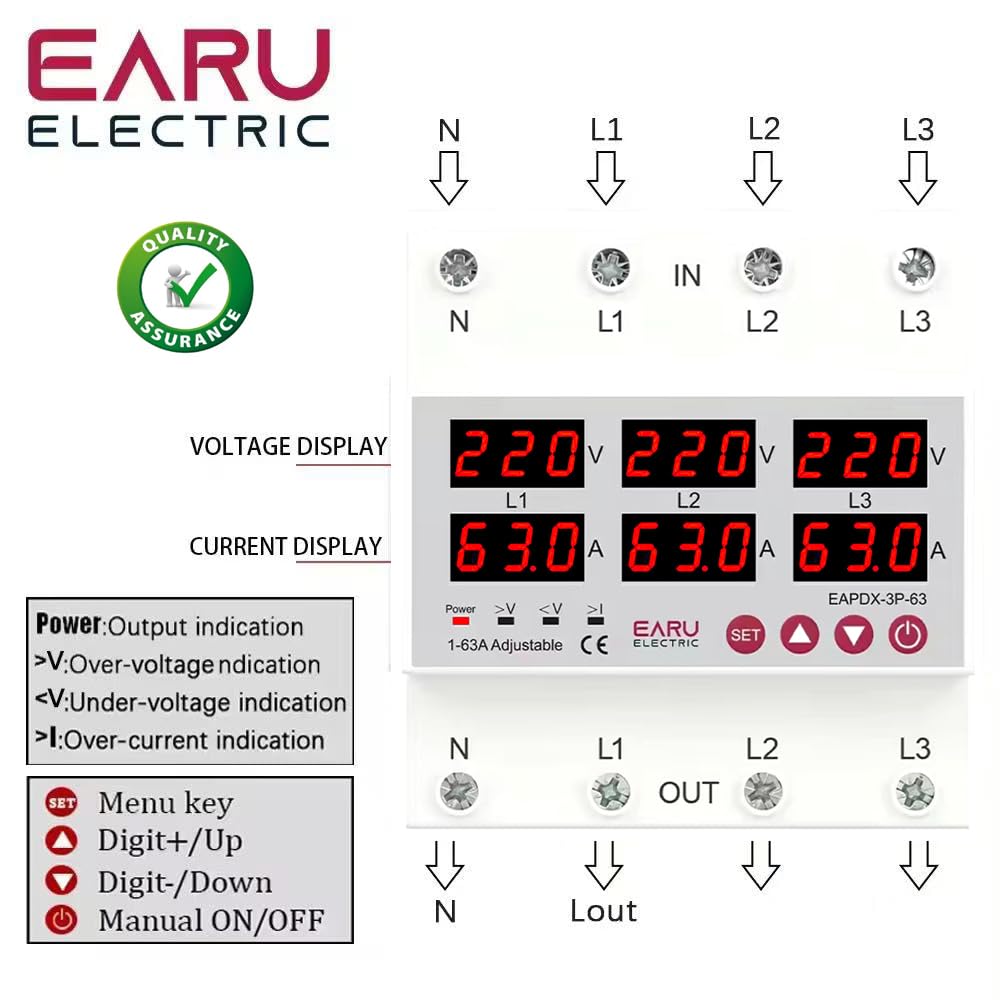
Stampa 3.2.1: Quddiem view of the EARU Electric Voltage Protector, showing the LED display for L1, L2, L3 voltage and current, along with control buttons (SET, Up, Down, Power) and protection indicators. Terminal labels for N, L1, L2, L3 (IN and OUT) are also visible.

Stampa 3.2.2: Perspettiva view highlighting the product features and the input/output terminals (N, L1, L2, L3) at the top and bottom of the device. This image emphasizes the physical layout and connection points.
4. Setup u Installazzjoni
4.1. Immuntar
The EARU-1008 is designed for DIN rail mounting. Securely attach the device to a standard 35mm DIN rail within an electrical enclosure.
4.2. Konnessjonijiet tal-Wiring
Refer to the wiring diagram below for correct connections. Ensure all connections are tight and properly insulated.
- Connect the incoming neutral (N) and phase lines (L1, L2, L3) to the 'IN' terminals.
- Connect the outgoing neutral (N) and phase lines (L1, L2, L3) to the 'OUT' terminals.
- Iċċekkja darbtejn il-konnessjonijiet kollha qabel ma tapplika l-enerġija.

Stampa 4.2.1: Detailed wiring diagram for the EARU Electric Voltage Protector, showing connections for N, L1, L2, L3 for both input and output. The diagram illustrates how to integrate the protector into a 3-phase electrical system.
5. Istruzzjonijiet Operattivi
5.1. L-Inizjali Tixgħel
Once wired, apply power to the device. The LED display will illuminate, showing the real-time voltage and current for each phase.
5.2. Indikaturi tal-Wiri
- V: Voltagwirja.
- A: Wirja kurrenti.
- Qawwa: Output indication.
- >V: Vol-żejjedtage indikazzjoni.
- <V: Taħt il-voltage indikazzjoni.
- > Jien: Over-current indication.
5.3. Twaqqif ta 'Parametri
Use the 'SET' button to enter the configuration menu and the 'Up' and 'Down' keys to adjust values. Press 'SET' again to confirm and move to the next parameter. Hold 'SET' for 3 seconds to enter settings mode.

Stampa 5.3.1: A detailed guide to setting various protection parameters on the EARU Electric Voltage Protector. This includes overvoltage, undervoltage, overcurrent, and recovery delay settings, with default values and adjustment ranges.
Key adjustable parameters include:
- Overvoltage Setting ta' Protezzjoni: Range 230-300V (Default 270V).
- Overvoltage Protection Recover Setting: Range 225-295V (Default 265V).
- Overvoltage Recovery Delay: Range 1-500s (Default 30s).
- Overvoltage Trip Delay: Range 0.1-30s (Default 1.0s).
- Undervoltage Setting ta' Protezzjoni: Range 140-210V (Default 170V).
- Undervoltage Protection Recover Setting: Range 145-215V (Default 175V).
- Undervoltage Trip Delay: Range 0.1-30s (Default 1.0s).
- Issettjar ta' Protezzjoni ta' Kurrent Żejjed: Range 1-63A (Default 30A).
- Overcurrent Trip Delay: Range 0.1-30s (Default 1.0s).
- Voltage & Current Manual Error Calibration: Adjust for accuracy, range -9.5% to +9.5% (Default 0%).
- Power-on Delay Setting: Adjustable Range: 1-500S (Default: 10s).
5.4. Manual ON/OFF
The power button allows for manual switching of the device output.
6. Manutenzjoni
The EARU-1008 is designed for minimal maintenance. However, periodic checks are recommended:
- Żomm l-apparat nadif u ħieles mit-trab u l-fdalijiet.
- Periodically inspect wiring connections for tightness and signs of wear.
- Kun żgur li jkun hemm ventilazzjoni adegwata madwar l-apparat biex tevita li jisħon iżżejjed.
7 Issolvi l-problemi
Jekk l-apparat mhux qed jaħdem kif mistenni, ikkunsidra dan li ġej:
- Ebda Wiri/Ebda Qawwa: Check the main power supply and all wiring connections.
- Protection Trip: Identify the active protection indicator (>V, <V, >I). Check the corresponding voltage or current levels. The device will automatically reset once conditions return to normal, based on configured recovery delays.
- Phase Failure: The device automatically detects and responds to phase failures, initiating a cut-off and auto-reset once the phase is restored.
- Qari Skorrett: If readings appear inaccurate, consider performing a manual error calibration as described in Section 5.3.
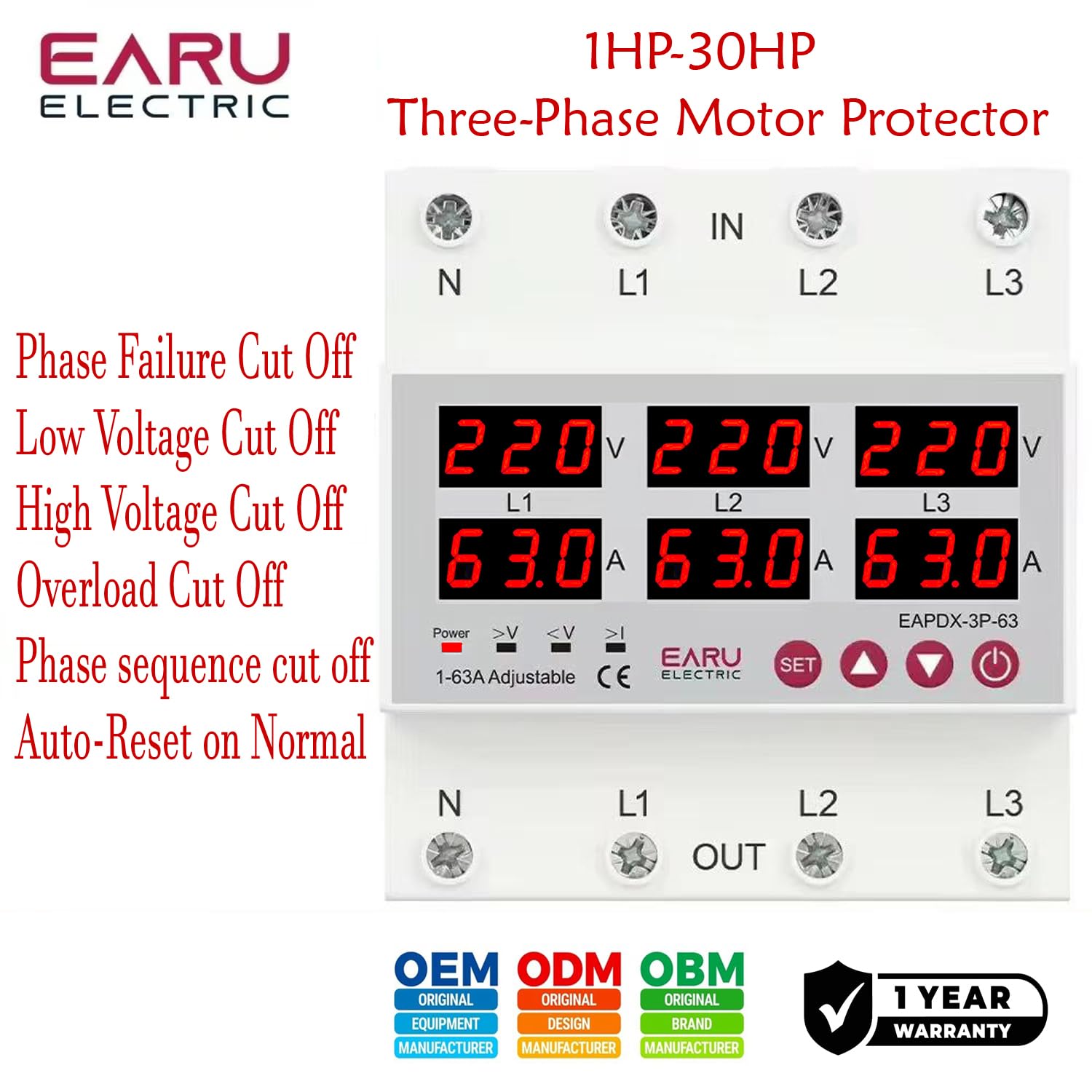
Stampa 7.1: This image highlights the various protection features of the EARU Electric Voltage Protector, including phase failure cut-off, low voltage cut-off, high voltage cut-off, overload cut-off, phase sequence cut-off, and auto-reset on normal conditions. These are key aspects for troubleshooting protection trips.
8. Speċifikazzjonijiet
| Parametru | Valur |
|---|---|
| Brand | EARU |
| Mudell | EARU-1008 |
| Provvista Rated Voltage | AC 3*220V (N-L1/L2/L3) / 440V |
| Frekwenza Rated | 50/60Hz |
| Over Current Protection Setting Range | 1-63A (Default 30A) |
| Fuq Voltage Protection Setting Range | 230-300V (Default 270V) |
| Taħt Voltage Protection Setting Range | 140-210V (Default 170V) |
| Dimensjonijiet tal-Prodott | 20 x 10 x 20 ċm |
| Piż tal-oġġett | 450 g |
| Tip ta 'Immuntar | Binarji DIN |

Stampa 8.1: This image provides a visual representation of the EARU Electric Voltage Protector's dimensions and a table of key technical specifications, including voltage, frequency, and protection ranges.
9. Garanzija u Appoġġ
9.1. Garanzija
The EARU Electric Voltage Protector (Model EARU-1008) comes with a Garanzija ta' 1 snin mill-manifattur mid-data tax-xiri, li tkopri difetti fil-materjali u l-abbilità taħt użu normali. Jekk jogħġbok żomm il-prova tax-xiri tiegħek għal talbiet ta' garanzija.
9.2. Appoġġ għall-Klijent
For technical assistance, troubleshooting, or warranty inquiries, please contact EARU customer support through your retailer or the official EARU website. Provide your model number (EARU-1008) and a detailed description of the issue for efficient service.