

1. Introduzzjoni
This manual provides essential information for the proper setup, operation, and maintenance of your MJX T3D 2.4GHz RC Car Transmitter. Please read this manual thoroughly before use to ensure safe and optimal performance of your remote control system.
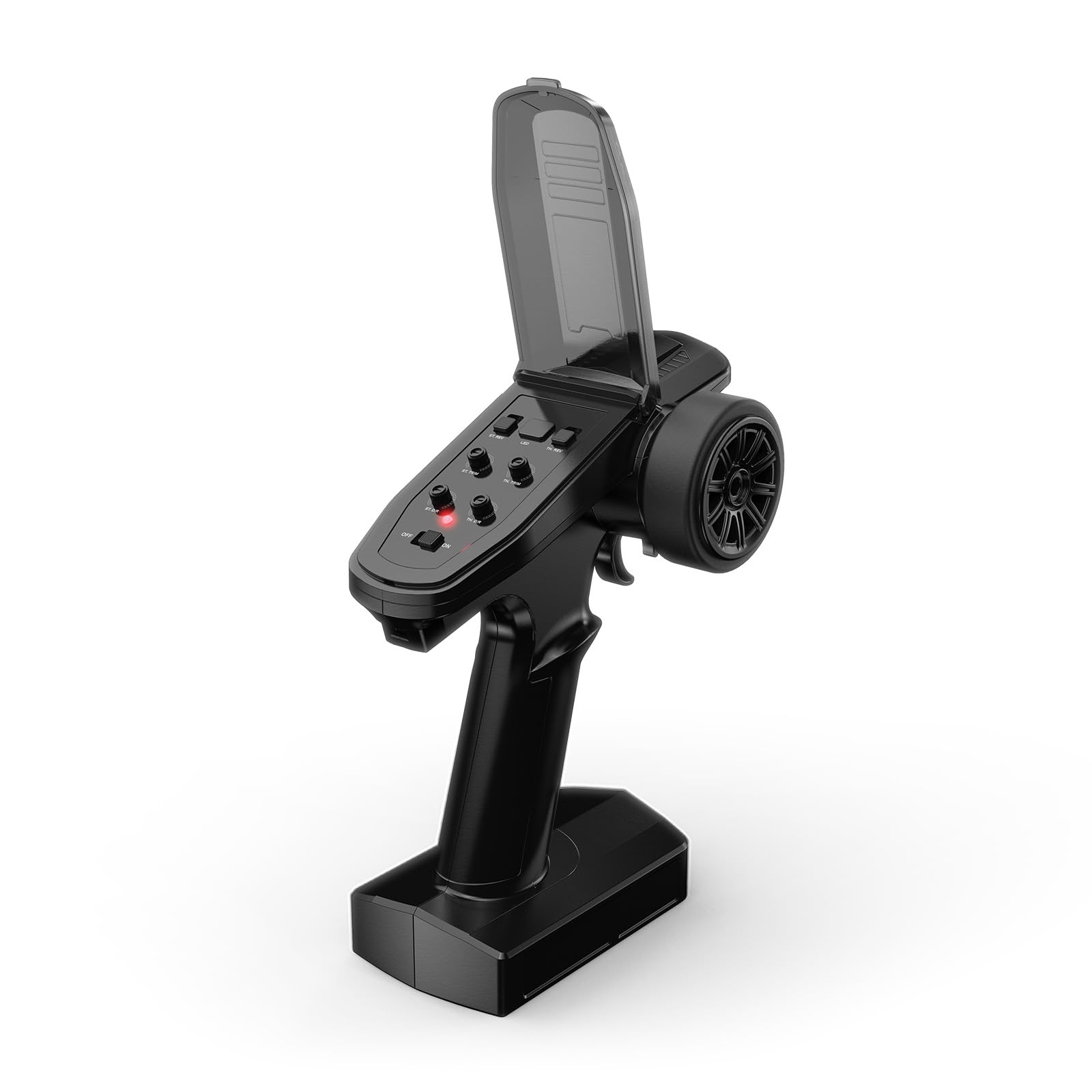
Figure 1: MJX T3D 2.4GHz RC Car Transmitter
The MJX T3D transmitter is designed for use with various MJX RC car models, offering enhanced control and functionality. This transmitter is a spare part and does not include a receiver.
2. Kontenut tal-Pakkett
- MJX T3D 2.4GHz Transmitter
- R6FG Receiver (Note: While the product description states 'Receiver not Included', the video content indicates a receiver is often bundled. Please verify your specific package contents.)
- Battery Tray (for AA batteries)
- Lanyard
- Manwal ta' Istruzzjoni
3. Setup
3.1 Installazzjoni tal-batterija
The transmitter requires 4 AA batteries (not included) or a compatible 2S LiPo battery. To install, open the battery compartment cover on the bottom of the transmitter. Insert the batteries according to the polarity markings or connect the LiPo battery to the designated connector. Close the cover securely.

Figure 2: Battery Tray for AA Batteries
3.2 Ir-rabta tar-riċevitur
The R6FG receiver (if included) needs to be bound to the transmitter for communication. Refer to the detailed instructions in the included Instruction Manual for the specific binding procedure. Typically, this involves pressing a bind button on the receiver while powering it on, then initiating the binding process on the transmitter.

Figure 3: R6FG Receiver
4. It-Tħaddim tat-Trasmettitur
4.1 Kontrolli tat-Trasmettitur Fuqview

Figure 4: Transmitter Controls
- Swiċċ tal-Enerġija: Jixgħel/Jitfi t-trasmettitur.
- Dawl Indikatur: Juri l-istatus tal-enerġija u tal-konnessjoni.
- Stering: Controls the direction of the RC car (left/right).
- Trigger tat-throttle: Jikkontrolla l-moviment 'il quddiem u lura, u l-ibbrejkjar.
- ST.NOR REV (Steering Normal/Reverse): Ireġġa' lura d-direzzjoni tal-istering.
- TH.NOR REV (Throttle Normal/Reverse): Reverses throttle direction.
- ST.TRIM (Steering Trim): Jaġġusta l-pożizzjoni newtrali tal-istering.
- TH.TRIM (Throttle Trim): Adjusts the neutral position of the throttle.
- ST.D/R (Steering Dual Rate): Jaġġusta l-angolu massimu tal-istering.
- TH.D/R (Throttle Dual Rate): Adjusts the maximum throttle output.
- Kontroll tad-Dawl: Controls the vehicle's lights (if applicable).
4.2 Karatteristiċi Avvanzati
The MJX T3D transmitter offers advanced programming capabilities via its screen and buttons, allowing for fine-tuning of your RC vehicle's performance.

Figure 5: Transmitter Screen Display

Figure 6: Transmitter Screen Menu Options
- Rati Doppju: Adjust steering and throttle sensitivity on the fly for different driving conditions (e.g., crawling vs. high-speed).
- ABS Braking System: Program the transmitter to pulse the brakes, preventing wheel lock-up during hard braking and improving control.
- Steering Travel Adjustment: Fine-tune the endpoints of your steering servo for precise control and to prevent over-stressing the servo.
- Programmable Auxiliary Channels: Utilize additional channels for controlling accessories like winches, lights, or other custom functions on your RC car.
- Buddy Box System (DSC Port): The DSC port allows for trainer/student functionality, connecting two transmitters for shared control, ideal for learning or teaching.

Figure 7: USB and DSC Ports
4.3 Aċċessorji twaħħil
The transmitter features a 1/4-20 screw mount on top, allowing for the attachment of various accessories such as mobile device holders or action cameras to record your RC experience.

Figure 8: Top Screw Mount
5. Manutenzjoni
- Tindif: Regularly wipe down the transmitter with a soft, dry cloth. Avoid using harsh chemicals or solvents.
- Kura tal-batterija: Remove batteries if the transmitter will not be used for an extended period to prevent leakage. If using LiPo batteries, follow proper charging and storage guidelines.
- Ħażna: Aħżen it-trasmettitur f'post frisk u niexef 'il bogħod mix-xemx diretta u minn temperaturi estremi.
6 Issolvi l-problemi
- Ebda Qawwa: Check battery installation and ensure batteries are charged. Verify the power switch is in the 'ON' position.
- No Control: Ensure the transmitter and receiver are properly bound. Check all connections between the receiver and the RC car's components.
- Kontroll Erratiku: Check for interference from other 2.4GHz devices. Ensure the receiver antenna is properly positioned and not damaged.
- Steering/Throttle Not Centered: Use the ST.TRIM and TH.TRIM adjustments to fine-tune the neutral positions.
7. Speċifikazzjonijiet
- Numru tal-oġġett: T3D
- Dimensjonijiet tal-Prodott: 0.2 x 0.5 x 0.5 pulzieri
- Piż tal-oġġett: 1.6 uqija
- Manifattur: Estensjoni MJ
- Età Rakkomandata: 14 snin 'il fuq
8. Garanzija u Appoġġ
For warranty information and technical support, please refer to the contact details provided on the product packaging or visit the official MJX websit. Żomm l-irċevuta tax-xiri tiegħek bħala prova tax-xiri għal talbiet ta' garanzija.