

Introduzzjoni
This manual provides essential information for the safe and efficient operation of your Philips PLD2030P7 DVD Player. Please read these instructions thoroughly before using the device and retain them for future reference.
1. Setup
1.1 Disimballaġġ
Neħħi l-komponenti kollha mill-imballaġġ bir-reqqa. Kun żgur li l-oġġetti kollha elenkati hawn taħt huma preżenti:
- Philips PLD2030P7 DVD Player
- Kontroll mill-bogħod
- Cable HDMI
- RCA Cable
1.2 Konnessjoni ma' Televiżjoni
The Philips PLD2030P7 DVD Player offers both HDMI and RCA connections for video and audio output.
HDMI Connection (Recommended for HD TVs)
- Connect one end of the HDMI cable to the HDMI OUT port on the DVD player.
- Qabbad it-tarf l-ieħor tal-kejbil HDMI ma' port HDMI IN disponibbli fuq it-televiżjoni tiegħek.
- Agħżel l-input HDMI korrispondenti fuq it-televiżjoni tiegħek billi tuża l-kontroll remot tiegħu.
Illustration of the HDMI connection process, highlighting the 1080P upconversion capability from 480P resolution.
RCA Connection (For older TVs or alternative audio)
- Connect the red, white, and yellow RCA plugs from the RCA cable to the corresponding color-coded AV OUT jacks on the DVD player.
- Connect the other end of the RCA cable to the matching color-coded AV IN jacks on your television or home stereo system.
- Select the corresponding AV input on your television or stereo system.

Visual guide to various connection types, including HDMI for Smart TVs, projectors, and monitors, and RCA for older TVs, speakers, soundbars, amplifiers, and tuners.
1.3 Tixgħel
After connecting the player to your TV, plug the power cord into an electrical outlet. Press the Power button on the front panel or the remote control to turn on the DVD player.
1.4 Region Free Setup Guide
This DVD player supports multiple regions (1,2,3,4,5,6). To adjust region settings:
- Connect your DVD player to a TV.
- Ensure no disc is in the compartment, or press the FTUĦ/MAGĦLUQ button to eject the disc tray. The TV screen should display 'NO DISC'.
- Using the remote control, input the number "5168" to access the Super Setup Mode.
- Agħfas il- UP button to highlight "REGION". Press the DRITT button to highlight the region code. Press the UP button to highlight "TEST 0". Press the DĦUL buttuna biex tikkonferma.
- Agħfas SETUP għall-ħruġ.
Visual instructions detailing the process to configure the DVD player for region-free playback, including remote control input and screen prompts.
2. Istruzzjonijiet Operattivi
2.1 Daqq tad-Diska
The Philips PLD2030P7 is compatible with CD, (S),VCD,DVD,DVD+R/RW,DVD-R/RW, or MP3 discs.
- Agħfas il- FTUĦ/MAGĦLUQ buttuna biex tiftaħ it-trej tad-diska.
- Poġġi diska bil-mod fuq it-trej bin-naħa tat-tikketta tħares 'il fuq.
- Agħfas il- FTUĦ/MAGĦLUQ button again to close the tray. The player will automatically begin playback or display a disc menu.
- Use the remote control to navigate menus and control playback (Play, Pause, Stop, Skip, Fast Forward/Rewind).
2.2 Daqq tal-Midja USB
The player supports media playback from USB devices for JPEG, MP3, and MP4 files.
- Insert your USB device into the USB port on the front of the DVD player.
- The player should automatically detect the USB device and display a media browser. If not, press the USB buttuna fuq il-kontroll remot.
- Innaviga permezz tiegħek files using the remote control and press PLAY or DĦUL biex tibda daqq.

Demonstration of the USB input functionality, illustrating how to connect a USB device and the supported media formats including video (AVI, DIVX, MPG, MPEG, VOB), images (JPG), and music.
2.3 Screen Fit Feature
To optimize the picture to fill your screen, press the Screen Fit button on the remote control during playback. This feature adjusts the aspect ratio to match your display.
2.4 Audio and Video Quality
The player features a 10-bit/108 MHz video DAC for superior picture quality and a built-in Dolby decoder chip for immersive audio.

Visual representation emphasizing the DAC/Dolby audio technology, which provides an immersive audio experience.

Description of the 10-bit/108 MHz video processing, ensuring sharp and natural images.
3. Manutenzjoni
3.1 Tindif tal-Unità
To clean the exterior of the DVD player, use a soft, dry cloth. Do not use liquid or aerosol cleaners, as they may damage the finish. Ensure the unit is unplugged before cleaning.
3.2 Kura tad-Diska
Handle discs by their edges to avoid fingerprints. Store discs in their cases when not in use to prevent scratches and dust accumulation. Clean discs with a soft, lint-free cloth, wiping from the center outwards.
4 Issolvi l-problemi
Jekk tiltaqa' ma' problemi bid-DVD player tiegħek, irreferi għall-problemi u s-soluzzjonijiet komuni li ġejjin:
| Problema | Kawża Possibbli | Soluzzjoni |
|---|---|---|
| Ebda qawwa | Il-korda tal-enerġija mhux imqabbda; Is-sokit tal-enerġija mhux attiv | Kun żgur li l-korda tal-enerġija hija mdaħħla sew; Ittestja s-sokit b'apparat ieħor |
| L-ebda stampa fuq it-TV | Incorrect input selected on TV; Loose video cable connection | Select correct HDMI/AV input on TV; Check HDMI/RCA cable connections |
| L-ebda ħoss | TV/receiver volume too low; Loose audio cable connection | Increase volume; Check HDMI/RCA audio cable connections |
| Diska mhux qed tindaqq | Disc is dirty or scratched; Incorrect disc type; Region code mismatch | Clean disc; Ensure disc is compatible (DVD, CD, VCD); Verify region settings (refer to 1.4) |
| Il-kontroll mill-bogħod ma jaħdimx | Il-batteriji huma mejta jew imdaħħla ħażin; Ostruzzjoni bejn ir-remote u l-plejer | Replace batteries; Ensure correct polarity; Remove obstructions; Point remote directly at player |
5. Speċifikazzjonijiet
Below are the technical specifications for the Philips PLD2030P7 DVD Player:
| Karatteristika | Dettall |
|---|---|
| Brand | Philips |
| Isem tal-Mudell | PLD2030P7 |
| Tip tal-Midja | CD, DVD, VCD |
| Karatteristika Speċjali | Compact, Progressive Scan |
| Riżoluzzjoni | 1280x800 (Internal processing), Video Output: 1080p |
| Tip ta' Konnettur | HDMI |
| Teknoloġija tal-Konnettività | HDMI |
| Kulur | Iswed |
| Piż tal-oġġett | 2.3 Liri |
| Modalità tal-Ħruġ tal-Awdjo | Jdawru |
| Format awdjo appoġġjat | Dolby Diġitali |
| Surround Sound Channel Konfigurazzjoni | 5.1 |
| Numru Totali ta' Portijiet HDMI | 1 |
| Kodifikazzjoni tal-vidjo | MPEG-2 |
| Apparati Kompatibbli | AV Receiver, Home Stereo System, Television |
| File Format (USB) | JPEG, MP3, MP4 |
| Midja Inkorporata | DVD Player, HDMI Cable, RCA Cable, Remote Control |
| UPC | 850041387796 |
| ASIN | B0F4F53JSS |
| GTIN | 850041387796 |

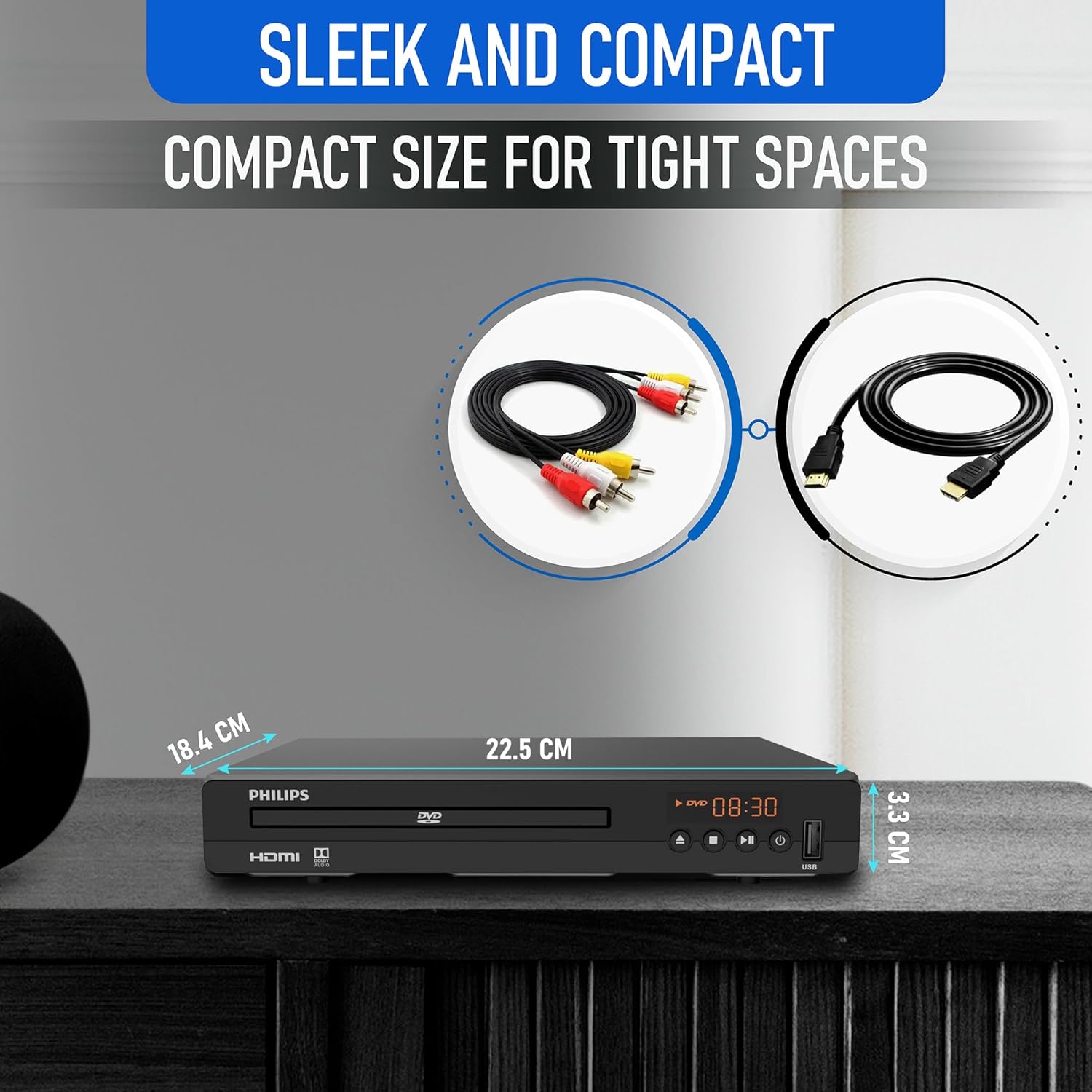
Diagram illustrating the compact dimensions of the DVD player: 22.5 cm (width), 18.4 cm (depth), and 3.3 cm (height).
6. Informazzjoni dwar Garanzija
For detailed warranty information, please refer to the warranty card included in your product packaging or contact Philips customer support. The manufacturer's warranty covers defects in materials and workmanship under normal use.
7. Appoġġ għall-Klijent
If you require further assistance or have questions not covered in this manual, please contact Philips customer support through their official webis-sit jew l-informazzjoni ta' kuntatt ipprovduta fid-dokumentazzjoni tal-prodott tiegħek.