
Introduzzjoni
Thank you for choosing the UGREEN 12000mAh 100W Fast Charging Power Bank. This device is designed to provide portable, high-speed charging for a wide range of electronic devices, including laptops, smartphones, and tablets. Please read this manual carefully to ensure safe and optimal use of your power bank.
Prodott Overview
The UGREEN 100W Power Bank features a compact design with a digital display for battery status and charging information. It includes multiple ports for versatile charging options.

Deskrizzjoni tal-Immaġni: A quddiem view of the UGREEN 12000mAh 100W Fast Charging Power Bank, showcasing its sleek grey design and digital display.

Deskrizzjoni tal-Immaġni: A close-up view of the UGREEN Power Bank's top, highlighting the USB-C (IN/OUT 1) and USB-A (OUT 2) ports, along with the 100W power indicator.

Deskrizzjoni tal-Immaġni: The UGREEN Power Bank being held, illustrating its compact size and lightweight design, suitable for portability.
Setup
- Ħlas Inizjali: Before first use, fully charge the power bank. Connect a USB-C cable to the IN/OUT 1 port and connect the other end to a suitable power adapter (not included). The digital display will show the charging progress.
- Iċċekkja l-Livell tal-Batterija: Agħfas fil-qosor il-buttuna tal-qawwa biex view il-perċentwali tal-batterija kurrentitage fuq il-wiri diġitali.
Istruzzjonijiet Operattivi
Iċċarġjar tal-Power Bank
To recharge your UGREEN Power Bank, connect a USB-C cable to the IN/OUT 1 port. The power bank supports fast charging input, allowing for quick replenishment of its internal battery.
Iċċarġjar tat-Tagħmir Tiegħek
- Qabbad Apparat: Use a compatible charging cable to connect your device to either the USB-C (IN/OUT 1) or USB-A (OUT 2) port on the power bank.
- Ibda l-Iċċarġjar: The power bank will automatically detect the connected device and begin charging. The digital display will show the output power.
- Iċċarġjar b'Veloċità Għolja: The USB-C port supports up to 100W Power Delivery (PD) for fast charging compatible laptops and other devices.
- Apparati Multipli: You can charge up to two devices simultaneously using both output ports.

Deskrizzjoni tal-Immaġni: The UGREEN Power Bank simultaneously charging a laptop via USB-C and another device via USB-A, demonstrating its multi-device charging capability.
Modalità ta 'Ċarġjar ta' Kurrent Baxx
For small devices like smartwatches, Bluetooth earbuds, or fitness trackers that require lower charging currents, activate the low current charging mode:
- Attiva: Double-press the power button to enter low current charging mode. An indicator on the display may appear.
- Qabbad: Qabbad l-apparat tiegħek li juża enerġija baxxa mal-power bank.
- Iddiżattiva: Double-press the power button again to exit low current charging mode, or it will automatically turn off after a period of inactivity.
Deskrizzjoni tal-Immaġni: The UGREEN Power Bank connected to a smartwatch and wireless earbuds, illustrating its low current charging mode for small electronic accessories.
Manutenzjoni
- Tindif: Uża drapp artab u niexef biex tnaddaf il-power bank. Tużax prodotti tat-tindif likwidi jew aerosols.
- Ħażna: Aħżen il-power bank f'post frisk u niexef 'il bogħod mix-xemx diretta u minn temperaturi estremi.
- Kura tal-batterija: Biex ittawwal il-ħajja tal-batterija, iċċarġja l-power bank kompletament mill-inqas darba kull tliet xhur jekk ma tkunx qed tużah regolarment.
Issolvi l-problemi
- Power Bank Mhux Iċċarġja:
- Kun żgur li l-kejbil tal-iċċarġjar u l-adapter tal-enerġija qed jaħdmu sew.
- Check if the cable is securely connected to the IN/OUT 1 port.
- Apparat Mhux Qed Jiċċarġja mill-Power Bank:
- Verify the power bank has sufficient charge.
- Ensure the charging cable is compatible with your device and securely connected.
- Try a different port or cable.
- Jekk qed tiċċarġja apparat li juża enerġija baxxa, kun żgur li l-modalità ta' ċċarġjar b'kurrent baxx tkun attivata.
- Iċċarġjar bil-mod:
- Ensure your cable and device support fast charging protocols (e.g., Power Delivery for 100W output).
- Charging multiple devices simultaneously may reduce individual port output.
Speċifikazzjonijiet

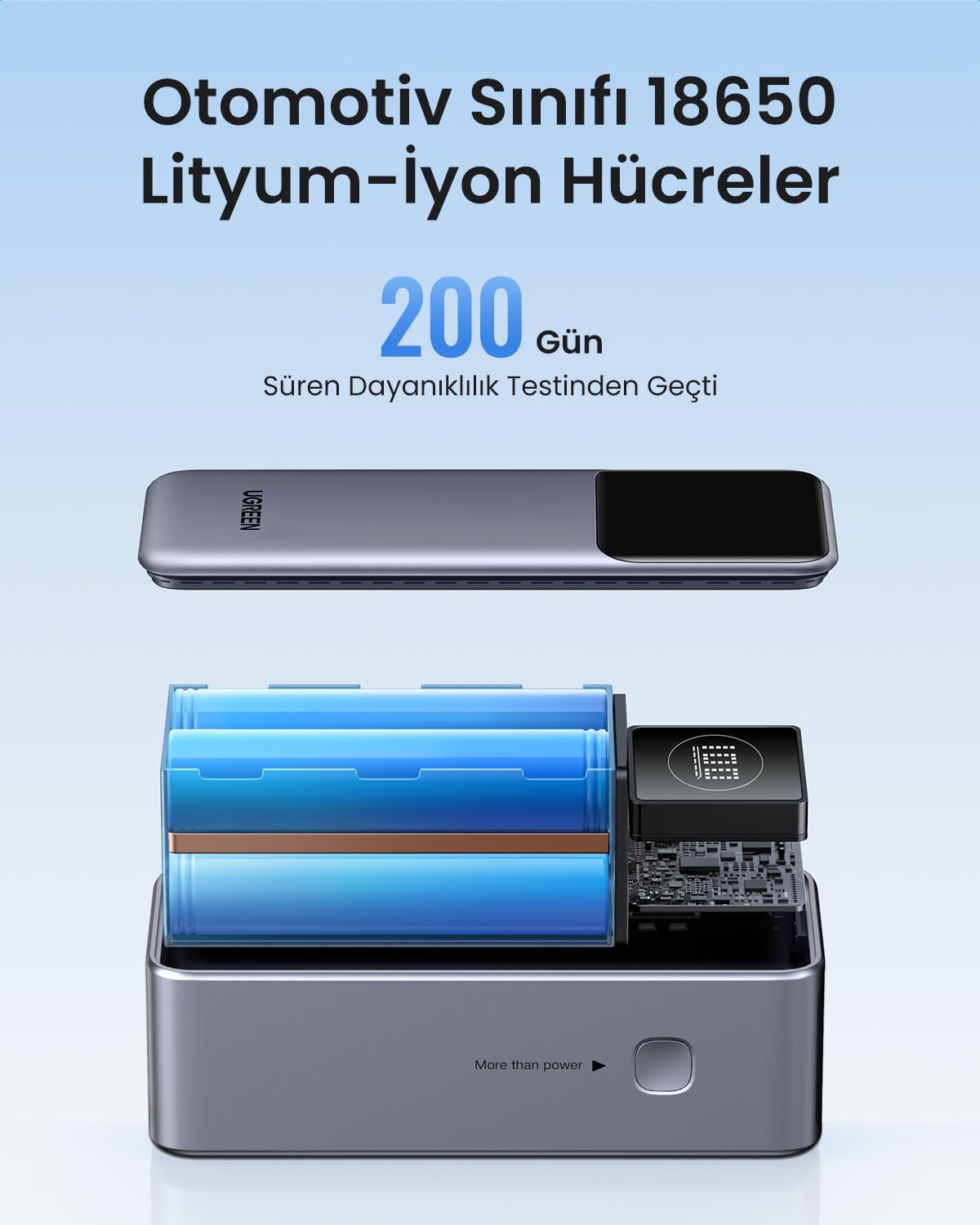
Deskrizzjoni tal-Immaġni: An sploda view of the UGREEN Power Bank, revealing its internal structure and the automotive-grade 18650 lithium-ion battery cells.
| Karatteristika | Dettall |
|---|---|
| Brand | UGREEN |
| Numru tal-Mudell | 35526B / AFNUGRNW28 |
| Kapaċità tal-batterija | 12000mAh |
| Output ta 'Qawwa Max | 100W |
| Numru ta' Portijiet | 3 (1x USB-C In/Out, 1x USB-A Out) |
| Tip ta 'batterija | Automotive Grade 18650 Lithium-ion Cells |
| Dimensjonijiet | 45.5 x 46 x 115 mm (madwar) |
| Piż | 309g (madwar) |
Informazzjoni dwar is-Sigurtà
- Tesponix il-power bank għal temperaturi estremi, dawl tax-xemx dirett, jew nar.
- Evita li twaqqa', tittaqqab, jew tiżżarma l-apparat.
- Żomm fejn ma jintlaħaqx mit-tfal.
- Tużax jekk il-power bank ikun bil-ħsara jew minfuħ.
- Armi l-prodott b'mod responsabbli skont ir-regolamenti lokali.
Garanzija u Appoġġ
This UGREEN Power Bank comes with a Garanzija ta '90 jum mid-data tax-xiri, li tkopri difetti fil-manifattura. Jekk jogħġbok żomm il-prova tax-xiri tiegħek għal talbiet ta' garanzija.
For technical support, warranty inquiries, or further assistance, please contact UGREEN customer service through the official UGREEN webis-sit jew il-kanali ta' appoġġ tal-bejjiegħ bl-imnut tiegħek.
Uffiċjali tal-UGREEN Websit: www.ugreen.com