
1. Prodott Aktarview
The GIGABYTE MO27Q2 is a 27-inch QD-OLED Gaming Monitor designed for superior visual performance. It features a QHD 2560x1440 resolution, an ultra-fast 240Hz refresh rate, and a rapid 0.03ms GTG response time, ensuring seamless and fluid motion for gaming and professional applications. This monitor also includes a Type-C KVM switch for convenient multi-device management, AMD FreeSync Premium Pro technology for tear-free gaming, and a height-adjustable stand for ergonomic comfort. Its advanced display technology provides vibrant colors with 99% DCI-P3 coverage and 10-bit color depth, making it an ideal choice for users seeking high-fidelity visuals and responsive performance.

Figura 1.1: Quddiem view of the GIGABYTE MO27Q2 QD-OLED Gaming Monitor, showcasing id-disinn eleganti u l-wiri vibranti tiegħu.
2. Setup u Installazzjoni
2.1 X'hemm fil-Kaxxa
Upon unboxing your GIGABYTE MO27Q2 monitor, please verify that all the following components are included:
- Kejbil tal-enerġija
- Cable HDMI 2.1
- DP cable (DisplayPort cable)
- USB cable (USB 3.2 Upstream cable)
- Gwida għall-Bidu Mgħaġġel (QSG)
- Karta tal-garanzija
- Color calibration test report
2.2 Assembling the Stand and Monitor
Segwi dawn il-passi biex twaħħal l-istand mal-monitor tiegħek:
- Oħroġ il-monitor u l-komponenti tal-istand mill-imballaġġ bir-reqqa.
- Waħħal il-bażi tal-istand mal-għonq tal-istand, billi twaħħalha bil-vit provdut.
- Align the stand assembly with the mounting slot on the back of the monitor and gently push until it clicks into place. Ensure it is securely fastened.
The monitor features a height-adjustable stand with tilt functionality (-5° to +21°) and supports VESA wall mounting (100x100mm) for flexible placement options.
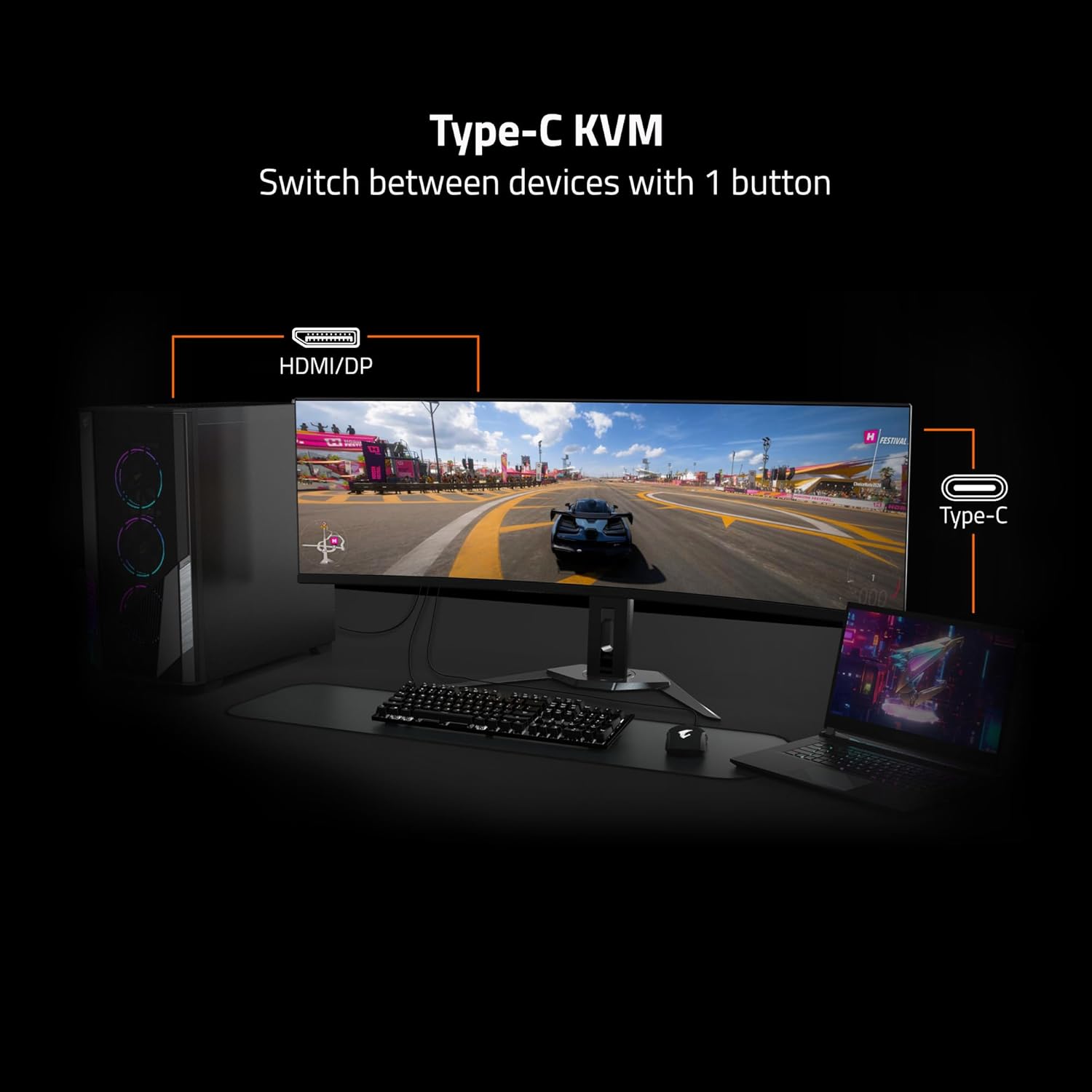
Figure 2.1: Diagram illustrating the adjustable stand's tilt and height range, and the VESA 100x100mm mounting points on the rear of the monitor.
2.3 Konnessjoni mat-Tagħmir Tiegħek
Connect your computer or other devices to the monitor using the appropriate cables. The MO27Q2 offers a variety of input and output ports:
- 2x HDMI 2.1: For high-definition video and audio input.
- 1x DisplayPort 1.4: For high-resolution video input, often preferred for gaming.
- 1x USB Type-C: Supports video input, data transfer, and power delivery (KVM functionality).
- 2x USB 3.2 Downstream ports: For connecting peripherals like keyboards, mice, or USB drives.
- 1x USB 3.2 Upstream port: Connects to your computer to enable the USB downstream ports and KVM functionality.
- 1x Earphone Jack: Għall-konnessjoni ta' headphones jew kelliema esterni.

Figure 2.2: Detailed diagram of the monitor's I/O ports, including HDMI, DisplayPort, USB Type-C, USB Upstream, USB Downstream, and Earphone Jack.
After connecting all necessary cables, plug the power cable into the monitor and then into a power outlet.
3. It-tħaddim tal-Monitor
3.1 Tixgħel/Jitfi
Locate the power button, typically on the back or bottom edge of the monitor. Press it once to power on the monitor. To power off, press and hold the power button for a few seconds until the display turns off.
3.2 Karatteristiċi u Settings Ewlenin
The GIGABYTE MO27Q2 monitor is equipped with advanced features to enhance your viewesperjenza ta' logħob:
- Rata Għolja ta' Riffriskar u Ħin ta' Rispons: Enjoy ultra-smooth visuals with a 240Hz refresh rate and an incredibly fast 0.03ms GTG (Gray-to-Gray) response time, minimizing motion blur and ghosting.
- Exceptional Color Accuracy: With 99% DCI-P3 color gamut coverage and 10-bit color depth, the monitor delivers vibrant, true-to-life colors and smooth gradients.
- AMD FreeSync Premium Pro: Synchronizes the monitor's refresh rate with your GPU's frame rate to eliminate screen tearing and stuttering, providing a fluid gaming experience.
- Type-C KVM Functionality: The integrated KVM (Keyboard, Video, Mouse) switch allows you to control multiple devices (e.g., a desktop PC and a laptop) connected to the monitor using a single set of keyboard and mouse. Simply press a button to switch between inputs.
- VESA DisplayHDR True Black 400: Provides deep blacks and impressive contrast for a more immersive visual experience.
- Teknoloġiji tal-Kura tal-Għajnejn: Features TÜV Rheinland Certified and VESA Certified ClearMR 13000 for reduced blue light emission and flicker-free viewing, promoting eye comfort during extended use.

Figure 3.1: Visual comparison highlighting the superior performance of 0.03ms response time and 240Hz refresh rate over slower alternatives.

Figure 3.2: Diagram illustrating how the Type-C KVM feature allows switching between a desktop and a laptop using one keyboard and mouse connected to the monitor.

Figure 3.3: Icons representing key features such as Eyesafe Certified 2.0, Flicker Free, Low Blue Light, Low Motion Blur, 99% DCI-P3, 10-bit color, HDR 400, KVM, HDMI 2.1, and DisplayPort 1.4.
3.3 Menù tal-Wiri fuq l-Iskrin (OSD)
The OSD menu allows you to adjust various monitor settings such as brightness, contrast, color temperature, input source, and gaming features. Access the OSD menu using the joystick or buttons located on the back or bottom of the monitor. Navigate through the options and confirm selections as indicated on the screen.
4. Manutenzjoni
4.1 Tindif tal-Monitor
Biex iżżomm iċ-ċarezza u l-lonġevità tal-monitor tiegħek, segwi dawn il-linji gwida għat-tindif:
- Dejjem itfi l-monitor u aqlagħh mill-plagg tal-elettriku qabel ma tnaddfu.
- Uża drapp ratba u mingħajr ħelu ftit dampMaħsul bl-ilma jew b'soluzzjoni speċjalizzata għat-tindif tal-iskrin.
- Gently wipe the screen surface to remove dust and smudges. Avoid applying excessive pressure.
- Għall-monitor ċasing, use a dry, soft cloth. Do not use abrasive cleaners, waxes, or solvents as they may damage the finish.
- Evita li tisprejja likwidi direttament fuq l-iskrin jew fi kwalunkwe fetħiet.
4.2 Ħażna
If storing the monitor for an extended period, ensure it is powered off, unplugged, and stored in a cool, dry place away from direct sunlight and extreme temperatures. It is recommended to use the original packaging for protection during storage or transport.
5 Issolvi l-problemi
If you encounter issues with your GIGABYTE MO27Q2 monitor, refer to the following common troubleshooting steps:
| Problema | Kawża Possibbli | Soluzzjoni |
|---|---|---|
| L-ebda immaġni fuq l-iskrin |
|
|
| L-immaġni hija mċajpra jew distorta |
|
|
| L-ebda ħoss mill-jack tal-earphones |
|
|
| KVM function not working |
|
|
If the problem persists after trying these solutions, please contact GIGABYTE customer support for further assistance.
6. Speċifikazzjonijiet Tekniċi
| Karatteristika | Dettall |
|---|---|
| Brand | GIGABYTE |
| Numru tal-Mudell | MO27Q2 |
| Daqs tal-Iskrin | 27 Pulzier |
| Tip ta' Panel | QD-OLED |
| Riżoluzzjoni | 2560x1440 (QHD) |
| Riffriskar Rata | 240Hz |
| Ħin ta' Rispons | 0.03ms GTG |
| Gamut tal-Kulur | 99% DCI-P3 |
| Profond tal-Kulur | 10-il bit |
| Appoġġ HDR | VESA DisplayHDR Iswed Veru 400 |
| Sinkronizzazzjoni Adattiva | AMD FreeSync Premium Pro |
| Konnettività | 2x HDMI 2.1, 1x DisplayPort 1.4, 1x USB Type-C, 2x USB 3.2 Downstream, 1x USB 3.2 Upstream, 1x Earphone Jack |
| KVM | Yes (Type-C KVM) |
| Kompatibbli VESA Mount | 100x100mm |
| Aġġustabilità | Height Adjustable, Tilt (-5° to +21°) |
| Piż tal-oġġett | 21.6 liri |
| Dimensjonijiet tal-Prodott (LxWxH) | 7.38 x 24.03 x 19.67 pulzieri |
| Kulur | Iswed |
| Data L-Ewwel Disponibbli | 29 ta’ Jannar, 2025 |
7. Garanzija u Appoġġ
7.1 Informazzjoni dwar Garanzija
The GIGABYTE MO27Q2 QD-OLED Gaming Monitor comes with a Garanzija Limitata ta' 3 Snin. This warranty covers defects in materials and workmanship under normal use. Please refer to the warranty card included in your product packaging for full terms and conditions, including specific coverage details and exclusions.
Żomm il-prova tax-xiri tiegħek (irċevuta jew fattura) għax tkun meħtieġa għal kwalunkwe talba ta' garanzija.
7.2 Appoġġ għall-Klijent
For technical assistance, troubleshooting beyond this manual, or warranty service, please contact GIGABYTE customer support. You can find contact information and additional resources on the official GIGABYTE website. It is recommended to have your monitor's model number (MO27Q2) and serial number ready when contacting support.
Visit the official GIGABYTE Store for more information and support: GIGABYTE Official Store