
Wonderlit MAX116
Wonderlit Jellyfish Mood Lamp Manwal għall-Utent
Mudell: MAX116
Introduzzjoni
Grazzi tax-xiriasing the Wonderlit Jellyfish Mood Lamp. This innovative device combines a mesmerizing jellyfish aquarium simulation with a high-quality Bluetooth speaker, creating a unique ambiance for any room. Enjoy the enchanting visual display and immersive audio experience.
This manual provides detailed instructions for setup, operation, and maintenance to ensure optimal performance and longevity of your device.
Informazzjoni dwar is-Sigurtà
- Żomm l-apparat 'il bogħod mill-ilma u l-umdità.
- Tiżżarmax jew tippruvax issewwi l-apparat int stess. Irreferi għal persunal tas-servizz kwalifikat.
- Uża biss il-kejbil tal-iċċarġjar USB-C provdut.
- Evita li tpoġġi l-lamp fid-dawl tax-xemx dirett jew ħdejn sorsi ta’ sħana.
- Dan il-prodott huwa ddisinjat għall-użu fuq ġewwa biss.
- Keep out of reach of small children to prevent accidental damage or injury.
X'hemm fil-Kaxxa
- Wonderlit Jellyfish Mood Lamp (Model: MAX116)
- Cable tal-Iċċarġjar tal-USB-C
- Manwal għall-Utent (dan id-dokument)

Image: The retail packaging of the Wonderlit Jellyfish Mood Lamp, li juri l-lamp inside and highlighting features like "Simulated Motion Tentacles" and "Multiple Color Modes."
Prodott Overview
Familiarize yourself with the components of your Jellyfish Mood Lamp.

Immaġni: Faċċata ċara view of the Wonderlit Jellyfish Mood Lamp, wirjaasing its transparent dome, the illuminated jellyfish, and the speaker base with control buttons.
Pannell tal-Kontroll u Portijiet
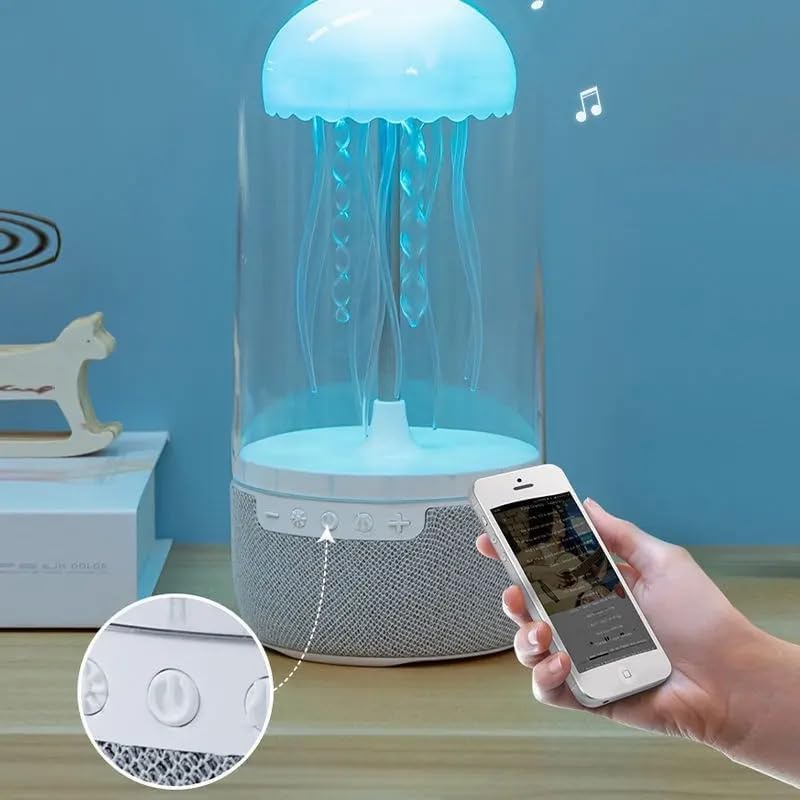
Immaġni: Close-up view of the control buttons located on the base of the lamp, including power, volume, and mode controls.
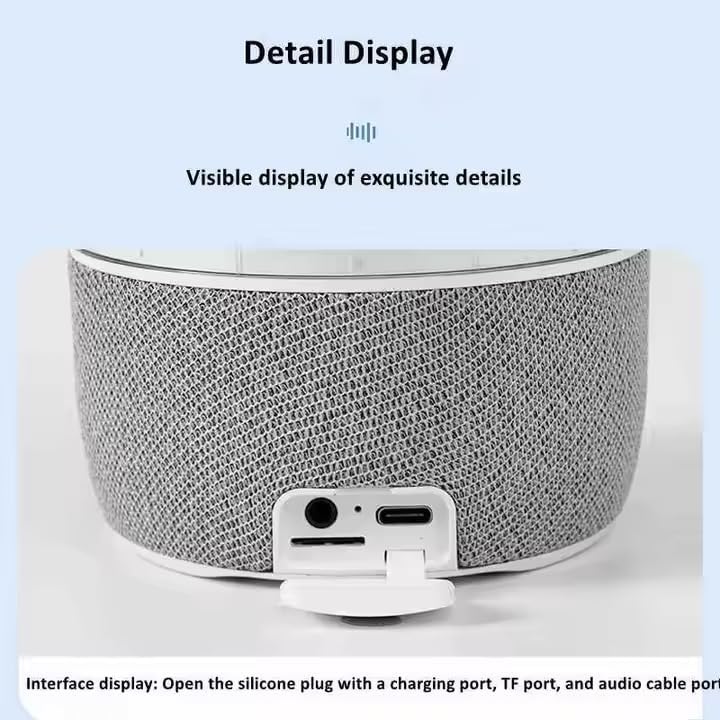
Immaġni: Dettaljata view of the interface display, showing the silicone plug opened to reveal the charging port (USB-C), TF card slot, and audio cable port.
- Buttuna tal-Qawwa: Dawwar il-lamp mixgħul/mitfi.
- Buttuna tal-Modalità: Switches between light modes and sound-activated mode.
- Volum Niżel / Track Preċedenti: Decreases volume or skips to the previous song.
- Volum 'il fuq / Track Li jmiss: Iżżid il-volum jew taqbeż għall-kanzunetta li jmiss.
- Port tal-Iċċarġjar USB-C: Għall-input tal-enerġija.
- Slott tal-Karta TF: Għad-daqq tal-mużika direttament minn memory card.
- Port tad-Dħul tal-Awdjo: For connecting external audio devices via AUX cable.
Setup
- Spakkjar: Neħħi bir-reqqa l-komponenti kollha mill-imballaġġ.
- Pjazzament: Place the Jellyfish Mood Lamp on a stable, flat surface. It can also be hung if desired.
- Konnessjoni tal-Enerġija: Qabbad il-kejbil tal-iċċarġjar USB-C ipprovdut mal-lamp's charging port and plug the other end into a USB power adapter (not included) or a computer USB port. The lamp will begin charging.
- Ħlas Inizjali: For best performance, fully charge the lamp qabel l-ewwel użu.
Istruzzjonijiet Operattivi
Qawwa mixgħul/mitfi
- Agħfas u żomm il- Buttuna tal-Qawwa biex iddawwar lamp mixgħul jew mitfi.
Modi tad-Dawl
Il-lamp features full-color gradient lighting and dynamic tentacle movement.
- Agħfas il- Buttuna tal-Modalità to cycle through different light colors and gradient effects.
- The jellyfish tentacles will move gently, simulating real jellyfish.

Image: The Jellyfish Mood Lamp illuminated with a soft pink light, placed on a bedside table next to an aromatherapy diffuser.
Funzjoni tal-Ispeaker Bluetooth
- Tqabbil:
- Turn on the Jellyfish Mood Lamp. It will automatically enter Bluetooth pairing mode.
- On your smartphone or audio device, enable Bluetooth and search for "Wonderlit Lamp" (or similar name).
- Select the device to pair. A confirmation sound will indicate successful pairing.
- Daqq tal-Mużika:
- Play music from your paired device.
- Uża l- Volum 'il fuq (+) u Volum 'l isfel (-) buttons on the lamp biex taġġusta l-volum.
- Agħfas u żomm Volum 'il fuq (+) or Volum 'l isfel (-) biex taqbeż għall-korsa li jmiss jew preċedenti.

Image: The Jellyfish Mood Lamp glowing with a blue light, with musical notes digitally added around it, indicating its speaker functionality.
Modalità Attivata mill-Ħoss
Il-lamp can synchronize its light effects with music or ambient sounds.
- Agħfas il- Buttuna tal-Modalità repeatedly until the sound-activated mode is engaged. The lights will react to the rhythm of the music playing through the speaker or external sounds.

Image: The Jellyfish Mood Lamp displaying a vibrant blue light, with musical notes and sound waves indicating its ability to react to music and provide "Shocking sound quality."
Using TF Card / AUX Input
- Karta TF: Daħħal kard TF (microSD) b'awdjo MP3 files into the TF card slot. The lamp will automatically switch to TF card playback mode.
- Input AUX: Connect an external audio device (e.g., MP3 player, computer) to the lamp's audio input port using a 3.5mm AUX cable (not included). The lamp will switch to AUX input mode.
Manutenzjoni
- Tindif: Imsaħ il-barra tal-lamp with a soft, dry cloth. Do not use abrasive cleaners or immerse the device in water.
- Ħażna: Meta ma tkunx qed tużaha għal perjodi twal, aħżen l-amp f'post frisk u niexef 'il bogħod mix-xemx diretta.
- Tentacles: The jellyfish tentacles are flexible. Handle them gently to avoid damage.
Issolvi l-problemi
| Problema | Kawża Possibbli | Soluzzjoni |
|---|---|---|
| Lamp ma jixgħelx. | Il-batterija hija eżawrita. | Connect the USB-C charging cable and charge the lamp. |
| L-ebda ħoss mill-ispiker. | Bluetooth not connected; Volume too low; Incorrect input mode. | Ensure Bluetooth is paired. Increase volume on both lamp and source device. Check if TF card or AUX cable is properly inserted/connected. |
| Jellyfish not moving. | Motor malfunction; Obstruction. | Ensure no foreign objects are obstructing the tentacles. If problem persists, contact customer support. |
| Tqabbil Bluetooth falla. | Device too far; Bluetooth not enabled; Interference. | Żgura lamp is in pairing mode and within range. Restart both devices and try again. |
Speċifikazzjonijiet
| Karatteristika | Dettall |
|---|---|
| Numru tal-Mudell | MAX116 |
| Brand | Wonderlit |
| Dimensjonijiet tal-Prodott | 9"D x 4"W x 4"H |
| Piż tal-oġġett | 1.39 liri |
| Materjal | Plastik |
| Tip ta' Sors tad-Dawl | LED |
| Temperatura tal-Kulur | 5000 Kelvin |
| Sors tal-Enerġija | USB Powered (5 Volts DC) |
| Konnettività | Bluetooth |
| Metodu ta' Kontroll | Mess |
| Karatteristiċi Speċjali | Floating Jellyfish, Volume Control, Light Mode, On/Off, Skip Tracks, Color Changing LED Lights, Sound-Activated Mode |
| Użu fuq ġewwa/barra | Ġewwa |
Garanzija u Appoġġ
For warranty information and customer support, please refer to the contact details provided on the product packaging or visit the official Wonderlit websit. Żomm l-irċevuta tax-xiri tiegħek bħala prova tax-xiri.
Manufacturer: TRUSTSTONE GROUP LLC