
Introduzzjoni
Thank you for choosing the VKROBAG P114 Smartwatch. This manual provides essential information for setting up, operating, and maintaining your device. Please read it carefully to ensure optimal performance and longevity of your smartwatch.
Informazzjoni dwar is-Sigurtà
- Tippruvax tiżżarma jew timmodifika l-apparat.
- Żomm l-apparat 'il bogħod minn temperaturi estremi u dawl tax-xemx dirett.
- Evita li tesponi l-apparat għal impatti jew waqgħat qawwija.
- Ikkonsulta professjonist mediku qabel tibda xi kors ġdid ta' eżerċizzju, speċjalment jekk għandek kundizzjonijiet tas-saħħa pre-eżistenti.
- Dan l-apparat mhuwiex apparat mediku u m'għandux jintuża għal skopijiet dijanjostiċi jew ta' trattament.
Kontenut tal-Pakkett
Kun żgur li l-oġġetti kollha huma preżenti fil-pakkett tiegħek:
- VKROBAG P114 Smartwatch
- Iċċarġjar Cable
- Manwal għall-Utent
Prodott Overview
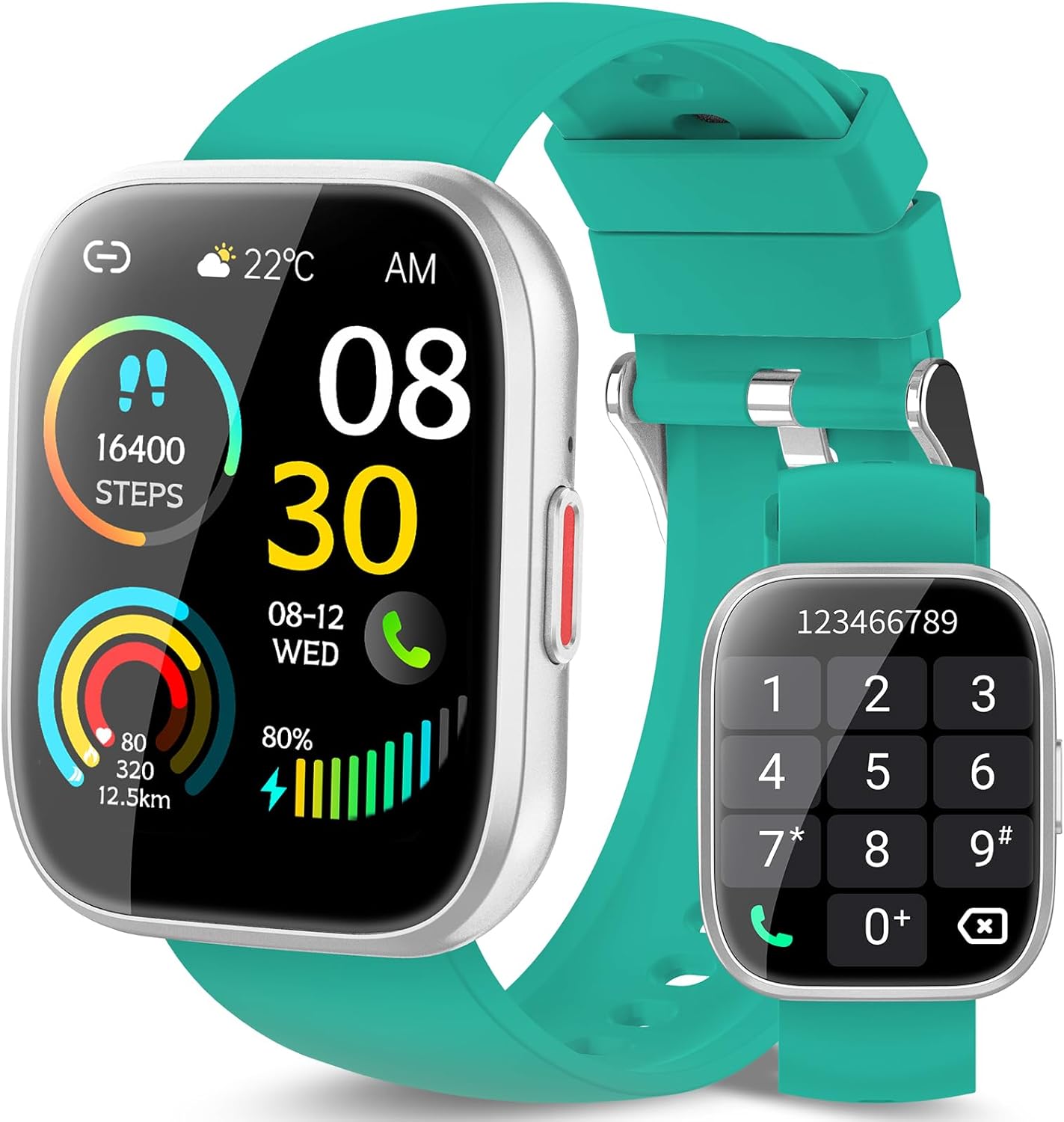
Figure 1: VKROBAG P114 Smartwatch. The display shows the current time (08:30 AM), date (08-12 WED), weather (22°C), step count (16400 steps), heart rate (80 bpm), calories burned (320), distance (12.5 km), and battery level (80%). A separate image shows the dial pad for making calls.
The VKROBAG P114 Smartwatch features a 1.85-inch digital display, a side button for navigation, and a comfortable silicone strap. It integrates various sensors for health and fitness tracking.
Setup
1. Iċċarġjar tal-Ismartwatch
Qabel l-ewwel użu, iċċarġja l-ismartwatch tiegħek kompletament. Qabbad il-kejbil tal-iċċarġjar manjetiku mal-punti tal-iċċarġjar fuq wara tal-arloġġ u daħħal it-tarf tal-USB f'adapter tal-enerġija USB standard (mhux inkluż).
- Ċarġ sħiħ tipikament jieħu madwar 2 sigħat.
- L-ikona tal-batterija fuq l-iskrin tindika l-istatus tal-iċċarġjar.
2. Tniżżil u Installazzjoni tal-App
To unlock all features, download the companion app on your smartphone. Scan the QR code provided in the quick start guide (if available) or search for the app name (e.g., "VKROBAG Fit" or similar, check packaging) in your phone's app store (App Store for iOS, Google Play Store for Android).
3. It-tqabbil mal-Ismartphone Tiegħek
- Kun żgur li l-Bluetooth huwa attivat fuq l-ismartphone tiegħek.
- Iftaħ l-app li takkumpanja u segwi l-istruzzjonijiet fuq l-iskrin biex toħloq kont jew tidħol.
- Fl-app, mur fit-taqsima "Apparat" jew "Żid Apparat".
- Select "VKROBAG P114" from the list of available devices.
- Ikkonferma t-talba ta' tqabbil kemm fuq l-ismartphone kif ukoll fuq l-ismartwatch tiegħek.
Note: For call functionality, you may need to pair the watch separately as a Bluetooth audio device in your phone's Bluetooth settings after the initial app pairing. Look for a device named "P114_Call" or similar.
Tħaddim tal-Ismartwatch
Navigazzjoni Bażika
- Touch Screen: Skrolla lejn ix-xellug/lemin, 'il fuq/'l isfel biex tinnaviga fil-menus u l-karatteristiċi. Tektek biex tagħżel.
- Buttuna tal-ġenb: Press to wake the screen, return to the home screen, or access the main menu. Long press for power options.
Sejħa Funzjoni
With the watch paired for calls, you can make and receive calls directly from your wrist.
- Tagħmel Sejħa: Access the dial pad or contact list on the watch. Enter the number or select a contact and tap the call icon.
- Tweġiba għal Sejħa: Meta tidħol telefonata, tektek l-ikona ħadra tat-tweġiba fuq l-iskrin tal-arloġġ.
Traċċar tal-Fitness
- Steps & Distance: L-arloġġ isegwi awtomatikament il-passi, id-distanza u l-kaloriji maħruqa tiegħek kuljum. View summaries on the watch face or in the app.
- Monitoraġġ tar-Rata tal-Qalb: Access the heart rate function on the watch to measure your current heart rate. The app provides historical data.
- Monitoraġġ tal-irqad: Wear the watch to bed for automatic sleep tracking. Review sleep patterns (deep sleep, light sleep, awake time) in the app.
- Modi sportivi: Select from over 110 sports modes (e.g., running, cycling, walking) to track specific workout data.
Notifiki
Receive notifications for calls, messages, and social media apps directly on your smartwatch. Ensure notification permissions are enabled in both your phone's settings and the companion app.
Manutenzjoni
Tindif
Wipe the watch screen and strap regularly with a soft, dry cloth. For stubborn dirt, use a slightly damp drapp u mbagħad nixxef sew. Evita kimiċi ħarxa jew materjali li joborxu.
Reżistenza għall-Ilma (IP68)
The VKROBAG P114 Smartwatch is IP68 rated, meaning it is resistant to dust and can withstand immersion in water up to 1.5 meters for up to 30 minutes. It is suitable for daily use, hand washing, and light rain. However, it is not recommended for hot showers, saunas, or diving, as steam and high water pressure can compromise the seal.
Kura tal-batterija
- Evita li tiċċarġja l-batterija kompletament ta' spiss.
- Charge the device using the provided cable and a compatible power adapter.
- Store the watch in a cool, dry place if not used for extended periods.
Issolvi l-problemi
- L-arloġġ ma jixgħelx: Kun żgur li l-arloġġ ikun iċċarġjat kompletament. Qabbad mal-ċarġer għal mill-inqas 30 minuti.
- Ma tistax tqabbad mat-telefon:
- Ensure Bluetooth is on for both devices.
- Kun żgur li l-arloġġ jinsab fil-firxa tal-Bluetooth tat-telefon tiegħek.
- Erġa' ibda kemm l-arloġġ kif ukoll it-telefon tiegħek.
- Insieh l-apparat fis-settings tal-Bluetooth tat-telefon tiegħek u erġa' pprova tqabbad permezz tal-app.
- Dejta dwar is-saħħa mhux preċiża: Kun żgur li l-arloġġ jintlibes sew fuq il-polz tiegħek, la issikkat wisq u lanqas maħlul wisq. Naddaf is-sensuri regolarment.
- Notifiki li ma jidhrux: Check app notification permissions on your phone and within the companion app. Ensure the watch is connected via Bluetooth.
Speċifikazzjonijiet
| Karatteristika | Dettall |
|---|---|
| Mudell | P114 |
| Daqs tal-Wiri | 1.85 pulzieri |
| Tip ta 'Wiri | Diġitali |
| Riżoluzzjoni | 320 x 320 |
| Konnettività | Bluetooth |
| Reżistenza għall-Ilma | IP68 |
| Tip ta 'batterija | Polimeru tal-litju (inkluż) |
| Apparati Kompatibbli | Smartphone |
| Apparat tal-Input | Mikrofonu |
Garanzija u Appoġġ
For warranty information and customer support, please refer to the documentation included with your purchase or contact the retailer/manufacturer directly. Keep your proof of purchase for warranty claims.
For further assistance, visit the official VKROBAG websit jew ikkuntattja lis-servizz tal-konsumatur tagħhom.