
Introduzzjoni
This manual provides essential information for the safe and efficient use of your NOHON 10000mAh Magnetic Wireless Power Bank, Model NX-YSP04. Please read this manual thoroughly before using the product and retain it for future reference.
The NOHON Magnetic Wireless Power Bank offers a convenient and portable charging solution with its 10000mAh capacity, magnetic wireless charging, and fast wired charging capabilities. Its compact design makes it ideal for travel and daily use.
Kontenut tal-Pakkett
Ivverifika li l-oġġetti kollha huma preżenti fil-pakkett tiegħek:
- 1 x NOHON 10000mAh Magnetic Wireless Power Bank
- 1 x Cable tal-Iċċarġjar USB-C
- 1 x Manwal għall-Utent
Prodott Overview
Iffamiljarizza ruħek mal-komponenti tal-power bank tiegħek.
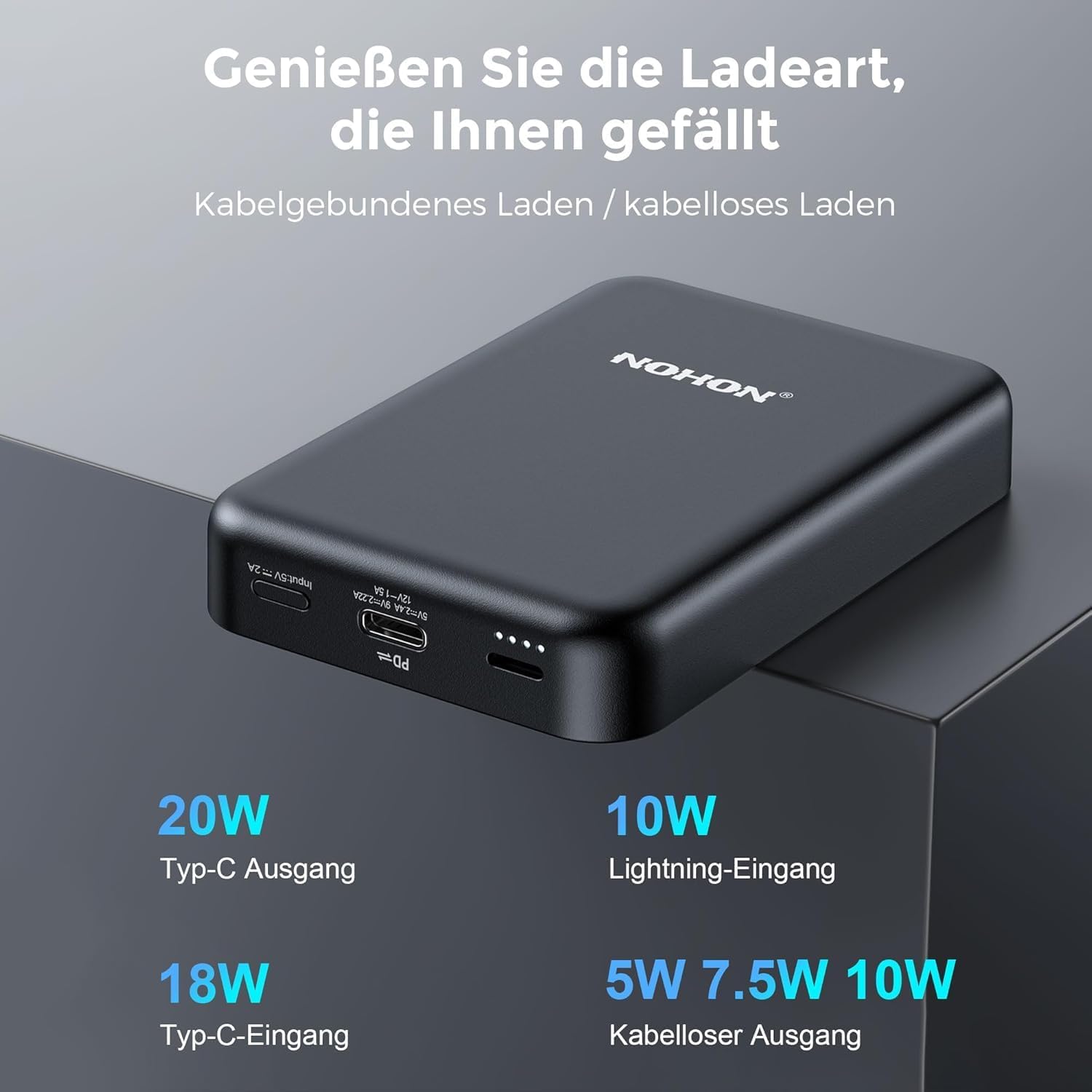
Image: NOHON Magnetic Wireless Power Bank showing its Type-C In/Out port, Lightning Input, and LED indicators.
- Magnetic Wireless Charging Pad: For wireless charging compatible devices.
- USB-C Port (In/Out): Supports 20W PD fast charging for both input and output.
- Lightning Input Port: For charging the power bank using a Lightning cable (10W).
- Indikaturi LED: Uri l-livell tal-batterija u l-istatus tal-iċċarġjar.
- Buttuna tal-Qawwa: To activate/deactivate the power bank and check battery level.
Setup
Iċċarġjar Inizjali tal-Power Bank
Before first use, fully charge your NOHON Power Bank.
- Qabbad il-kejbil USB-C provdut mal-port USB-C fuq il-power bank.
- Qabbad it-tarf l-ieħor tal-kejbil USB-C ma' adapter tal-ħajt USB kompatibbli (mhux inkluż).
- L-indikaturi LED jixegħlu biex juru l-progress tal-iċċarġjar. L-LEDs kollha jixegħlu b'mod solidu meta jkunu ċċarġjati kompletament.
- Alternatively, you can use a Lightning cable (not included) to charge the power bank via its Lightning input port.

Immaġni: Close-up view of the USB-C and Lightning input ports on the power bank.
Istruzzjonijiet Operattivi
Iċċekkjar tal-Livell tal-Batterija
Press the power button once to check the remaining battery level via the LED indicators.
Iċċarġjar bla fili
The power bank features magnetic wireless charging for compatible devices (e.g., iPhone 12/13/14 series).
- Ensure your device supports magnetic wireless charging. For other devices, a MagSafe-compatible case may be required.
- Align your device with the magnetic charging pad on the power bank. The magnets will securely attach the device.
- Wireless charging will begin automatically. The power bank supports 5W/7.5W/10W wireless output.

Image: An iPhone is shown magnetically attached to the NOHON power bank, indicating active wireless charging.

Image: A hand demonstrates the strong magnetic attachment of the power bank to a smartphone, ensuring stable charging.

Image: Illustration differentiating between MagSafe-compatible cases (green check) and non-MagSafe cases (red cross) for optimal magnetic charging.
Iċċarġjar bil-fili
Use the USB-C port for wired charging of your devices.
- Connect one end of a USB-C cable to the USB-C port on the power bank.
- Qabbad it-tarf l-ieħor tal-kejbil mal-port tal-iċċarġjar tat-tagħmir tiegħek.
- The power bank will automatically begin charging your device with up to 20W PD fast charging.
Iċċarġjar ta 'Apparat Multipli fl-istess ħin
The NOHON Power Bank supports charging two devices at the same time: one wirelessly and one via the USB-C port.

Image: The power bank is shown charging an iPhone wirelessly while simultaneously being recharged via a USB-C cable from a wall adapter.
Manutenzjoni
- Żomm il-power bank niexef u 'l bogħod mill-umdità.
- Tesponix għal temperaturi estremi (sħan jew kesħin).
- Clean the surface with a soft, dry cloth. Avoid harsh chemicals or abrasive materials.
- Aħżen f'post frisk u niexef meta ma tkunx qed tintuża għal perjodi twal.
- Evita li twaqqa’ jew tissuġġetta l-bank tal-enerġija għal impatti qawwija.
Issolvi l-problemi
- Il-power bank mhux qed jiċċarġja:
- Kun żgur li l-kejbil tal-iċċarġjar huwa konness sew kemm mal-power bank kif ukoll mas-sors tal-enerġija.
- Ipprova kejbil tal-iċċarġjar jew adapter tal-ħajt differenti.
- Iċċekkja jekk is-sors tal-enerġija huwiex attiv.
- Apparat li ma jiċċarġjax bla fili:
- Ensure your device is wirelessly charging compatible and properly aligned with the power bank's magnetic pad.
- Remove any thick cases or metal objects between the device and the power bank.
- Kun żgur li l-power bank għandu biżżejjed ċarġ.
- Press the power button on the power bank to activate wireless charging if it doesn't start automatically.
- L-apparat mhux qed jiċċarġja permezz tal-kejbil:
- Ensure the cable is securely connected to both the power bank and your device.
- Try a different cable or device to rule out cable or device issues.
- Kun żgur li l-power bank għandu biżżejjed ċarġ.
Speċifikazzjonijiet
| Numru tal-Mudell | NX-YSP04 |
| Kapaċità tal-batterija | 10000mAh |
| Input/Output USB-C | 20W PD (Kunsinna tal-Enerġija) |
| Input tas-Sajjetti | 10W |
| Output Wireless | 5W / 7.5W / 10W |
| Tip ta 'batterija | Lithium-polimer |
| Dimensjonijiet (L x W x H) | 9.6 x 6.4 x 1.8 ċm |
| Piż | 250 g |
| Apparati Kompatibbli | Smartphones (e.g., iPhone 12/13/14 series), Tablets, Wireless Earbuds |

Image: Visual representation of the power bank's broad compatibility with iOS devices (iPhone 12/13/14 series) and other smartphones (requiring a MagSafe case).
Informazzjoni dwar is-Sigurtà
Biex tiżgura tħaddim sikur u tevita ħsara, jekk jogħġbok osserva l-prekawzjonijiet ta' sigurtà li ġejjin:
- Tiżżarmax, timmodifikax, jew issewwiex l-apparat int stess.
- Do not expose to fire, water, or extreme temperatures.
- Evita l-waqgħa jew impatti qawwija.
- Żomm fejn ma jintlaħaqx mit-tfal.
- Tużax jekk il-power bank ikun bil-ħsara jew minfuħ.
- Armi l-prodott b'mod responsabbli skont ir-regolamenti lokali.
- The product features Multi-Protect safety technology to prevent overcharge, over-discharge, over-current, and short-circuit.
Garanzija u Appoġġ
NOHON is committed to product quality and customer satisfaction. If you encounter any issues or have questions regarding your NOHON Magnetic Wireless Power Bank, please contact our customer support.
Please refer to the contact information provided on the product packaging or the official NOHON websit għal dettalji ta 'appoġġ.
The product includes a standard manufacturer's warranty. Please retain your proof of purchase for warranty claims.