
Introduzzjoni
This manual provides detailed instructions for the setup, operation, and maintenance of your HOLDLAMP ZQ01528 6-Piece Battery Powered RGBWA+UV LED Uplight system. Designed for versatile lighting applications, these uplights feature a 9600 mAh built-in battery for true wireless operation, 6x18W RGBWA+UV LEDs, and multiple control modes including 2.4GHz wireless DMX512, master/slave, auto, sound, remote control, WiFi, and mobile phone APP control. Please read this manual thoroughly before use to ensure safe and efficient operation.
X'hemm fil-Kaxxa
- 6 x StagDwal Par e
- 6 x Kontrolli mill-bogħod
- 6 x Kurduni tal-Enerġija
- 6 x DMX Cables
- 6 x Manwali tal-Istruzzjonijiet
Karatteristiċi tal-Prodott
- Batterija inkorporata: Each uplight features a 9600 mAh built-in battery for 100% true wireless operation. Integrated 2.4GHz wireless DMX 512 receiver allows linking multiple lights without physical cables. Lights can operate while charging.
- Sors tad-Dawl LED: Each unit contains 6 LEDs, each capable of 18 watts. Each LED is a 6-in-1 RGBWA+UV (Red, Green, Blue, White, Amber, Purple) type with a 100,000-hour life expectancy.
- Modi ta' Kontroll Multipli: Supports 6 control modes: 2.4Ghz wireless DMX512, master/slave, auto, sound, remote control, WiFi, and mobile phone APP control (compatible with iOS and Android systems).
- Working Time & Colorful Effect: Provides approximately 4 hours of illumination at full RGBWA+UV brightness, and up to 26 hours for monochrome colors. Features include static color, hopping, color combination, sound activation, color fade, jump, strobe, auto play, and master-slave mode. Customized colors can be created via the built-in LED display.
- Funzjonalità tal-APP: Connects to the dedicated HOLDLAMP Par light APP for mobile control. The APP offers a simple interface and multi-functional settings, including scanning a QR code on the par light for download.
Setup
- Spakkjar: Neħħi l-komponenti kollha mill-imballaġġ bir-reqqa. Ivverifika li l-oġġetti kollha elenkati fit-taqsima 'X'hemm fil-Kaxxa' huma preżenti.
- Ħlas Inizjali: For optimal performance, fully charge the uplights before first use. Connect the provided power cord to the power input on the unit and plug it into a standard AC outlet. The charging status will be indicated on the unit's display.
- Immuntar/Tqegħid:
- Bil-wieqfa fl-art: The uplights are designed to stand upright on a flat surface.
- Angled Placement: Utilize the adjustable angle base to position the light beam as desired.
- Truss Mounting: The integrated handle can also serve as a mounting point for trusses or other fixtures. Securely attach using appropriate clamps (mhux inklużi).
- Attivazzjoni tal-Kontroll mill-bogħod: Before using the remote control, remove the plastic battery protector tab from the battery compartment.
Istruzzjonijiet Operattivi
Qawwa mixgħul/mitfi
Locate the hard switch on the bottom of the unit. Flip the switch to the 'ON' position to power on the uplight. The display will illuminate, and the light will activate. Flip to 'OFF' to power down.
Modi ta' Kontroll
The uplight offers various control methods:
- Wiri fuq l-Unità: Use the MENU, UP, DOWN, and ENTER buttons on the unit's display to navigate settings and select modes.
- Kontroll mill-bogħod: Use the provided IR remote control for quick access to color changes, brightness adjustments, and various effects. Ensure the remote is pointed towards the IR receiver on the unit.
- Kontroll tal-APP Mobbli: Download the HOLDLAMP Par light APP (scan QR code on unit or manual). Connect your smartphone to the uplight via WiFi for comprehensive control over colors, modes, and settings.
- 2.4GHz Wireless DMX512: For professional setups, utilize the built-in wireless DMX512 receiver to link multiple lights and control them via a DMX controller.
- Modalità Kaptan/Skjav: Connect multiple units via DMX cables or wireless DMX. Configure one unit as the master, and others as slaves to synchronize their operation.
- Modalità Awtomatika: The uplight cycles through pre-programmed lighting effects automatically.
- Modalità tal-Ħoss: The lights react to ambient sound, changing patterns and colors in sync with music or other audio.
Integrazzjoni tal-Midja
Stampi tal-Prodott
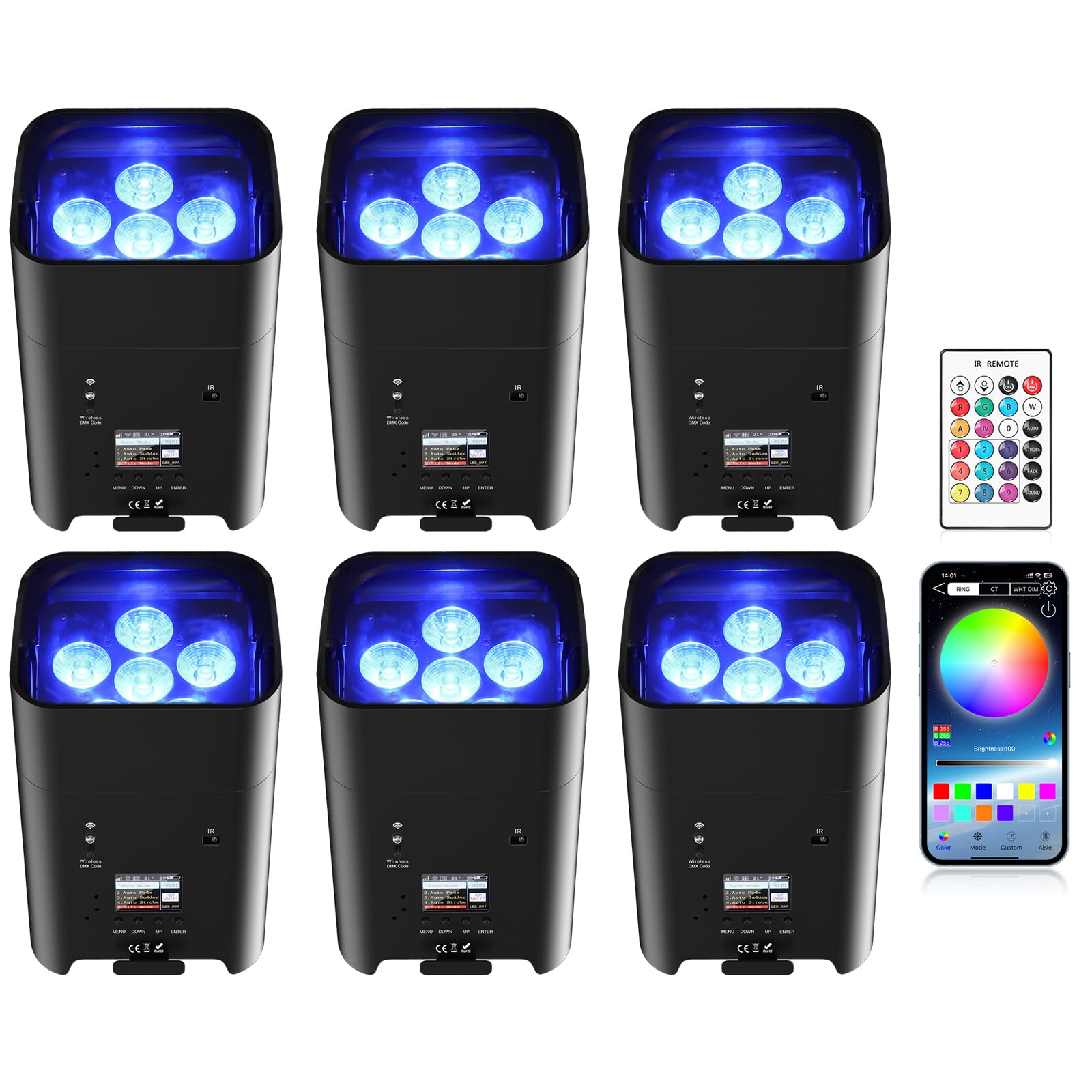
Figura 1: The HOLDLAMP ZQ01528 uplight showcasing its compact design, remote control, and mobile application interface for versatile control options.

Figura 2: An illustration of the uplight's 6-in-1 RGBWA+UV LEDs projecting distinct colors including Red, Green, Blue, White, Amber, and UV light.

Figura 3: Demonstrates the uplight's battery life for single color (26 hours), self-propelled (8 hours), and RGBWA+UV (6 hours) modes, along with placement options: standing on the floor, lying on the floor, or mounted on a truss.

Figura 4: Close-up view of the uplight's premium knob interface, portable handle, adjustable angle base, LCD operation screen, and various connectivity ports including DMX in/out and power in/out.
Vidjows Uffiċjali tal-Prodott
Vidjo 1: Fuqview of the Battery Powered Stage Par Lights 6x18W, demonstrating various features and applications. (Source: GCS-Store)
Vidjo 2: A demonstration of the 18*6W Wireless LED Light, highlighting its color capabilities and wireless functionality. (Source: GCS-Store)
Vidjo 3: Qasira preview of the HOLDLAMP 9600mAh Battery Uplights, focusing on their portability and brightness. (Source: GCS-Store)
Vidjo 4: A brief showcase of the rechargeable wireless uplights in action, demonstrating color changes and effects. (Source: GCS-Store)
Manutenzjoni
- Tindif: Regularly clean the exterior of the uplight with a soft, dry cloth. Avoid using abrasive cleaners or solvents.
- Kura tal-batterija: To prolong battery life, avoid fully discharging the unit frequently. Recharge promptly when the battery indicator is low. Store in a cool, dry place if not used for extended periods.
- Ħażna: Store the uplights in their original packaging or a protective case to prevent damage.
Issolvi l-problemi
- Id-dawl ma jixgħelx:
- Check if the power switch on the unit is in the 'ON' position.
- Ensure the battery is charged or the unit is connected to a power source.
- Il-Kontroll mill-bogħod ma Jirrispondix:
- Verify the plastic battery protector tab has been removed from the remote.
- Point the remote directly at the IR receiver on the uplight.
- Ibdel il-batterija tal-kontroll remot jekk meħtieġ.
- Kwistjonijiet ta' Konnettività tal-APP:
- Ensure your smartphone's WiFi is enabled and connected to the uplight's WiFi network.
- Restart the APP and the uplight.
- DMX Control Problems:
- Confirm correct DMX addressing for each unit.
- Check DMX cable connections or wireless DMX pairing.
Speċifikazzjonijiet
| Numru tal-Mudell | ZQ01528 |
| Tip ta' Sors tad-Dawl | 6x18W RGBWA+UV LED |
| Kapaċità tal-batterija | 9600 mAh Lithium Ion |
| Modi ta' Kontroll | 2.4Ghz Wireless DMX512, Master/Slave, Auto, Sound, Remote, WiFi, APP |
| Working Time (Full Brightness) | Approx. 4 hours (RGBWA+UV) |
| Working Time (Monochrome) | Appross. 26 sigħat |
| Materjal | Aluminju |
| Dimensjonijiet tal-Prodott | 5.3"T x 4.7"W x 5.3"Għ |
| Piż tal-oġġett | 2.79 liri |
| Angolu tar-raġġ | 15 Grad |
Garanzija u Appoġġ
For warranty information, technical support, or service inquiries, please refer to the contact details provided in your product packaging or visit the official HOLDLAMP websit. Żomm l-irċevuta tax-xiri tiegħek bħala prova tax-xiri għal kwalunkwe talba ta' garanzija.