
Introduzzjoni
Thank you for choosing the KLIM K7 Cassette Tape Player and MP3 Converter. This device allows you to enjoy your classic cassette tapes and convert them into digital MP3 files for modern playback. It features a built-in microphone for recording, an integrated speaker, and a rechargeable battery for portability. This manual provides detailed instructions for setup, operation, and maintenance of your KLIM K7.
Prodott Overview
Karatteristiċi Ewlenin
- Cassette to MP3 Converter: Effortlessly convert cassette tapes to digital MP3 files directly onto an SD card.
- Disinn portabbli: Lightweight and compact for on-the-go listening.
- Mikrofonu inkorporat: Record audio directly to the SD card.
- Kelliem inkorporat: Share your audio without external devices.
- Batterija rikarikabbli: Integrated 1000mAh battery provides extended playback.
- SD Card Player: Play MP3 files maħżuna fuq il-karta SD.
- Jack tal-widna ta' 3.5mm: Għal smigħ privat bil-earphones inklużi.
Komponenti u Kontrolli tal-Apparat
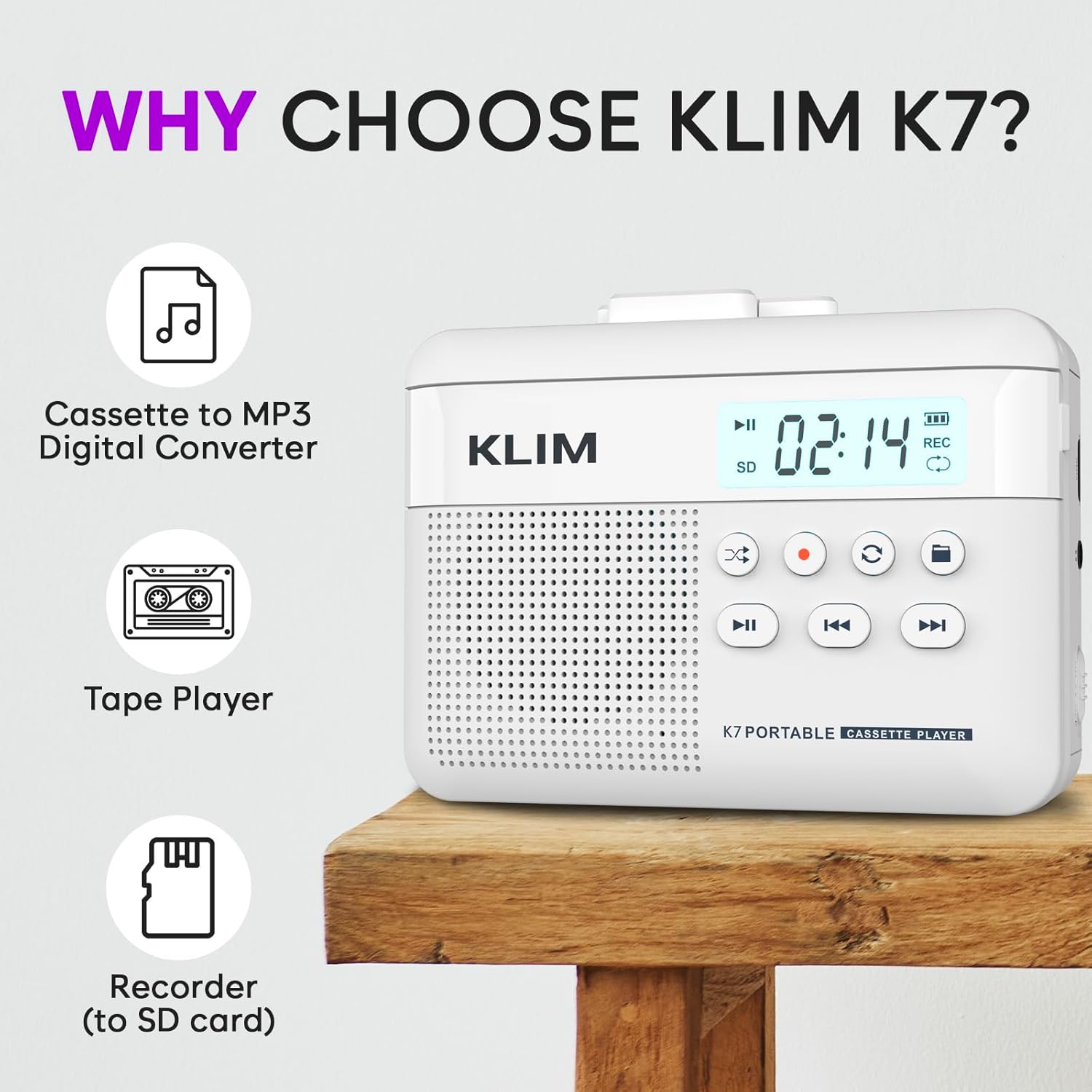
Figura 1: Quddiem view of the KLIM K7 Cassette Player, showing the speaker grille, LCD display, and control buttons (Play/Pause, Rewind, Fast Forward, Stop, Record, Mode, Folder, Loop).
- Display LCD: Juri n-numru tat-trakka, l-istatus tar-reġistrazzjoni, u l-livell tal-batterija.
- Kelliem: Kelliem integrat għal daqq tal-awdjo.
- Buttuna tal-Logħob/Pawża (►▮): Jibda jew iwaqqaf il-plejbek.
- Rewind Button (◀◀): Rewinds the cassette tape or navigates backward through MP3 tracks.
- Fast Forward Button (►►): Fast forwards the cassette tape or navigates forward through MP3 tracks.
- Buttuna ta' Waqfien (■): Jieqaf daqq jew reġistrazzjoni.
- Record Button (●): Initiates or stops recording.
- Mode Button (↻): Switches between cassette playback and SD card MP3 playback.
- Folder Button (🖿): Navigates through folders on the SD card.
- Loop Button (⟳): Jirrepeti t-trakka kurrenti jew it-trakkijiet kollha.

Figura 2: Ġenb view of the KLIM K7 Cassette Player, highlighting the SD card slot, 3.5mm headphone jack, and On/Off switch.
- Slot tal-Kard SD: Insert your Micro SD card here for recording and MP3 playback.
- Jack tal-headphones ta' 3.5mm: Connect the included earphones or other standard headphones.
- Swiċċ mixgħul/mitfi: Jixgħel jew jitfi l-apparat.
- Kontroll tal-Volum: Jaġġusta l-livell tal-ħruġ tal-awdjo.

Figura 3: Fuq view of the KLIM K7 Cassette Player with the cassette compartment open, showing the tape mechanism.
- Kompartiment tal-Kassett: Insert your cassette tapes here.
- Cassette Door Release: Opens the cassette compartment.
Setup
1. Iċċarġjar tal-batterija
Before first use, fully charge the KLIM K7. The device comes with a 1000mAh rechargeable battery.
- Locate the Type-C USB charging port on the side of the device.
- Connect the included Type-C USB cable to the charging port and the other end to a USB power adapter (not included) or a computer's USB port.
- The charging indicator on the LCD display will show charging status. A full charge typically takes approximately 2 hours.

Figura 4: The KLIM K7 connected to a Type-C USB cable for charging.
2. Daħħal Karta SD
An SD card (16GB included) is required for converting tapes to MP3 and for recording with the built-in microphone.
- Locate the SD card slot on the side of the device (refer to Figure 2).
- Daħħal il-kard Micro SD bil-mod fl-islott bil-kuntatti tad-deheb iħarsu 'l isfel sakemm tikklikkja f'postha.
- To remove, push the SD card inward until it clicks, then release, and it will eject.

Figura 5: Inserting the Micro SD card into the KLIM K7.
3. Daħħal Tejp tal-Kassett
- Press the Cassette Door Release button to open the cassette compartment.
- Insert your cassette tape with the open side facing upwards and the tape reels aligned with the player's mechanism.
- Agħlaq il-bieba tal-kompartiment tal-cassette sew sakemm tikklikkja.
Istruzzjonijiet Operattivi
1. Playing Cassette Tapes
- Ensure the device is powered on using the On/Off switch.
- Insert a cassette tape as described in the Setup section.
- Agħfas il- Play/Pause (►▮) buttuna biex tibda d-daqq.
- Aġġusta l-volum billi tuża l-kontroll tal-volum.
- Uża l- Rewind (◀◀) u Fast Forward (►►) buttuni biex tinnaviga t-tejp.
- Agħfas il- Waqqaf (■) buttuna biex ittemm il-plejbek.
2. Converting Cassette Tapes to MP3
Il-KLIM K7 jippermetti l-konverżjoni diretta tal-awdjo tal-cassette għal MP3 files on the inserted SD card, without needing a computer or additional software.
- Kun żgur li hemm kard SD imdaħħla u li l-apparat huwa mixgħul.
- Daħħal il-cassette tape li tixtieq tikkonverti.
- Agħfas il- Play/Pause (►▮) buttuna biex tibda ddoqq it-tejp.
- Pressa twila il Record (●) button. The 'REC' indicator on the LCD display will illuminate, indicating that recording has started.
- Biex tieqaf tirrekordja, agħfas Record (●) button again. The 'REC' indicator will turn off. The recorded audio will be saved as an MP3 file fuq il-karta SD.
- You can then remove the SD card and use the included SD card reader to transfer the MP3 files għal kompjuter jew apparat ieħor.

Figura 6: Visual guide for converting cassette audio to MP3 files.
3. Using the Built-in Microphone for Recording
The KLIM K7 can also record audio directly from its built-in microphone to the SD card.
- Kun żgur li hemm kard SD imdaħħla u li l-apparat huwa mixgħul.
- Agħfas il- Mode (↻) button until the device is in SD card mode (no cassette playing).
- Pressa twila il Record (●) button. The 'REC' indicator will light up, and the device will start recording audio from its microphone.
- Biex tieqaf tirrekordja, agħfas Record (●) button again. The 'REC' indicator will turn off, and the recording will be saved as an MP3 file.

Figura 7: Using the KLIM K7's built-in microphone for recording.
4. Daqq tal-MP3 Files minn SD Card
- Kun żgur li għandek kard SD b'MP3 files is inserted and the device is powered on.
- Agħfas il- Mode (↻) button to switch to SD card playback mode. The LCD display will show track information.
- Agħfas il- Play/Pause (►▮) buttuna biex tibda d-daqq.
- Uża l- Rewind (◀◀) u Fast Forward (►►) buttuni biex taqbeż il-binarji.
- Il- Folder (🖿) button allows navigation through different folders on the SD card.
- Il- Loop (⟳) button can be used to repeat the current track or all tracks.
- Aġġusta l-volum billi tuża l-kontroll tal-volum.
- Agħfas il- Waqqaf (■) buttuna biex ittemm il-plejbek.

Figura 8: Enjoying audio with the KLIM K7 and included earphones.
Manutenzjoni
Proper maintenance ensures the longevity and optimal performance of your KLIM K7.
- Tindif: Uża drapp artab u niexef biex tnaddaf il-barra tal-apparat. Tużax prodotti tat-tindif likwidi jew solventi.
- Kompartiment tal-Kassett: Naddaf ir-ras tat-tejp u r-rombli tal-għafsa perjodikament b'tajjara tal-qoton ħafifa.ampened with isopropyl alcohol to prevent audio quality degradation. Ensure the device is off and dry before use.
- Ħażna: Aħżen l-apparat f'post frisk u niexef 'il bogħod mix-xemx diretta u minn temperaturi estremi.
- Kura tal-batterija: Għal ħażna fit-tul, iċċarġja l-batterija sa madwar 50% kull ftit xhur biex iżżomm il-batterija f'saħħitha.
Issolvi l-problemi
If you encounter any issues with your KLIM K7, please refer to the following common solutions:
| Problema | Kawża Possibbli | Soluzzjoni |
|---|---|---|
| L-apparat ma jixgħelx. | Il-batterija hija eżawrita. | Charge the device using the provided Type-C USB cable. |
| L-ebda ħoss waqt il-daqq tal-cassette. | Volume is too low or headphones are not connected properly. | Increase the volume. Ensure headphones are fully plugged into the 3.5mm jack. |
| Recording to MP3 fails or produces no file. | SD card is full, not inserted correctly, or corrupted. | Check SD card insertion. Ensure sufficient space on the SD card. Try reformatting the SD card (this will erase all data). |
| Poor audio quality from cassette. | Dirty tape heads or worn-out cassette tape. | Clean the tape heads and pinch rollers. Try a different cassette tape to determine if the issue is with the tape itself. |
| L-apparat jiffriża jew ma jibqax jirrispondi. | Problema temporanju tas-softwer. | Turn the device off and then on again. If the issue persists, allow the battery to fully discharge and then recharge. |
Speċifikazzjonijiet
- Dimensjonijiet tal-Prodott: 4.76 x 3.61 x 1.56 pulzieri
- Piż tal-oġġett: 9.9 uqija
- Batterija: Batterija waħda tal-jone tal-litju (inkluża), 1000mAh
- Ħin tal-Iċċarġjar: Madwar sagħtejn
- Ħażna: Jappoġġja kard Micro SD (16GB inkluża)
- Output Awdjo: Built-in speaker, 3.5mm headphone jack
- Format tar-reġistrazzjoni: MP3

Figura 9: Dimensions of the KLIM K7 Cassette Player.
Garanzija u Appoġġ
KLIM is committed to producing quality electronics. The KLIM K7 Cassette Tape Player comes with a Assigurazzjoni ta' sena. If you encounter any problems with your device, please contact KLIM customer support for assistance.
Pjanijiet ta' protezzjoni addizzjonali jistgħu jkunu disponibbli għax-xiri:
- Pjan ta' Protezzjoni ta' 2 Snin: $3.99 (one-time)
- Pjan ta' Protezzjoni ta' 3 Snin: $5.99 (one-time)
- NEW Complete Protect: $16.99 (monthly)
Għal aktar appoġġ, żur il- KLIM Store on Amazon.