
1. Introduzzjoni
This manual provides comprehensive instructions for the installation, operation, and maintenance of your VECHTEL 9-inch Android 13 Car Stereo. This unit is designed to enhance your driving experience with advanced features such as wireless CarPlay, Android Auto, GPS navigation, Wi-Fi connectivity, Bluetooth, and support for a rear camera. Please read this manual thoroughly before installation and use to ensure proper functionality and safety.
2. Kontenut tal-Pakkett
Iċċekkja li l-oġġetti kollha elenkati hawn taħt huma inklużi fil-pakkett tiegħek:
- 1 x Car Stereo Unit
- 1 x Kejbil tal-Enerġija
- 1 x Wara View Kamera
- 1 x Antenna GPS
- 1 x Kejbil tad-Dħul tal-Kamera ta' Wara
- 1 x Cable RCA
- 2 x Kejbils USB
- 1 x Manwal ta 'Istruzzjoni
- 1 x Antenna tar-Radju
- 1 x Mikrofonu
- 1 x Canbus Decoder (if applicable for your vehicle)

Image: Contents of the VECHTEL car stereo package, including the main unit, rear camera, and various cables.
3. Mudelli ta' Karozzi Kompatibbli
This car stereo is designed for specific Volkswagen, Seat, and Skoda models. Please ensure your vehicle is listed below and verify the shape of your original car stereo and center console before installation.

Image: A list of compatible car models for the VECHTEL car stereo, including various VW, Seat, and Skoda models.
Volkswagen (VW)
- Golf 5, Golf 6
- Passat (B6, B7, CC, NMS, TSI, V6, Variant)
- Magotan (Variant, V6)
- Jetta, Sagitar
- Caddy
- EOS
- T5 (Multzvan)
- Tiguan, Tiguan GP
- Touran
- Polo
- R36 Variant
- Scirocco
- Sharan
- Sportline
- Beetle
- Bora
Sedil
- Altea (from 05/2004)
- Toledo (from 12/2004)
- Leon (from 09/2005)
- Altea XL, Alhambra (from 04/2007)
Skoda
- Fabia Limousine (02/2007 - 2012)
- Fabia Combi (04/2007 - 2012)
- Praktik (04/2007 - 2012)
- Roomster (04/2006 - 2012)
- Octavia Combi (06/2004 - Facelift)
Nota Importanti: Compatibility depends on the specific year and model of your car, as well as the shape of your original car stereo and center console. If you are unsure, please consult customer service with your car's model, year, and a photo of your center console.

Image: Visual guide showing examples of compatible (green checkmark) and incompatible (red X) car stereo slots in various car dashboards.
4. Setup u Installazzjoni
Installazzjoni professjonali hija rakkomandata. Kun żgur li l-vettura tkun skonnettjata qabel tibda l-installazzjoni.
4.1 Kontroll ta' Qabel l-Installazzjoni
- Iċċekkja li l-kontenut kollu tal-pakkett huwa preżenti.
- Confirm compatibility with your car model and dashboard configuration.
- If your car has a 52-pin connector, contact customer service for assistance before proceeding. The package includes 36 and 40-pin connectors.
4.2 Konnessjonijiet tal-Wiring
Connect the provided cables according to your vehicle's wiring diagram. The unit supports a plug-and-play connection for compatible models.
- Cable tal-Enerġija: Connect to the vehicle's power harness.
- Antenna tal-GPS: Immonta f'post b'dawl ċar view tas-sema għal riċeviment ottimali tas-sinjal.
- Antenna tar-radju: Connect for FM/RDS radio functionality.
- Kamera ta' wara: Connect the rear camera input cable to the unit and install the camera at the rear of the vehicle.
- Kejbils USB: Connect the two USB cables for external device connectivity.
- Kejbil RCA: Use for audio/video output connections, including subwoofer output.
- Mikrofonu: Qabbad il-mikrofonu estern għal kwalità aħjar tas-sejħa.
- Dekoder tal-Canbus: If your vehicle requires a Canbus decoder for steering wheel controls or other vehicle data integration, connect it as per the vehicle's specific instructions.

Immaġni: Dettaljata view of the wiring harness and connectors for the VECHTEL car stereo, including the 52-pin connector note.
4.3 Immuntar tal-Unità
Carefully insert the car stereo into the dashboard opening, ensuring all cables are properly routed and secured. Fasten the unit using the appropriate mounting brackets and screws.
5. Istruzzjonijiet Operattivi
Your VECHTEL car stereo runs on Android 13 and features a 9-inch HD touchscreen for intuitive control.
5.1 CarPlay mingħajr fili u Android Auto
Connect your smartphone wirelessly via Bluetooth or wired via USB to access CarPlay or Android Auto. This allows for seamless integration of navigation, music, calls, and voice control (Siri/Google Assistant).
- Konnessjoni bla fili: Enable Bluetooth on your phone and pair it with the car stereo. Follow the on-screen prompts to activate CarPlay or Android Auto.
- Konnessjoni bil-fili: Connect your phone to one of the USB ports using a compatible USB cable.
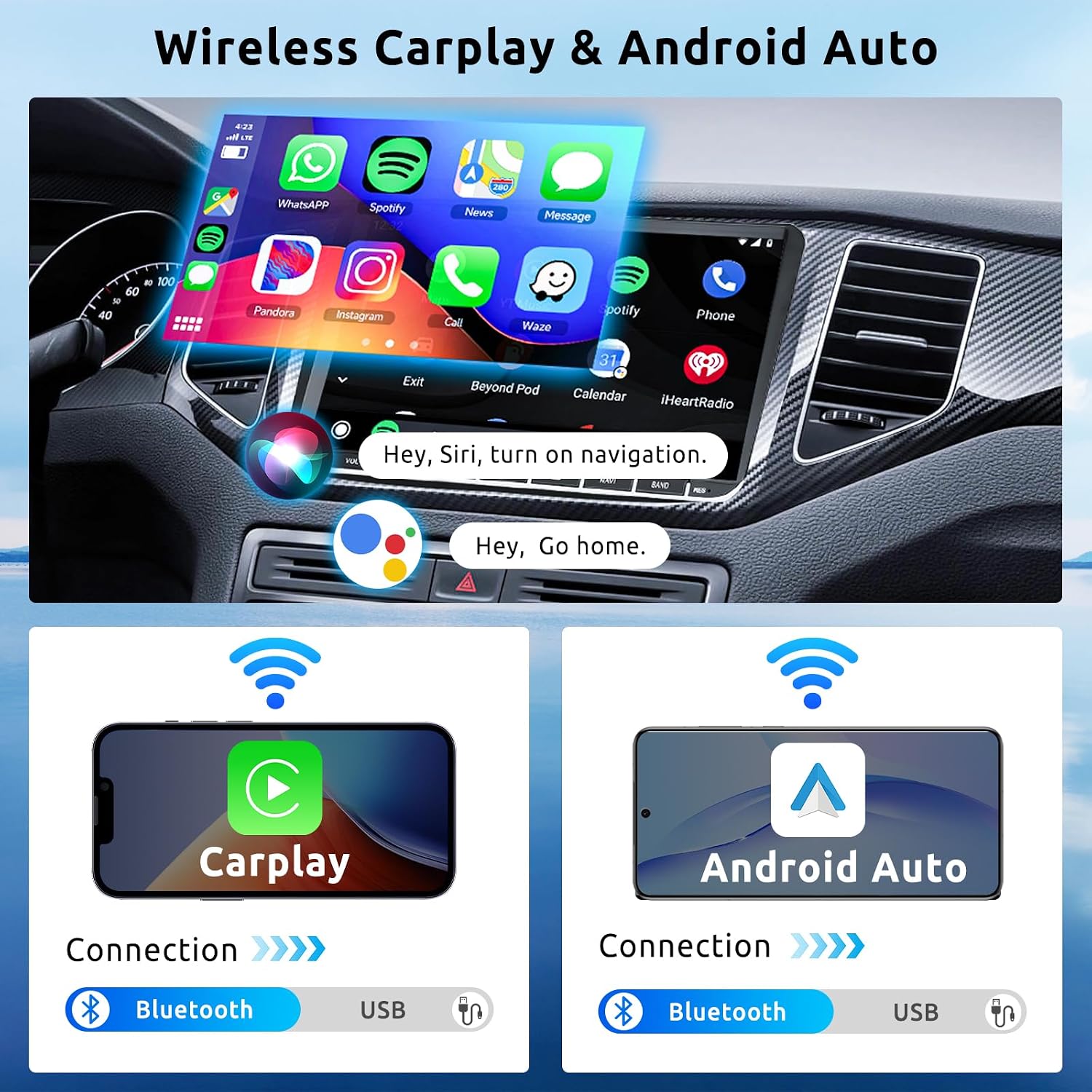
Image: The car stereo display showing the CarPlay interface with various app icons, and diagrams illustrating wireless and wired connections for CarPlay and Android Auto via Bluetooth and USB.
5.2 Navigazzjoni GPS
The unit includes a built-in GPS module. You can use pre-installed offline maps or download online maps via Wi-Fi.
- Mapep Offline: Access pre-loaded maps without an internet connection.
- Mapep Online: Connect to Wi-Fi to use real-time navigation services and traffic updates.

Image: Screenshots demonstrating online and offline GPS navigation on the car stereo, showing map interfaces and route details.
5.3 Konnettività tal-Wi-Fi
Connect the car stereo to a Wi-Fi network or your phone's hotspot to access online features.
- Installazzjoni tal-App: Niżżel u installa applikazzjonijiet mill-Google Play Store.
- Online Video: Stream videos from platforms like YouTube.
- Navigazzjoni Online: Utilize real-time map services.

Image: Displays showing online map usage, online video streaming (YouTube, Netflix, TikTok), and various app icons accessible via Wi-Fi connection.
5.4 Funzjonalità tal-Bluetooth
Qabbad it-telefon tiegħek permezz tal-Bluetooth għal sejħiet hands-free u streaming tal-awdjo.
- Sejħiet mingħajr idejn: Make and receive calls directly from the car stereo. Synchronize your phonebook for easy access to contacts.
- Streaming tal-Mużika: Daqq l-awdjo mit-telefon tiegħek permezz tal-ispikers tal-karozza.
Radju 5.5 FM/RDS
Tune into FM radio stations. The RDS (Radio Data System) feature displays station information where available.
- Stazzjonijiet issettjati minn qabel: Save up to 18 of your favorite stations for quick access.
5.6 Rear Camera Support
When the vehicle is in reverse, the display automatically switches to the rear camera view, li jipprovdi immaġni ċara għal parkeġġ u manuvrar sikuri.
- The included camera offers HD resolution, waterproof design, night vision, and a wide-angle view.
5.7 Kontroll tal-Istering Wheel (SWC)
If your vehicle supports it and the Canbus decoder is correctly installed, you can control basic functions of the car stereo (e.g., volume, track skipping) directly from your steering wheel buttons.
5.8 Link tal-Mera
Mirror Link allows you to display your smartphone's screen content directly onto the car stereo's display.
5.9 Funzjonalità tal-Iskrin Maqsum
The 9-inch touchscreen supports split-screen mode, allowing you to run two applications simultaneously (e.g., navigation and music player).

Image: A collage showing various features: HD rear camera view, steering wheel control interface, FM/RDS radio display, and Bluetooth call interface.
6. Speċifikazzjonijiet
| Brand | VECHTEL |
| Numru tal-Mudell | 7b2555ed-a449-4467-b7d2-e0d4d6e070b9 |
| Sistema Operattiva | Android 13 |
| RAM | 2GB |
| ROM | 64GB |
| Daqs tal-Iskrin | 9 Pulzier |
| Tip ta 'Wiri | Touchscreen HD |
| Teknoloġija tal-Konnettività | Bluetooth, USB, Wi-Fi |
| Karatteristiċi Speċjali | Built-in Bluetooth, Wireless CarPlay, Wireless Android Auto, GPS Navigation, Built-in Wi-Fi, Touchscreen |
| Apparati Kompatibbli | Smartphone |
| Modalità tal-Ħruġ tal-Awdjo | Stereo |
| Surround Sound Channel Konfigurazzjoni | 5.1 |
| Qawwa tal-Ħruġ | 180 Watts (4*45W) |
| Metodu ta' Kontroll | Touch, Wireless Control |
| Format tal-Midja Diġitali | AIFF, AVI, MP3 audio, MPEG, WAV, MKV, RMVB, MP4, MDV |
| Dimensjonijiet (L x W x H) | 21.4 x 13.3 x 5.5 ċm |
| Pajjiż ta' Oriġini | Iċ-Ċina |
7 Issolvi l-problemi
Din it-taqsima tindirizza kwistjonijiet komuni li tista' tiltaqa' magħhom. Għal problemi mhux elenkati hawn, jekk jogħġbok ikkuntattja l-appoġġ għall-klijenti.
7.1 Bla Enerġija / L-Unità Mhux Mixgħul
- Iċċekkja l-konnessjonijiet kollha tal-enerġija biex tiżgura li huma sikuri.
- Verify the vehicle's fuse for the car stereo is intact.
- Kun żgur li l-ignition tal-karozza hija mixgħula.
7.2 Ebda Ħoss jew Ħoss Distort
- Iċċekkja l-konnessjonijiet tal-wajer tal-ispiker.
- Adjust the volume level on the unit and ensure it is not muted.
- Ivverifika li s-settings tal-awdjo (EQ, bilanċ, fader) huma kkonfigurati b'mod korrett.
- If using Bluetooth audio, ensure the phone's volume is also up.
- Utent review mentioned sound cutting out at certain volumes: If sound cuts out at high volumes, reduce the volume. This could indicate an impedance mismatch or power supply issue. Consult a professional installer if the problem persists.
7.3 Kwistjonijiet ta' Skonnessjoni tal-Bluetooth
- Ensure your phone is within range and Bluetooth is enabled.
- Delete the device pairing from both the car stereo and your phone, then re-pair.
- Erġa' ibda kemm l-istereo tal-karozza kif ukoll it-telefon tiegħek.
- Iċċekkja għal kwalunkwe interferenza minn apparati oħra mingħajr fili.
7.4 GPS Signal Loss or Inaccuracy
- Kun żgur li l-antenna tal-GPS hija konnessa sew u mmuntata f'post b'wisa' ċara. view tas-sema, 'il bogħod mill-ostakli.
- Check GPS settings on the unit.
- Update map data if available.
7.5 Rear Camera Not Displaying
- Verify the rear camera and its input cable are correctly connected to the unit.
- Ensure the camera's power supply is correctly wired (usually to the reverse light circuit).
- Check the camera settings in the car stereo menu.
- Utent review mentioned inability to connect rear camera: Double-check all wiring connections, especially the trigger wire that signals the unit to switch to camera view when reversing. If issues persist, contact support.
7.6 Incompatible Wiring Harness or Fit
- If the provided harness does not match your vehicle's connectors or the unit does not fit your dashboard, do not force installation.
- Contact customer service immediately with your car's model, year, and photos of your original car stereo and connectors.
8. Manutenzjoni
8.1 Tindif tal-Iskrin
Uża drapp artab u mingħajr suf biex timsaħ bil-mod it-touchscreen. Għal tbajja' persistenti, nixxef ftit.ampNaddaf id-drapp bl-ilma jew b'prodott tat-tindif li ma jagħmilx ħsara lill-iskrin. Evita materjali li joborxu jew kimiċi ħarxa.
8.2 Aġġornamenti tas-Software
Periodically check for software updates via the system settings menu (requires Wi-Fi connection). Keeping your system updated ensures optimal performance and access to new features.
8.3 Kura Ġenerali
- Evita li tesponi l-unità għal temperaturi estremi jew dawl tax-xemx dirett għal perjodi twal.
- Txerridx likwidi fuq l-unità.
- Żgura ventilazzjoni xierqa madwar l-unità biex tevita sħana żejda.
9. Garanzija u Appoġġ
9.1 Informazzjoni dwar Garanzija
This VECHTEL car stereo comes with a garanzija ta' tliet snin mid-data tax-xiri. Din il-garanzija tkopri difetti fil-manifattura u malfunzjonijiet taħt użu normali. Ma tkoprix ħsara kkawżata minn installazzjoni mhux xierqa, użu ħażin, inċidenti, jew modifiki mhux awtorizzati.
9.2 Appoġġ għall-Klijent
For technical assistance, warranty claims, or any questions regarding your product, please contact VECHTEL customer support. When contacting support, please provide your product model number (7b2555ed-a449-4467-b7d2-e0d4d6e070b9) and a detailed description of the issue.
You can typically find contact information for VECHTEL through the retailer where you purchased the product or on the official VECHTEL websit.

Image: A graphic illustrating steps to contact VECHTEL customer support, emphasizing 24/7 technical support.