
RIDEN KCX-BT003-V1.1
RIDEN KCX BT003 Bluetooth 4.2 Audio Receiver Module User Manual
Model: KCX-BT003-V1.1 | Brand: RIDEN
1. Introduzzjoni
The RIDEN KCX BT003 Bluetooth 4.2 Audio Receiver Module is a compact and versatile circuit board designed to add wireless audio reception capabilities to various electronic projects. Utilizing Bluetooth 4.2 protocol, it offers stable and efficient audio streaming, making it suitable for upgrading existing audio systems, integrating into DIY speakers, or enhancing car audio setups. This manual provides detailed instructions for its installation, operation, and maintenance.
2. Karatteristiċi
- Excellent durability and coexistence for reliable performance.
- Ensures stability of Bluetooth transmission through various techniques.
- Intuitive LED indicator for status feedback.
- Voice prompts for convenient operation.
- Wireless transmission distance of 10 meters or more.
- Utilizes the latest Bluetooth 4.2 protocol, backward compatible with earlier versions.
- Compact and lightweight design for easy integration.
- Compatible with smartphones and various audio devices for wireless audio streaming.
3. Speċifikazzjonijiet
| Parametru | Valur |
|---|---|
| Provvista tal-Enerġija | 3.3-5.0V |
| Kurrent tax-Xogħol | 35mA |
| Kanal | Stereo |
| Verżjoni Bluetooth | 4.2 |
| Frekwenza tax-Xogħol | 2400-2485MHz |
| Sensittività Riċevitur | -85dBm |
| Dimensjonijiet tal-Modulu | Approximately 2.3cm x 1.5cm (0.91" x 0.59") |
| Apparati Kompatibbli | Smartphone, various audio devices |
| Karatteristiċi Speċjali | Bluetooth inkorporat |
| Tip ta' Output Awdjo | Kelliema (Stereo) |
| Tip ta' Konnettur | Bluetooth, USB (for power/data, depending on implementation) |
| Format tal-Midja | Awdjo MP3 |
| Pajjiż ta' Oriġini | Iċ-Ċina |
4. Prodott Aktarview
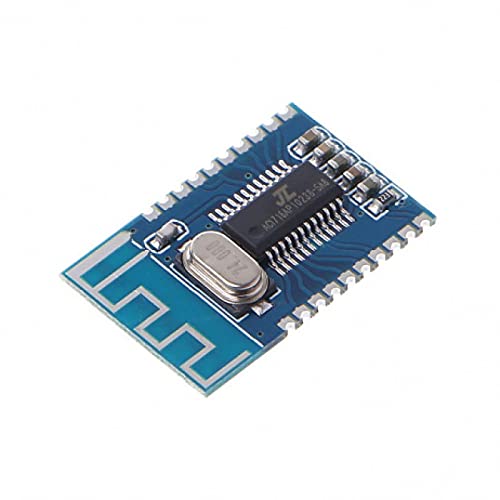
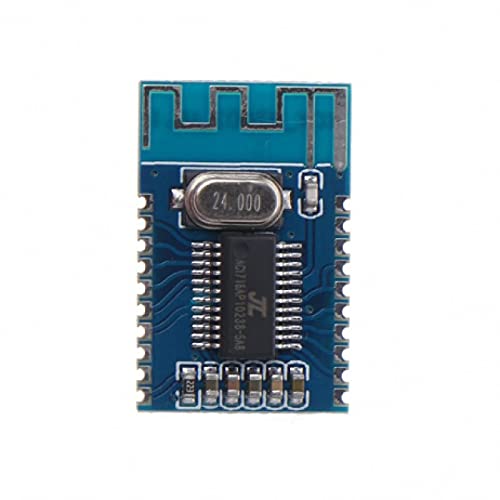
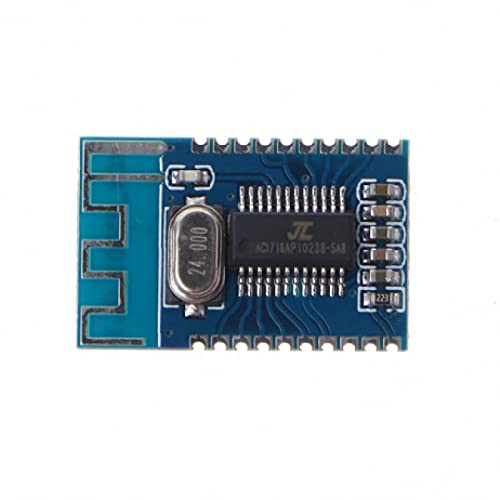
The following images illustrate the RIDEN KCX BT003 Bluetooth Audio Receiver Module from various angles, highlighting its components and pinout.

5. Setup u Wiring
Proper wiring is essential for the correct operation of the KCX BT003 module. Refer to Figure 4.4 for the pinout diagram. Always ensure power is disconnected before making any connections.
5.1. Konnessjoni tal-Provvista tal-Enerġija
- Connect the positive power supply (3.3V to 5.0V DC) to the VBAT pin.
- Connect the negative power supply (Ground) to any GND pin.
- Kun żgur li l-provvista tal-enerġija hija stabbli u fil-volum speċifikattage range to prevent damage to the module.
5.2. Konnessjoni tal-Output tal-Awdjo
The module provides stereo audio output. These pins should be connected to an audio amplifier or directly to speakers if they have an integrated ampaktar ħaj.
- Connect the left audio channel output to the DAC_L pin.
- Connect the right audio channel output to the DAC_R pin.
- Connect the audio ground to a GND pin.
5.3. Konnessjonijiet Fakultattivi
- LED: Connect an LED (with a current-limiting resistor) to this pin to indicate Bluetooth status (e.g., pairing, connected).
- MIC: If microphone input is desired, connect a suitable microphone to this pin and a GND pin.
- USB_DP / USB_DM: These pins are typically used for USB data communication or power, depending on the specific application and firmware. Consult advanced documentation if USB functionality is required.
- SD_DAT / SD_CMD / SD_CLK / ACKEY: These pins are for SD card interface, allowing the module to play audio directly from an SD card. Specific wiring and control logic are required for this functionality.
6. Istruzzjonijiet Operattivi
Once the module is correctly wired and powered, follow these steps to operate it:
6.1. Tixgħel
Apply power to the VBAT and GND pins. The module will typically emit a voice prompt indicating it is powered on and ready for pairing. If an LED is connected, it will likely flash to indicate pairing mode.
6.2. Tqabbil tal-Bluetooth
- Ensure the module is powered on and in pairing mode (indicated by flashing LED and/or voice prompt).
- Fuq l-ismartphone tiegħek jew apparat ieħor li jaħdem bil-Bluetooth, mur fis-settings tal-Bluetooth.
- Scan for available devices. The module should appear as "BT003" or a similar identifier.
- Select the module to initiate pairing. A voice prompt will confirm successful pairing, and the LED will typically change to a solid state or a slower flash.
6.3. Daqq tal-Awdjo
After successful pairing, you can play audio from your connected device. The audio will be transmitted wirelessly to the KCX BT003 module and output through the DAC_L and DAC_R pins to your connected amplifier/kelliema.
6.4. Voice Prompts and LED Indicators
The module provides voice prompts for key actions (e.g., power on, pairing, connected). The LED indicator provides visual feedback on the module's status:
- Teptip Rapidu: Pairing mode, waiting for connection.
- Slow Flashing / Solid: Konness ma' apparat Bluetooth.
7. Manutenzjoni
To ensure the longevity and optimal performance of your RIDEN KCX BT003 module, follow these maintenance guidelines:
- Żomm Niexef: Evita li tesponi l-modulu għall-umdità jew likwidi, għax dan jista' jikkawża short circuits u ħsara.
- Naddaf bil-mod: Jekk it-tindif ikun meħtieġ, uża drapp artab u niexef. Tużax kimiċi ħarxa jew materjali li joborxu.
- Immaniġġja b'Kura: This is a sensitive electronic component. Avoid dropping it or subjecting it to strong impacts.
- Elettriku Statiku: Take precautions against electrostatic discharge (ESD) when handling the module, as static can damage sensitive components.
- Ventilazzjoni: Ensure adequate ventilation if the module is enclosed in a case, especially if other heat-generating components are present.
8 Issolvi l-problemi
If you encounter issues with your KCX BT003 module, refer to the following troubleshooting steps:
8.1. No Power / Module Not Responding
- Iċċekkja l-Konnessjonijiet tal-Enerġija: Verify that VBAT and GND are correctly connected and that the power supply is providing 3.3V-5.0V DC.
- Iċċekkja l-Provvista tal-Enerġija: Ensure the power supply itself is functional and providing sufficient current.
8.2. Cannot Pair with Bluetooth Device
- Module in Pairing Mode: Confirm the module is powered on and its LED is flashing rapidly, indicating it's in pairing mode.
- Device Bluetooth On: Ensure Bluetooth is enabled on your smartphone or audio source device.
- Distanza: Keep the module and your device within close proximity (e.g., 1 meter) during pairing.
- Interferenza: Move away from other 2.4GHz wireless devices that might cause interference.
- Tinsa l-Apparat: If previously paired, try forgetting the module from your device's Bluetooth list and re-pairing.
8.3. No Audio Output / Poor Audio Quality
- Check Audio Connections: Verify that DAC_L, DAC_R, and audio GND are correctly connected to your amplifier/kelliema.
- Amplifier/Speaker Functionality: Tiżgura tiegħek amplifier and speakers are working correctly.
- Livelli tal-Volum: Check the volume settings on both your source device and your ampaktar ħaj.
- Distanza u Ostakli: Ensure the Bluetooth connection is stable and within range (up to 10m). Walls or other obstacles can degrade signal quality.
- Sors Awdjo: Ittestja b'sorsi awdjo differenti jew files to rule out issues with the source material.
9. Garanzija u Appoġġ
Specific warranty information for the RIDEN KCX BT003 module is not provided in this manual. For details regarding warranty coverage, technical support, or service, please contact your retailer or the manufacturer directly. Keep your purchase receipt as proof of purchase.
Ask a question about this manual
Ask about setup, troubleshooting, compatibility, parts, safety, or missing instructions. Manuals+ will review the question and use this page’s manual context to help answer it.