
1. Introduzzjoni
This manual provides essential information for the safe and efficient operation of your Sharp GX-BT190 Portable Bluetooth Speaker. Please read it thoroughly before using the device and retain it for future reference.
2. Informazzjoni dwar is-Sigurtà
- Tesponix l-ispiker għal temperaturi estremi, dawl tax-xemx dirett, jew umdità għolja.
- Tiżżarmax, issewwiex, jew timmodifikax l-ispiker. Dan jista' jannulla l-garanzija u joħloq riskji għas-sigurtà.
- Ensure the charging port cover is securely closed when using the speaker near water to maintain its IP67 rating.
- Uża biss il-kejbil tal-iċċarġjar provdut jew wieħed ekwivalenti ċċertifikat.
- Żomm il-kelliem 'il bogħod mit-tfal u l-annimali domestiċi.
- Evita li tisma' f'livelli ta' volum għoljin għal perjodi estiżi biex tevita ħsara fis-smigħ.
3. Kontenut tal-Pakkett
- Sharp GX-BT190 Portable Bluetooth Speaker
- Cable tal-Iċċarġjar tal-USB
- Lanyard
- Manwal ta' Istruzzjoni
4. Prodott Aktarview

Quddiem view of the Sharp GX-BT190 speaker, showing the central speaker grille with the Sharp logo and the LED light ring.

Ġenb view of the Sharp GX-BT190 speaker, highlighting the textured speaker grille and the integrated lanyard.
Wara view of the Sharp GX-BT190 speaker, showing the control buttons and the sealed charging port cover.
Kontrolli u Indikaturi:
- Buttuna tal-Qawwa: Agħfas u żomm biex tixgħel/itfi.
- Buttuna Volum 'il Fuq / Trakka li Jmiss (+): Agħfas qasir biex tgħolli l-volum, agħfas twil għat-trakka li jmiss.
- Buttuna Volum 'l isfel / Trakka Preċedenti (-): Agħfas qasir biex tnaqqas il-volum, agħfas twil għat-trakka ta' qabel.
- Play/Pause / Call Button (►||): Short press to play/pause, answer/end calls. Long press to reject calls.
- Mode / Light Button (M): Short press to cycle through LED light modes. Long press to turn off LED lights.
- Port tal-Iċċarġjar USB-C: For charging the speaker. Ensure the rubber cover is sealed when not charging.
- Indikatur LED: Displays charging status and Bluetooth pairing status.
5. Setup
5.1 Iċċarġjar tal-Ispeaker
- Open the rubber cover on the back of the speaker to access the USB-C charging port.
- Connect the provided USB charging cable to the speaker's USB-C port.
- Qabbad it-tarf l-ieħor tal-kejbil USB ma' adapter tal-enerġija USB (mhux inkluż) jew mal-port USB tal-kompjuter.
- The LED indicator will illuminate during charging and turn off once fully charged.
- Close the rubber cover securely after charging to maintain the speaker's waterproof rating.
5.2 Tixgħel/Jitfi
- Biex Tixgħel: Press and hold the Power button for approximately 3 seconds. You will hear an audible prompt, and the LED indicator will flash.
- Biex Tifi: Press and hold the Power button for approximately 3 seconds. You will hear an audible prompt, and the LED indicator will turn off.
5.3 Tqabbil tal-Bluetooth
- Ensure the speaker is powered on and the LED indicator is flashing, indicating it is in pairing mode.
- Fuq it-tagħmir mobbli tiegħek, ippermetti l-Bluetooth u fittex tagħmir disponibbli.
- Select "GX-BT190" from the list of devices.
- Once paired, the LED indicator will stop flashing and remain solid, and you will hear a confirmation tone.
- L-ispiker jerġa' jikkonnettja awtomatikament mal-aħħar apparat imqabbad meta jixgħel, jekk l-apparat ikun fil-firxa u l-Bluetooth ikun attivat.
5.4 Tqabbil ta' Stereo Veru Wireless (TWS)
TWS allows you to pair two GX-BT190 speakers together for a stereo audio experience.

Two Sharp GX-BT190 speakers, one red and one blue, positioned together, illustrating the True Wireless Stereo (TWS) pairing feature.
- Ensure both GX-BT190 speakers are powered on and not connected to any Bluetooth device.
- Fuq wieħed mill-ispikers (dan se jkun l-ispiker primarju), agħfas darbtejn il-buttuna tal-Power. L-ispiker jidħol fil-modalità ta' tqabbil TWS.
- Iż-żewġ kelliema awtomatikament ifittxu u jikkonnettjaw ma' xulxin. Se tisma' ton ta' konferma ladarba t-tqabbil tat-TWS ikun b'suċċess.
- Once TWS paired, connect your mobile device to the primary speaker via Bluetooth as described in section 5.3.
- To disconnect TWS, double-press the Power button on either speaker.
6. Joperaw
6.1 Daqq tal-Awdjo
- Play/Pawsa: Agħfas qasir il-buttuna Play/Pause.
- Volum 'il fuq: Agħfas fil-qosor il-buttuna '+'.
- Volum 'l isfel: Agħfas fil-qosor il-buttuna '-'.
- Track li jmiss: Agħfas fit-tul il-buttuna '+'.
- Track preċedenti: Agħfas fit-tul il-buttuna '-'.
6.2 Sejħiet mingħajr idejn
- Irrispondi Sejħa: Agħfas qasir il-buttuna Play/Pause meta dieħla telefonata.
- Tmiem Sejħa: Agħfas qasir il-buttuna Play/Pause waqt telefonata.
- Irrifjuta Sejħa: Agħfas fit-tul il-buttuna Play/Pause meta dieħla telefonata.
6.3 LED Mood Lights
- Short press the 'M' (Mode/Light) button to cycle through the 6 available LED mood light modes.
- Long press the 'M' button to turn off the LED lights.
6.4 Użu li ma jgħaddix ilma minnu u mit-trab (IP67)

The Sharp GX-BT190 speaker partially submerged in water, demonstrating its IP67 waterproof and dustproof capabilities.
The GX-BT190 speaker is rated IP67, meaning it is protected from dust ingress and can withstand immersion in water up to 1 meter for 30 minutes. To ensure this protection:
- Always ensure the rubber cover for the charging port is fully and securely sealed before exposing the speaker to water or dust.
- Tgħaddasx l-ispiker intenzjonalment għal perjodi twal jew lil hinn mill-fond speċifikat.
- After exposure to water, wipe the speaker dry with a soft cloth before charging.
7. Manutenzjoni
7.1 Tindif
- Imsaħ il-kelliem b 'soft, damp drapp.
- Tużax prodotti tat-tindif li joborxu, alkoħol, jew solventi kimiċi.
- Ensure the speaker is dry before charging or storing.
7.2 Ħażna
- Aħżen l-ispiker f'post frisk u niexef 'il bogħod mix-xemx diretta u minn temperaturi estremi.
- Jekk se taħżinha għal perjodu estiż, iċċarġja l-batterija perjodikament (eż. kull 3 xhur) biex iżżommha f'saħħitha.
8 Issolvi l-problemi
| Problema | Soluzzjoni |
|---|---|
| L-ispiker ma jixgħelx. | Kun żgur li l-batterija hija ċċarġjata. Qabbad l-ispiker ma' sors ta' enerġija permezz tal-kejbil USB. |
| Ma tistax tqabbad permezz tal-Bluetooth. | Ensure the speaker is in pairing mode (LED flashing). Turn off and on Bluetooth on your device. Move the speaker closer to your device. Clear previous Bluetooth connections on your device. |
| L-ebda ħoss jew volum baxx. | Żid il-volum kemm fuq l-ispiker kif ukoll fuq l-apparat konness tiegħek. Kun żgur li l-ispiker huwa mqabbad sew. |
| Kwalità tal-ħoss ħażina. | Move the speaker closer to your device. Ensure there are no obstructions between the speaker and your device. Try playing a different audio source. |
| It-tqabbil tat-TWS ifalli. | Ensure both speakers are GX-BT190 models and are not connected to any other Bluetooth device. Try powering both speakers off and on, then re-attempt TWS pairing. |
9. Speċifikazzjonijiet

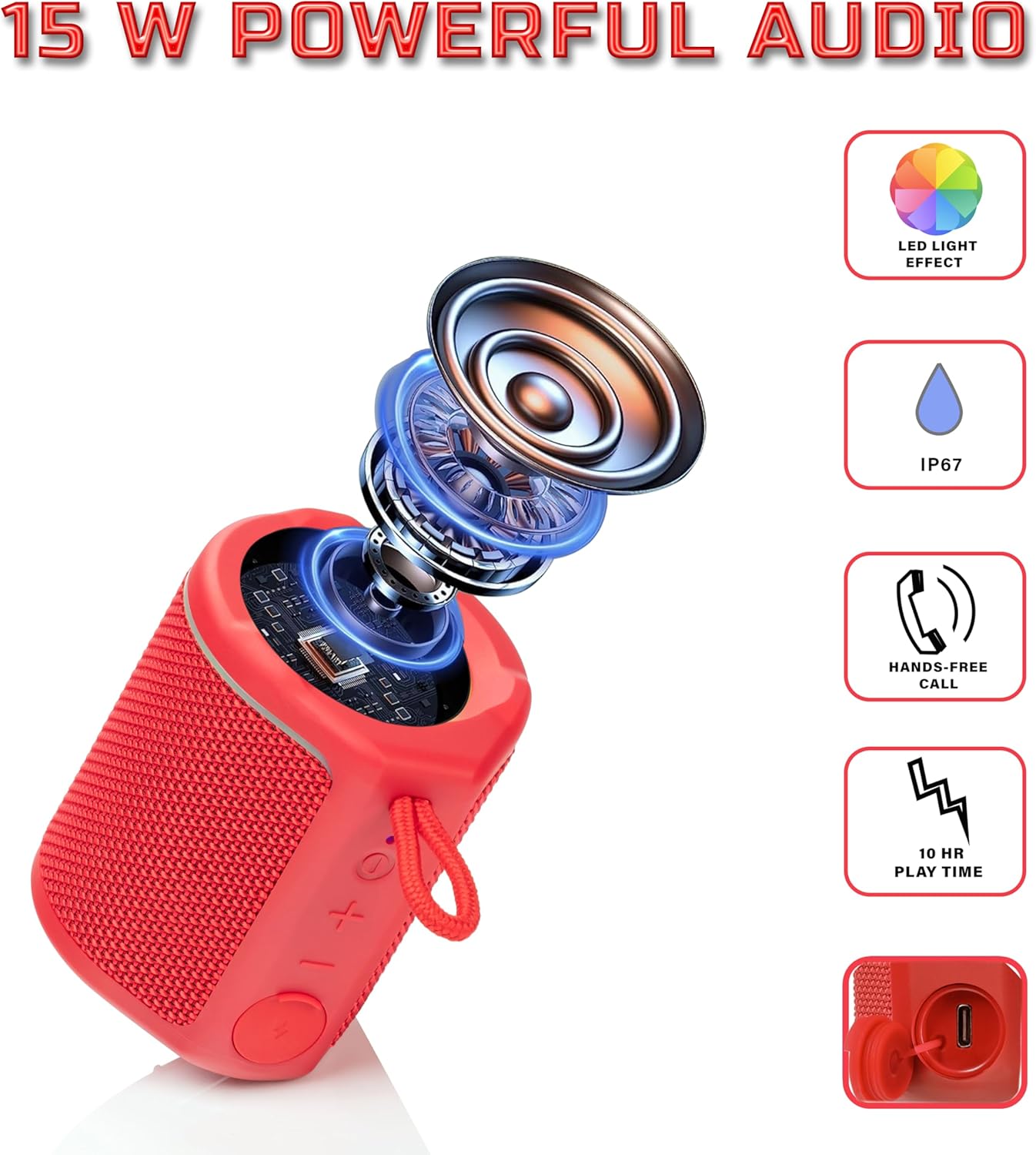
Diagram illustrating the internal components of the Sharp GX-BT190 speaker, including the speaker driver, and highlighting features like LED light effect, IP67 rating, hands-free call function, and battery life.
| Karatteristika | Dettall |
|---|---|
| Numru tal-Mudell | GX-BT190 |
| Teknoloġija tal-Konnettività | Bluetooth |
| Qawwa tal-Ħruġ Massimu tal-Ispeaker | 10 Watts |
| Klassifikazzjoni li ma jgħaddix ilma minnha | IP67 |
| Ħajja tal-batterija | Sa 15-il Siegħa |
| Tip ta 'batterija | 1 Lithium Ion (inkluż) |
| Kapaċità tal-batterija | 1200 mAh |
| Dimensjonijiet tal-Prodott (P x W x H) | 7.5 x 7.5 x 7.5 ċm (madwar) |
| Piż tal-oġġett | 226.8 g (8 Uqija) |
| Firxa Wireless | Sa 33 pied |
| Karatteristiċi Addizzjonali | LED Light, True Wireless Stereo (TWS), Hands-Free Calling |
10. Garanzija
The Sharp GX-BT190 Portable Bluetooth Speaker comes with a 1-Year Limited Warranty from the date of purchase. This warranty covers manufacturing defects under normal use. It does not cover damage caused by misuse, accidents, unauthorized modifications, or normal wear and tear. Please retain your proof of purchase for warranty claims.
11. Appoġġ
For technical assistance, warranty inquiries, or further information regarding your Sharp GX-BT190 speaker, please contact Sharp Inc. customer support:
- Kuntatt tal-manifattur: Sharp Inc
- Telefon: 1-800-BE-SHARP