
1. Introduzzjoni
This manual provides detailed instructions for the safe and efficient use of your new Honor Magic 6 Lite Smartphone. Please read this manual thoroughly before using the device to ensure optimal performance and longevity.

Figure 1.1: The Honor Magic 6 Lite Smartphone, showcasinid-disinn eleganti u l-modulu tal-kamera tiegħu.
Karatteristiċi ewlenin:
- 1.5K Ultra-Bounce Anti-Drop Display: Certified with SGS five-star anti-drop protection for enhanced durability.
- 5300 mAh Super Durable Battery: High-density battery providing extended usage and supporting 35W fast charging.
- 108 MP Lossless Capture Camera: High-resolution main camera with 3x lossless zoom and a 16 MP front camera.
- Qualcomm Snapdragon 6 Gen 1 Processor: Powerful 4nm chipset for smooth performance.
- 8 GB RAM + 256 GB Storage: Enhanced memory with HONOR Turbo RAM for seamless multitasking.
- Android 13 with MagicOS 7.2: Full support for Google Mobile Services.
2. Gwida ta' Setup
2.1. Unboxing u Spezzjoni Inizjali
Neħħi bir-reqqa l-komponenti kollha mill-imballaġġ. Ivverifika li l-oġġetti kollha huma preżenti:
- Honor Magic 6 Lite Smartphone
- Kejbil USB Type-C
- Għodda Ejector SIM
- Gwida ta' Bidu Mgħaġġel (jekk inkluża)
Inspect the device for any visible damage. If any damage is found, do not proceed with setup and contact customer support.
2.2. Daħħal il-Karta(i) SIM
- Sib it-trej tal-kard SIM fuq il-ġenb tat-tagħmir tiegħek.
- Daħħal l-għodda tal-ejecter tas-SIM fit-toqba ż-żgħira ħdejn it-trej u agħfas sew sakemm it-trej joħroġ 'il barra.
- Place your Nano-SIM card(s) into the designated slots on the tray. Ensure the gold contacts face downwards. The Honor Magic 6 Lite supports dual SIM functionality.
- Imbotta b'attenzjoni t-trej lura fl-apparat sakemm tikklikkja f'postha.
2.3. Iċċarġjar tal-Apparat
Before first use, it is recommended to fully charge your smartphone.
- Qabbad il-kejbil USB tat-Tip Ċ mal-port tal-iċċarġjar fil-qiegħ tat-telefon tiegħek.
- Connect the other end of the cable to a compatible 35W fast charger (sold separately or included in some regional packages) and plug it into a power outlet.
- L-indikatur tal-iċċarġjar se jidher fuq l-iskrin. Ħalli l-apparat jiċċarġja sakemm l-ikona tal-batterija tidher mimlija.
2.4. Tixgħel u Setup Inizjali
- Press and hold the Power button (located on the right side of the device) until the Honor logo appears.
- Follow the on-screen instructions to complete the initial setup, which includes selecting your language, connecting to Wi-Fi, setting up your Google account, and configuring security features like fingerprint or face unlock.
3. Istruzzjonijiet Operattivi
3.1. Wiri u Navigazzjoni
The Honor Magic 6 Lite features a vibrant 6.78-inch AMOLED display with a 120Hz refresh rate, 1.5K Retina resolution (2652x1200 pixels), and 429 PPI, offering crisp visuals and smooth scrolling. It supports 1.07 billion colors and has a 92.8% screen-to-body ratio.

Figure 3.1: Detailed specifications of the Honor Magic 6 Lite's display.
The device incorporates a 360° Anti-Drop Display technology, providing comprehensive protection against drops and impacts, certified by SGS five-star anti-drop rating.
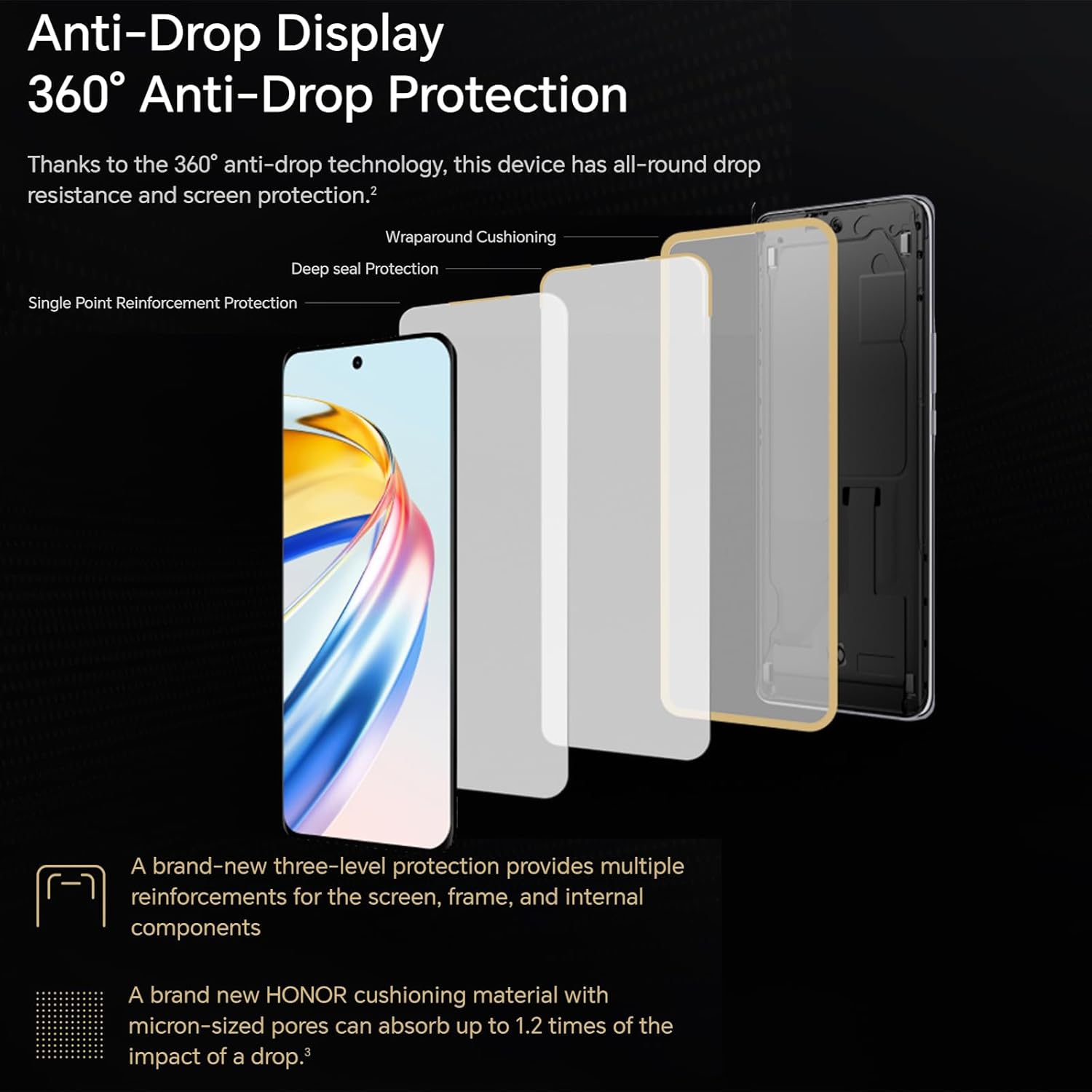
Figure 3.2: The multi-layered anti-drop protection system of the display.
3.2. Karatteristiċi tal-Kamera
The Honor Magic 6 Lite is equipped with a powerful 108 MP main camera and a 16 MP front camera, allowing you to capture high-quality photos and videos.

Figura 3.3: Eżamples of image quality from the 108MP main camera and wide-angle lens.
The camera supports 3x lossless zoom, enabling you to capture distant subjects with clarity without compromising image quality. It also features a sports recording mode to capture fast-moving action.
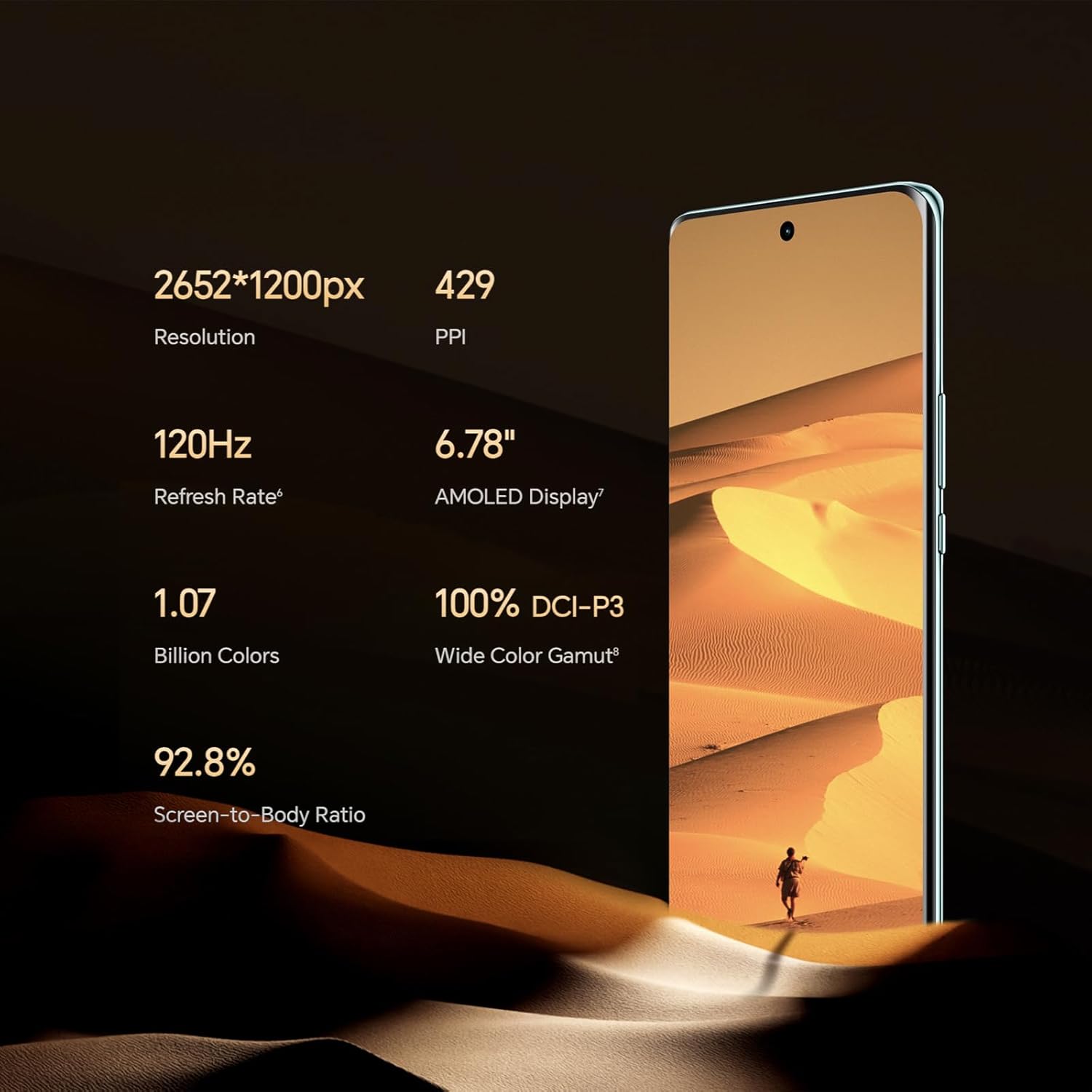
Figure 3.4: Illustration of the 3x lossless zoom feature.
3.3. Ġestjoni tal-batterija
The 5300 mAh high-density battery provides exceptional endurance, designed to last through intensive use. With 35W fast charging support, you can quickly replenish the battery.

Figura 3.5: Aktarview of the 5300mAh battery's capacity and typical usage times.
3.4. Prestazzjoni u Softwer
Powered by the Qualcomm Snapdragon 6 Gen 1 processor, built on a 4nm process, the Honor Magic 6 Lite delivers robust performance for demanding tasks and gaming. The device comes with 8 GB of RAM and 256 GB of internal storage, enhanced by HONOR Turbo RAM technology for smooth application launches and transitions.
The smartphone runs on MagicOS 7.2, based on Android 13, and fully supports Google Mobile Services, allowing access to all your favorite apps from the Google Play Store.
3.5. Konnettività
The Honor Magic 6 Lite supports 5G cellular networks for high-speed internet access. It also includes standard connectivity options such as Wi-Fi and USB Type-C for data transfer and charging.
4. Manutenzjoni u Kura
4.1. Tindif tal-Apparat Tiegħek
To keep your Honor Magic 6 Lite in optimal condition, follow these cleaning guidelines:
- Uża drapp artab u mingħajr suf biex timsaħ l-iskrin u l-qafas tat-telefon.
- Avoid using abrasive materials, alcohol, or chemical cleaners, as these can damage the screen coating and finish.
- Għal tbajja' iebsa, ftit dampen the cloth with water, but ensure no liquid enters the ports.
4.2. Aġġornamenti tas-Software
Iċċekkja u installa aġġornamenti tas-softwer regolarment biex tiżgura li t-tagħmir tiegħek ikollu l-aħħar karatteristiċi, irqajja tas-sigurtà, u titjib fil-prestazzjoni. L-aġġornamenti tipikament jitwasslu mingħajr fili (OTA).
- Mur fuq Settings > Sistema u aġġornamenti > Aġġornament tas-softwer.
- Tektek Iċċekkja għal aġġornamenti.
- If an update is available, follow the on-screen prompts to download and install it. Ensure your device has sufficient battery life and a stable internet connection before starting an update.
4.3. Kura tal-batterija
Biex timmassimizza l-ħajja tal-batterija:
- Evita li tesponi l-apparat għal temperaturi estremi (sħana kbira jew kesħa kbira).
- Tħallix il-batterija tixxotta kompletament ta' spiss.
- Uża biss ċarġers u kejbils approvati.
5 Issolvi l-problemi
This section addresses common issues you might encounter with your Honor Magic 6 Lite. If the problem persists, please contact customer support.
5.1. Apparat Mhux Tixgħel
- Iċċekkja l-batterija: Ensure the device has sufficient charge. Connect it to a charger for at least 10-15 minutes before attempting to power on again.
- Forza mill-ġdid: Press and hold the Power button for about 10-15 seconds until the device vibrates and the Honor logo appears.
5.2. L-Applikazzjonijiet Jiġġarraf jew Jiffriża
- Close and Reopen: Close the problematic app from recent apps and reopen it.
- Clear Cache: Mur fuq Settings > Apps > [Isem tal-App] > Ħażna > Ċar il-cache.
- Aġġorna l-App: Kun żgur li l-app hija aġġornata għall-aħħar verżjoni tagħha mill-Google Play Store.
- Irristartja l-Apparat: Sempliċi bidu mill-ġdid spiss jista' jsolvi problemi temporanji tas-softwer.
5.3. Poor Wi-Fi or Cellular Connection
- Ixgħel/Itfi: Turn Wi-Fi or cellular data off and then on again from the Quick Settings panel.
- Erġa' ibda r-Router/Modem: For Wi-Fi issues, restart your Wi-Fi router.
- Iċċekkja l-Qawwa tas-Sinjal: Ensure you are in an area with good network coverage.
- Irrisettja l-issettjar tan-Netwerk: Mur fuq Settings > Sistema u aġġornamenti > Irrisettja > Irrisettja s-settings tan-netwerk. Note: This will erase all saved Wi-Fi passwords and Bluetooth connections.
5.4. Il-Batterija Tiskula Malajr
- Identifika l-Użu: Mur fuq Settings > Batterija biex tara liema apps qed jikkunsmaw l-aktar enerġija.
- Aġġusta Settings: Reduce screen brightness, disable unnecessary features like GPS or Bluetooth when not in use, and close background apps.
- Aġġornament tas-Software: Ensure your device software is up to date.
6. Speċifikazzjonijiet Tekniċi
| Karatteristika | Speċifikazzjoni |
|---|---|
| Brand | UNUR |
| Isem tal-Mudell | Magic6 Lite |
| Kulur | Iswed |
| Sistema Operattiva | Android 13.0 (MagicOS 7.2) |
| Daqs tal-Wiri | 6.78 Pulzier |
| Riżoluzzjoni tal-Wiri | 2652 x 1200 pixel |
| Riffriskar Rata | 120 Hz |
| Proċessur | Qualcomm Snapdragon 6 Ġen 1 |
| Veloċità tas-CPU | 2.4 GHz |
| Daqs RAM | 8 GB |
| Kapaċità tal-Ħżin | 256 GB (Intern) |
| Riżoluzzjoni tal-Kamera Prinċipali | 108 Megapixels |
| Riżoluzzjoni tal-Kamera ta 'quddiem | 16 Megapixels |
| Kompożizzjoni tal-batterija | Lithium-Polimer |
| Kapaċità tal-batterija | 5300 mAh |
| Karatteristiċi Speċjali | High-resolution camera, Long battery life with fast charging, High-quality display |
| Konnettività | USB Type-C, Wi-Fi, 5G |
| ASIN | B0CS6688HG |
| Pajjiż ta' Oriġini | il-Ġermanja |
7. Garanzija u Appoġġ
7.1. Garanzija tal-Prodott
Your Honor Magic 6 Lite Smartphone comes with a standard manufacturer's warranty. Please refer to the warranty card included in your product packaging for specific terms, conditions, and duration. Keep your proof of purchase for warranty claims.
Please note that information regarding the availability of spare parts and guaranteed software updates is not available at this time.
7.2. Appoġġ għall-Klijent
For technical assistance, troubleshooting beyond this manual, or warranty inquiries, please contact Honor customer support through their official webis-sit jew l-informazzjoni ta' kuntatt ipprovduta fid-dokumentazzjoni tal-prodott tiegħek.
You can also visit the official Honor support page for FAQs, software downloads, and service center locations.