
1. Introduzzjoni
This manual provides instructions for the Generic replacement remote control, designed for use with Wimius T4, T7, and EUB X99+AB WiFi 4K HD 1080P Video LED Projectors. This remote functions as a direct replacement for your original remote, offering essential control over your projector's features. No complex setup or programming is required; simply insert batteries and begin use.

Stampa 1.1: Quddiem view of the remote control. This image displays the full layout of the remote control, including all buttons for power, navigation, playback, and numerical input.
2. Setup
2.1. Installazzjoni tal-batterija
Il-kontroll remot jeħtieġ żewġ (2) batteriji AAA (mhux inklużi). Segwi dawn il-passi biex tinstallahom:
- Sib il-kompartiment tal-batterija fuq wara tal-kontroll remot.
- Żerżaq l-għatu tal-kompartiment tal-batterija 'l isfel jew agħfas il-lukkett u erfa' biex tiftaħ.
- Daħħal żewġ batteriji AAA, waqt li tiżgura li t-terminali pożittivi (+) u negattivi (-) ikunu allinjati sew mal-marki ġewwa l-kompartiment.
- Erġa’ poġġi l-għatu tal-kompartiment tal-batterija, waqt li tiżgura li jikklikkja sew f’postu.
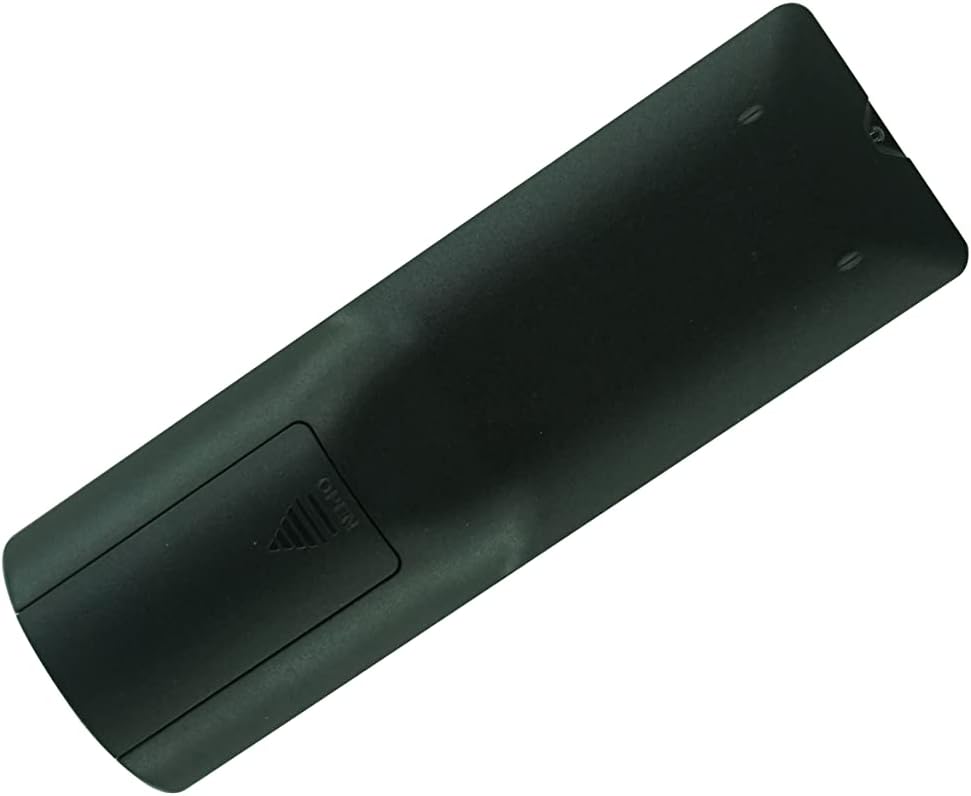
Immaġni 2.1: Wara view of the remote control with the battery compartment open. This image shows the location of the battery compartment and the correct orientation for inserting AAA batteries.
2.2. Użu Inizjali
This remote control is an infrared (IR) replacement and does not require any pairing or code setup. Once batteries are installed, point the remote directly at your compatible projector and press the desired function button.
3. Istruzzjonijiet Operattivi
Iffamiljarizza ruħek mal-buttuni fuq il-kontroll remot tiegħek:
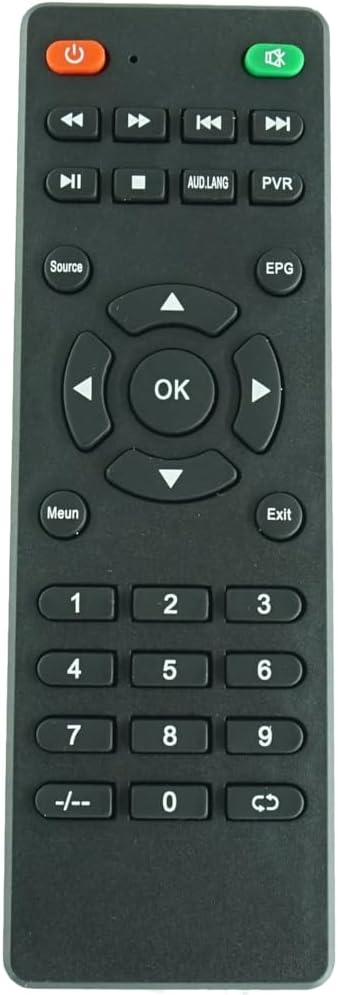
Immaġni 3.1: Veduta mill-qrib minn quddiem view of the remote control buttons. This image provides a clearer view of the individual buttons and their labels for easier identification.
- Qawwa: Turns the projector ON or OFF.
- Mute: Mutes or unmutes the projector's audio.
- Kontrolli tal-daqq:
- Rewind / Fast 'il quddiem
- Preċedenti / Li jmiss
- Play / Pawża
- Waqqaf
- AUD.LANG: Selects audio language or track.
- PVR: Accesses Personal Video Recorder functions (if supported by projector).
- Sors: Selects input source (HDMI, USB, etc.).
- EPG: Displays the Electronic Program Guide (if supported by projector).
- Pad tan-Navigazzjoni ('Il fuq, 'l isfel, Xellug, Lemin, OK)Jinnaviga l-menus u jikkonferma l-għażliet.
- Menu: Opens the projector's main menu.
- Ħruġ: Joħroġ mill-menù jew mill-funzjoni kurrenti.
- Numru Pad (0-9): For direct channel input or numerical selections.
- -/-: Toggles between single and double-digit channel input.
- Recall/Return: Returns to the previous channel or menu.
Note: Specific functions may vary depending on your projector model and its firmware. Refer to your projector's original manual for detailed information on its features.
4. Manutenzjoni
4.1. Tindif
To clean the remote control, gently wipe it with a soft, dry cloth. Do not use liquid cleaners, abrasive pads, or chemical solvents, as these may damage the surface or internal components.
4.2. Sostituzzjoni tal-batterija
Ibdel il-batteriji meta r-rispons tar-remote isir kajman jew jieqaf jaħdem. Dejjem ibdel iż-żewġ batteriji fl-istess ħin b'batteriji AAA ġodda. Tħallatx batteriji qodma u ġodda, jew tipi differenti ta' batteriji.
4.3. Ħażna
Jekk il-kontroll remot ma jkunx se jintuża għal perjodu twil ta' żmien, neħħi l-batteriji biex tevita t-tnixxija u ħsara potenzjali.
5 Issolvi l-problemi
- Ir-remote mhux qed jirrispondi:
- Kun żgur li l-batteriji huma mdaħħla sew bil-polarità korretta.
- Ibdel batteriji qodma b'oħrajn ġodda.
- Ipponta r-remote direttament lejn ir-riċevitur IR tal-proġettazzjoni.
- Kun żgur li m'hemm l-ebda ostaklu bejn ir-remote u l-proġettazzjoni.
- Verify that your projector model (Wimius T4, T7, EUB X99+AB) is compatible with this remote.
- Xi buttuni mhux qed jaħdmu:
- Some advanced functions may be specific to the original remote or projector model. Refer to your projector's manual.
- Naddaf il-wiċċ u l-buttuni tar-remote biex tiżgura li ma jkunx hemm debris li jkun qed jinterferixxi.
If issues persist, consider contacting the seller for further assistance.
6. Speċifikazzjonijiet
| Tip ta' Prodott | Replacement Infrared Remote Control |
| Brand | Ġeneriċi |
| Proġetturi Kompatibbli | Wimius T4, Wimius T7, EUB X99+AB WiFi 4K HD 1080P Video LED Projectors |
| Sors tal-Enerġija | 2 x Batteriji AAA (mhux inklużi) |
| Konnettività | Infra-aħmar (IR) |
| Kulur | Iswed |
| Karatteristika Speċjali | Ergonomic design, direct replacement |
7. Garanzija u Appoġġ
This product is a generic replacement remote control. Specific warranty information may vary by seller. For any issues or support inquiries, please contact the original seller or manufacturer of the remote control. Please retain your purchase receipt for any warranty claims.