
1. Introduzzjoni
The GODOX MF-R76C Macro Ring Flash is a specialized lighting tool designed for close-up photography, ideal for subjects such as insects, plants, jewelry, and dental work. It offers precise and versatile illumination to enhance detail and clarity in macro shots.
Key features of the MF-R76C include:
- TTL/M Mode: Supports both Through-The-Lens (TTL) automatic exposure and Manual (M) mode for precise power control, improving shooting efficiency.
- Sistema bla fili 2.4G: Built-in wireless capability allows it to function as a master or slave unit with other Godox 2.4G wireless system lights, expanding creative lighting possibilities.
- Kompatibilità Universali: Comes with a wide range of adapter rings (49mm, 52mm, 55mm, 58mm, 62mm, 67mm, 72mm, 77mm) for high compatibility with various lenses. The controller unit uses a hot shoe compatible with most cameras.
- Ħajja tal-batterija fit-tul: Powered by a powerful rechargeable lithium battery, capable of delivering approximately 660 full-power flashes for extended shooting sessions.
- Twin-Tube Design: Allows independent adjustment of each flash tube's power ratio, enabling creative lighting effects and contrasts.

Figure 1: Versatile applications of the GODOX MF-R76C Macro Ring Flash.
2. Kontenut tal-Pakkett
Jekk jogħġbok ivverifika li l-oġġetti kollha elenkati hawn taħt huma inklużi fil-pakkett tiegħek:
- Godox MF-R76C Ring Flash x1
- Batterija tal-litju x1
- Ċarġer tal-USB x1
- Adapter Rings x8 (49mm, 52mm, 55mm, 58mm, 62mm, 67mm, 72mm, 77mm)
- Cable tal-Iċċarġjar tal-USB tat-Tip-C x1
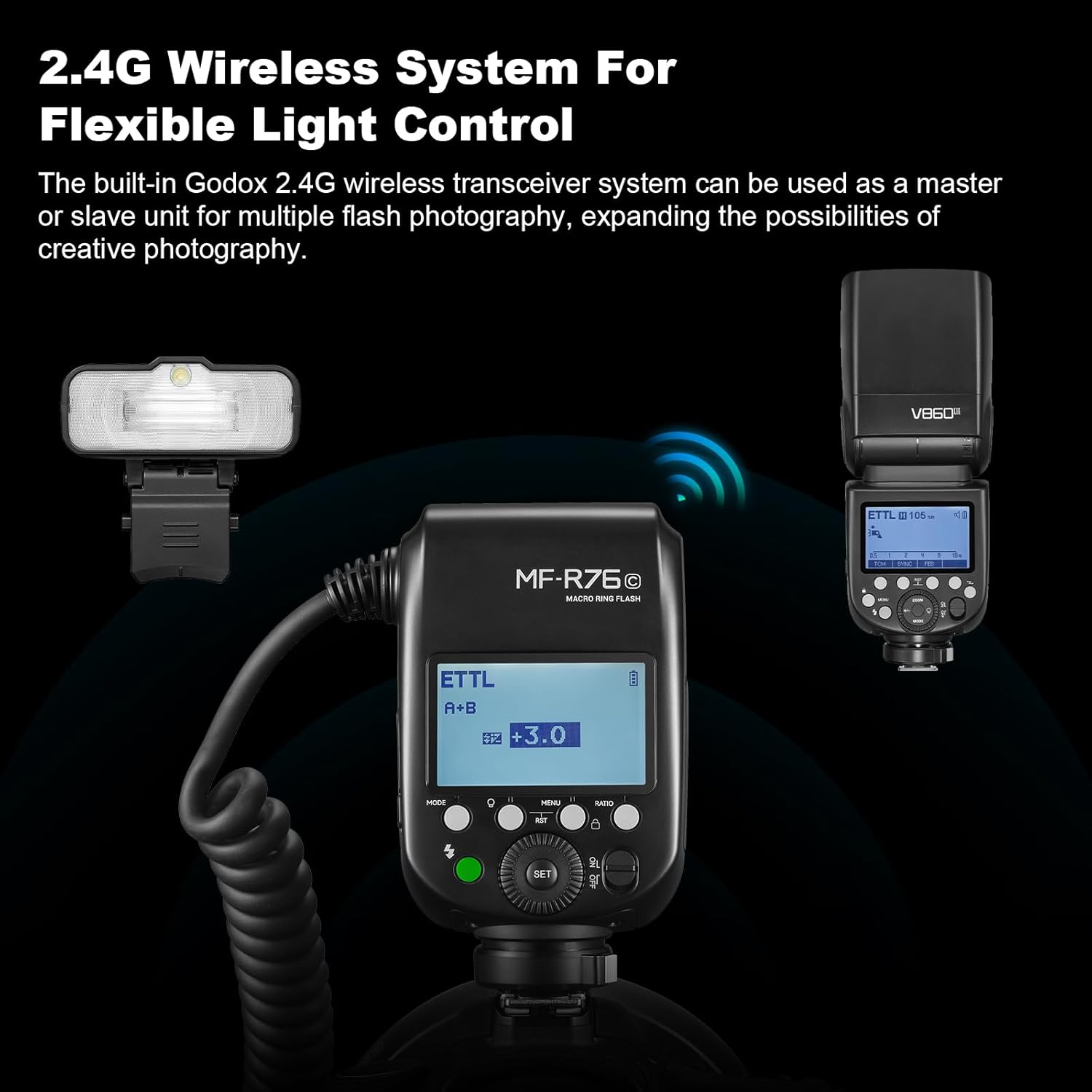
Figure 2: All components included in the MF-R76C package.
3. Setup
3.1 Installazzjoni tal-batterija
The MF-R76C is powered by a rechargeable lithium battery. To install, open the battery compartment on the controller unit and insert the battery according to the polarity indicators. Close the compartment securely.

Figure 3: Battery compartment and specifications.
3.2 Attaching to Camera and Lens
1. Select the appropriate adapter ring that matches your lens's filter thread diameter. The MF-R76C includes rings for 49mm, 52mm, 55mm, 58mm, 62mm, 67mm, 72mm, and 77mm lenses.
2. Screw the chosen adapter ring onto the front filter thread of your camera lens.
3. Attach the ring flash head to the adapter ring by aligning the mounting points and twisting until it locks into place.
4. Slide the controller unit onto your camera's hot shoe mount. Ensure it is fully seated and secure the locking mechanism if present.

Figura 4: Aktarview of the MF-R76C components and their connection.
4. Istruzzjonijiet Operattivi
4.1 Flash Modes (TTL/M)
The MF-R76C supports both TTL (Through-The-Lens) and Manual (M) flash modes. TTL mode automatically adjusts flash output for correct exposure, while M mode allows you to manually set the flash power.
To switch between modes and adjust settings:
- Press the 'MODE' button on the controller unit to cycle through TTL and M modes.
- In TTL mode, you can adjust flash exposure compensation using the dial.
- In Manual mode, rotate the dial to set the desired flash power (e.g., 1/1, 1/2, 1/4, up to 1/256).

Figure 5: LCD screen showing TTL mode and power settings.
Video 1: Demonstrates how to switch between TTL and Manual flash modes and adjust power settings on the MF-R76C controller unit.
Sistema bla fili 4.2 2.4G
The MF-R76C features a built-in 2.4G wireless system, allowing it to communicate with other Godox wireless flash units. This enables complex multi-flash setups for diverse lighting scenarios.
To set up wireless channels:
- Access the 'MENU' on the controller unit.
- Navigate to 'WIRELESS' settings.
- Adjust the 'CH' (Channel) and 'ID' (Wireless ID) to match your other Godox wireless devices.

Figure 6: The 2.4G wireless system for flexible light control.
Video 2: Guide on setting up wireless channels and IDs for multi-flash synchronization.
4.3 Dual-Flash Tubes
The MF-R76C features two independent flash tubes, allowing you to adjust the power ratio of each side separately. This enables precise control over lighting direction and contrast, adding depth to your macro images.

Figure 7: Demonstrating versatile lighting controls with dual flash tubes.
4.4 Assistenza għall-Fokus Lamps
For optimal efficiency in low-light conditions, the MF-R76C is equipped with two focus assist lamps. Dawn lamps provide illumination to aid in focusing, making it simpler to achieve sharp focus even in dim environments.
5. Manutenzjoni
To ensure the longevity and optimal performance of your GODOX MF-R76C Macro Ring Flash, follow these maintenance guidelines:
- Tindif: Use a soft, dry cloth to clean the flash unit. Avoid using harsh chemicals, solvents, or abrasive cleaners, as they may damage the surface or internal components.
- Kura tal-batterija: Always use the provided charger and cable for charging. Do not overcharge or completely drain the battery. If storing the unit for an extended period, ensure the battery is partially charged (around 50%) and store it in a cool, dry place.
- Ħażna: Store the flash unit in a dry, dust-free environment away from direct sunlight and extreme temperatures.
- Immaniġġjar: Handle the unit with care to avoid dropping or subjecting it to strong impacts, which can damage internal circuitry or the flash tubes.
6 Issolvi l-problemi
If you encounter issues with your MF-R76C, refer to the following common problems and solutions:
| Problema | Kawża Possibbli | Soluzzjoni |
|---|---|---|
| Il-flash mhux qed jaħraq | Low battery; Incorrect hot shoe connection; Flash mode mismatch; Wireless interference. | Charge battery; Re-seat controller on hot shoe; Check camera flash settings; Verify wireless channel/ID. |
| Incorrect exposure | Incorrect flash power setting (M mode); Exposure compensation in TTL mode; Subject distance. | Adjust flash power; Reset exposure compensation; Adjust subject distance or camera settings. |
| Kwistjonijiet ta' konnessjoni bla fili | Mismatched channel/ID; Distance too far; Obstructions. | Ensure matching CH/ID; Reduce distance; Remove obstructions. |
| Flash head not attaching securely | Incorrect adapter ring size; Improper alignment. | Use correct adapter ring for lens; Align mounting points carefully. |
6.1 Lamp Body Reset
If the unit behaves unexpectedly or freezes, a lamp body reset can often resolve the issue. Refer to the video below for instructions on how to perform a reset.
Video 3: Instructions on how to perform a lamp body reset for the MF-R76C.
7. Speċifikazzjonijiet
| Speċifikazzjoni | Valur |
|---|---|
| Dimensjonijiet tal-Prodott | 5.12 x 5.12 x 1.97 pulzieri |
| Piż tal-oġġett | 2.51 liri |
| ASIN | B0CFQRMJJP |
| Numru tal-Mudell tal-Oġġett | MF-R76C |
| Batteriji | 1 batteriji tal-jone tal-litju meħtieġa (inklużi) |
| Re tal-Klijentviews | 4.8 minn 5 stilel (15 klassifikazzjonijiet) |
| Ranking tal-Aħjar Bejjiegħa | #379 in Shoe-Mount Flashes |
| Data L-Ewwel Disponibbli | 15 ta’ Awwissu, 2023 |
| Manifattur | GODOX |
| Brand | GODOX |
| Muntaturi Kompatibbli | Kanonku |
| Tip ta' Flash tal-Kamera | Makro |
| Komponenti Inklużi | Godox MF-R76C Ring Flash and Battery |
| Kulur | Għal Canon |
8. Garanzija u Appoġġ
GODOX products are manufactured to the highest quality standards. This product is covered by a limited warranty against defects in materials and workmanship from the date of purchase. Please retain your proof of purchase for warranty claims.
For technical support, service, or warranty inquiries, please contact GODOX customer service through their official website or authorized distributors. Detailed contact information can typically be found on the product packaging or the official GODOX websit.