
1. Introduzzjoni
The CALEX Smart Home Indoor Ambiance Aroma Diffuser 590100500 is designed to enhance your indoor environment by improving air quality, diffusing pleasant aromas, and providing ambient lighting. This smart device integrates seamlessly into your smart home ecosystem, offering control through the Calex app, voice commands, and programmable features.
Il-karatteristiċi ewlenin jinkludu:
- Aroma diffusion with essential oils.
- Realistic flame effect for ambiance.
- Adjustable ambient lighting with 16 million color options.
- Smart control via Calex app (timers, programmable scenarios).
- Voice control compatibility with Google Assistant, Siri, and Amazon Alexa.
- 300ml water tank capacity with automatic shut-off.
2. Informazzjoni dwar is-Sigurtà
Jekk jogħġbok aqra l-istruzzjonijiet kollha tas-sigurtà qabel ma tuża l-apparat biex tevita korriment jew ħsara.
- Always place the diffuser on a stable, flat surface away from direct sunlight, heat sources, and electronic devices.
- Do not exceed the maximum water fill line (300ml) to prevent overflow.
- Uża biss ilma nadif tal-vit jew ilma distillat. Tużax ilma sħun.
- Only use 100% pure, water-soluble essential oils. Other oils or corrosive liquids may damage the device.
- Żomm l-apparat fejn ma jintlaħaqx mit-tfal u l-annimali domestiċi.
- Do not cover the mist outlet during operation.
- Skonnettja l-apparat mis-sokit tal-enerġija qabel ma tnaddaf jew timlieh mill-ġdid.
- The device features an automatic shut-off function when the water tank is empty, and sends a notification to your phone.
- A built-in safety configuration will cause the diffuser to flash if the remaining water in the tank needs to cool down after a maximum of 72 hours of continuous operation.
- Tippruvax issewwi jew timmodifika l-apparat int stess. Ikkuntattja l-appoġġ għall-klijenti għall-għajnuna.
3. Kontenut tal-Pakkett
Ivverifika li l-oġġetti kollha huma preżenti fil-pakkett:
- CALEX Smart Home Indoor Ambiance Aroma Diffuser (Model 5901000500)
- Adapter tal-Enerġija
- Manwal għall-Utent
4. Prodott Aktarview
Familiarize yourself with the components of your aroma diffuser.
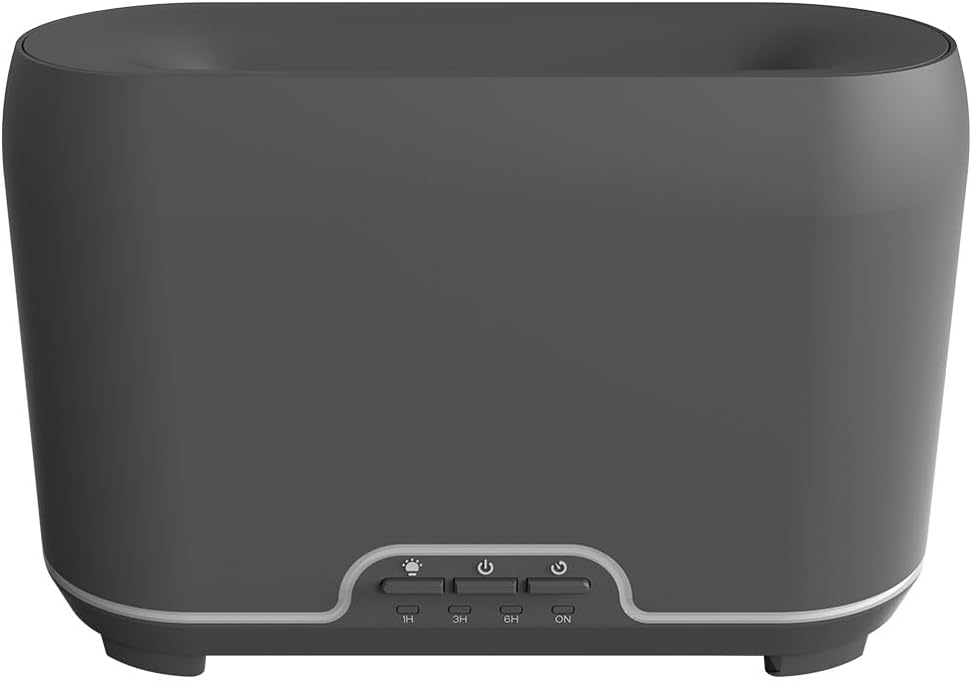
Immaġni: Quddiem view of the CALEX Smart Home Aroma Diffuser, showing the control panel with buttons for light, power, and timer settings (1H, 3H, 6H, ON).

Image: The CALEX Smart Home Aroma Diffuser operating on a wooden table, displaying its ambient flame effect and mist output.
The diffuser typically consists of a water tank, an ultrasonic plate, a mist outlet, and a control panel with buttons for power, light, and timer functions. The power input port is usually located at the back or bottom of the device.
5. Setup
Segwi dawn il-passi għas-setup inizjali:
- Pjazzament: Poġġi d-diffużur fuq wiċċ ċatt u stabbli.
- Miftuħa għatu: Gently remove the top cover of the diffuser.
- Imla t-Tank tal-Ilma: Fill the water tank with clean water up to the 300ml maximum fill line. Do not overfill.
- Żid Żejt Essenzjali: Add a few drops of your preferred essential oil directly into the water tank.
- Agħlaq l-għatu: Ibdel il-qoxra ta' fuq b'mod sikur.
- Qabbad l-Enerġija: Plug the power adapter into the diffuser's power input port, then plug the adapter into a wall outlet.
- Download Calex App: Download the free Calex Smart app from your smartphone's app store (available for iOS and Android).
- Qabbad mal-WiFi: Follow the in-app instructions to connect your diffuser to your home WiFi network. Ensure your WiFi is 2.4GHz.
6. Istruzzjonijiet Operattivi
The CALEX Smart Home Aroma Diffuser can be operated via the Calex app or its integrated control buttons.
6.1 Using the Calex Smart App
The Calex app provides full control over your diffuser's functions:
- Power On/Off: Turn the diffuser on or off remotely.
- Kontroll taċ-Ċpar: Adjust the mist output level.
- Kontroll tad-Dawl: Change the ambient light color from over 16 million options, adjust brightness, and select lighting modes.
- Effett tal-Fjammi: Activate or deactivate the flame effect.
- Timers: Set schedules for the diffuser to turn on or off automatically.
- Programmable Scenarios: Create custom scenarios based on time, weather, or other smart home triggers.
- Notifiki: Receive alerts when the water tank is empty.
6.2 Kontroll tal-Vuċi
Integrate your diffuser with voice assistants for hands-free control:
- Google Assistent: Link your Calex account in the Google Home app. Use commands like "Hey Google, turn on the diffuser."
- Siri: Create custom shortcuts in the Apple Home app or through the Calex app for Siri commands.
- Amazon Alexa: Enable the Calex skill in the Alexa app. Use commands like "Alexa, set diffuser light to blue."
6.3 Manual Control Buttons
The control panel on the diffuser allows for basic operation:
- Buttuna tal-Qawwa: Press once to turn on/off the mist and flame effect.
- Buttuna tad-Dawl: Press to cycle through light colors or turn the light on/off.
- Timer Buttons (1H, 3H, 6H, ON): Select a desired operating duration. The diffuser will automatically shut off after the selected time. 'ON' typically means continuous operation until water runs out or manually turned off.
7. Manutenzjoni
Regular cleaning ensures optimal performance and extends the lifespan of your diffuser.
- Tindif ta 'Kuljum: After each use, empty any remaining water from the tank. Wipe the inside of the tank with a clean, soft cloth.
- Tindif ta 'kull ġimgħa: For a more thorough clean, unplug the device. Add a small amount of white vinegar (about 10ml) to the water tank and let it sit for 10-15 minutes to dissolve mineral buildup. Gently wipe the ultrasonic plate with a cotton swab or soft brush. Rinse the tank thoroughly with clean water, avoiding the air outlet.
- Tindif Esterni: Imsaħ il-barra tad-diffużur b'ċarruta ratba u damp drapp. Tużax tindif jew solventi li joborxu.
- Ensure the device is completely dry before refilling or storing.
8 Issolvi l-problemi
Jekk tiltaqa' ma' problemi, irreferi għall-problemi u s-soluzzjonijiet komuni li ġejjin:
| Problema | Kawża Possibbli | Soluzzjoni |
|---|---|---|
| L-ebda ċpar jew ċpar dgħajfa | Livell baxx ta 'ilma Pjanċa ultrasonika maħmuġa Żbokk taċ-ċpar imblukkat | Refill water to the appropriate level. Clean the ultrasonic plate as per maintenance instructions. Ensure the mist outlet is clear. |
| L-apparat ma jixgħelx | Ebda qawwa Tank tal-ilma vojt Ħsara fl-apparat | Iċċekkja l-konnessjoni tal-enerġija u s-sokit tal-ħajt. Erġa' imla t-tank tal-ilma. Ikkuntattja l-appoġġ tal-klijent jekk il-kwistjoni tippersisti. |
| Kwistjonijiet ta 'konnessjoni tal-app | Password WiFi mhux korretta Router too far 2.4GHz vs 5GHz WiFi | Ivverifika l-password tal-WiFi. Move diffuser closer to the router. Ensure your router is broadcasting a 2.4GHz network and connect to it. |
| L-effett tal-fjamma ma jaħdimx | Feature deactivated in app Ħsara fl-apparat | Check app settings to ensure flame effect is enabled. Ikkuntattja l-appoġġ tal-klijent. |
9. Speċifikazzjonijiet
| Karatteristika | Speċifikazzjoni |
|---|---|
| Numru tal-Mudell | 5901000500 |
| Brand | CALEX |
| Kapaċità | 300 Millilitru |
| Materjal | Plastik |
| Itfi Awtomatiku | Iva |
| Konnettività | Wi-Fi (2.4GHz) |
| Metodi ta' Kontroll | Calex Smart App, Voice Control (Google Assistant, Siri, Amazon Alexa), Manual Buttons |
| Għażliet Dawl | 16 Miljun Kulur |
| Żona ta' Użu Rakkomandata | Medium space |
| Kodiċi Internazzjonali tal-Oġġetti (EAN/UPC) | 08712879157090 |
10. Garanzija u Appoġġ
Għal informazzjoni dwar il-garanzija jew appoġġ tekniku, jekk jogħġbok irreferi għad-dokumentazzjoni pprovduta max-xiri tiegħek jew ikkuntattja lill-bejjiegħ bl-imnut/manifattur direttament. Żomm il-prova tax-xiri tiegħek għal talbiet ta' garanzija.