
1. Introduzzjoni u Fuqview
The UGREEN Uno 65W GaN USB-C Charger is a compact and efficient multi-port charging device. Utilizing advanced GaN (Gallium Nitride) technology, it offers high power output in a smaller form factor, reducing energy loss and heat generation during operation. This charger features an interactive LED display that indicates the charging status, providing a clear visual cue.
Equipped with two USB-C ports and one USB-A port, it supports various fast charging protocols, making it compatible with a wide range of devices including laptops, tablets, and smartphones. Integrated multiple safety features protect against short circuits, overcharging, overheating, and overvoltage, ensuring safe and reliable charging.

Image 1.1: UGREEN Uno 65W GaN USB-C Charger, showcasing id-disinn kompatt tiegħu.
2. Informazzjoni dwar is-Sigurtà
- Tesponix il-ċarġer għal likwidi, umdità, jew temperaturi estremi.
- Evita li twaqqa' l-ċarġer jew li tissottomettih għal impatti qawwija.
- Do not disassemble, modify, or attempt to repair the charger. This may void the warranty and pose safety risks.
- Ensure proper ventilation when using the charger. Do not cover it with clothing or other materials.
- Use only compatible cables and devices with the charger.
- Żomm fejn ma jintlaħaqx mit-tfal.
- Skonnettja l-ċarġer mill-plagg tal-enerġija meta ma jkunx qed jintuża jew waqt maltempati elettriku.
3. Kontenut tal-Pakkett
Jekk jogħġbok iċċekkja l-pakkett għall-oġġetti li ġejjin:
- UGREEN Uno 65W GaN USB-C Charger (Model CD361)
- Manwal għall-Utent
4. Karatteristiċi tal-prodott
- Qawwa Massima ta' 65W: Delivers up to 65W of power for rapid charging of compatible devices.
- GaNFast Technology: High-efficiency power conversion (95%) for reduced heat and compact size.
- Disinn Multi-Port 3-f'1: Features 2 USB-C ports and 1 USB-A port for simultaneous charging of multiple devices.
- Wiri LED: An interactive LED screen indicates the current charging status.
- Sistema ta' Sigurtà Avvanzata: Built-in protections against short circuits, overcharging, overheating, and overvoltage.
- Removable Magnetic Feet: Provides stability and a unique aesthetic.
- Kompatibbiltà Wiesgħa: Supports a wide range of devices including laptops, tablets, and smartphones from various brands.

Immaġni 4.1: Dettaljata view of the charger's ports, magnetic feet, and LED display.
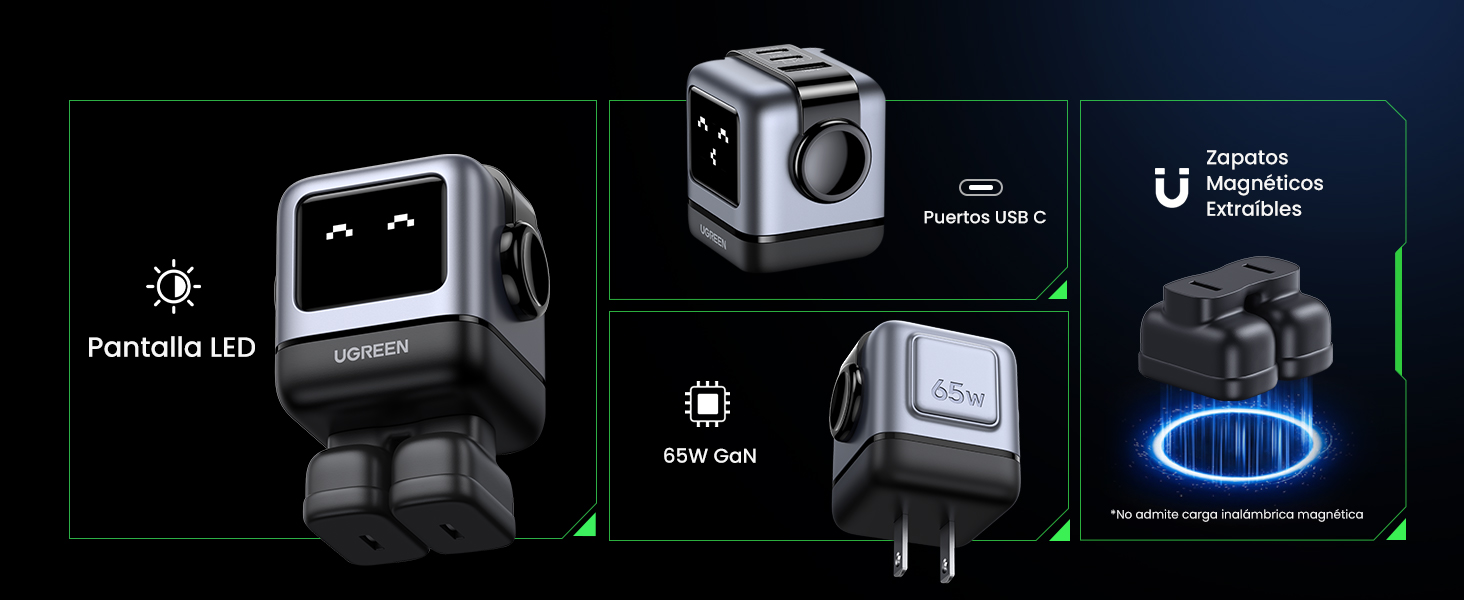
Image 4.2: The charger's LED display showing charging status.
5. Setup
- Spakkja l-Ċarġer: Carefully remove the UGREEN Uno 65W GaN USB-C Charger from its packaging.
- Attach Magnetic Feet (Optional): If desired, attach the removable magnetic feet to the bottom of the charger for added stability.
- Qabbad mal-Power Outlet: Plug the charger into a standard wall power outlet (AC 100-240V, 50/60Hz).
- Lest għall-Użu: The charger is now ready to connect your devices.
6. Istruzzjonijiet Operattivi
6.1 Apparat li jgħaqqad
- Use a compatible USB-C to USB-C cable for devices that support USB-C charging.
- Use a compatible USB-A to [device connector] cable for devices that charge via USB-A.
- Connect the appropriate cable to one of the charger's ports (2x USB-C, 1x USB-A).
- Qabbad it-tarf l-ieħor tal-kejbil mat-tagħmir tiegħek.
6.2 Distribuzzjoni tal-Enerġija
The charger intelligently distributes power based on the connected devices and their charging requirements:
- Użu ta' Port Uniku: When only one USB-C port is used, it can deliver up to 65W (e.g., charging a MacBook Air M2 from 0% to 51% in approximately 30 minutes).
- Użu ta' Portijiet Multipli: When multiple ports are in use, the 65W total power is dynamically distributed. For example, if both USB-C ports are used, one might provide 45W for a laptop and the other 20W for a mobile device.
- Port USB-A: The USB-A port provides standard charging output, typically up to 18W, depending on the device.
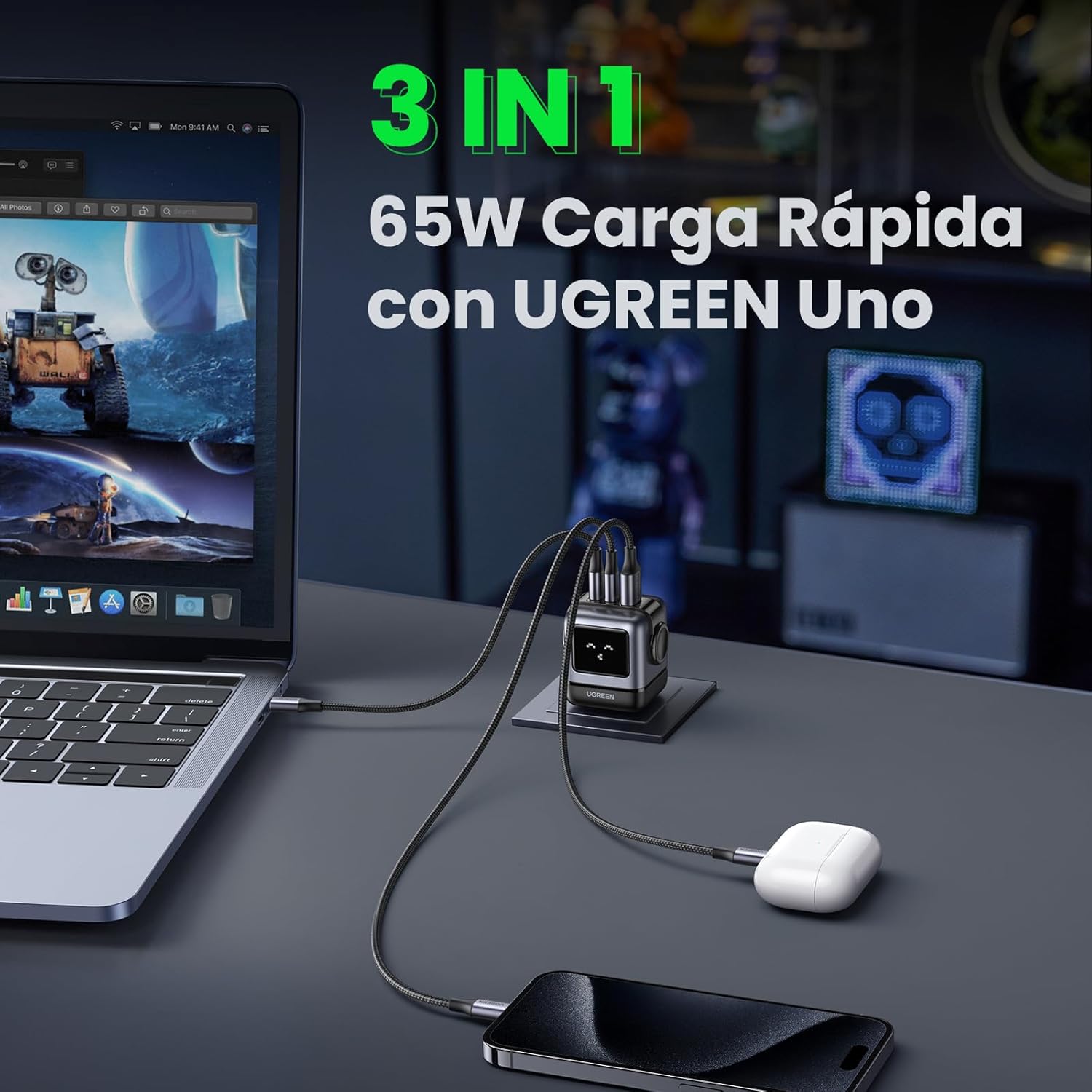
Image 6.1: The charger simultaneously charging a laptop, smartphone, and earbuds.
6.3 LED Display Indications
The LED display on the charger provides visual feedback on its operational status:
- Iċċarġjar: The LED display will show an animation or specific icon indicating that a device is actively charging.
- Kompletament Iċċarġjat: Once a connected device reaches full charge, the LED display will change to indicate completion.
- Inattiv: When no devices are connected or charging, the display may show a standby indicator.

Image 6.2: Comparison of the LED display during charging and when fully charged.
Nota: The charger is not compatible with 60W fast charging for the Samsung S26 Ultra; it will charge at a maximum of 45W PPS for this device.
7. Manutenzjoni
- Tindif: Skonnettja l-ċarġer mill-iżbokk tal-enerġija qabel ma tnaddaf. Uża drapp artab u niexef biex timsaħ il-wiċċ. Tużax prodotti tat-tindif likwidi jew aerosols.
- Ħażna: Aħżen il-ċarġer f'post frisk u niexef 'il bogħod mid-dawl tax-xemx dirett u temperaturi estremi.
- Kura tal-Cable: Avoid bending or twisting charging cables excessively, as this can damage them.
8 Issolvi l-problemi
| Problema | Kawża Possibbli | Soluzzjoni |
|---|---|---|
| Apparat mhux jiċċarġja. | 1. Charger not plugged in. 2. Cable is faulty. 3. Device is incompatible or port is damaged. | 1. Ensure the charger is securely plugged into a live power outlet. 2. Try a different charging cable. 3. Test with another device or try a different port on the charger. |
| Iċċarġjar bil-mod. | 1. Using a non-fast charging cable. 2. Multiple devices connected, distributing power. 3. Device does not support fast charging. 4. Device requires higher PPS than provided (e.g., S26 Ultra). | 1. Use a high-quality, fast-charging compatible cable. 2. Disconnect other devices to allow maximum power to a single device. 3. Verify your device supports fast charging. 4. Note that some devices may not achieve their absolute maximum charging speed if they require specific PPS profiles not fully supported by the charger. |
| Il-ċarġer iħoss sħun. | Tħaddim normali, speċjalment waqt iċċarġjar b'qawwa għolja. | The charger is designed with thermal protection. If it becomes excessively hot, disconnect it and allow it to cool. Ensure adequate ventilation. |
| LED display not working or showing incorrect status. | Problema temporanja tas-softwer jew tal-enerġija. | Unplug the charger from the wall outlet, wait a few seconds, and plug it back in. If the issue persists, contact customer support. |
9. Speċifikazzjonijiet
| Karatteristika | Dettall |
|---|---|
| Brand | UGREEN |
| Numru tal-Mudell | CD361 |
| Tip ta' Konnettur | USB Tip-Ċ |
| Apparati Kompatibbli | Game consoles, Laptops, Smartphones, Tablets (e.g., iPhone 8-17 Series, Galaxy S10-S24 Series, Pixel 8/7/6, MacBook Air/Pro, iPad Pro/Air/mini, Watch 8/7, HomePod, AirPods Pro) |
| Input Voltage | 240 Volt (AC 100-240V) |
| Ampetà | 3.25 Amperes |
| Portijiet USB totali | 3 (2x USB-C, 1x USB-A) |
| Output ta 'Qawwa Max | 65 Watts |
| Kurrent tal-Ħruġ | 5 Amperes |
| Ħruġ Voltage | 5 Volts |
| Sors tal-Enerġija | Elettriku bil-fili |
| Medda ta' Frekwenzi | 50-60 Hz |
| Tip ta 'Konnettur tal-Enerġija Prinċipali | 2-pin (North America Type A) |
| Portabbli | Iva |
| Piż tal-oġġett | 146 Gramm |
| Materjal Estern | GaN |
| Fattur tal-Formola | Robot-shaped |
10. Garanzija u Appoġġ
10.1 Informazzjoni dwar Garanzija
This UGREEN product is covered by an 18-il xahar garanzija mid-data tax-xiri. Din il-garanzija tkopri difetti fil-manifattura u kwistjonijiet li jirriżultaw minn użu normali. Ma tkoprix ħsara kkawżata minn użu ħażin, inċidenti, modifiki mhux awtorizzati, jew diżastri naturali.
Jekk jogħġbok żomm il-prova tax-xiri tiegħek għal pretensjonijiet ta' garanzija.
10.2 Appoġġ għall-Klijent
For technical support, warranty claims, or any questions regarding your UGREEN Uno 65W GaN USB-C Charger, please contact UGREEN customer service through the following channels:
- Uffiċjali tal-UGREEN Websit: Żur www.ugreen.com għal FAQs, riżorsi ta' appoġġ, u informazzjoni ta' kuntatt.
- Appoġġ bl-Email: Irreferi għat-taqsima tal-kuntatt fuq il-paġna uffiċjali website for the appropriate email address.
- Online Retailer Support: If purchased from an online retailer, you may also contact their customer service for assistance.