
1. Introduzzjoni
The Samsung Galaxy Buds 2 Pro are advanced true wireless Bluetooth earbuds designed to provide a premium audio experience with features such as Intelligent Active Noise Cancellation, Hi-Fi Sound, and 360 Audio. They offer a secure in-ear fit, HD Voice technology for clear calls, and are water resistant for versatile use.
Il-karatteristiċi ewlenin jinkludu:
- Intelligent Active Noise Cancellation (ANC) to quiet external sounds.
- Enhanced 360-degree audio for an immersive sound experience.
- HD Voice Technology for clear communication.
- IPX7 water resistance for protection against splashes and submersion.
- Seamless connectivity and auto-switching between compatible Galaxy devices.
- Real-time translation features with compatible Galaxy devices.

Figure 1.1: Samsung Galaxy Buds 2 Pro earbuds in their charging case.
2. Setup
2.1 Tneħħija tal-kaxxa u l-komponenti
Upon opening the retail packaging, ensure all included components are present:
- Earbud tax-Xellug
- Earbud tal-lemin
- Kawża tal-Iċċarġjar
- USB-C Cable
- Ponot tal-widnejn (daqsijiet varji)

Figure 2.1: The Galaxy Buds 2 Pro earbuds removed from their charging case.
2.2 Iċċarġjar tal-Earbuds u l-Kaxxa
Before first use, fully charge the earbuds and the charging case. Place the earbuds into the charging case. Connect the USB-C cable to the charging case and a power source. The indicator light on the case will show charging status.
2.3 Tqabbil ma' Apparati
To pair the Galaxy Buds 2 Pro with your device:
- Kun żgur li l-earbuds jinsabu fil-kaxxa tal-iċċarġjar u li l-kaxxa tkun miftuħa.
- Fuq l-ismartphone, it-tablet, jew il-PC tiegħek, attiva l-Bluetooth.
- Select 'Galaxy Buds 2 Pro' from the list of available Bluetooth devices.
- For Galaxy devices, Easy Pair functionality allows for quick connection by simply opening the case near your device.

Figure 2.2: The Galaxy Buds 2 Pro seamlessly integrate with other Samsung Galaxy devices.
3. It-Tħaddim tal-Earbuds
3.1 Kanċellazzjoni Attiva tal-Istorbju (ANC) u Ħoss Ambjentali
The Galaxy Buds 2 Pro feature Intelligent Active Noise Cancellation to minimize external distractions. You can switch between ANC and Ambient Sound mode, which allows you to hear your surroundings without removing the earbuds. This can be controlled via the Galaxy Wearable app or through touch controls on the earbuds.

Figure 3.1: Active Noise Cancellation helps focus your audio experience.
3.2 360 Audio
Experience immersive sound with enhanced 360-degree audio. This feature provides a personalized surround sound experience, making you feel like you are in the center of the action. This feature requires a compatible Galaxy smartphone with Android 8.0 and One UI 4.1 or later with 1.5GB RAM or above.

Figure 3.2: Enjoy a personalized surround sound experience with 360 Audio.
3.3 Call Functionality and HD Voice
The Galaxy Buds 2 Pro utilize HD Voice Technology to separate your voice from surrounding noise, ensuring clear communication during calls. The earbuds can also auto-detect voices and adjust sound levels so you can hear conversations without removing them.

Figure 3.3: Be heard clearly on calls with HD Voice Technology.
3.4 Language Translation Features
With compatible Galaxy devices, the Galaxy Buds 2 Pro support real-time language translation. Use the Interpreter feature on your Galaxy phone for face-to-face conversations or Live Translate through the Samsung Phone app for calls, allowing you to communicate across language barriers.

Figure 3.4: Real-time translation from phone to ear.
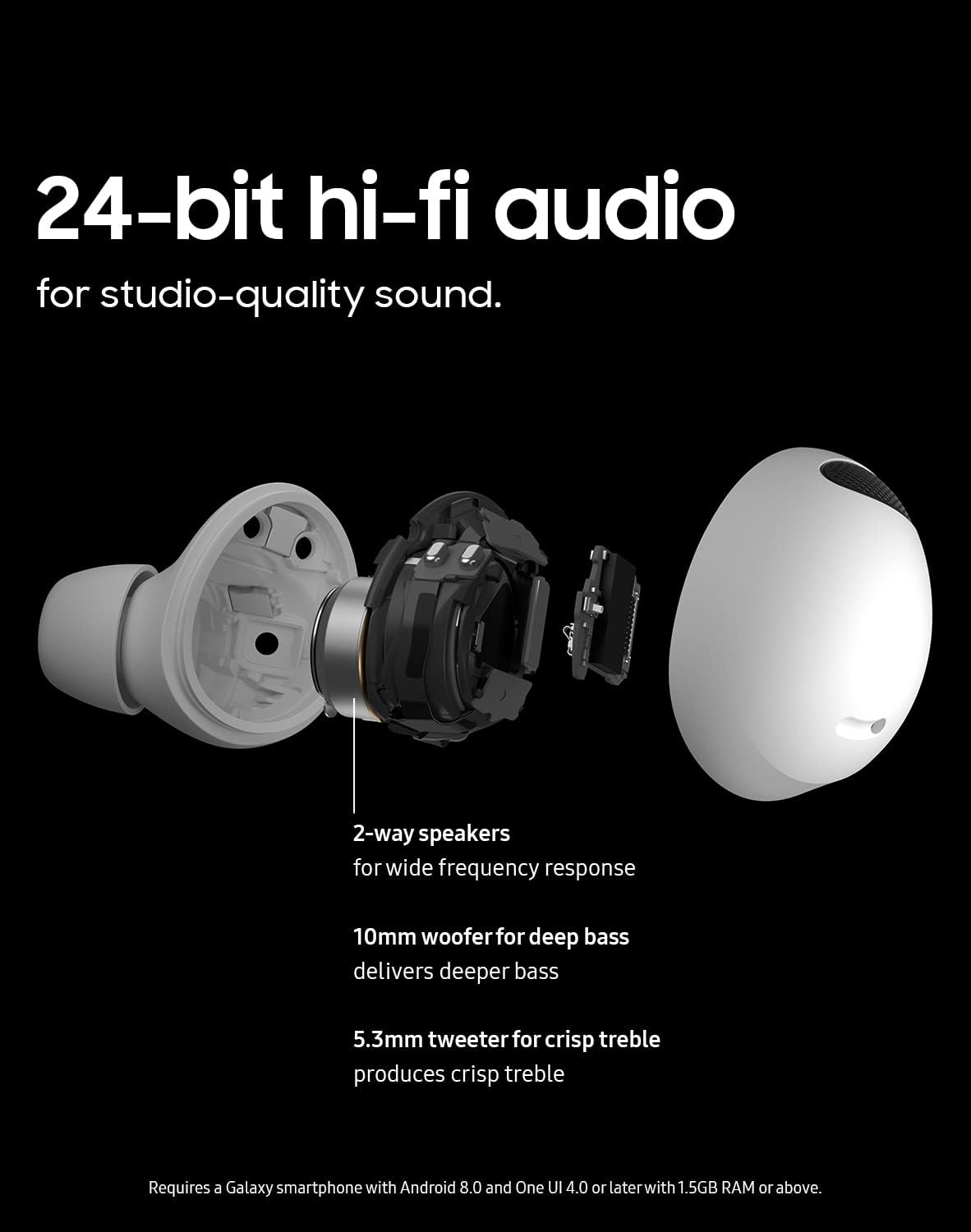
Figure 3.5: Use the Interpreter feature for seamless communication.
3.5 Kontrolli touch
The earbuds feature touch controls for media playback, volume adjustment, and managing calls. These controls can be customized via the Galaxy Wearable app.
4. Manutenzjoni
4.1 Tindif tal-Earbuds
Regularly clean your Galaxy Buds 2 Pro to maintain optimal performance and hygiene. Use a soft, dry, lint-free cloth to wipe the earbuds and charging case. For the eartips, remove them and clean with a mild soap solution if necessary, then rinse and dry thoroughly before reattaching.
4.2 Reżistenza għall-Ilma
The Galaxy Buds 2 Pro are rated IPX7 for water resistance, meaning they can withstand submersion in up to 3 feet of fresh water for up to 30 minutes. They are suitable for workouts and light rain. The charging case is not water-resistant. If the earbuds or your hands are wet, ensure they are thoroughly dried before handling or placing them in the charging case.
5 Issolvi l-problemi
5.1 Kwistjonijiet ta' Konnessjoni
- Il-earbuds mhux qed jikkonnettjaw: Ensure Bluetooth is enabled on your device and the earbuds are charged. Try placing the earbuds back in the case, closing it, and reopening it to re-enter pairing mode.
- Konnessjoni intermittenti: Move closer to your connected device. Avoid environments with strong electromagnetic interference.
5.2 Kwistjonijiet tal-Kwalità tal-Ħoss
- Volum baxx jew ħoss distort: Check the volume levels on both your device and the earbuds. Ensure the eartips are clean and properly seated in your ear for a good seal.
- ANC mhux effettiv: Ensure the earbuds are properly seated in your ears. Try different eartip sizes to achieve a better seal.
5.3 Tajbin u Kumdità
The Galaxy Buds 2 Pro are designed for a comfortable and secure fit. If you experience discomfort or an unstable fit, try experimenting with the different eartip sizes provided to find the best fit for your ears.

Figure 5.1: The ergonomic design ensures a comfortable and secure fit.
6. Speċifikazzjonijiet
| Karatteristika | Dettall |
|---|---|
| Isem tal-Mudell | Galaxy Buds2 Pro |
| Numru tal-Mudell | SM-R510NZWAXAR |
| Teknoloġija tal-Konnettività | Bluetooth |
| Teknoloġija tal-Komunikazzjoni mingħajr Fili | Bluetooth |
| Tip ta' Kontroll | Kontroll tal-Midja |
| Metodu ta' Kontroll | App, Mess, Vuċi |
| Kontroll tal-Ħoss | Kanċellazzjoni Attiva tal-Ħoss |
| Livell ta 'Reżistenza għall-Ilma | Water Repellent (IPX7) |
| Piż tal-oġġett | 1.98 uqija |
| Dimensjonijiet tal-Prodott | 1.97 x 1.98 x 1.09 pulzieri |
| Medda ta' Frekwenzi | 20Hz-20KHz |
| Tip ta' Sewwieq Awdjo | Sewwieq Dinamika |
| Batteriji | 1 batteriji tal-jone tal-litju meħtieġa (inklużi) |
| UPC | 887276668741 |

Figure 6.1: Internal components of the Galaxy Buds 2 Pro, highlighting the 2-way speakers for Hi-Fi audio.
7. Garanzija u Appoġġ
7.1 Garanzija tal-Manifattur
The Samsung Galaxy Buds 2 Pro includes a 1-year limited manufacturer warranty. Please retain your proof of purchase for warranty claims. For detailed terms and conditions, refer to the warranty information provided with your product packaging or visit the official Samsung support websit.
7.2 Appoġġ għall-Klijent
For further assistance, technical support, or service inquiries, please visit the official Samsung support channels. You can find more information and resources on the Ħanut tal-Marka Samsung fuq Amazon or the main Samsung websit.