
1. Introduzzjoni
Thank you for choosing the Orange Super Crush 100 Combo Amplifier. This 100-watt solid-state amplifier is designed to deliver a wide range of tones, from pristine cleans to high-gain distortion, utilizing high-quality analog circuitry. It features two independent channels, a Celestion G12H-150 12-inch speaker, and a balanced XLR output with CabSim speaker emulation. This manual will guide you through the proper setup, operation, and maintenance of your amplifier to ensure years of reliable performance.

Figura 1: Quddiem view of the Orange Super Crush 100 Combo Ampaktar ħaj.
2. Istruzzjonijiet Importanti dwar is-Sigurtà
Jekk jogħġbok aqra u segwi l-istruzzjonijiet kollha tas-sigurtà qabel ma tħaddem dan il-prodott. Żomm dan il-manwal għal referenza futura.
- Sors tal-Enerġija: Qabbad il- amplifier only to a power supply of the type described in this manual or marked on the unit. Ensure the voltage hija korretta għar-reġjun tiegħek.
- L-ertjar: This appliance must be grounded. Do not defeat the safety purpose of the polarized or grounding-type plug.
- Ventilazzjoni: Do not block any ventilation openings. Install in accordance with the manufacturer's instructions. Do not install near any heat sources such as radiators, heat registers, stoves, or other apparatus (including amplifiers) li jipproduċu sħana.
- Ilma u Umdità: Do not use this apparatus near water. Do not expose to dripping or splashing. No objects filled with liquids, such as vases, shall be placed on the apparatus.
- Tindif: Naddaf biss b'ċarruta niexfa.
- Kejbils: Ipproteġi l-korda tad-dawl milli timxi fuqha jew maqrusa, partikolarment fil-plakek, ir-reċipjenti tal-konvenjenza, u l-punt fejn joħorġu mill-apparat.
- Servizzi: Irreferi l-manutenzjoni kollha lil persunal tas-servizz kwalifikat. Is-servizz huwa meħtieġ meta l-apparat ikun ġie bil-ħsara b'xi mod, bħal korda tal-provvista tal-enerġija jew plagg ikun bil-ħsara, likwidu jkun inxtered jew oġġetti jkunu waqgħu fl-apparat, l-apparat ikun ġie espost għax-xita jew umdità, ma jaħdimx b'mod normali , jew twaqqgħet.
- Protezzjoni tas-Smigħ: Espożizzjoni fit-tul għal livelli għoljin ta’ volum tista’ tikkawża ħsara permanenti fis-smigħ. Oqgħod attent meta tissettja l-livelli tal-volum.
3. X'hemm fil-Kaxxa
Upon unpacking your Orange Super Crush 100 Combo Amplifier, jekk jogħġbok kun żgur li l-oġġetti kollha huma preżenti:
- Orange Super Crush 100 Combo Ampaktar ħaj
- Kejbil tal-Enerġija
- Manwal għall-Utent (dan id-dokument)
If any items are missing or damaged, please contact your retailer or Orange customer support immediately.
4. Setup
4.1 Disimballaġġ
Neħħi bil-galbu amplifier from its packaging. Retain all packaging materials for future transport or servicing needs.
4.2 Tqegħid
Poġġi l- ampPoġġi l-apparat fuq wiċċ stabbli u livellat. Kun żgur li jkollok ventilazzjoni adegwata madwar l-unità biex tevita li tisħon iżżejjed. Evita li tpoġġi l-apparat amplifier in direct sunlight or near sources of excessive heat or moisture.
4.3 Qawwa tal-Konnessjoni
Qabel ma tqabbad il-kejbil tal-enerġija, kun żgur li amplifier's power switch is in the 'OFF' position. Connect the supplied power cable to the AC input on the rear panel of the amplifier and then to a grounded electrical outlet.
4.4 Il-Konnessjoni tal-Istrument Tiegħek
Qabbad il-kitarra jew strument ieħor tiegħek mal- INPUT jack on the front panel using a high-quality instrument cable.

Figura 2: Ġenb view of the Orange Super Crush 100 Combo Amplifier, showing its robust construction.
5. Kontrolli u Karatteristiċi
The Orange Super Crush 100 Combo Amplifier features a user-friendly control layout. Familiarize yourself with the following controls:

Figura 3: Minn fuq 'il quddiem view tal- amplifer, li jenfasizza l-pannell tal-kontroll.
5.1 Front Panel Overview
- DĦUL: Jack ta' 1/4 pulzier biex tikkonnettja l-istrument tiegħek.
- CLEAN CHANNEL CONTROLS:
- VOLUM: Adjusts the overall output level of the Clean Channel.
- BASS, NOFSANI, TREBLE: 3-band EQ for shaping the tone of the Clean Channel.
- DIRTY CHANNEL CONTROLS:
- QLIGĦ: Controls the amount of overdrive/distortion.
- BASS, NOFSANI, TREBLE: 3-band EQ for shaping the tone of the Dirty Channel.
- VOLUM: Adjusts the overall output level of the Dirty Channel.
- SEZZJONI MASTER:
- REVERB: Controls the amount of built-in digital reverb.
- VOLUM MASTER: Jikkontrolla l-volum ġenerali tal-ħruġ kollu ampaktar ħaj.
- SWIĊĊ TAL-KANALL: Toggles between the Clean and Dirty channels.
- SWITCH TA 'L-ENERĠIJA: Dawwar il- amplifier ON jew OFF.
5.2 Panel ta' wara Overview
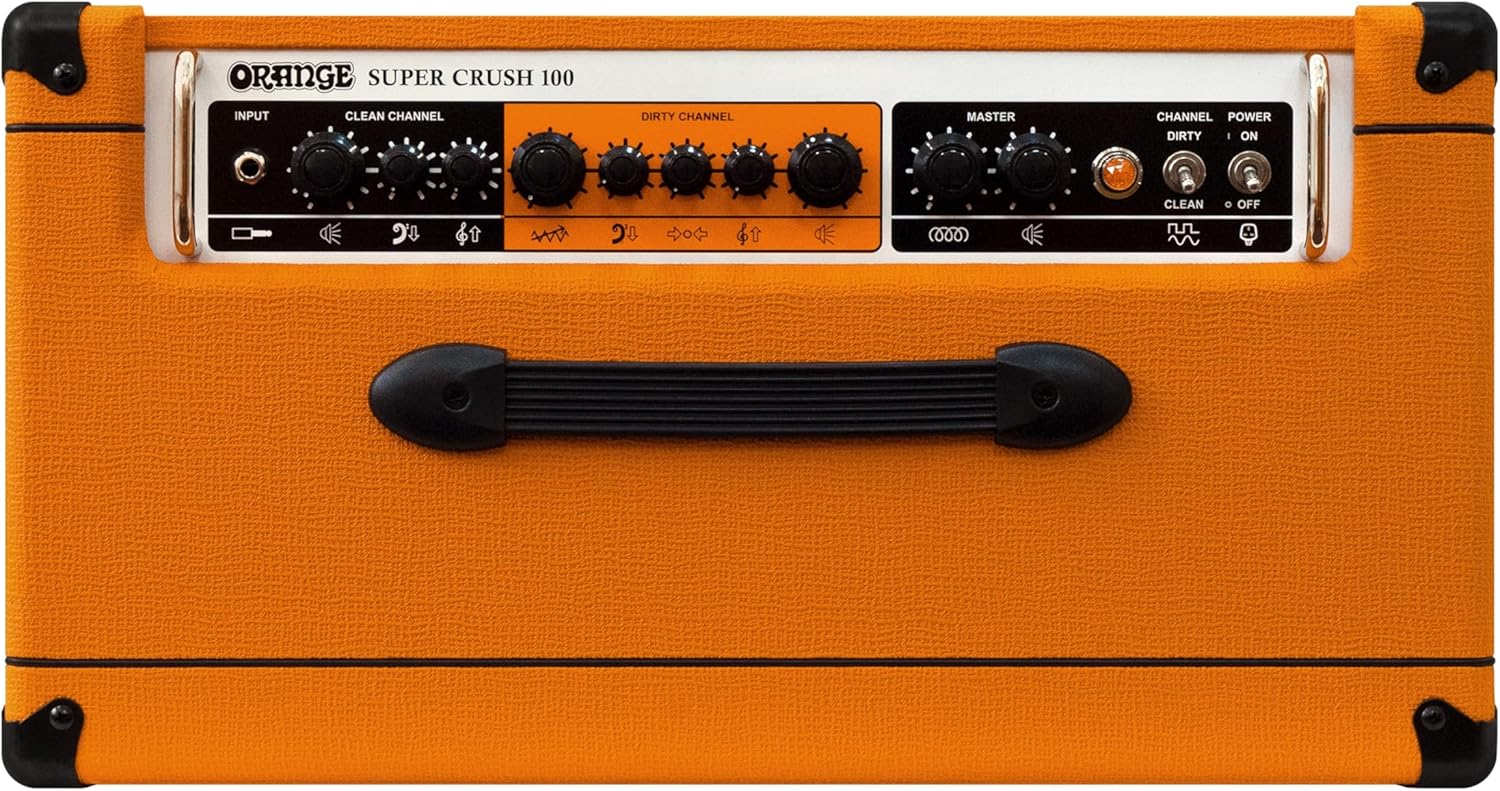
Figura 4: Wara view tal- amplifier, showing the various input/output connections.
- FX LOOP (IBGĦAT/RITORN): Għall-konnessjoni ta' pedali tal-effetti esterni.
- CABSIM OUT (XLR): Balanced XLR output with speaker cabinet emulation for direct connection to a mixing console or audio interface.
- RIŻULTATI TA 'SPEAKER: Connect external speaker cabinets. Ensure correct impedance matching.
- SWITCH TAL-PIEDA: Input for an optional footswitch to control channel switching and reverb.
- DĦUL AC: Għall-konnessjoni tal-kejbil tad-dawl.
6. Istruzzjonijiet Operattivi
6.1 Tixgħel/Jitfi
- Ensure all connections (instrument, power) are secure.
- Dawwar il- VOLUM MASTER control to its minimum setting.
- Aqleb il- SWITCH TA 'L-ENERĠIJA to the 'ON' position. The indicator light will illuminate.
- Żid bil-mod il- VOLUM MASTER għal-livell ta' smigħ mixtieq tiegħek.
- To power off, reverse these steps: turn down VOLUM MASTER, then flip the SWITCH TA 'L-ENERĠIJA to 'OFF'.
6.2 Għażla tal-Kanali
Uża l- SWIĊĊ TAL-KANALI on the front panel to toggle between the Clean and Dirty channels. An optional footswitch (sold separately) can also be used for remote channel switching.
6.3 Adjusting Tone
Each channel features independent BASS, NOFSANI, u TREBLE controls. Experiment with these to find your desired sound. The QIBDA control on the Dirty Channel allows you to dial in the amount of overdrive, from subtle crunch to heavy distortion.
6.4 Using Reverb
The built-in digital reverb can be adjusted using the REVERB control in the Master section. Turn the knob clockwise to increase the reverb effect.
6.5 Effects Loop Usage
The buffered effects loop allows you to integrate external effects pedals into your signal chain after the preamp section. Connect the Ibgħat jack to the input of your effects pedal and the output of your effects pedal to the RITORN jack.
7. Manutenzjoni
7.1 Tindif
Imsaħ il- amplifier's exterior with a soft, dry cloth. Do not use abrasive cleaners, solvents, or waxes, as these can damage the finish. Avoid spraying liquids directly onto the ampaktar ħaj.
7.2 Ħażna
Meta ma tkunx qed tużaha għal perjodi twal, aħżenha amplifier in a cool, dry place, away from extreme temperatures and humidity. If possible, cover the amplifikatur biex jipproteġih mit-trab.
7.3 Kura tal-Ispeaker
The Celestion speaker is robust, but avoid physical impact to the speaker cone. Do not attempt to clean the speaker cone directly.
8 Issolvi l-problemi
If you encounter issues with your Orange Super Crush 100, consult the table below for common problems and solutions.
| Problema | Kawża Possibbli | Soluzzjoni |
|---|---|---|
| L-ebda ħoss | Power not connected, volume too low, instrument cable faulty, speaker cable disconnected. | Check power connection, increase Master Volume, test instrument cable, ensure speaker is connected. |
| Ħoss distort jew dgħajjef | Incorrect gain settings, faulty instrument/cable, external effects issue. | Adjust Gain and Volume controls, test with a different instrument/cable, bypass effects loop. |
| Ħsejjes ta’ daqq jew żanżin | Ground loop, faulty power cable, interference from other electronics. | Try a different power outlet, ensure proper grounding, move ampl-illuminatur 'il bogħod minn apparat elettroniku ieħor. |
| Reverb not working | Reverb control set to minimum. | Increase the Reverb control. |
If the problem persists after attempting these solutions, please contact Orange customer support or a qualified service technician.
9. Speċifikazzjonijiet
- Output Wattage: 100 Watts
- Kelliem: 1 x 12-inch Celestion G12H-150
- Kanali: Two (Clean, Dirty)
- Preamp: All-analogue circuitry
- EQ: 3-band (Bass, Middle, Treble) per channel
- Effetti: Built-in Reverb, Fully-buffered Effects Loop
- Outputs: Balanced XLR output with CabSim speaker emulation
- Dimensjonijiet (Prodott): 18 x 25 x 24 pulzieri (approssimattiv)
- Piż tal-oġġett: 49 liri (madwar)
- Numru tal-Mudell: SUPER-CRUSH-100-C
- Ditta: Oranġjo
10. Garanzija u Appoġġ
10.1 Informazzjoni dwar Garanzija
Orange products are manufactured to high standards and are warranted against defects in materials and workmanship for a specified period from the date of purchase. Please refer to the warranty card included with your product or visit the official Orange Amplifikazzjoni websit għal termini u kundizzjonijiet dettaljati tal-garanzija speċifiċi għar-reġjun tiegħek.
10.2 Ikkuntattja l-Appoġġ
For technical assistance, service inquiries, or to purchase accessories, please contact Orange customer support through their official websit jew id-distributur lokali tiegħek.
10.3 Riżorsi Online
Żur il- Orange Store on Amazon għal aktar informazzjoni dwar il-prodott u aċċessorji.