
1. Prodott Aktarview
The KAIDI KD-763 is a wired gaming headset designed for use with the PlayStation 4 (PS4) console and other compatible devices with a 3.5mm audio jack. It features over-ear cups for immersive sound, a rotary microphone for clear communication, and an inline volume control for convenient audio adjustments. The headset also includes an LED lighting effect, typically powered via a USB connection.
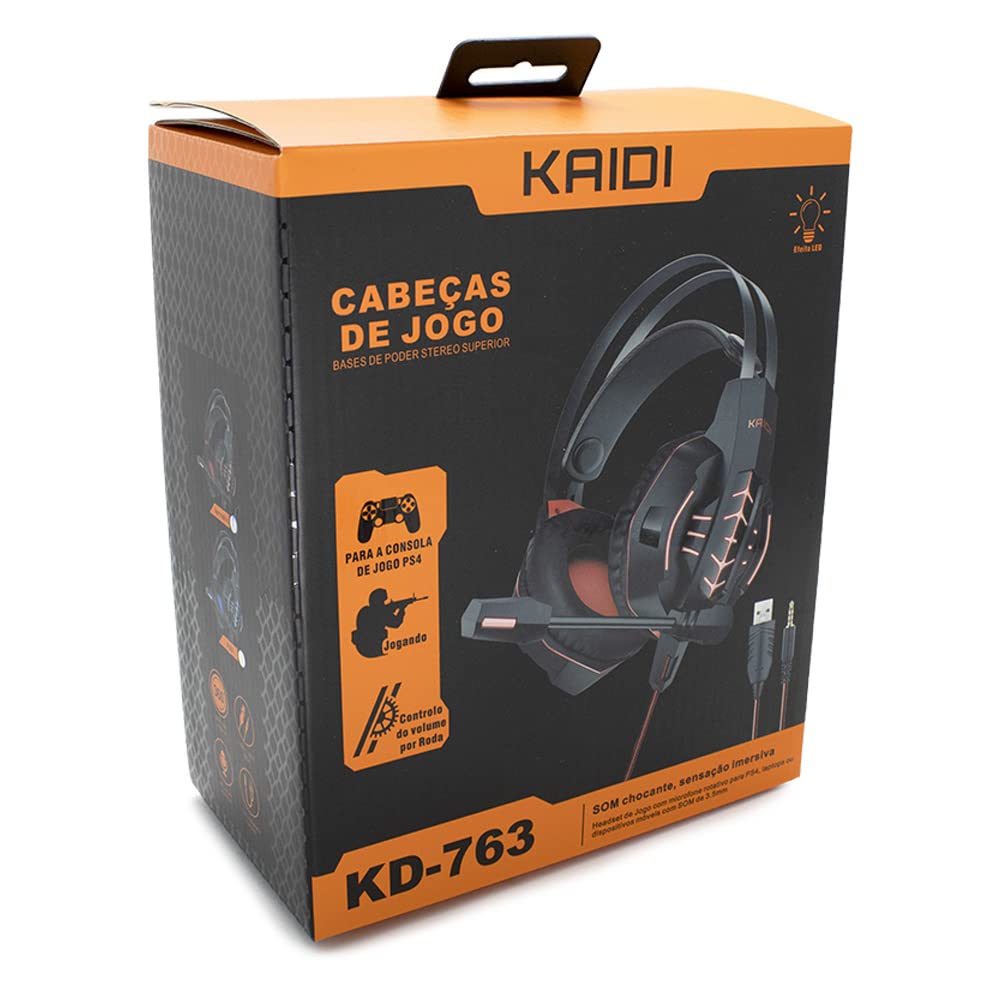
Figura 1.1: The KAIDI KD-763 PS4 Gaming Headset packaging, showing the headset, its features, and compatibility with PS4.
2. Informazzjoni dwar is-Sigurtà
- Evita smigħ għal żmien twil b'volum għoli biex tevita ħsara fis-smigħ.
- Tesponix il-headset għal temperaturi estremi, umdità, jew dawl tax-xemx dirett.
- Żomm il-widna 'l bogħod mill-ilma u likwidi oħra.
- Tippruvax tiżżarma jew timmodifika l-headset. Dan jista' jannulla l-garanzija u jikkawża ħsara.
- Naddaf il-headset b'ċarruta ratba u niexfa biss.
- Żomm fejn ma jintlaħaqx mit-tfal.
3. Kontenut tal-Pakkett
Jekk jogħġbok iċċekkja l-kontenut tal-pakkett malli tiftaħ. Jekk xi oġġetti huma nieqsa jew bil-ħsara, ikkuntattja lill-bejjiegħ tiegħek.
- KAIDI KD-763 Gaming Headset
- Manwal għall-Utent (dan id-dokument)
4. Gwida ta' Setup
- Connect to PS4 Controller: Locate the 3.5mm audio jack on your PS4 controller. Insert the 3.5mm connector from the KD-763 headset firmly into this port.
- Powering LED Lights (Optional): If your headset features LED lighting, connect the USB connector from the headset to an available USB port on your PS4 console or a compatible USB power adapter. The LED lights will illuminate once connected.
- Aġġusta l-Qiegħda tal-Headset: Extend or retract the headband to ensure the earcups sit comfortably and securely over your ears. The over-ear design should fully enclose your ears for optimal sound isolation.
- Pożizzjoni tal-Mikrofonu: Adjust the flexible rotary microphone boom to a position near your mouth for clear voice pickup. Ensure it is not obstructing your vision.
- Configure PS4 Audio Settings:
- Mur fuq Settings > Apparati > Apparat Awdjo on your PS4.
- Issettja Apparat tal-Input to "Headset (Controller)".
- Issettja Apparat tal-Output to "Headset (Controller)".
- Issettja Output għal Headphones to "All Audio" for full game and chat sound.
- Aġġusta Kontroll tal-Volum (Headphones) għal livell komdu.
5. Istruzzjonijiet Operattivi
5.1. Kontroll tal-Volum
The KD-763 headset features an inline volume control wheel located on the cable. Rotate the wheel upwards to increase the volume and downwards to decrease it. Adjust to a comfortable listening level.
5.2. Użu tal-mikrofonu
The microphone is designed to capture your voice clearly. Ensure it is positioned correctly near your mouth. If your PS4 audio settings are configured correctly, your voice will be transmitted to other players in online games or chat parties.
To mute the microphone, check if there is a physical mute switch on the inline control. If not, you can mute the microphone through your PS4's quick menu (hold the PS button on your controller).
6. Manutenzjoni
- Tindif: Use a soft, dry, lint-free cloth to wipe the earcups and headband. Do not use liquid cleaners or abrasive materials.
- Ħażna: When not in use, store the headset in a clean, dry place, away from direct sunlight and extreme temperatures. Avoid tangling the cable.
- Kura tal-Cable: Do not pull on the cable to disconnect the headset. Always grasp the plug. Avoid bending or twisting the cable excessively.
7 Issolvi l-problemi
- L-ebda ħoss jew volum baxx:
- Ensure the 3.5mm jack is fully inserted into the PS4 controller.
- Check the inline volume control wheel on the headset cable and turn it up.
- Verify PS4 audio settings (Settings > Apparati > Apparat Awdjo) are correctly configured for the headset.
- Test the headset with another device (e.g., smartphone) to rule out a headset issue.
- Il-mikrofonu mhux qed jaħdem:
- Ensure the microphone boom is positioned correctly.
- Check PS4 audio settings (Settings > Apparati > Apparat Awdjo) to ensure Apparat tal-Input is set to "Headset (Controller)".
- Confirm the microphone is not muted via an inline switch or the PS4 quick menu.
- Ittestja l-mikrofonu b'applikazzjoni jew apparat ieħor jekk possibbli.
- Id-dwal LED ma jaħdmux:
- Ensure the USB connector is firmly plugged into a powered USB port.
- Ipprova port USB differenti.
8. Speċifikazzjonijiet
| Ditta: | KAIDI |
| Mudell: | KD-763 |
| Tip ta' headset: | Over-ear (Circumaurais) |
| Impedenza: | 32 Ohms |
| Sensittività: | 110 dB |
| Konnettività: | Bil-fili (jack tal-awdjo ta' 3.5mm + USB għal LED) |
| Apparati Kompatibbli: | Gaming Consoles (e.g., PS4), devices with 3.5mm audio jack |
| Użu Speċifiku: | Logħob |
| Tip ta' Kontroll: | Inline Volume Control Wheel |
| Mikrofonu: | Rotary/Swivel |
| Effett LED: | Yes (USB powered) |
9. Garanzija u Appoġġ
KAIDI products are designed and manufactured to the highest quality standards. For information regarding warranty coverage, terms, and conditions, please refer to the warranty card included with your purchase or visit the official KAIDI websit.
For technical support, troubleshooting assistance, or to inquire about replacement parts, please contact KAIDI customer service through their official channels. Contact information can typically be found on the product packaging or the official KAIDI websit.