
Honor KAN-B19
Honor Watch GS Pro Instruction Manual
Multisport Smartwatch with 25-Day Battery Life
1. Introduzzjoni
The Honor Watch GS Pro is a rugged multisport smartwatch designed for outdoor enthusiasts. It features a durable build with 14 military-grade certifications, extended battery life, and comprehensive health and fitness tracking capabilities. This manual provides essential information for setting up, operating, maintaining, and troubleshooting your device.

Image 1.1: The Honor Watch GS Pro in blue with a camouflage strap, showcasinid-displej tiegħu.

Image 1.2: A display of three Honor Watch GS Pro models, highlighting its recognition at IFA 2020.
2. Setup
2.1 Iċċarġjar inizjali
Before first use, fully charge your Honor Watch GS Pro. Connect the charging cable to the charging port on the back of the watch and plug the USB end into a power adapter (not included) or a computer's USB port. The watch display will indicate charging status.
2.2 It-tqabbil mal-Ismartphone Tiegħek
- Niżżel u installa l-aħħar App Huawei Health from your device's app store (HUAWEI AppGallery, iOS App Store, Google Playstore).
- Open the Huawei Health app and log in or register an account.
- Kun żgur li l-Bluetooth huwa attivat fuq l-ismartphone tiegħek.
- In the Huawei Health app, navigate to 'Devices' and tap 'Add device'. Select 'Smartwatches' and then 'Honor Watch GS Pro'.
- Follow the on-screen instructions in the app to complete the pairing process. Confirm the pairing request on both your phone and the watch.
2.3 Settings Bażiċi
Once paired, the watch will automatically synchronize time and language settings from your phone. You can further customize watch faces, notification preferences, and other settings through the Huawei Health app.
3. Operating Your Honor Watch GS Pro
3.1 Navigazzjoni
- Touch Screen: Skrolla 'l fuq, 'l isfel, lejn ix-xellug, jew lejn il-lemin biex tinnaviga fil-menus u n-notifiki. Tektek biex tagħżel l-oġġetti.
- Buttuna 'l fuq: Press to access the app list or return to the home screen.
- Buttuna 'l isfel: Press to access workout modes or customize its function via the app.
3.2 Modalità ta' Workout
The Honor Watch GS Pro supports over 100 workout modes, including outdoor running, cycling, swimming, mountaineering, and more. To start a workout:
- Press the Down Button or navigate to 'Workout' from the app list.
- Select your desired workout mode.
- Tap 'Start' to begin tracking.

Image 3.1: A visual representation of the extensive range of workout modes supported by the watch.
3.3 GPS and Route Back Functionality
Equipped with built-in GPS + GLONASS, the watch provides accurate positioning and route tracking. The unique 'Route Back' feature helps you retrace your steps, ensuring you can find your way back to your starting point, even in unfamiliar terrain.
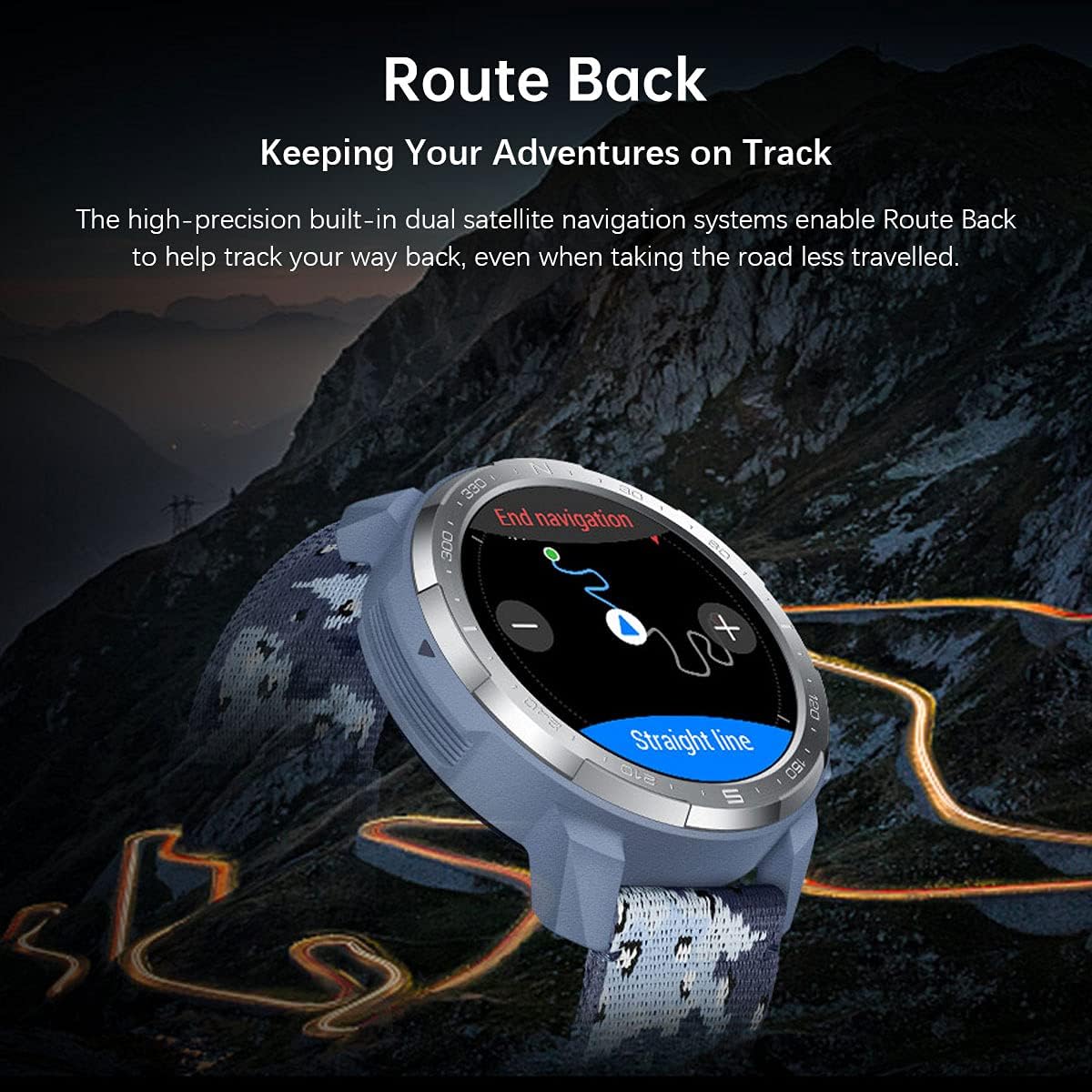
Image 3.2: The 'Route Back' feature in action, guiding users back along their original path.
3.4 Monitoraġġ tas-Saħħa
L-arloġġ jimmonitorja kontinwament diversi metriċi tas-saħħa:
- Traċċar tar-Rata tal-Qalb: 24/7 heart rate monitoring.
- Monitoraġġ SpO2: Ikejjel il-livelli ta' saturazzjoni tal-ossiġnu fid-demm.
- Monitoraġġ tal-irqad: Traċċi tal-irqadtages and provides insights for better sleep.
- Monitoraġġ tal-istress: Helps manage daily stress levels.

Immaġni 3.3: Fuqview of health tracking features including heart rate, sleep, and SpO2.
3.5 Karatteristiċi Smart
Stay connected with your Honor Watch GS Pro:
- Notifiki: Receive call, SMS, and app notifications directly on your wrist.
- Kontroll tal-Mużika: Ikkontrolla l-daqq tal-mużika fuq l-ismartphone tiegħek.
- Ġestjoni tas-Sejħiet: Answer or reject calls from your watch.

Image 3.4: The watch's capabilities for controlling music and receiving smart notifications.
3.6 IP68 Reżistenza għall-Ilma
The Honor Watch GS Pro is IP68 water-resistant, allowing you to wear it during swimming, showering, or in rainy conditions. It is suitable for shallow-water activities but not for diving or high-pressure water activities.

Image 3.5: The Honor Watch GS Pro is designed to withstand water exposure, suitable for swimming.
4. Manutenzjoni
4.1 Tindif u Kura
- Naddaf il-qafas u ċ-ċinga tal-arloġġ regolarment b'drapp artab u nadifamp drapp.
- Kun żgur li l-kuntatti tal-iċċarġjar huma nodfa u niexfa qabel ma tiċċarġja.
- Evita li tesponi l-arloġġ għal temperaturi estremi jew kimiċi ħarxa.
4.2 Ottimizzazzjoni tal-Ħajja tal-Batterija
The Honor Watch GS Pro boasts an impressive 25-day battery life under typical usage. Battery performance can vary based on usage patterns, GPS activity, and continuous health monitoring. To optimize battery life:
- Iddiżattiva l-monitoraġġ kontinwu tar-rata tal-qalb jekk mhux meħtieġ 24/7.
- Naqqas il-luminożità tal-iskrin.
- Limita n-numru ta' apps li jibagħtu notifiki lill-arloġġ.
- Use power-saving modes when available.
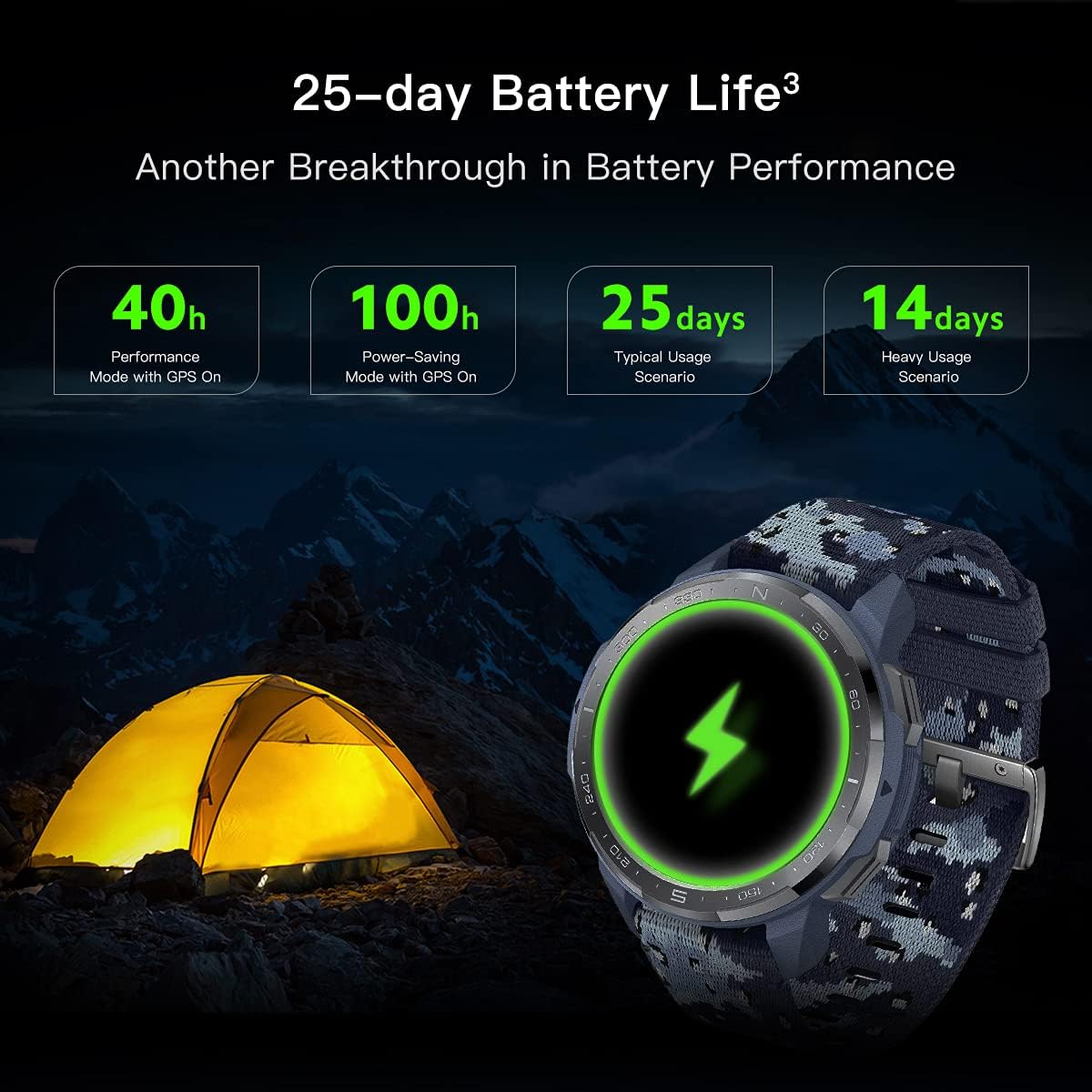
Image 4.1: Detailed breakdown of the Honor Watch GS Pro's exceptional battery performance under various conditions.
4.3 Aġġornamenti tas-Software
Regularly check for and install software updates via the Huawei Health app to ensure optimal performance, new features, and bug fixes. Keep your app updated to the latest version for the best experience.
5 Issolvi l-problemi
If you encounter issues with your Honor Watch GS Pro, try the following:
- L-arloġġ ma jixgħelx: Kun żgur li huwa ċċarġjat kompletament.
- Ma tistax tqabbad mat-telefon: Ensure Bluetooth is on, the watch is discoverable, and the Huawei Health app is updated. Try restarting both devices.
- Ineżattezza tal-GPS: Kun żgur li tinsab f'żona miftuħa b'dawl ċar view of the sky. Allow the watch time to acquire a signal.
- Dejta dwar is-saħħa mhux preċiża: Kun żgur li l-arloġġ jintlibes sew fuq il-polz tiegħek, la issikkat wisq u lanqas maħlul wisq. Naddaf is-sensor fuq wara tal-arloġġ.
- Ħajja qasira tal-batterija: Refer to Section 4.2 for optimization tips.
- Ara li ma jirrispondix: Try a force restart by pressing and holding the Up button for approximately 16 seconds until the watch vibrates and restarts.
For persistent issues, consult the help section within the Huawei Health app or visit the official Honor support websit.
6. Speċifikazzjonijiet
| Karatteristika | Speċifikazzjoni |
|---|---|
| Isem tal-Mudell | GS Pro |
| Numru tal-Mudell | KAN-B19 |
| Daqs tal-Wiri | 1.39 Pulzieri AMOLED |
| Dimensjonijiet | 1.89 x 1.89 x 0.54 inches (48 mm × 48 mm × 13.6 mm) |
| Piż tal-oġġett | 12.3 uqija |
| Ħajja tal-Batterija (Tipika) | Sa 25 jum |
| GPS | Built-in GPS, GLONASS |
| Reżistenza għall-Ilma | IP68 |
| Ċertifikazzjonijiet | 14 Military Grade Certifications (MIL-STD-810G) |
| Konnettività | Bluetooth |
| Kapaċità tal-Ħżin tal-Memorja | 4000 MB |
7. Garanzija u Appoġġ
For detailed information regarding the product warranty, return policy, and customer support, please refer to the official Honor website or the documentation provided with your purchase. You can also find support resources within the Huawei Health app.
Ask a question about this manual
Ask about setup, troubleshooting, compatibility, parts, safety, or missing instructions. Manuals+ will review the question and use this page’s manual context to help answer it.